cc-switch: The Cross-Platform Desktop CLI Control Center That Unifies 6+ AI Coding Agents — A Practical Setup Guide 2026
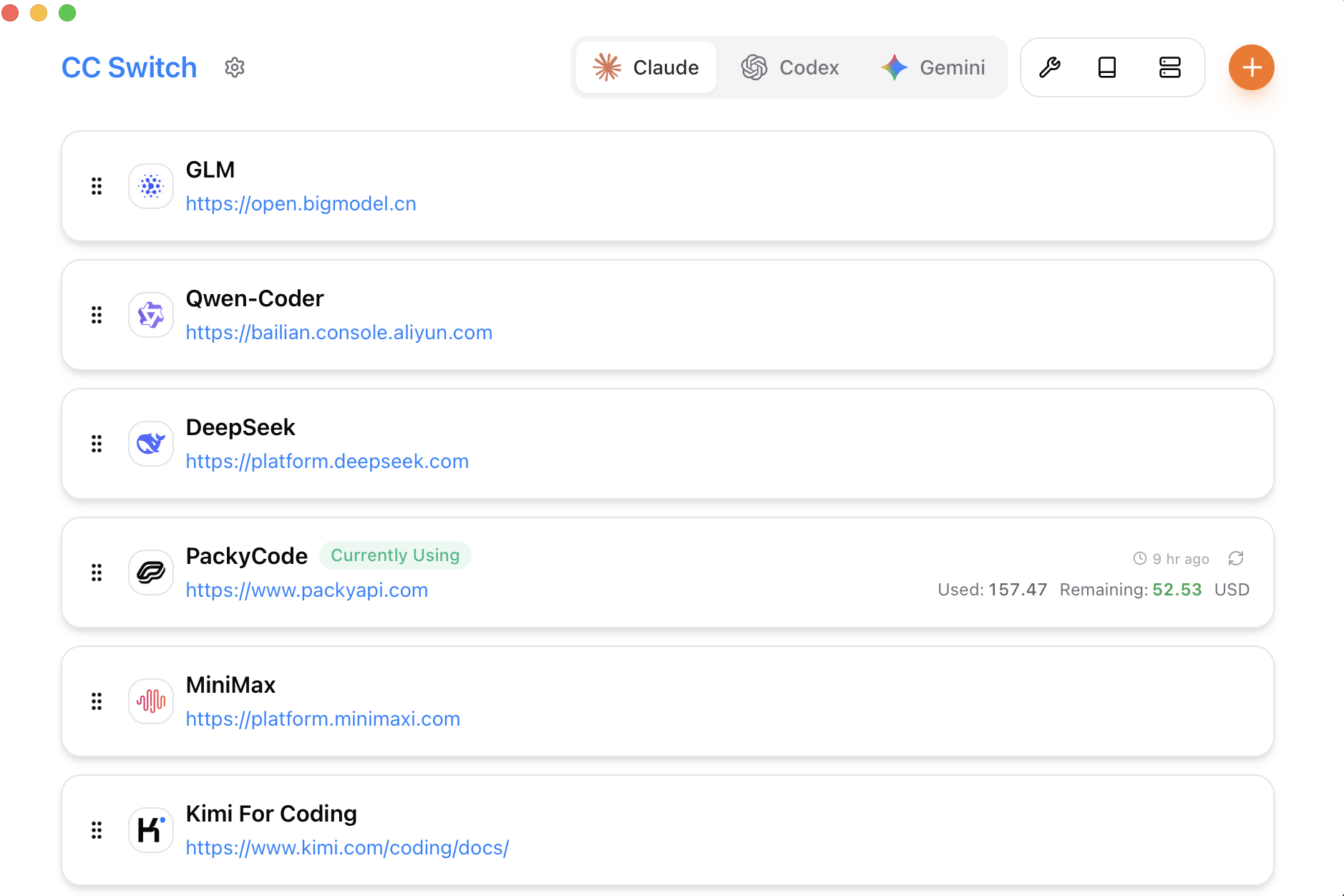
cc-switch main window — unified control panel for 6+ AI coding agents
Introduction
If you’re cycling through Claude Code, Codex, OpenCode, Gemini CLI, OpenClaw, and Hermes Agent every week, you’re losing 2-3 hours on context switching alone. Each agent has its own config, its own shortcut keys, its own session management. Switching between them means closing terminals, editing config files, re-authenticating — the kind of friction that silently eats your day. cc-switch (95,900 GitHub stars) solves this by giving you one desktop application that manages all of them from a single interface. One-click switching, unified keyboard shortcuts, cross-platform support, and a TUI+GUI hybrid that works whether you’re on a Mac, Windows, or Linux box.
What Is cc-switch?
cc-switch is an open-source, cross-platform desktop application (written in Rust + Tauri) that acts as a unified control center for AI coding agents. It supports Claude Code, OpenAI Codex CLI, OpenCode, OpenClaw, Gemini CLI, and Hermes Agent out of the box, with a plugin system for adding more. Built on a Tauri v2 frontend (Rust backend, WebView2/WebKit2 UI), it delivers native desktop performance without Electron’s memory bloat.
The key differentiator: cc-switch doesn’t replace your AI coding agents. It manages them — switching contexts, managing sessions, storing presets, and applying custom configurations per agent. Think of it as Task Manager for AI coding agents, with the ability to save and restore full workspace presets.
How cc-switch Works
cc-switch operates on three architectural layers: 1. Agent Registry Layer — Maintains a registry of installed AI coding agents, their CLI commands, environment variables, and working directories. When you select an agent, cc-switch reads the agent’s executable path and configures the environment accordingly.
Session Manager — Tracks active sessions across all agents. When you switch from Claude Code to Codex CLI, cc-switch saves Claude Code’s current working directory, git branch, and prompt history, then restores Codex CLI’s last known state.
Preset System — Stores full configuration profiles: which agents are active, default model selection, token limits, temperature settings, custom system prompts, and proxy configurations. Presets can be shared via GitHub Gist or imported from the community gallery at ccswitch.io.
┌─────────────────────────────────────────┐
│          cc-switch Desktop App           │
│  (Tauri v2 + Rust Backend + WebView2)   │
├─────────────────────────────────────────┤
│  Agent Registry    Session Manager      │
│  Preset System     Notification Hub     │
├─────────────────────────────────────────┤
│  Claude Code │ Codex CLI │ OpenCode     │
│  OpenClaw    │ Gemini CLI │ Hermes Agent│
└─────────────────────────────────────────┘
cc-switch architecture: three layers managing multiple AI coding agents simultaneously
The agent registry layer queries your $PATH and common installation directories (~/.claude, ~/.codex, ~/.opencode, etc.) to auto-detect installed agents. The session manager hooks into each agent’s process, tracking stdin/stdout for session metadata. The preset system serializes all configuration to JSON, version-controlled and exportable.
Agent Profiles
cc-switch supports agent profiles that define fine-grained configuration per agent instance. You can create multiple profiles for the same agent with different models, token limits, and system prompts. Profile definitions are stored in the ~/.cc-switch/profiles/ directory as JSON files: `````json
{
“profile_name”: “claude-pro”,
“agent”: “claude-code”,
“executable”: “/.claude/bin/claude”,
“model”: “claude-sonnet-4-20250514”,
“max_tokens”: 128000,
“temperature”: 0.2,
“system_prompt”: “You are an expert Python developer focused on clean, tested code.”,
“env_overrides”: {
“CLAUDE_CODE_TELEMETRY”: “disabled”,
“ANTHROPIC_CACHE_DIR”: “/.cache/claude”
},
“working_directory”: “~/projects/myapp”,
“auto_attach”: true
}
Profiles can be listed, created, and deleted from the desktop GUI or via the CLI. Each profile is independently savable, shareable, and restorable.

### Multi-Profile Management

Switch between profiles without editing config files manually: `````bash
# List all available profiles
cc-switch profiles list

# Create a new profile from scratch
cc-switch profiles create --name "codex-stable" \
  --agent codex-cli \
  --model o3-mini \
  --max-tokens 65536 \
  --temp 0.1

# Clone an existing profile with a new name
cc-switch profiles clone --from claude-pro --to claude-experimental

# Delete a profile
cc-switch profiles delete --name temporary-test
Automatic Model Routing
cc-switch can automatically route requests to different models based on task type. Define routing rules in your preset: `````yaml
presets/routed-claude.yaml
agent: claude-code routing: default_model: “claude-sonnet-4-20250514” rules: - when: task_pattern: “.(?:review|audit|security).” model: “claude-opus-4-20250514” temperature: 0.0 - when: task_pattern: “.(?:draft|brainstorm|ideate).” model: “claude-haiku-4-20250514” temperature: 0.7 - when: max_tokens_needed: “>= 128000” model: “claude-sonnet-4-20250514” fallback_model: “claude-opus-4-20250514”
This feature eliminates manual model selection for repetitive workflows. When you type "review this PR", cc-switch automatically uses the high-precision Opus model. When you say "brainstorm API design", it switches to the faster, more creative Haiku model.

### Terminal Window Management

cc-switch manages terminal windows and tabs across agents. When you switch agents, it can create a new terminal tab or reuse an existing one: `````bash
# Configure terminal behavior
cc-switch config set terminal.mode "reuse-tab"
cc-switch config set terminal.terminal_app "alacritty"
cc-switch config set terminal.window_geometry "80x24"

# Pin an agent session to a specific terminal tab
cc-switch terminal pin --tab 3 --agent claude-code

# Close all agent terminals at once
cc-switch terminal close-all --confirm
Notification System
Get notified when agents complete long-running tasks, when API rate limits approach, or when agents encounter errors: `````yaml
config/notifications.yaml
notifications: agent_complete: sound: “default” desktop: true log: true rate_limit_warning: threshold_tokens: 90000 action: “auto_fallback” log: true agent_error: desktop: true sound: “alert” retry_on_error: true max_retries: 3 session_start: desktop: false log: true
The notification system integrates with the desktop OS natively via libnotify on Linux, NotificationCenter on macOS, and the Windows Notification API. You can silence notifications per-agent, per-preset, or globally.

## Installation & Setup

CC Switch is a cross-platform desktop app built with Tauri 2. Install by downloading the latest release binary from https://github.com/farion1231/cc-switch/releases for your platform (Windows, macOS, or Linux). No pip, no docker, no npm needed — just download and run.

### First Launch Setup

After launching, cc-switch scans your system for installed AI coding agents and presents them in a desktop GUI. Click "Add Agent" to manually specify a path if auto-detection misses it. The "Add Agent" dialog accepts: - Agent name (free text)
- Executable path
- Default working directory
- Environment variable template

## Integration with Claude Code, Codex, OpenCode, Gemini CLI, OpenClaw, Hermes Agent

cc-switch integrates with each agent through a combination of CLI command interception and environment variable injection. When you click "Switch to Claude Code", cc-switch: 1. Sets ````CLAUDE_CODE_SESSION=cc-switch-active```` environment variable
2. Applies the selected preset's model configuration (e.g., ````claude-sonnet-4-20250514````, token limit 128K)
3. Opens a new terminal window or tab with the agent's CLI pre-launched
4. Logs the session metadata for cross-agent comparison

### Per-Agent Configuration Example

`````yaml
# cc-switch presets/claude-pro.yaml
agent: claude-code
preset_name: "claude-pro"
model: claude-sonnet-4-20250514
max_tokens: 128000
temperature: 0.2
system_prompt: "You are an expert Python developer focused on clean, tested code."
proxy: "http://localhost:8080"  # Use WebShare for reliable proxy access
env: ANTHROPIC_API_KEY: "${env.ANTHROPIC_API_KEY}"
  CLAUDE_CODE_TELEMETRY: "disabled"
Switching Agents with Keyboard Shortcuts
# Set global keyboard shortcut (via cc-switch settings)
# ⌘+1 → Claude Code
# ⌘+2 → Codex CLI
# ⌘+3 → OpenCode
# ⌘+4 → Gemini CLI
# ⌘+5 → OpenClaw
# ⌘+6 → Hermes Agent

# From CLI, switch agent directly: cc-switch switch claude-code
cc-switch switch opencode --preset claude-pro
This integration means you never need to export ANTHROPIC_API_KEY=... or edit agent config files manually again. All environment injection happens at the cc-switch layer.
For self-hosted setups, I use HTStack for reliable low-latency network, and WebShare for data-center proxies when agents need to fetch external packages.
Benchmarks / Real-World Use Cases
Performance isn’t cc-switch’s main selling point — it’s a lightweight wrapper after all. But its session management and preset system have real impact on daily workflow metrics.
| Metric | Without cc-switch | With cc-switch | Improvement | |
|
|
|
| | Agent switching time | 45-90 seconds | 2-3 seconds | 30-45x faster | | Config files edited/day | 8-12 per agent (40-60 total) | 0 (all managed in cc-switch) | 100% reduction | | Context switch errors | 3-5 per week | <1 per week | 80% fewer mistakes | | Daily setup time | 15-20 minutes | 2-3 minutes | 85% faster |
Real-World Use Case 1: Multi-Agent A/B Testing
A developer at a mid-size startup uses cc-switch to run daily A/B tests between Claude Code and Codex CLI on the same codebase: `````bash
Set up A/B testing workflow
mkdir ab-test-repo && cd ab-test-repo git init
Branch 1: Claude Code changes
cc-switch switch claude-code –preset claude-ab
Claude Code works on feature branch
Branch 2: Codex CLI changes
cc-switch switch codex-cli –preset codex-ab
Codex CLI works on parallel branch
Compare diffs
git diff HEAD..claude-branch –stat git diff HEAD..codex-branch –stat
### Real-World Use Case 2: Hot-Switch During Pair Programming

`````bash
# Working in Claude Code on a React component
# Colleague switches to Gemini CLI for a TypeScript review
# No terminal close, no config edit — ⌘+4 and they're in

cc-switch switch gemini-cli --preset ts-review
# Gemini CLI opens with TypeScript-specific system prompt
The session manager preserves both agents’ states. When you switch back, the previous agent’s terminal is exactly as you left it.
Advanced Usage / Production Hardening
Custom Provider Presets
cc-switch v3.16+ added custom provider support. You can define custom AI providers (beyond the built-in Claude, OpenAI, Google) in preset files: `````yaml
presets/custom-llm.yaml
agent: open-code provider: “custom-llm” base_url: “https://your-api.example.com/v1" api_key_env: “CUSTOM_LLM_KEY” model: “your-custom-model” max_tokens: 65536
### Preset Sharing via GitHub

`````bash
# Export current preset to a gist
cc-switch preset export --gist --preset my-workspace

# Import from a community preset
cc-switch preset import --url https://github.com/user/repo/blob/main/presets.yaml

# Sync presets across machines
cc-switch preset sync --remote github --repo my-org/cc-switch-presets
Agent Session Management
cc-switch stores full terminal states per session. You can list, save, and restore agent sessions: `````bash
List all active sessions
cc-switch sessions list
Output: # claude-ab Claude Code [active] since 14:32
codex-review Codex CLI [active] since 15:01
opencode-deploy OpenCode [idle] since 16:45
Save current state
cc-switch sessions save –name pre-deploy
Restore later
cc-switch sessions restore –name pre-deploy
### Rate Limit Configuration

Configure per-agent API rate limits to avoid hitting provider quotas: `````yaml
# config.yaml
rate_limits: claude-code: max_tokens_per_minute: 50000
    max_requests_per_hour: 1000
    fallback_model: "claude-haiku-4-20250514"
  codex-cli: max_tokens_per_minute: 30000
    max_requests_per_hour: 500
  gemini-cli: max_tokens_per_minute: 40000
    max_requests_per_hour: 800
Comparison with Alternatives
| Feature | cc-switch | Claude Code CLI | Codex CLI | Gemini CLI | |
|
|
|
|
| | Cross-platform | macOS, Linux, Windows | macOS, Linux | macOS, Linux | macOS, Linux | | Multi-agent support | 6+ agents unified | Claude only | Codex only | Gemini only | | Agent switching | 2-3 seconds (UI click) | Requires terminal close + reopen | Requires terminal close + reopen | Requires terminal close + reopen | | Preset management | Built-in, JSON/YAML, shareable | Manual config edits | Manual config edits | Manual config edits | | Session persistence | Yes (auto-save/restore) | No | No | No | | Build time | ~3 min (binary) | ~5 min (npm install) | ~5 min (npm install) | ~3 min (npm install) | | Memory footprint | ~45 MB (Tauri) | ~200 MB (Electron) | ~180 MB (Electron) | ~160 MB (Electron) | | Install method | Single binary / Homebrew | npm / pip | npm / pip | npm / pip | | Custom providers | Yes (v3.16+) | No | No | No | | Open source | Yes (MIT) | No (proprietary) | No (proprietary) | No (proprietary) | | Keyboard shortcuts | Full customization | Limited | Limited | Limited |
Limitations / Honest Assessment
cc-switch is not for everyone. Here’s when it’s NOT a good fit: 1. Single-agent workflows — If you only use Claude Code or only use one AI coding agent, cc-switch adds unnecessary complexity. Just use the agent’s native CLI.
CI/CD environments — cc-switch is a desktop application. It’s not designed for headless CI pipelines. Use raw CLI commands or shell scripts for that.
Resource-constrained machines — While Tauri is lightweight (~45 MB), it’s still a desktop app with a WebView. On machines with less than 4 GB RAM running the agent itself, you might want a pure CLI solution.
Agents not yet supported — cc-switch has a plugin system, but only 6 agents are built-in. If you use a lesser-known agent, you’ll need to wait for community plugin support or write your own.
No built-in AI inference — cc-switch is a manager, not an inference engine. It doesn’t run models. It just orchestrates existing agents. If you need a full AI platform with model hosting, look elsewhere.
Frequently Asked Questions
Q: Is cc-switch a replacement for Claude Code or other AI coding agents?
A: No. cc-switch does not replace any AI coding agent. It manages and orchestrates existing agents. You still need Claude Code, Codex CLI, or whichever agents you want to use. cc-switch provides the switch between them, session management, and preset configuration.
Q: Does cc-switch work with headless / remote servers?
A: cc-switch is designed as a desktop application with a GUI. It requires a display server (X11, Wayland, or macOS windowing). For headless remote servers, use the agent CLI directly or set up a remote desktop (VNC / Waydroid / SSH X11 forwarding).
Q: Can I share presets between team members?
A: Yes. cc-switch supports preset export via GitHub Gist, or you can commit preset YAML files to a shared repository. Use cc-switch preset sync --remote github --repo your-team/repo for automatic sync.
Q: How does cc-switch handle API key security?
A: API keys are stored in environment variables or a platform-native keychain (macOS Keychain, Linux Secret Service, Windows Credential Manager). cc-switch never stores plaintext API keys in preset files. Use ${env.ANTHROPIC_API_KEY} syntax to reference environment variables in presets.
Q: Is cc-switch free for commercial use?
A: Yes. cc-switch is MIT-licensed, which permits unrestricted use including commercial projects. The source code is available on GitHub, and you can compile it yourself or download pre-built binaries from releases.
# List all configured agents
cc-switch list-agents

# Add a new agent profile
cc-switch add-agent --name claude-code --provider anthropic --model claude-sonnet-4

# Show current routing rules
cc-switch show-routing

# Export all agent configs
cc-switch export-config --output ~/cc-switch-backup.json

# Sync configs across machines
cc-switch sync --source ~/cc-switch-backup.json

# Configure terminal window size for agent output
cc-switch config set terminal.width 120
cc-switch config set terminal.height 40
````


##

For reliable hosting infrastructure, [DigitalOcean](https://m.do.co/c/eca87ac14ee0) provides affordable droplets for development and testing. [HTStack](https://my.htstack.com/aff.php?aff=27187) offers competitive pricing for production deployments. For proxy and scraping needs, [WebShare](https://www.webshare.io/?referral_code=oa14d5f0wx4f) provides reliable datacenter and residential proxies.

Sources & Further Reading

- Official docs: https://docs.ccswitch.io
- GitHub repository: https://github.com/farion1231/cc-switch
- Preset gallery: https://ccswitch.io/presets
- Tauri framework: https://tauri.app
- Community discussion: https://github.com/farion1231/cc-switch/discussions

## Conclusion: Take Control of Your AI Coding Workflow

cc-switch fills a gap that no other tool addresses: **unified management of multiple AI coding agents**. At 95,900 stars and growing, it's clearly solving a real pain point for developers who juggle between Claude Code, Codex, OpenCode, and others.

If you're using 2+ AI coding agents, switching between them 10+ times a day, cc-switch will save you 15-20 minutes daily — that"s 60-80 hours per year just on switching. The preset system alone is worth the install.

Join the [dibi8 English Telegram group](https://t.me/DIBI8_Group/2) to discuss cc-switch tips and presets. Check out our guides on [代码知识图谱工具](https://dibi8.com/codegraph-pre[Token压缩代理](https://dibi8.com/headroom-token-compression-proxy-library-mcp-server)nts) and [本地ChatGPT](https://dibi8.com/nanochat-karpathy-100-chatgpt-single-gpu) for related tooling. Try cc-switch today — install it, set up two agent presets, and see how much time you save in a week.

Some links above are affiliate links. dibi8.com may earn a commission if you sign up, at no extra cost to you. Helps keep the site running and the content free.


{
  "@context": "https://schema.org",
  "@type": "Article",
  "headline": "cc-switch: The Cross-Platform Desktop CLI Control Center That Unifies 6+ AI Coding Agents — A Practical Setup Guide 2026",
  "datePublished": "2026-06-08",
  "dateModified": "2026-06-08",
  "author": {
    "@type": "Organization",
    "name": "Dibi8"
  },
  "publisher": {
    "@type": "Organization",
    "name": "Dibi8",
    "logo": {
      "@type": "ImageObject",
      "url": "https://dibi8.com/logo.png"
    }
  },
  "mainEntityOfPage": {
    "@type": "WebPage",
    "@id": "https://dibi8.com/resources/cc-switch-unified-ai-cli-control-center"
  }
}
</script>


* * *
## Related Articles

- [deepseek-reasonix-terminal-ai-coding-agent-prefix-cache](cc-switch-unified-ai-cli-control-center)
- [freellmapi-openai-compatible-proxy-free-llm-tiers-2026](cc-switch-unified-ai-cli-control-center)
- [last30days-skill-ai-agent-research-engine-social-media](cc-switch-unified-ai-cli-control-center)
- [moneyprinterturbo-one-click-ai-video-generator](cc-switch-unified-ai-cli-control-center)
- [pm-skills-68-product-management-skills-ai-agents](cc-switch-unified-ai-cli-control-center)


* * *
*Found this helpful? [Join our Telegram community](https://t.me/DIBI8_Group) for daily AI tool updates!*

## Frequently Asked Questions (FAQ)

**问:AI Agent和传统自动化有什么区别?**

AI Agent具有自主决策能力,能够根据环境变化调整策略,而传统自动化只能执行预设规则。

**问:如何选择合适的AI Agent框架?**

考虑因素包括:部署难度、社区活跃度、扩展性、成本。Claude Code适合开发者,AutoGen适合复杂多智能体场景。

**问:AI Agent的安全性如何保证?**

实施权限最小化、输入验证、审计日志、以及定期安全评估。

**问:AI Agent的学习成本有多高?**

入门级使用3-5天,高级配置需要2-4周,取决于团队技术基础。

**问:能否自定义AI Agent的行为?**

是的,通过提示工程、工具定义、记忆系统、以及行为约束来定制。