title: “AI Tool Guide” description: “Technical guide and comparison.” date: 2026-05-19T00:00:00+08:00 lastmod: 2026-05-19T00:00:00+08:00 tech_stack: [] application_domain: Ai Tools source_version: ’' licensing_model: Open Source license_type: Apache-2.0 file_size: ’' file_md5: ’' download_url: ’' backup_url: ’' last_maintained: “2026-05-19” draft: false categories: [“ai-tools”] tags: [“cogvideo”, “cogvideox”, “text-to-video”, “diffusion-transformer”, “zhipu-ai”, “comfyui”, “open-source-ai”, “video-generation”] aliases:
- /posts/cogvideo/-
Turn text and images into cinematic video with Zhipu AI’s open-source diffusion transformer. From zero to production in under 30 minutes.
Introduction
Text-to-video generation moved from research curiosity to production tool in 2024-2025. Open-source models now compete with commercial APIs on quality while running on consumer GPUs. The problem: most repositories ship as bare model weights with scattered documentation. You spend hours piecing together inference scripts, VRAM optimization flags, and fine-tuning pipelines instead of generating video.
CogVideo from Zhipu AI solves this differently. With 12.7K GitHub stars, 36 contributors, and active releases, it ships a complete toolkit: pretrained 2B and 5B parameter models, Diffusers pipeline integration, SAT-based fine-tuning, ComfyUI nodes, and a 3D causal VAE that compresses video into efficient latent representations. This CogVideo tutorial covers everything from ```pip install```` to production deployment with quantized inference and LoRA fine-tuning — the most complete CogVideo setup guide for developers in 2026.
What Is CogVideo?

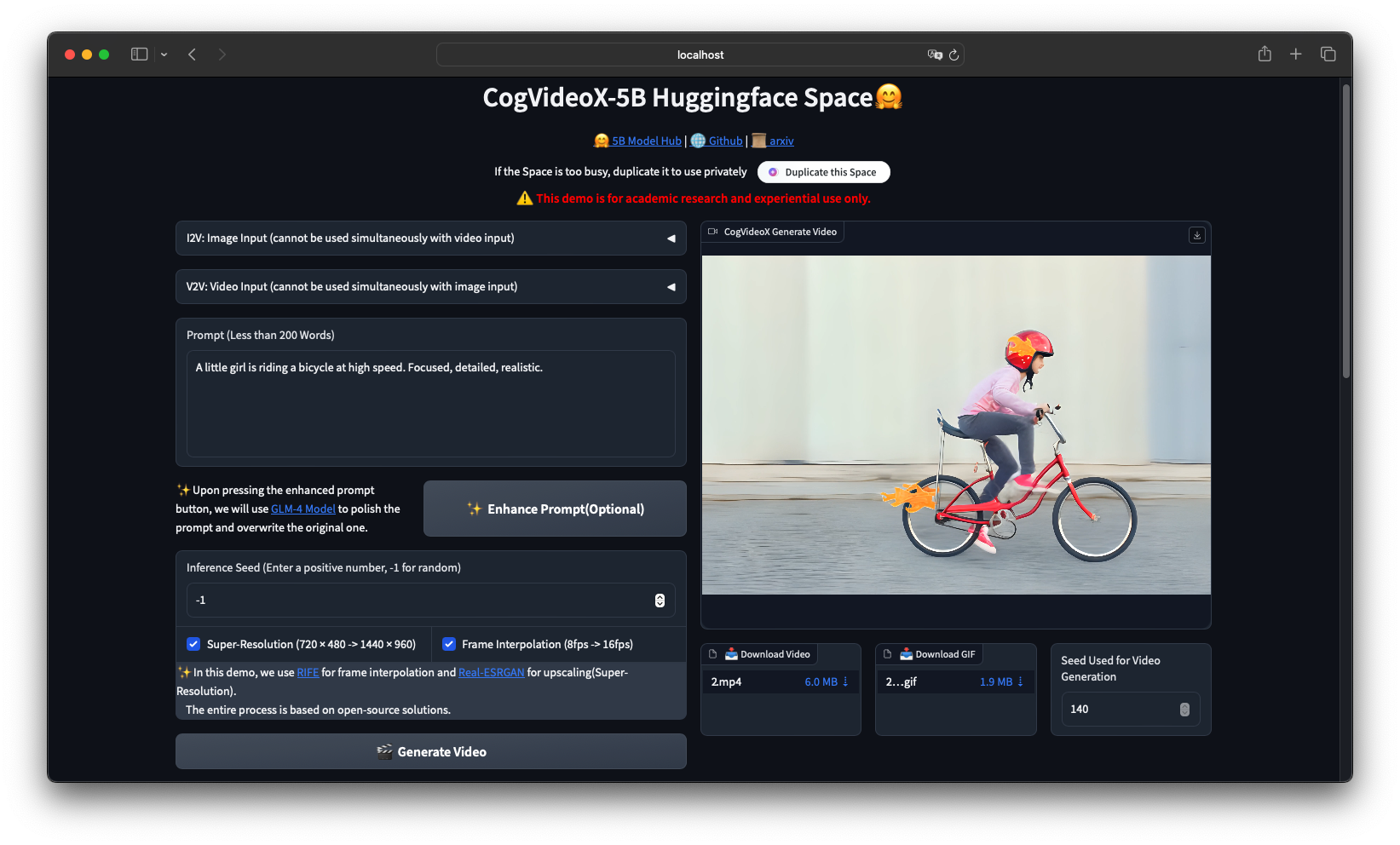
CogVideo is an open-source text to video AI generation framework developed by Zhipu AI, built on a 3D causal VAE and expert transformer architecture. The CogVideoX series (2024) succeeds the original CogVideo model published at ICLR 2023, offering 5B parameter models that generate 6-second 720p videos from text prompts or still images.
CogVideo is an open-source text-to-video and image-to-video generation framework developed by Zhipu AI, built on a 3D causal VAE and expert transformer architecture. The CogVideoX series (2024) succeeds the original CogVideo model published at ICLR 2023, offering 5B parameter models that generate 6-second 720p videos from text prompts or still images.
How CogVideo Works
Architecture Overview
CogVideoX uses a three-component pipeline: 1. T5 Text Encoder: Encodes text prompts into dense vector representations (224-token limit for CogVideoX-5B, 226 tokens for CogVideoX1.5-5B) 2. 3D Causal VAE: Compresses video spatially and temporally into latent space — 4x spatial compression and 4x-8x temporal compression depending on the model variant 3. Expert Transformer (DiT): A diffusion transformer with 3D full attention that denoises latent video representations over 50 inference steps
The architecture follows the flow: Text Prompt → T5 Encoder → Latent Text Embedding → DiT Denoising → 3D VAE Decoder → MP4 Video

The CogVideoX pipeline: T5 text encoder processes the prompt, the Expert Transformer denoises latent representations, and the 3D VAE decodes to pixel-space video.
Model Variants
| Model | Parameters | Resolution | Max Frames | VRAM (BF16) | VRAM (INT8) | |
|
|
|
|
|
| | CogVideoX-2B | 2B | 720 x 480 | 49 | 5 GB min | 4.4 GB | | CogVideoX-5B | 5B | 720 x 480 | 49 | 10 GB min | 7 GB | | CogVideoX-5B-I2V | 5B | 720 x 480 | 49 | 4 GB min | 3.6 GB | | CogVideoX1.5-5B | 5B | 1360 x 768 | 161 (10s) | 10 GB min | 7 GB | | CogVideoX1.5-5B-I2V | 5B | 768 x 1360 | 49 (6s) | 4 GB min | 3.6 GB |
Installation & Setup
Prerequisites
- Python: 3.10 - 3.12 (inclusive)
- CUDA: 12.1+ with NVIDIA driver 525+
- GPU: NVIDIA with 5GB+ VRAM for CogVideoX-2B, 10GB+ for CogVideoX-5B
- Storage: 20GB free for model weights + dependencies
Method 1: pip Install (Recommended, Under 5 Minutes)
Step 1 — Create a virtual environment: `````bash python3.11 -m venv cogvideo_env source cogvideo_env/bin/activate
Step 2 — Clone the repository and install dependencies: `````bash
git clone https://github.com/zai-org/CogVideo.git
cd CogVideo
pip install -r requirements.txt
The requirements.txt installs PyTorch, Diffusers, Transformers, Accelerate, and the SAT toolkit: `````
torch>=2.3.0
diffusers>=0.30.0
transformers>=4.40.0
accelerate>=0.30.0
sentencepiece
opencv-python
Step 3 — Verify the installation: `````python
import torch
from diffusers import CogVideoXPipeline

print(f"PyTorch version: {torch.__version__}")
print(f"CUDA available: {torch.cuda.is_available()}")
print(f"CUDA version: {torch.version.cuda}")
Expected output: ````` PyTorch version: 2.5.1+cu121 CUDA available: True CUDA version: 12.1
### Method 2: Docker Deployment (Production)

For reproducible deployments and multi-GPU inference, use **CogVideo Docker** containers. This **cogvideo docker** approach ensures identical environments across dev and production: `````dockerfile
FROM nvidia/cuda:12.1.0-devel-ubuntu22.04

RUN apt-get update && apt-get install -y \
    python3.11 python3-pip git wget \
    && rm -rf /var/lib/apt/lists/*

RUN pip3 install --no-cache-dir torch torchvision --index-url \
    https://download.pytorch.org/whl/cu121

WORKDIR /app
RUN git clone https://github.com/zai-org/CogVideo.git .
RUN pip3 install -r requirements.txt

ENV PYTHONUNBUFFERED=1
EXPOSE 7860

CMD ["python3", "-m", "inference.cli_demo"]
Build and run: `````bash
docker build -t cogvideo:latest .
docker run –gpus all -it –rm
-v $(pwd)/output:/app/output
-v $(pwd)/models:/app/models
cogvideo:latest
–prompt “A serene mountain lake at sunrise”
–model_path THUDM/CogVideoX-5B
For multi-GPU inference, add ``device_map="balanced"`` to ``from_pretrained()`` and remove ``enable_model_cpu_offload()``: `````python
pipe = CogVideoXPipeline.from_pretrained(
    "THUDM/CogVideoX-5B",
    torch_dtype=torch.bfloat16,
    device_map="balanced"
)
Method 3: SAT Framework (Research & Fine-Tuning)
The Swiss Army Transformer (SAT) framework is Zhipu AI’s training toolkit. Install it for fine-tuning and research: `````bash git clone https://github.com/zai-org/CogVideo.git cd CogVideo/sat pip install -e .
Verify SAT installation: `````python
from sat import get_args
print("SAT framework loaded successfully")
Integration with Popular Tools
Hugging Face Diffusers (Recommended for Beginners)
The Diffusers pipeline is the fastest way to generate video. Here is a complete text-to-video script: `````python import torch from diffusers import CogVideoXPipeline, CogVideoXDPMScheduler from diffusers.utils import export_to_video
1. Load pipeline
pipe = CogVideoXPipeline.from_pretrained( “THUDM/CogVideoX-5B”, torch_dtype=torch.bfloat16 )
2. Set scheduler — DPM for 5B, DDIM for 2B
pipe.scheduler = CogVideoXDPMScheduler.from_config( pipe.scheduler.config, timestep_spacing=“trailing” )
3. Enable memory optimizations
pipe.enable_sequential_cpu_offload() # Lowest VRAM pipe.vae.enable_slicing() pipe.vae.enable_tiling()
4. Generate
video = pipe( prompt=“A majestic eagle soaring over snow-capped mountains, " “golden hour lighting, cinematic composition”, num_inference_steps=50, guidance_scale=6.0, num_frames=49, # 6 seconds at 8 fps height=480, width=720, generator=torch.Generator().manual_seed(42), ).frames[0]
5. Save
export_to_video(video, “output.mp4”, fps=8)
For image-to-video with CogVideoX1.5-5B-I2V: `````python
import torch
from diffusers import CogVideoXImageToVideoPipeline, CogVideoXDPMScheduler
from diffusers.utils import export_to_video, load_image

pipe = CogVideoXImageToVideoPipeline.from_pretrained(
    "THUDM/CogVideoX1.5-5B-I2V",
    torch_dtype=torch.float16
)
pipe.scheduler = CogVideoXDPMScheduler.from_config(
    pipe.scheduler.config, timestep_spacing="trailing"
)
pipe.enable_sequential_cpu_offload()
pipe.vae.enable_slicing()
pipe.vae.enable_tiling()

image = load_image("input_image.jpg")
video = pipe(
    image=image,
    prompt="The cat in the image slowly turns its head and blinks, "
           "soft natural lighting from a nearby window",
    height=768,
    width=1360,
    num_inference_steps=50,
    num_frames=49,
    guidance_scale=6.0,
    generator=torch.Generator().manual_seed(42),
).frames[0]

export_to_video(video, "output_i2v.mp4", fps=8)
ComfyUI Node-Based Workflow
ComfyUI-CogVideoXWrapper enables visual node-based workflows. Install it: `````bash cd ComfyUI/custom_nodes git clone https://github.com/kijai/ComfyUI-CogVideoXWrapper.git cd ComfyUI-CogVideoXWrapper pip install -r requirements.txt
Restart ComfyUI and load the CogVideoX workflow. The wrapper supports all model variants including I2V and video-to-video.

### SAT Framework Fine-Tuning

For custom styles and concepts, fine-tune with LoRA using SAT: Configure ``sat/configs/sft.yaml``: `````yaml
model_parallel_size: 1
experiment_name: lora-custom-style
mode: finetune
load: "{your_CogVideoX-2b-sat_path}/transformer"
train_iters: 1000
eval_interval: 100
save_interval: 100
save: ckpts
train_data: ["your_train_data_path"]
valid_data: ["your_val_data_path"]
deepseed: bf16: enabled: False  # True for 5B
  fp16: enabled: True   # False for 5B
Run fine-tuning on a single GPU: `````bash cd CogVideo/sat bash finetune_single_gpu.sh
Convert SAT LoRA weights to Hugging Face format: `````bash
python tools/export_sat_lora_weight.py \
  --sat_pt_path ckpts/lora-custom-style/1000/mp_rank_00_model_states.pt \
  --lora_save_directory ./hf_lora_weights/
Load the fine-tuned weights in inference: `````python pipe.load_lora_weights( “./hf_lora_weights/”, weight_name=“pytorch_lora_weights.safetensors”, adapter_name=“custom_style” ) pipe.fuse_lora(components=[“transformer”], lora_scale=1.0)
### Prompt Optimization Pipeline

CogVideoX is trained on long, descriptive prompts. Short prompts produce lower quality video. Use the prompt conversion script: `````bash
python inference/convert_demo.py \
  --prompt "A girl riding a bike" \
  --type "t2v"
The script calls a large language model (GLM-4 Plus or GPT-4o) to expand simple prompts into detailed descriptions. Example conversion: Input: "A girl riding a bike"
Output: "A young woman with flowing auburn hair rides a vintage red bicycle along a cobblestone path. She wears a light summer dress that billows gently in the breeze. The path winds through a sun-dappled forest with tall oak trees casting long shadows on the ground. Golden afternoon light filters through the leaves, creating a warm, nostalgic atmosphere. She pedals at a leisurely pace, a serene smile on her face, occasionally glancing at wildflowers growing along the path edge."
For programmatic use: `````python from inference.convert_demo import convert_prompt
optimized_prompt = convert_prompt( “A cat playing with a toy mouse”, retry_times=3, type=“t2v” ) print(optimized_prompt)
### Quantized Inference with TorchAO

For limited VRAM deployments, use INT8 quantization via diffusers-torchao: `````bash
pip install torchao
import torch
from diffusers import CogVideoXPipeline
from torchao.quantization import quantize_, int8_weight_only

pipe = CogVideoXPipeline.from_pretrained(
    "THUDM/CogVideoX-5B",
    torch_dtype=torch.bfloat16
)

# Quantize transformer to INT8
quantize_(pipe.transformer, int8_weight_only())

pipe.enable_sequential_cpu_offload()
pipe.vae.enable_slicing()

video = pipe(
    prompt="A robot walking through a futuristic city at night",
    num_inference_steps=50,
    num_frames=49,
).frames[0]
Quantization reduces VRAM from 10GB to approximately 7GB for CogVideoX-5B with minimal quality loss.
Benchmarks & Real-World Use Cases
Inference Speed (Single A100 80GB)
| Model | Precision | Steps | Time (5s video) | Time (10s video) | |
|
|
|
|
| | CogVideoX-2B | BF16 | 50 | ~180s | N/A | | CogVideoX-5B | BF16 | 50 | ~1000s | N/A | | CogVideoX1.5-5B | BF16 | 50 | ~550s (H100) | ~1000s | | CogVideoX1.5-5B-I2V | FP16 | 50 | ~90s | N/A | | CogVideoX1.5-5B-I2V | FP16 | 50 | ~45s (H100) | N/A |
VBench-2.0 Quality Scores
| Dimension | CogVideoX-5B (BLADE 8-step) | CogVideoX-5B (50-step) | Wan2.1-1.3B | |
|
|
|
| | Overall | 0.569 | 0.534 | 0.570 | | Human Fidelity | 0.896 | 0.871 | 0.918 | | Controllability | 0.612 | 0.581 | 0.593 | | Physics | 0.543 | 0.512 | 0.538 | | Creativity | 0.587 | 0.554 | 0.571 |
Source: Video-BLADE paper (Zhejiang University, 2025)
Real-World Use Cases
Content Creation Studios: A Tokyo-based animation studio uses CogVideoX-5B-I2V to animate concept art, cutting storyboard production time by 60%. The image-to-video pipeline turns static illustrations into 6-second motion previews.
E-commerce Product Demos: A furniture retailer generates product showcase videos from single product photos using CogVideoX1.5-5B-I2V. The model produces smooth camera orbits and natural lighting transitions at 1360 x 768 resolution.
Educational Content: A MOOC platform auto-generates demonstration videos for physics experiments from text descriptions. The CogVideoX-5B model’s strong text-following ensures accurate depiction of described physical processes.
Social Media Marketing: Marketing teams use prompt-optimized batch generation to create 50+ short video variants daily for A/B testing, running quantized inference on shared GPU servers with 16GB VRAM.
Advanced Usage / Production Hardening
Multi-GPU Parallel Inference
For high-throughput deployments, distribute across multiple GPUs: `````python import torch from diffusers import CogVideoXPipeline
pipe = CogVideoXPipeline.from_pretrained( “THUDM/CogVideoX-5B”, torch_dtype=torch.bfloat16, device_map=“balanced” # Auto-distribute across GPUs )
Do NOT call enable_model_cpu_offload() with device_map
Multi-GPU reduces per-GPU memory to approximately 24GB BF16 for CogVideoX-5B.

### API Server with FastAPI

Wrap inference in a production API: `````python
from fastapi import FastAPI
from pydantic import BaseModel
import torch
from diffusers import CogVideoXPipeline
from diffusers.utils import export_to_video
import uuid
import os

app = FastAPI()
pipe = None

@app.on_event("startup")
async def load_model(): global pipe
    pipe = CogVideoXPipeline.from_pretrained(
        "THUDM/CogVideoX-5B",
        torch_dtype=torch.bfloat16
    )
    pipe.enable_model_cpu_offload()
    pipe.vae.enable_slicing()

class GenerateRequest(BaseModel): prompt: str
    num_frames: int = 49
    guidance_scale: float = 6.0
    num_inference_steps: int = 50

@app.post("/generate")
async def generate_video(req: GenerateRequest): video = pipe(
        prompt=req.prompt,
        num_frames=req.num_frames,
        guidance_scale=req.guidance_scale,
        num_inference_steps=req.num_inference_steps,
        height=480,
        width=720,
    ).frames[0]

    output_id = str(uuid.uuid4())
    output_path = f"output/{output_id}.mp4"
    export_to_video(video, output_path, fps=8)

    return {"video_url": f"/videos/{output_id}.mp4", "status": "complete"}
Run with: `````bash uvicorn api_server:app –host 0.0.0.0 –port 8000 –workers 1
### VRAM Optimization Checklist

Apply these optimizations in order based on your GPU: 1. **VAE Slicing**: Always enable — splits large batches with negligible overhead
2. **VAE Tiling**: Enable for resolutions above 720p — processes in patches
3. **Sequential CPU Offload**: Use with < 12GB VRAM — moves layers to CPU between steps
4. **Model CPU Offload**: Use with 12-16GB VRAM — faster than sequential but uses more memory
5. **INT8 Quantization**: Use TorchAO for 7-10GB VRAM targets
6. **BF16 over FP32**: Always use BF16 on Ampere+ GPUs — halves memory vs FP32

### Monitoring with Prometheus

Track inference metrics in production: `````python
from prometheus_client import Counter, Histogram, start_http_server
import time

INFERENCE_COUNT = Counter(cogvideo_inferences_total, 'Total inferences')
INFERENCE_TIME = Histogram(cogvideo_inference_seconds, 'Inference latency')
VRAM_USAGE = Histogram(cogvideo_vram_bytes, 'Peak VRAM usage')

start_http_server(9090)

@INFERENCE_TIME.time()
def generate_tracked(pipe, prompt): INFERENCE_COUNT.inc()
    torch.cuda.reset_peak_memory_stats()
    result = pipe(prompt=prompt, num_frames=49).frames[0]
    vram = torch.cuda.max_memory_allocated()
    VRAM_USAGE.observe(vram)
    return result
Comparison with Alternatives
| Feature | CogVideoX-5B | Wan 2.1-14B | HunyuanVideo-13B | Open-Sora 1.2 | |
|
|
|
|
| | Parameters | 5B | 14B | 13B | ~7B (STDiT3) | | License | Apache-2.0 | Apache-2.0 | Apache-2.0 | Apache-2.0 | | Max Resolution | 1360 x 768 | 1280 x 720 | 1280 x 720 | 1280 x 720 | | Max Duration | 10 seconds | 5 seconds | 5.4 seconds | 16 seconds | | Min VRAM (FP16) | 5 GB (2B) / 10 GB (5B) | 16 GB (1.3B) / 24 GB (14B) | 24 GB | 16 GB | | Inference (A100) | ~1000s (5s vid) | ~846s (5s vid) | ~132s/step at 2K | ~94s/step | | Text Alignment | Strong | Moderate | Strong | Moderate | | Motion Quality | Moderate | Strong | Excellent | Moderate | | I2V Support | Yes (dedicated model) | Yes | Yes | Yes | | Fine-Tuning | LoRA + Full (SAT) | LoRA | LoRA + Full | Full only | | ComfyUI Support | Yes (wrapper) | Yes (wrapper) | Yes (wrapper) | Yes (wrapper) | | Quantization | INT8 via TorchAO | INT8/INT4 | INT8/INT4 | Limited | | Multilingual Prompt | English focused | Chinese + English | Chinese + English | English |
When to choose CogVideoX: Pick it when you need precise text-following, long-form generation (up to 10s), image-to-video with dedicated I2V models, or the lowest VRAM footprint among quality models. CogVideoX1.5-5B-I2V runs on a 4GB GPU. In the cogvideo vs wan comparison, CogVideoX wins on VRAM efficiency and dedicated I2V support, while Wan 2.1 leads on motion fluidity.
When to choose Wan 2.1: Better for multilingual Chinese/English workflows and when you have 16GB+ VRAM for the 14B model. Wan 2.1 shows superior motion quality in benchmarks and faster inference on equivalent hardware.
When to choose HunyuanVideo: Best overall quality on VBench-2.0, strongest human fidelity, but requires 24GB+ VRAM for full-precision inference. The default choice when GPU memory is unlimited.
When to choose Open-Sora: For research flexibility and very long video generation (up to 16 seconds), though with lower visual quality.
Limitations / Honest Assessment
CogVideoX has clear constraints you should know before committing: 1. Slow Inference: A single 5-second video takes ~1000 seconds on A100 with CogVideoX-5B at 50 steps. Wan 2.1 and HunyuanVideo are faster on equivalent hardware. The upcoming BLADE acceleration (8.89x speedup) helps but requires separate model conversion.
English-Only Prompts: CogVideoX is trained primarily on English captions. Multilingual prompts degrade compared to Wan 2.1 or HunyuanVideo which handle Chinese natively.
Human Figure Quality: VBench-2.0 human fidelity scores lag behind HunyuanVideo (0.871 vs 0.964). Human faces and body movements occasionally show artifacts.
Maximum 10 Seconds: Even CogVideoX1.5-5B tops out at 10 seconds (161 frames). For longer content, you need video extension techniques or switch to Open-Sora.
Prompt Engineering Required: The model expects long, detailed prompts (200+ words). Without prompt optimization via LLM expansion, output quality drops significantly.
No Commercial Video API: Unlike Runway or Kling, CogVideoX is self-hosted only. You manage GPU infrastructure, scaling, and queueing.
Frequently Asked Questions
Q: What GPU do I need to run CogVideoX locally?
A: CogVideoX-2B runs on 5GB VRAM with Diffusers + sequential CPU offload. CogVideoX-5B needs 10GB minimum. CogVideoX1.5-5B-I2V works on just 4GB. For comfortable experience without CPU offloading, aim for 16GB+ VRAM (RTX 4080/4090 or A100).
Q: How do I speed up inference beyond 50 steps?
A: Use the CogVideoXDPMScheduler with timestep_spacing="trailing" and reduce steps to 25-30 for draft previews. For production speedup, apply Video-BLADE step distillation which achieves 8.89x acceleration on CogVideoX-5B at comparable quality. Enable VAE tiling and slicing, and use enable_model_cpu_offload() instead of sequential offload when VRAM allows.
Q: Can I fine-tune CogVideoX on my own dataset?
A: Yes, via two paths. SAT framework supports full-parameter fine-tuning and LoRA with custom datasets. Diffusers supports LoRA fine-tuning through train_cogvideox_lora.py. Both require A100 GPUs for 5B models — 2B models can train on single RTX 4090 with gradient checkpointing. You need 25+ videos for meaningful style or concept learning.
Q: What is the difference between CogVideoX-5B and CogVideoX1.5-5B?
A: CogVideoX1.5-5B is the November 2024 update with higher resolution support (1360 x 768 vs 720 x 480), longer video generation (up to 10 seconds vs 6 seconds), and improved frame handling (16N+1 frame formula vs 8N+1). The 1.5 series also introduces dedicated I2V models with better motion coherence from static images.
Q: How does CogVideoX compare to commercial APIs like Sora or Kling?
A: Commercial APIs offer simpler access and higher peak quality, especially for human subjects. CogVideoX wins on cost (no per-video fees), privacy (local inference), customization (LoRA fine-tuning), and reproducibility (fixed seeds). For batch content generation at scale, self-hosted CogVideoX is typically 10x cheaper than API billing.
Q: What file formats does CogVideoX output?
A: The Diffusers pipeline outputs PyTorch tensors. Use export_to_video() from diffusers.utils to save as MP4 with H.264 encoding at 8-16 FPS depending on the model. For other formats, convert the MP4 with FFmpeg: `````bash
ffmpeg -i output.mp4 -c:v libx265 -crf 23 output_h265.mp4
**Q: Is there a web UI for non-technical users?**

A: Yes, multiple options. The official Hugging Face Space provides online inference without setup. For local use, install ComfyUI with the CogVideoXWrapper node for a visual workflow interface. Third-party tools like Pinokio also offer one-click installations.

* * *

## Conclusion

CogVideoX delivers production-grade text-to-video generation with the flexibility of open-source deployment. From 4GB VRAM consumer GPUs to multi-A100 server clusters, the model scales across hardware tiers thanks to quantization, CPU offloading, and SAT framework fine-tuning.

**Action items to get started today:**

1. Clone the repository: ````git clone https://github.com/zai-org/CogVideo.git````
2. Install dependencies: ````pip install -r requirements.txt````
3. Run your first generation: ````python inference/cli_demo.py --prompt "Your prompt here" --model_path THUDM/CogVideoX-5B````
4. Optimize prompts with ````convert_demo.py``` for better quality
5. Join the CogVideo community on [Discord](https://github.com/zai-org/CogVideo#-join-our-community) for support and workflow sharing

For production deployments, start with the Docker setup, add FastAPI wrapping, and monitor with Prometheus. Fine-tune with SAT LoRA when you need custom styles.

**Join our Telegram group for daily AI source code updates:** [@dibi8source](https://t.me/dibi8source)

* * *


## Recommended Hosting & Infrastructure

Before you deploy any of the tools above into production, you'll need solid infrastructure. Two options dibi8 actually uses and recommends: - **[DigitalOcean](https://m.do.co/c/eca87ac14ee0)** — $200 free credit for 60 days across 14+ global regions. The default option for indie devs running open-source AI tools.
- **[HTStack](https://my.htstack.com/aff.php?aff=27187)** — Hong Kong VPS with low-latency access from mainland China. This is the same IDC that hosts dibi8.com — battle-tested in production.

*Affiliate links — they don"t cost you extra and they help keep dibi8.com running.*

## Sources & Further Reading

- CogVideo GitHub Repository: https://github.com/zai-org/CogVideo
- CogVideoX-5B Model Card (Hugging Face): https://huggingface.co/THUDM/CogVideoX-5B
- CogVideoX1.5-5B Model Card: https://huggingface.co/THUDM/CogVideoX1.5-5B
- CogVideoX Paper (arXiv): https://arxiv.org/abs/2408.06072
- Diffusers Documentation: https://huggingface.co/docs/diffusers/main/en/api/pipelines/cogvideox
- Video-BLADE Acceleration Paper: https://arxiv.org/abs/2508.10774
- VBench-2.0 Benchmark Paper: https://arxiv.org/abs/2503.21755
- CogKit Fine-Tuning Framework: https://github.com/zai-org/CogKit
- ComfyUI-CogVideoXWrapper: https://github.com/kijai/ComfyUI-CogVideoXWrapper
- diffusers-torchao Quantization: https://github.com/sayakpaul/diffusers-torchao
- Wan 2.1 Repository: https://github.com/Wan-Video/Wan2.1
- HunyuanVideo Repository: https://github.com/Tencent/HunyuanVideo
- Open-Sora Repository: https://github.com/hpcaitech/Open-Sora


{
  "@context": "https://schema.org",
  "@type": "Article",
  "headline": "CogVideo: 12.7K Stars — Complete Text-to-Video Setup Guide 2026",
  "datePublished": "2026-05-19",
  "dateModified": "2026-05-19",
  "author": {
    "@type": "Organization",
    "name": "Dibi8"
  },
  "publisher": {
    "@type": "Organization",
    "name": "Dibi8",
    "logo": {
      "@type": "ImageObject",
      "url": "https://dibi8.com/logo.png"
    }
  },
  "mainEntityOfPage": {
    "@type": "WebPage",
    "@id": "https://dibi8.com/resources/cogvideo"
  }
}
</script>

* * *

## Related Articles

- [stable-diffusion-complete-guide](cogvideo)
- [comfyui-workflows-complete-guide](cogvideo)
- [comfyui-workflows-complete-guide](cogvideo)
- [comfyui-workflows-complete-guide](cogvideo)
- [moneyprinterturbo-one-click-ai-video-generator](cogvideo)

* * *

*Found this helpful? [Join our Telegram community](https://t.me/DIBI8_Group) for daily AI tool updates!*