title: “AI Tool Guide” description: “Technical guide and comparison.” date: 2026-05-19T00:00:00+08:00 lastmod: 2026-05-19T00:00:00+08:00 tech_stack: [] application_domain: Ai Tools source_version: ’' licensing_model: Open Source license_type: MIT file_size: ’' file_md5: ’' download_url: ’' backup_url: ’' last_maintained: “2026-05-19” draft: false categories: [“ai-tools”] tags: [“demucs”, “music-source-separation”, “ai-audio”, “stem-separation”, “pytorch”, “docker”, “open-source”] aliases:
- /posts/demucs/-
Separating a mixed song into individual instrument tracks — vocals, drums, bass, and others — used to require the original multitrack studio files. That changed when deep learning models learned to “unmix” finished audio. Today, musicians, producers, and developers use these tools for karaoke creation, sample isolation, remix preparation, and voice conversion pipelines. Among the open-source options, one model dominates the conversation: Demucs, Meta’s hybrid transformer architecture with over 10,000 GitHub stars and top-ranked benchmarks on the MUSDB18-HQ dataset.
This guide walks through what Demucs is, how it works, how to install it locally, how it compares to Spleeter and Ultimate Vocal Remover, and how to integrate it into real production workflows.
What Is Demucs?
Demucs (Deep Extractor for Music Sources) is an open-source music source separation model developed by Meta AI Research. It takes a stereo audio mixture as input and outputs isolated “stems” — typically vocals, drums, bass, and a catch-all “other” track containing guitars, keyboards, and remaining instruments.
The project lives at ```facebookresearch/demucson GitHub, where it has accumulated over 10,100 stars and 1,500 forks. The repository was archived by Meta on January 1, 2025, but the original author Alexandre Defossez maintains an active fork atadefossez/demucs````. The latest stable release is v4.1.0, and the entire project is MIT-licensed.
What sets Demucs apart from earlier tools is its hybrid approach: it processes audio simultaneously in the time domain (raw waveform) and the frequency domain (spectrogram), then fuses both representations. This dual-domain processing preserves phase information that pure spectrogram methods lose, resulting in cleaner separation with fewer metallic artifacts.
How Demucs Works
Architecture Overview
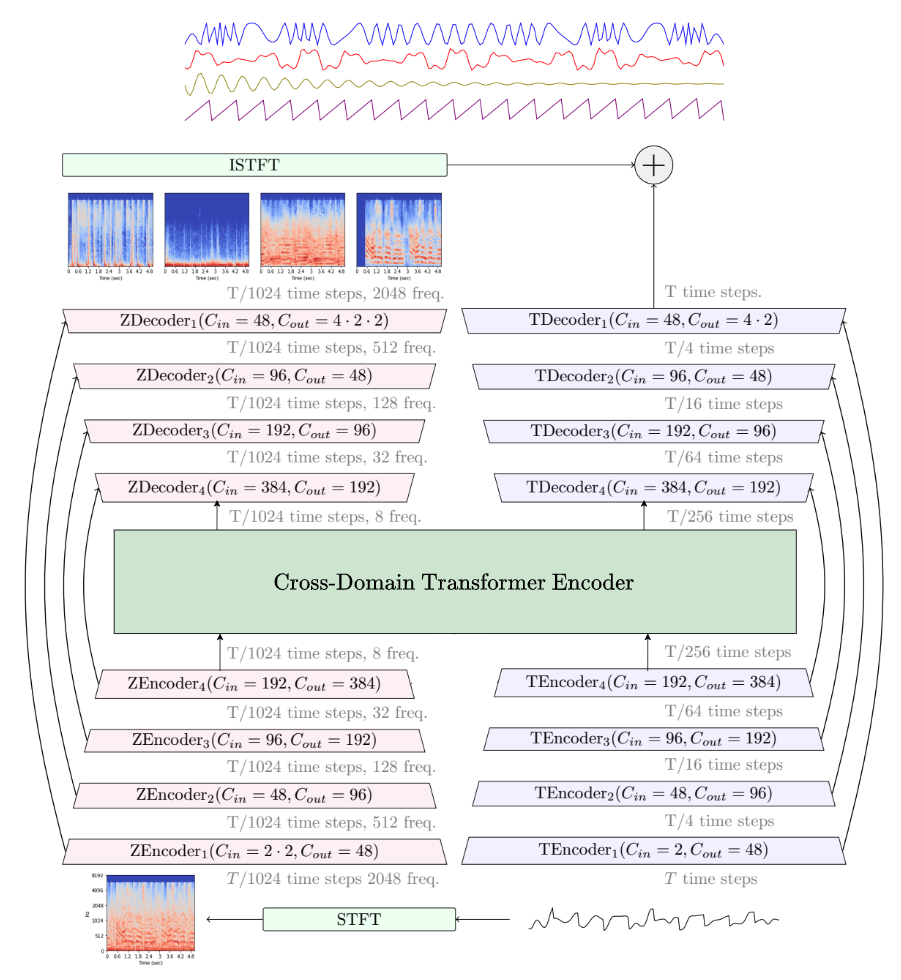
The current generation of Demucs — officially called Hybrid Transformer Demucs (HTDemucs) — builds on a U-Net convolutional backbone augmented with transformer layers. The architecture operates in three conceptual stages: 1. Encoder: The input waveform passes through both a time-domain encoder (1D convolutions) and a frequency-domain encoder (STFT followed by 2D convolutions). This dual encoding captures both fine-grained temporal details and harmonic frequency structures.
Transformer bottleneck: The deepest layers of the U-Net use a cross-domain transformer encoder with self-attention within each domain and cross-attention across domains. This mechanism models long-range dependencies — critical for separating, say, a vocal melody that spans multiple bars from a similarly pitched guitar line.
Decoder: Separate decoders reconstruct each source (drums, bass, other, vocals) in both domains, and a fusion layer combines the outputs into the final separated waveforms.
Available Models
Demucs ships with multiple pretrained models optimized for different speed/quality tradeoffs: | Model | Stems | VRAM | SDR (MUSDB) | Use Case | |
|
|
|
|
|
| htdemucs | 4 | ~5.2 GB | 7.1 dB | Default, best speed/quality balance |
| htdemucs_ft | 4 | ~7.8 GB | 7.8 dB | Maximum quality, ~4x slower |
| htdemucs_6s | 6 | ~6.5 GB | 6.8 dB | Guitar + piano isolation |
| mdx_extra_q | 4 | ~3.0 GB | 6.5 dB | Low-VRAM systems |
The htdemucs_ft model achieves an overall SDR of 7.8 dB on MUSDB18-HQ, with per-source breakdowns of approximately 8.5 dB for vocals, 7.5 dB for bass, 8.9 dB for drums, and 6.2 dB for the “other” category. For reference, 0 dB means no separation improvement over the original mixture.
Installation & Setup
Prerequisites
Before installing Demucs, verify your environment: `````bash
Python 3.8+ required
python –version
FFmpeg must be installed
ffmpeg -version
(Optional) NVIDIA GPU with CUDA 11.8+ for acceleration
nvidia-smi
### Option 1: pip Install (Fastest)

The simplest way to get Demucs running: `````bash
# Create a virtual environment
python -m venv demucs-env
source demucs-env/bin/activate  # Linux/macOS
# demucs-env\Scripts\activate   # Windows

# Install Demucs
pip install -U demucs

# Verify installation
demucs --help
Option 2: Conda with GPU Support (Recommended)
For GPU-accelerated inference and training: `````bash
Clone the repository
git clone https://github.com/adefossez/demucs.git cd demucs
Create environment from official spec
conda env update -f environment-cuda.yml conda activate demucs
Install in development mode
pip install -e .
Verify GPU is detected
python -c “import torch; print(f’CUDA available: {torch.cuda.is_available()}’)”
### Option 3: Docker (Cleanest Isolation)

For reproducible, dependency-free deployment: `````bash
# Dockerfile
FROM pytorch/pytorch:2.5.1-cuda12.4-cudnn9-runtime

RUN pip install -U demucs

WORKDIR /audio
ENTRYPOINT ["demucs"]
Build and run: `````bash docker build -t demucs . docker run –gpus all -v $(pwd):/audio demucs song.mp3
**Docker Compose (for batch services):**

`````yaml
version: '3.8'

services: demucs: build: .
    runtime: nvidia
    environment: - NVIDIA_VISIBLE_DEVICES=all
    volumes: - ./input:/audio/input:ro
      - ./output:/audio/output
    command: ["-n", "htdemucs_ft", "--mp3", "-o", "/audio/output", "/audio/input"]
First Separation Run
After installation, separate your first track: `````bash
Basic 4-stem separation with default model
demucs song.mp3
Output goes to ./separated/htdemucs/song/
Contains: drums.wav, bass.wav, other.wav, vocals.wav
Use the fine-tuned model for better quality
demucs -n htdemucs_ft song.mp3
Separate only vocals from instrumental
demucs –two-stems=vocals song.mp3
Output as MP3 (smaller files)
demucs –mp3 –mp3-bitrate 320 song.mp3
### Verify Model Download and Cache

Models download automatically on first use. Verify the cache: `````bash
# List downloaded models
ls ~/.cache/torch/hub/checkpoints/

# Expected output includes: # htdemucs-*.th, htdemucs_ft-*.th

# Check which model will be used
demucs -n htdemucs_ft --help | grep "name"

# Quick test with a short audio file
ffmpeg -f lavfi -i "sine=frequency=1000:duration=5" test_tone.wav
demucs -n htdemucs test_tone.wav
Integration with Popular Tools
Ultimate Vocal Remover (UVR)
Ultimate Vocal Remover is the most popular GUI frontend for Demucs. Rather than using Demucs directly through the command line, most producers use UVR because it bundles Demucs models with other architectures and adds ensemble processing.
Configuration in UVR: 1. Download UVR5 from the official GitHub releases
2. In the UI, select Process Method: “Demucs”
3. Choose model: V4 | htdemucs_ft
4. Enable GPU Conversion if available
5. For best results, use Ensemble Mode with htdemucs_ft + MDX-Net combined
UVR ensemble mode runs multiple models in parallel and blends their outputs, consistently producing cleaner separation than any single model. The cost is processing time — ensemble runs are roughly 3–5x slower than a single model pass.
RVC (Retrieval-based Voice Conversion)
RVC pipelines commonly use Demucs as a preprocessing step to isolate vocals before voice extraction: `````python import subprocess import os
def preprocess_for_rvc(input_song, output_dir): “““Extract clean vocals for RVC voice conversion.””” os.makedirs(output_dir, exist_ok=True)
# Step 1: Separate with Demucs
subprocess.run([
    demucs, '-n', htdemucs_ft,
    '--two-stems=vocals',
    '-o', output_dir,
    input_song
], check=True)

# Step 2: Return path to isolated vocals
base = os.path.splitext(os.path.basename(input_song))[0]
vocals_path = os.path.join(
    output_dir, htdemucs_ft, base, 'vocals.wav'
)
return vocals_path
Usage
vocals = preprocess_for_rvc(‘input.mp3’, ‘./separated’)
Feed vocals into RVC for voice conversion
### GPT-SoVITS

GPT-SoVITS voice cloning requires clean reference audio. Demucs removes background music before feeding samples into the TTS pipeline: `````python
from demucs.api import Separator
import torchaudio

separator = Separator(model="htdemucs", device="cuda")

# Separate and extract vocals
origin, separated = separator.separate_audio_file("reference.mp3")
vocals = separated["vocals"]

# Save at 24kHz for GPT-SoVITS
torchaudio.save("clean_reference.wav", vocals, 24000)
Gradio Web Interface
For a self-hosted separation service: `````python import gradio as gr from demucs.api import Separator
separator = Separator(model=“htdemucs_ft”)
def separate(audio_file, stem): origin, separated = separator.separate_audio_file(audio_file) output_path = f"{stem}.wav" separator.save_audio(separated[stem], output_path, samplerate=44100) return output_path
demo = gr.Interface( fn=separate, inputs=[ gr.Audio(type=“filepath”, label=“Upload Song”), gr.Dropdown( choices=[“vocals”, “drums”, “bass”, “other”], value=“vocals”, label=“Stem” ) ], outputs=gr.Audio(label=“Isolated Stem”), title=“Demucs Source Separation”, description=“Separate music into stems using Meta’s Demucs model” )
demo.launch(server_name=“0.0.0.0”, server_port=7860)
## Benchmarks / Real-World Use Cases

### MUSDB18-HQ Benchmark Results

MUSDB18-HQ is the standard benchmark for music source separation, containing 150 full-length songs with ground-truth isolated stems. Higher SDR (Signal-to-Distortion Ratio) means cleaner separation.

| Model | Overall SDR | Vocals | Drums | Bass | Other | Speed (RTX 3090) |
|
* * *
|
* * *
|
* * *
|
* * *
|
* * *
|
* * *
|
* * *
|
| **HTDemucs FT (v4)** | **7.8 dB** | **8.5 dB** | **8.9 dB** | **7.5 dB** | **6.2 dB** | ~4x real-time |
| HTDemucs (v4) | 7.1 dB | 7.8 dB | 8.2 dB | 6.9 dB | 5.6 dB | ~16x real-time |
| Hybrid Demucs (v3) | 7.7 dB | 8.1 dB | 8.5 dB | 7.2 dB | 5.9 dB | ~12x real-time |
| Spleeter 4stems | 5.9 dB | 6.3 dB | 6.8 dB | 5.4 dB | 4.2 dB | ~100x real-time |
| Open-Unmix | 5.3 dB | 6.2 dB | 5.9 dB | 4.7 dB | 4.2 dB | ~80x real-time |

### Production Use Cases

**Karaoke track generation**: The ````--two-stems=vocals```` option produces an instrumental by simply mixing drums + bass + other, discarding the vocals track. A 4-minute song processes in under 30 seconds on GPU.

**Sample extraction for producers**: Isolate drum breaks, basslines, or melodic elements from full mixes. The ````htdemucs_6s```` model adds guitar and piano separation, though quality on these stems is lower than the main four.

**Voice conversion preprocessing**: Clean vocal extraction is a prerequisite for RVC, GPT-SoVITS, and similar voice cloning pipelines. Demucs consistently produces vocal stems with less bleed than spectrogram-only methods.

**Audio restoration**: Archivists use Demucs to separate historical recordings for noise reduction on individual stems, then remix.

### Processing Time Reference

For a 4-minute stereo track at 44.1 kHz: | Hardware | htdemucs | htdemucs_ft | htdemucs_6s |
|
* * *
|
* * *
|
* * *
|
* * *
|
| RTX 4080 GPU | ~15s | ~55s | ~25s |
| RTX 3080 GPU | ~20s | ~75s | ~35s |
| Apple M3 (MPS) | ~45s | ~3min | ~70s |
| Intel i7-13700 CPU | ~5min | ~18min | ~8min |

## Advanced Usage / Production Hardening

### Python API for Custom Pipelines

For programmatic control, bypass the CLI and use the Python API directly: `````python
import torch
import torchaudio
from demucs.pretrained import get_model
from demucs.apply import apply_model

# Load model
device = torch.device("cuda" if torch.cuda.is_available() else "cpu")
model = get_model("htdemucs_ft")
model.to(device)
model.eval()

# Load audio
wav, sr = torchaudio.load("input.mp3")

# Ensure stereo
if wav.shape[0] == 1: wav = wav.repeat(2, 1)

# Add batch dimension
mix = wav.unsqueeze(0).to(device)

# Separate with optimized settings
with torch.no_grad(): sources = apply_model(
        model,
        mix,
        shifts=1,       # Shift trick: higher = better, slower
        split=True,     # Process in chunks (required for long audio)
        overlap=0.25,   # Overlap between chunks
        segment=10,     # Segment length in seconds
        progress=True,
        device=device
    )[0]

# sources shape: (num_sources, channels, samples)
source_names = model.sources  # [drums, bass, other, vocals]

# Save individual stems
for i, name in enumerate(source_names): torchaudio.save(f"{name}.wav", sources[i].cpu(), sr)
Batch Processing Pipeline
from pathlib import Path
import subprocess
import json

def batch_separate(input_dir, output_dir, model="htdemucs"): """Process all audio files in a directory."""
    input_dir = Path(input_dir)
    output_dir = Path(output_dir)
    output_dir.mkdir(parents=True, exist_ok=True)

    audio_exts = {'.mp3', '.wav', '.flac', '.ogg', '.m4a'}
    files = [f for f in input_dir.iterdir() if f.suffix in audio_exts]

    # Process all files in a single Demucs invocation
    subprocess.run([
        demucs, '-n', model,
        '-o', str(output_dir),
        '--mp3',
        '--mp3-bitrate', 320,
        *[str(f) for f in files]
    ], check=True)

    # Generate metadata manifest
    manifest = {}
    for f in files: base = f.stem
        stem_dir = output_dir / model / base
        manifest[base] = {
            drums: str(stem_dir / 'drums.mp3'),
            bass: str(stem_dir / 'bass.mp3'),
            other: str(stem_dir / 'other.mp3'),
            vocals: str(stem_dir / 'vocals.mp3'),
        }

    with open(output_dir / 'manifest.json', w) as fp: json.dump(manifest, fp, indent=2)

    return manifest

# Usage
batch_separate('./raw_songs/', './stems/', model=htdemucs_ft)
Memory Optimization for Long Files
Demucs loads the entire audio file into GPU memory. For long tracks or limited VRAM: `````python
Force CPU offloading for large files
import os os.environ[PYTORCH_CUDA_ALLOC_CONF] = ‘max_split_size_mb:128’
Use smaller segments
sources = apply_model( model, mix, split=True, segment=7, # Reduce from default ~10s to 7s overlap=0.1, # Reduce overlap device=device )[0]
### Monitoring and Logging

`````python
import logging
import time

logging.basicConfig(level=logging.INFO)
logger = logging.getLogger(demucs)

def separate_with_metrics(input_path, output_dir): start = time.time()

    separator = Separator(model="htdemucs_ft", device="cuda")
    origin, separated = separator.separate_audio_file(input_path)

    duration = time.time() - start
    logger.info(f"Separated {input_path} in {duration:.1f}s")

    # Log per-stem levels
    for name, audio in separated.items(): rms = torch.sqrt(torch.mean(audio ** 2)).item()
        logger.info(f"  {name}: RMS={rms:.4f}")

    return separated
Comparison with Alternatives
| Feature | Demucs (v4) | Ultimate Vocal Remover | Spleeter | Open-Unmix | |
|
|
|
|
| | Architecture | Hybrid waveform + spectrogram + Transformer | GUI wrapper (multiple backends) | Spectrogram U-Net | Spectrogram LSTM | | MUSDB SDR | 7.8 dB (htdemucs_ft) | N/A (uses Demucs/MDX) | 5.9 dB | 5.3 dB | | Max Stems | 6 (vocals, drums, bass, guitar, piano, other) | 4 (depends on model) | 5 (sides included) | 4 | | GPU Required | Recommended | Recommended | Optional | Optional | | Processing Speed | ~4–16x real-time (GPU) | ~3–10x real-time (ensemble) | ~100x real-time | ~80x real-time | | VRAM Usage | 5–8 GB | 6–12 GB (ensemble) | <2 GB | <2 GB | | Active Development | Community fork | Active | Archived (2021) | Maintenance mode | | License | MIT | MIT | MIT | MIT | | Best For | Quality-first separation | Easy GUI + ensemble | Fast batch processing | Lightweight deployment |
When to choose what: Use Demucs directly when you need maximum separation quality and are building automated pipelines. Use UVR when you want a GUI, ensemble processing, and do not mind the setup overhead. Use Spleeter only when you need maximum speed on constrained hardware or are maintaining legacy code. Open-Unmix remains viable for educational purposes and resource-constrained edge deployments.
Limitations / Honest Assessment
Demucs is not the right tool for every audio task. Here is what it does not do well: Real-time separation: Even the fastest Demucs model (htdemucs) processes at roughly 16x real-time on an RTX 4080. This is far too slow for live performance or real-time streaming applications. Tools like Spleeter or specialized ONNX exports are better suited for latency-sensitive use cases.
Guitar and piano isolation: The htdemucs_6s model attempts to separate guitar and piano as distinct stems, but SDR on these sources is significantly lower than the main four stems. If your primary need is isolating a specific guitar track, specialized transcription tools like Basic Pitch may be more appropriate.
Highly compressed masters: Loudness-maximized tracks with heavy limiting (common in modern EDM and pop) create frequency masking that confuses separation models. Demucs may produce artifacts — swirling sounds, cross-source bleed — on these tracks that are not present on more dynamic mixes.
Model size: At ~2 GB for htdemucs_ft, Demucs models are an order of magnitude larger than Spleeter (~150 MB). This matters for edge deployments, mobile apps, and serverless environments with cold-start constraints.
Archived upstream: The original facebookresearch/demucs repository is archived and no longer maintained. While adefossez/demucs is active, the long-term maintenance trajectory is unclear. Factor this into your dependency planning.
Frequently Asked Questions
Q: What hardware do I need to run Demucs?
A: Demucs runs on CPU, but an NVIDIA GPU with 6+ GB VRAM is strongly recommended. For the htdemucs model, 5.2 GB VRAM is sufficient. For htdemucs_ft, budget 8 GB. CPU-only processing works but expect 5–20 minute processing times for a 4-minute song versus under a minute on GPU.
Q: Can I use Demucs commercially? A: Yes. Demucs is MIT-licensed, which permits commercial use, modification, and distribution without restrictions. Separated stems can be used in commercial productions. Note that the MIT license applies to the code and models, not to the copyright of the music you process.
Q: Why does Demucs sound better than Spleeter? A: Demucs processes audio in both the time and frequency domains simultaneously, preserving phase information that pure spectrogram methods discard. The transformer layers also model long-range musical dependencies better than Spleeter’s U-Net. This translates to fewer artifacts and less cross-source interference.
Q: How do I process a full album efficiently?
A: Pass multiple files to a single Demucs invocation: demucs -n htdemucs *.mp3. Demucs processes them sequentially but avoids repeated model loading overhead. For maximum throughput, run multiple Demucs instances on different GPUs or use the batch processing script provided in the Advanced Usage section.
Q: What audio formats does Demucs support?
A: Demucs uses FFmpeg for decoding and torchaudio for encoding. Input: MP3, WAV, FLAC, OGG, M4A, and any format FFmpeg supports. Output: WAV (default, 16-bit), float32 WAV (--float32), 24-bit WAV (--int24), or MP3 (--mp3 with adjustable bitrate).
Q: Can I fine-tune Demucs on my own data?
A: Yes, but it requires the full training pipeline. You need isolated stems for your training songs (same format as MUSDB18-HQ), then use the Dora experiment manager with dora run -d solver=htdemucs dset=your_dataset. Most users do not need this — the pretrained models generalize well across genres.
Q: What is the difference between htdemucs and htdemucs_ft?
A: htdemucs_ft is fine-tuned per source with additional training data and the shift trick enabled by default. It achieves ~0.7 dB higher SDR across all sources but runs approximately 4x slower and uses 50% more VRAM. Use htdemucs for fast iteration and htdemucs_ft for final production-quality output.
Conclusion
Demucs remains the reference implementation for open-source music source separation in 2026. Its hybrid transformer architecture delivers separation quality that exceeds Spleeter by 20–40% on standard benchmarks, and it integrates cleanly with voice conversion pipelines, karaoke generators, and audio production tools.
For developers building audio pipelines, Demucs offers a well-documented Python API, Docker support, and multiple model variants for different speed/quality tradeoffs. The MIT license removes commercial friction. The main caveats are hardware requirements (GPU strongly recommended), model size (~2 GB), and the archived status of the upstream repository.
Action items: Install Demucs with pip install -U demucs, run your first separation on a test track with ````demucs -n htdemucs_ft song.mp3```, and integrate it into your pipeline using the Python API examples above. For a GUI experience, download Ultimate Vocal Remover and use its ensemble mode.
Join the dibi8.com Telegram group for weekly deep dives into open-source AI tools: https://t.me/dibi8channel
Recommended Hosting & Infrastructure
Before you deploy any of the tools above into production, you’ll need solid infrastructure. Two options dibi8 actually uses and recommends: - DigitalOcean — $200 free credit for 60 days across 14+ global regions. The default option for indie devs running open-source AI tools.
- HTStack — Hong Kong VPS with low-latency access from mainland China. This is the same IDC that hosts dibi8.com — battle-tested in production.
Affiliate links — they don"t cost you extra and they help keep dibi8.com running.
Sources & Further Reading
- Demucs GitHub Repository (Meta, archived)
- Demucs Active Fork (adefossez)
- Hybrid Transformers for Music Source Separation (paper)
- MUSDB18-HQ Benchmark Dataset
- Ultimate Vocal Remover GUI
- Spleeter (Deezer, archived)
- Open-Unmix (Sony)
- MVSEP Quality Checker Leaderboard
- Audio Developers Conference 2025 — Demucs ONNX Export Talk
{ “@context”: “https://schema.org”, “@type”: “Article”, “headline”: “Demucs: Music Source Separation with 10K+ Stars — Comparison vs UVR, Spleeter in 2026”, “datePublished”: “2026-05-19”, “dateModified”: “2026-05-19”, “author”: { “@type”: “Organization”, “name”: “Dibi8” }, “publisher”: { “@type”: “Organization”, “name”: “Dibi8”, “logo”: { “@type”: “ImageObject”, “url”: “https://dibi8.com/logo.png" } }, “mainEntityOfPage”: { “@type”: “WebPage”, “@id”: “https://dibi8.com/resources/demucs" } }

Related Articles
- wandb-ml-experiment-tracking-platform-2026
- wandb-ml-experiment-tracking-platform-2026
- 2026-05-25-trending-ai-agents
- 2026-06-01-trending-ai-agents
- 2026-06-08-trending-ai-agents
Found this helpful? Join our Telegram community for daily AI tool updates!