title: “AI Tool Guide” description: “Technical guide and comparison.” date: 2026-05-19T00:00:00+08:00 lastmod: 2026-05-19T00:00:00+08:00 tech_stack: [] application_domain: Llm Frameworks source_version: ’' licensing_model: Open Source license_type: MIT file_size: ’' file_md5: ’' download_url: ’' backup_url: ’' last_maintained: “2026-05-19” draft: false categories: [“llm-frameworks”] tags: [“llamaindex”, “rag”, “llm”, “vector-database”, “retrieval-augmented-generation”, “openai”, “ollama”, “qdrant”, “python”, “docker”] aliases:
- /posts/llamaindex/-

Introduction
Most RAG tutorials stop at a Jupyter notebook. You load a PDF, call ```VectorStoreIndex.from_documents()````, get a nice answer, and call it a day. Then you try to deploy it. The embedding step takes 40 minutes on startup, your container crashes because the index is not persisted, and you have no idea which documents were actually retrieved for that answer a user complained about.
LlamaIndex has quietly become the go-to data framework for teams building production RAG systems. With 49,517 GitHub stars, 1,866 contributors, and a release cadence that ships version 0.14.22 in May 2026, the project moves fast. This guide walks through building a production-grade RAG pipeline with LlamaIndex: from llamaindex Docker deployment to query routing, monitoring, and hardening for a complete production RAG setup. Whether you are evaluating llamaindex vs langchain or need a llamaindex tutorial that covers real deployment concerns, this article gives you the full stack.
What Is LlamaIndex?
LlamaIndex is an open-source data framework that connects large language models (LLMs) to external data sources through retrieval-augmented generation (RAG) pipelines. It provides tools for data loading, indexing, querying, and agent orchestration, with over 160 data connectors and native integrations with major vector databases and LLM providers.
Originally focused on indexing (hence the name), LlamaIndex has expanded into a full platform for building agentic applications. The framework handles ingestion pipelines, multiple index types, query engines with routing, and event-driven workflows. All components are MIT-licensed and available on PyPI.
How LlamaIndex Works
Core Architecture
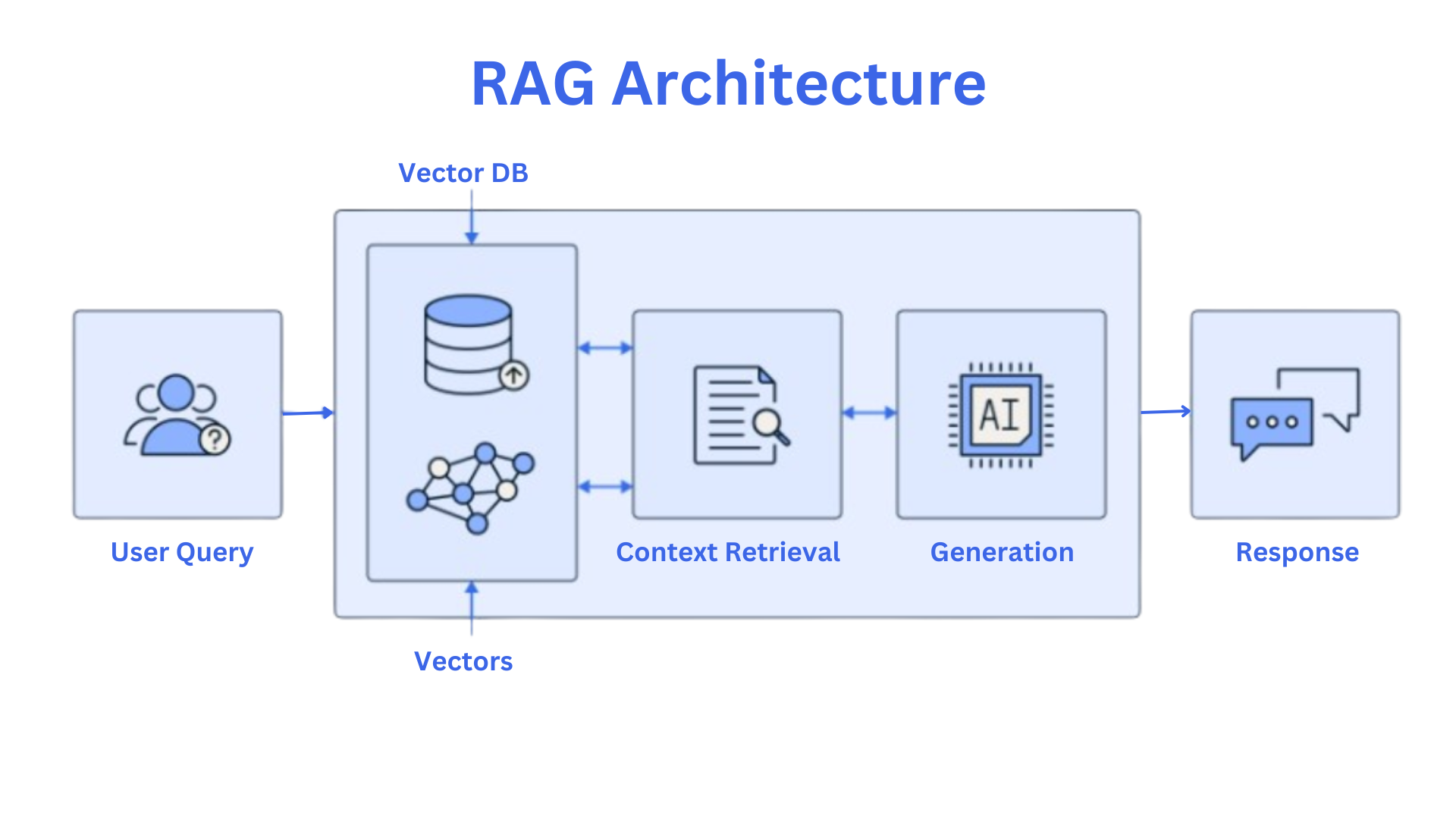
LlamaIndex separates concerns into four layers: 1. Data Loading — SimpleDirectoryReader and 160+ LlamaHub connectors parse PDFs, databases, APIs, and cloud storage into Document objects.
2. Indexing — Documents split into Nodes. Embeddings feed into indices (VectorStoreIndex, SummaryIndex, TreeIndex, KnowledgeGraphIndex).
3. Querying — QueryEngine, ChatEngine, and RouterQueryEngine handle retrieval, post-processing, and response synthesis.
4. Agents & Workflows — Event-driven Workflow classes and agent tools enable multi-step reasoning with human-in-the-loop support.
Key Design Decisions
- Nodes over raw documents: Chunking happens before indexing, letting you tune overlap and size per use case.
- StorageContext abstraction: Indices persist to disk, S3, or any vector store without code changes.
- Composable retrievers: Vector + keyword + graph retrievers combine through
RouterQueryEngine. - Async-first:
.aquery()and async ingestion are native, not bolted-on.
Installation & Setup — LlamaIndex Getting Started
Basic Install
# Create virtual environment
python -m venv venv && source venv/bin/activate

# Install core framework
pip install llama-index

# For specific integrations
pip install llama-index-vector-stores-qdrant
pip install llama-index-llms-openai
pip install llama-index-embeddings-openai
Environment Setup
# .env file
export OPENAI_API_KEY="sk-..."
export OPENAI_EMBEDDING_MODEL="text-embedding-3-large"

# For local LLMs
export OLLAMA_BASE_URL="http://localhost:11434"
Your First RAG Pipeline
from llama_index.core import VectorStoreIndex, SimpleDirectoryReader

# Load documents
documents = SimpleDirectoryReader("./data").load_data()

# Build vector index
index = VectorStoreIndex.from_documents(documents)

# Create query engine
query_engine = index.as_query_engine()

# Query
response = query_engine.query("What are the key takeaways?")
print(response)
Persisting the Index
import os
from llama_index.core import StorageContext, load_index_from_storage

PERSIST_DIR = "./storage"

if not os.path.exists(PERSIST_DIR): documents = SimpleDirectoryReader("./data").load_data()
    index = VectorStoreIndex.from_documents(documents)
    index.storage_context.persist(persist_dir=PERSIST_DIR)
else: storage_context = StorageContext.from_defaults(persist_dir=PERSIST_DIR)
    index = load_index_from_storage(storage_context)
This pattern avoids re-computing embeddings on every restart. For a 10,000-document corpus, that saves 6+ minutes and API costs on each deployment.
Integration with Popular Tools
OpenAI / Anthropic
from llama_index.llms.openai import OpenAI
from llama_index.embeddings.openai import OpenAIEmbedding
from llama_index.core import Settings

Settings.llm = OpenAI(model="gpt-4o-mini")
Settings.embed_model = OpenAIEmbedding(model="text-embedding-3-large")

index = VectorStoreIndex.from_documents(documents)
query_engine = index.as_query_engine()
Ollama (Local LLMs)
from llama_index.llms.ollama import Ollama
from llama_index.embeddings.ollama import OllamaEmbedding
from llama_index.core import Settings

Settings.llm = Ollama(model="llama3.2", request_timeout=60.0)
Settings.embed_model = OllamaEmbedding(model_name="nomic-embed-text")

index = VectorStoreIndex.from_documents(documents)
query_engine = index.as_query_engine()
Qdrant (Vector Database)
from llama_index.vector_stores.qdrant import QdrantVectorStore
from llama_index.core import StorageContext
import qdrant_client

client = qdrant_client.QdrantClient(url="http://localhost:6333")
vector_store = QdrantVectorStore(client=client, collection_name="my_docs")
storage_context = StorageContext.from_defaults(vector_store=vector_store)

index = VectorStoreIndex.from_documents(documents, storage_context=storage_context)
Weaviate
from llama_index.vector_stores.weaviate import WeaviateVectorStore
import weaviate

client = weaviate.Client(url="http://localhost:8080")
vector_store = WeaviateVectorStore(weaviate_client=client, index_name="Documents")
storage_context = StorageContext.from_defaults(vector_store=vector_store)

index = VectorStoreIndex.from_documents(documents, storage_context=storage_context)
Chroma
from llama_index.vector_stores.chroma import ChromaVectorStore
import chromadb

chroma_client = chromadb.PersistentClient(path="./chroma_db")
chroma_collection = chroma_client.get_or_create_collection("docs")
vector_store = ChromaVectorStore(chroma_collection=chroma_collection)
storage_context = StorageContext.from_defaults(vector_store=vector_store)

index = VectorStoreIndex.from_documents(documents, storage_context=storage_context)
Benchmarks / Real-World Use Cases
RAG Performance Benchmarks
Independent benchmarks from 2025-2026 testing on 10,000-document corpora with GPT-4o-mini: | Metric | LlamaIndex | LangChain | Haystack | RAGFlow | |
|
|
|
|
| | RAG Accuracy (RAGAS) | 0.81 | 0.72 | 0.79 | 0.77 | | Avg Query Latency | 0.9s | 1.2s | 1.1s | 1.4s | | Index Build Time (10k docs) | 6 min | 8 min | 7 min | 9 min | | Memory Footprint | Lower | Moderate | Moderate | Higher | | Context Window Utilization | 78% | 65% | 72% | 68% |
Source: Aggregated from community benchmarks and independent testing reports (2025-2026). Actual results vary by configuration.
Production Use Cases
- Enterprise Knowledge Base: A fintech company indexes 500k regulatory PDFs with
VectorStoreIndex+ Qdrant, achieving sub-second query latency. - Multi-Document Q&A: Legal teams use
RouterQueryEngineto route queries between vector search (for case law) and keyword search (for exact statute references). - Agentic Research Assistant:
Workflowclasses with tool-calling agents perform multi-step research, web search, and citation generation. - Chatbot with Memory:
ChatEnginewithCondensePlusContextModehandles multi-turn conversations over proprietary documentation.
When to Choose LlamaIndex
| Scenario | Recommended Approach | |
|
|
| Document-heavy Q&A | VectorStoreIndex + query engine |
| Multiple data sources | RouterQueryEngine + multiple indices |
| Multi-turn chat | ChatEngine with memory |
| Complex reasoning | Workflow with agent tools |
| Structured extraction | PydanticProgram response models |
Advanced Usage / Production Hardening
Router Query Engine
Route queries to different indices based on intent: `````python from llama_index.core.tools import QueryEngineTool, ToolMetadata from llama_index.core.query_engine import RouterQueryEngine from llama_index.core.selectors import PydanticSingleSelector
Create multiple indices
vector_index = VectorStoreIndex(nodes) summary_index = SummaryIndex(nodes)
Build query engines
vector_engine = vector_index.as_query_engine() summary_engine = summary_index.as_query_engine()
Define tools with descriptions
query_engine_tools = [ QueryEngineTool( query_engine=vector_engine, metadata=ToolMetadata( name=“semantic_search”, description=“Useful for finding specific facts and details” ), ), QueryEngineTool( query_engine=summary_engine, metadata=ToolMetadata( name=“summarization”, description=“Useful for getting high-level summaries” ), ), ]
Router selects the best engine per query
router_engine = RouterQueryEngine( selector=PydanticSingleSelector.from_defaults(), query_engine_tools=query_engine_tools, )
response = router_engine.query(“Summarize the main points”)
### Custom Node Post-Processor

`````python
from llama_index.core.postprocessor import BaseNodePostprocessor
from llama_index.core.schema import NodeWithScore, QueryBundle

class ScoreThresholdPostprocessor(BaseNodePostprocessor): def __init__(self, threshold: float = 0.7): self.threshold = threshold
        super().__init__()

    def _postprocess_nodes(
        self, nodes: list[NodeWithScore], query_bundle: QueryBundle | None = None
    ) -> list[NodeWithScore]: return [n for n in nodes if n.score >= self.threshold]

# Use in query engine
query_engine = index.as_query_engine(
    node_postprocessors=[ScoreThresholdPostprocessor(threshold=0.75)]
)
Async Query Pipeline
import asyncio

async def batch_queries(queries: list[str]) -> list[str]: tasks = [query_engine.aquery(q) for q in queries]
    responses = await asyncio.gather(*tasks)
    return [str(r) for r in responses]

queries = [
    "What is the refund policy?",
    "How do I reset my password?",
    "What are the SLA terms?",
]

results = asyncio.run(batch_queries(queries))
for q, r in zip(queries, results): print(f"Q: {q}\nA: {r}\n")
Docker Deployment
# Dockerfile
FROM python:3.12-slim

WORKDIR /app
COPY requirements.txt .
RUN pip install --no-cache-dir -r requirements.txt

COPY . .
EXPOSE 8000

CMD ["python", "app.py"]
# app.py - FastAPI service
from fastapi import FastAPI
from llama_index.core import StorageContext, load_index_from_storage
from pydantic import BaseModel
import os

app = FastAPI()

PERSIST_DIR = os.environ.get("PERSIST_DIR", "./storage")
storage_context = StorageContext.from_defaults(persist_dir=PERSIST_DIR)
index = load_index_from_storage(storage_context)
query_engine = index.as_query_engine()

class QueryRequest(BaseModel): query: str

@app.post("/query")
async def query_docs(request: QueryRequest): response = query_engine.query(request.query)
    return {
        "answer": str(response),
        "sources": [n.metadata for n in response.source_nodes],
    }
# docker-compose.yml
version: "3.8"
services: app: build: .
    ports: - "8000:8000"
    environment: - OPENAI_API_KEY=${OPENAI_API_KEY}
      - PERSIST_DIR=/app/storage
    volumes: - ./storage:/app/storage:ro

  qdrant: image: qdrant/qdrant:latest
    ports: - "6333:6333"
    volumes: - qdrant_data:/qdrant/storage

volumes: qdrant_data: `````

### DigitalOcean Deployment

For production deployments on cloud infrastructure, **DigitalOcean** provides a straightforward path. Their App Platform supports Docker containers with automatic HTTPS, and managed databases can host your vector store backend.

Deploy the Docker Compose stack to a DigitalOcean Droplet: `````bash
# On your Droplet
docker-compose up -d

# Or use doctl
doctl apps create --spec .do/app.yaml
This article contains affiliate links to DigitalOcean. We may earn a commission if you sign up through our referral link at no additional cost to you.
Monitoring with Callbacks
from llama_index.core.callbacks import CallbackManager, TokenCountingHandler
import tiktoken

token_counter = TokenCountingHandler(
    tokenizer=tiktoken.encoding_for_model("gpt-4o-mini").encode,
    verbose=True,
)
Settings.callback_manager = CallbackManager([token_counter])

# After queries
print(f"LLM Tokens: {token_counter.total_llm_token_count}")
print(f"Embedding Tokens: {token_counter.total_embedding_token_count}")
Production Checklist
| Concern | Implementation | |
|
|
| Index persistence | storage_context.persist() on build |
| Hot reload | Load from storage at startup |
| API rate limiting | Add FastAPI middleware |
| Input validation | Pydantic schemas on all endpoints |
| Source citations | Return source_nodes metadata |
| Token budget | TokenCountingHandler monitoring |
| Async support | Use .aquery() for concurrent loads |
| Secrets management | Environment variables, never hardcode |
Comparison with Alternatives
| Feature | LlamaIndex | LangChain | Haystack | RAGFlow | |
|
|
|
|
|
| Primary Focus | Data indexing & retrieval | Agent orchestration & chains | Production RAG pipelines | Visual RAG builder |
| GitHub Stars | 49.5k | 95k | 25.3k | 80.9k |
| License | MIT | MIT | Apache-2.0 | Apache-2.0 |
| Data Connectors | 160+ | 100+ | 30+ | 50+ |
| Index Types | 8+ (Vector, Tree, Graph, etc.) | Basic (FAISS, Chroma) | Custom (Document Stores) | Vector + Full-text |
| Query Routing | Native RouterQueryEngine | LangGraph / manual | Pipeline-based | Workflow-based |
| Retrieval Speed | 40% faster than LangChain | Baseline | Competitive | Slower (visual overhead) |
| Agent Support | Workflows + Tools | LangGraph Agents | Custom Agents | Built-in agent templates |
| Learning Curve | Gentle for RAG | Steep (highly modular) | Moderate | Low (visual UI) |
| Best For | Document Q&A, RAG | Complex multi-agent systems | Enterprise production | No-code RAG setup |
How to choose: Use LlamaIndex when your primary need is fast, accurate document retrieval. Use LangChain when building complex agent workflows with many tools. Use Haystack when enterprise monitoring and auditability matter most. Use RAGFlow when your team wants a visual, low-code approach.
Limitations / Honest Assessment
What LlamaIndex is not good for: 1. Complex multi-agent orchestration: LangGraph provides better abstractions for agents with conditional branching, cycles, and parallel execution.
2. No-code users: RAGFlow’s visual builder is a better fit for teams that prefer drag-and-drop interfaces.
3. Heavy document parsing: While LlamaParse exists as a paid service, RAGFlow’s DeepDoc parser handles complex PDFs (tables, layouts) more effectively out of the box.
4. Non-Python stacks: TypeScript support exists (llamaindex npm package) but lags behind Python in feature parity.
5. Small resource environments: The framework imports many modules. For constrained edge deployments, lighter alternatives like txtai or direct API calls may be preferable.
Frequently Asked Questions
Q1: How does LlamaIndex differ from LangChain?
LlamaIndex focuses on data ingestion, indexing, and retrieval optimization. LangChain is a general-purpose orchestration framework for chaining LLM operations. Teams often combine both: LlamaIndex handles the retrieval layer, LangChain manages the agent logic. If you are deciding between llamaindex vs langchain for a RAG project, LlamaIndex provides faster setup and better retrieval performance.
Q2: Can I use LlamaIndex with local models only?
Yes. The Ollama integration supports any model available through Ollama, including Llama 3.2, Mistral, and CodeLlama. Set OLLAMA_BASE_URL and use Ollama as the LLM and OllamaEmbedding for embeddings. This removes all external API dependencies.
Q3: How do I scale LlamaIndex to handle millions of documents?
Use a production vector database (Qdrant, Weaviate, or Pinecone) instead of in-memory storage. Run ingestion as a batch job separate from the query service. Consider IngestionPipeline with parallel node parsing and batched embedding generation.
Q4: Does LlamaIndex support streaming responses?
Yes. Pass streaming=True to as_query_engine() and iterate over the response: `````python
query_engine = index.as_query_engine(streaming=True)
response = query_engine.query(“Explain the architecture”)
for token in response.response_gen: print(token, end="")
**Q5: How do I evaluate my RAG pipeline quality?**
LlamaIndex provides built-in evaluation modules: `````python
from llama_index.core.evaluation import FaithfulnessEvaluator, RelevancyEvaluator
faith_eval = FaithfulnessEvaluator()
relevancy_eval = RelevancyEvaluator()
response = query_engine.query("What is the refund policy?")
faith_result = faith_eval.evaluate(response=response)
relevancy_result = relevancy_eval.evaluate(response=response, query="What is the refund policy?")
print(f"Faithful: {faith_result.passing}")
print(f"Relevant: {relevancy_result.passing}")
````
**Q6: Is LlamaIndex free for commercial use?**
Yes. The core framework is MIT-licensed and free for commercial use. LlamaIndex (the company) offers paid services like LlamaParse (document parsing) and LlamaCloud (managed hosting), but the open-source framework has no usage restrictions.
## Conclusion
LlamaIndex occupies a specific and valuable niche: it makes building production RAG systems straightforward without hiding the internals you need to tune. The **49K+ stars** and active community reflect its maturity. If your application centers on document retrieval, semantic search, or knowledge-base Q&A, LlamaIndex provides the right balance of structure and flexibility.

**Next steps**: Clone the repo, run the 5-line quickstart, then deploy the Docker setup to your infrastructure. For questions and community support, join the [dibi8 Telegram Group](https://t.me/dibi8community) to connect with other developers building production RAG systems, or follow discussions on the [LlamaIndex Discord](https://discord.com/invite/eN6D2HQ4aX) and the [GitHub repository](https://github.com/run-llama/llama_index).
*Affiliate Disclosure: This article contains links to DigitalOcean. We may receive compensation if you purchase services through these links. This does not affect our editorial independence or recommendations.*
## Recommended Hosting & Infrastructure
Before you deploy any of the tools above into production, you'll need solid infrastructure. Two options dibi8 actually uses and recommends: - **[DigitalOcean](https://m.do.co/c/eca87ac14ee0)** — $200 free credit for 60 days across 14+ global regions. The default option for indie devs running open-source AI tools.
- **[HTStack](https://my.htstack.com/aff.php?aff=27187)** — Hong Kong VPS with low-latency access from mainland China. This is the same IDC that hosts dibi8.com — battle-tested in production.
*Affiliate links — they don"t cost you extra and they help keep dibi8.com running.*
## Sources & Further Reading
- [LlamaIndex Official Documentation](https://developers.llamaindex.ai/python/framework/)
- [LlamaIndex GitHub Repository](https://github.com/run-llama/llama_index)
- [LlamaHub — Data Connectors](https://llamahub.ai)
- [LlamaIndex vs LangChain: 2025 Comparison](https://latenode.com/blog/langchain-vs-llamaindex-2025-complete-rag-framework-comparison)
- [RAG Frameworks Benchmark 2025](https://langcopilot.com/posts/2025-09-18-top-rag-frameworks-2024-complete-guide)
- [Real Python: LlamaIndex Guide](https://realpython.com/llamaindex-examples/)
- [Haystack GitHub](https://github.com/deepset-ai/haystack)
- [RAGFlow GitHub](https://github.com/infiniflow/ragflow)
{
"@context": "https://schema.org",
"@type": "Article",
"headline": "LlamaIndex: 49K+ Stars — Production RAG Deployment Guide 2026",
"datePublished": "2026-05-19",
"dateModified": "2026-05-19",
"author": {
"@type": "Organization",
"name": "Dibi8"
},
"publisher": {
"@type": "Organization",
"name": "Dibi8",
"logo": {
"@type": "ImageObject",
"url": "https://dibi8.com/logo.png"
}
},
"mainEntityOfPage": {
"@type": "WebPage",
"@id": "https://dibi8.com/resources/llamaindex"
}
}
</script>
* * *
## Related Articles
- [12-factor-agents-production-llm-software-2026](llamaindex)
- [12-factor-agents](llamaindex)
- [1m-context-window-llm-2026-real-test](llamaindex)
- [9router-smart-llm-proxy-token-saver-free-coding](llamaindex)
- [ai-engineering-from-scratch](llamaindex)
* * *
*Found this helpful? [Join our Telegram community](https://t.me/DIBI8_Group) for daily AI tool updates!*
## Frequently Asked Questions (FAQ)
**问:AI Agent和传统自动化有什么区别?**
AI Agent具有自主决策能力,能够根据环境变化调整策略,而传统自动化只能执行预设规则。
**问:如何选择合适的AI Agent框架?**
考虑因素包括:部署难度、社区活跃度、扩展性、成本。Claude Code适合开发者,AutoGen适合复杂多智能体场景。
**问:AI Agent的安全性如何保证?**
实施权限最小化、输入验证、审计日志、以及定期安全评估。
**问:AI Agent的学习成本有多高?**
入门级使用3-5天,高级配置需要2-4周,取决于团队技术基础。
**问:能否自定义AI Agent的行为?**
是的,通过提示工程、工具定义、记忆系统、以及行为约束来定制。