title: “AI Tool Guide” description: “Technical guide and comparison.” date: 2026-05-19T00:00:00+08:00 lastmod: 2026-05-19T00:00:00+08:00 tech_stack: [] application_domain: Dev Utils source_version: ’' licensing_model: Open Source license_type: MIT file_size: ’' file_md5: ’' download_url: ’' backup_url: ’' last_maintained: “2026-05-19” draft: false categories: [“dev-utils”] tags: [“traefik”, “docker”, “kubernetes”, “reverse-proxy”, “edge-router”, “ingress”, “devops”, “cloud-native”] aliases:
- /posts/traefik/-
Managing ingress traffic in containerized environments is a persistent headache. Every time a new microservice spins up, someone has to update the reverse proxy configuration, reload the service, and pray nothing breaks. In a world where deployments happen dozens of times per day, this manual approach collapses under its own weight. Traefik, the open-source edge router built for cloud-native infrastructure, solves this by watching your container orchestrator and updating routes automatically — no config reloads, no downtime, no human intervention.
This Traefik tutorial walks through a production-grade Traefik setup: Docker Compose deployment, Kubernetes ingress configuration, TLS automation, middleware hardening, and observability. Whether you are exploring Traefik vs Nginx for your stack or need a complete edge router setup, every config in this guide is copy-paste ready.
What Is Traefik?
Traefik is an open-source HTTP reverse proxy and load balancer designed for dynamic, cloud-native environments. Originally released in 2015 by Containous (now Traefik Labs), it has grown to 63,229 GitHub stars and become the default ingress choice for Docker and Kubernetes operators who value automation over manual configuration. Unlike traditional proxies that rely on static config files, Traefik connects directly to your orchestrator’s API — Docker, Kubernetes, Consul, ECS, and more — and builds its routing table in real time as containers start and stop.

How Traefik Works
Traefik’s architecture splits configuration into two layers: static configuration (loaded at startup, defines entrypoints, providers, and global settings) and dynamic configuration (discovered from your orchestrator, updated without restarts).
Architecture Overview
┌─────────────────────────────────────────────────────────┐
│                      Clients                            │
└─────────────────────────────────────────────────────────┘
                           │
                    ┌──────▼──────┐
                    │   80/443    │
                    │  EntryPoints │
                    └──────┬──────┘
                           │
                    ┌──────▼──────┐
                    │   Routers   │◄──── Dynamic Rules
                    │  (Rules)    │      (Host, Path, Headers)
                    └──────┬──────┘
                           │
                    ┌──────▼──────┐
                    │ Middlewares │◄──── Rate Limit, Auth, Headers
                    │  (Transform)│
                    └──────┬──────┘
                           │
                    ┌──────▼──────┐
                    │   Services  │◄──── Load Balancing, Health Check
                    │  (Upstream) │
                    └──────┬──────┘
                           │
              ┌────────────┼────────────┐
              ▼            ▼            ▼
         ┌────────┐  ┌────────┐  ┌────────┐
         │ Service│  │ Service│  │ Service│
         │   A    │  │   B    │  │   C    │
         └────────┘  └────────┘  └────────┘
Core Concepts
| Component | Purpose | Example | |
|
|
|
| EntryPoint | Listening port for incoming traffic | :80, :443, :8080 |
| Router | Matches requests against rules | Host("api.example.com") |
| Middleware | Modifies requests/responses | BasicAuth, RateLimit, RedirectScheme |
| Service | Forwards to upstream backends | LoadBalancer across 3 replicas |
| Provider | Discovers services from orchestrator | Docker, Kubernetes CRD, Consul |
Installation & Setup
Docker Compose (Single Node, ≤5 Minutes)
Create a dedicated directory and the main Traefik configuration: `````bash mkdir -p ~/traefik/{data,configs} cd ~/traefik touch data/acme.json && chmod 600 data/acme.json
The ````acme.json```` file stores Let's Encrypt certificates. It must have restrictive permissions (````600````) or Let's Encrypt will refuse to write to it.

**``docker-compose.yml``** — Traefik v3.x production-ready: `````yaml
services: traefik: image: traefik:v3.2
    container_name: traefik
    restart: unless-stopped
    security_opt: - no-new-privileges:true
    read_only: true
    networks: - proxy
    ports: - "80:80"
      - "443:443"
      - "8080:8080"
    volumes: - /var/run/docker.sock:/var/run/docker.sock:ro
      - ./data/acme.json:/acme.json
      - ./data/traefik.yml:/etc/traefik/traefik.yml:ro
      - ./configs:/configs:ro
      - ./data/logs:/logs
    labels: - "traefik.enable=true"
      - "traefik.http.routers.traefik.rule=Host(````traefik.yourdomain.com````)"
      - "traefik.http.routers.traefik.entrypoints=websecure"
      - "traefik.http.routers.traefik.tls.certresolver=letsencrypt"
      - "traefik.http.routers.traefik.service=api@internal"
      - "traefik.http.middlewares.traefik-auth.basicauth.users=admin:$$apr1$$H6uskkkW$$IgXLP6ewTrSuBkTrqE8wj/"
      - "traefik.http.routers.traefik.middlewares=traefik-auth"

  whoami: image: traefik/whoami
    container_name: whoami
    restart: unless-stopped
    networks: - proxy
    labels: - "traefik.enable=true"
      - "traefik.http.routers.whoami.rule=Host(````whoami.yourdomain.com````)"
      - "traefik.http.routers.whoami.entrypoints=websecure"
      - "traefik.http.routers.whoami.tls.certresolver=letsencrypt"
      - "traefik.http.services.whoami.loadbalancer.server.port=80"

networks: proxy: external: true
Create the network first: `````bash docker network create proxy docker compose up -d
**``data/traefik.yml``** — Static configuration: `````yaml
global: sendAnonymousUsage: false

api: dashboard: true
  insecure: false

entryPoints: web: address: ":80"
    http: redirections: entryPoint: to: websecure
          scheme: https
          permanent: true
  websecure: address: ":443"
  traefik: address: ":8080"

providers: docker: exposedByDefault: false
    network: proxy
    watch: true
  file: directory: /configs
    watch: true

certificatesResolvers: letsencrypt: acme: email: [email protected]
      storage: /acme.json
      tlsChallenge: {}

log: level: INFO
  format: json
  filePath: "/logs/traefik.log"

accessLog: format: json
  filePath: "/logs/access.log"

metrics: prometheus: addEntryPointsLabels: true
    addRoutersLabels: true
    addServicesLabels: true
Verify the dashboard at https://traefik.yourdomain.com. The basic auth credentials are admin / admin (change the basicauth.users label in production using htpasswd -nb admin yourpassword).
Binary Installation (Linux)
For non-Docker environments, Traefik distributes a single static binary: `````bash wget https://github.com/traefik/traefik/releases/download/v3.2.0/traefik_v3.2.0_linux_amd64.tar.gz tar -xzf traefik_v3.2.0_linux_amd64.tar.gz sudo mv traefik /usr/local/bin/ sudo chmod +x /usr/local/bin/traefik
### Kubernetes with Helm

For Traefik Kubernetes deployments, Helm is the standard method for installing the ingress controller on clusters: `````bash
helm repo add traefik https://traefik.github.io/charts
helm repo update
kubectl create namespace traefik
helm install traefik traefik/traefik \
  --namespace traefik \
  --set ingressRoute.dashboard.enabled=true \
  --set ports.websecure.tls.enabled=true \
  --set [email protected] \
  --set certResolvers.letsencrypt.acme.storage=/data/acme.json \
  --set certResolvers.letsencrypt.acme.tlsChallenge=true
Verify the deployment: `````bash kubectl get pods -n traefik kubectl port-forward -n traefik svc/traefik 9000:9000
Open http://localhost:9000/dashboard/
## Integration with Docker, Kubernetes, Consul, and Docker Compose

### Docker Provider (Auto-Discovery)

The Docker provider is Traefik's killer feature. Any container with Traefik labels gets registered automatically: `````yaml
services: api: image: myapp/api:latest
    networks: - proxy
    labels: - "traefik.enable=true"
      - "traefik.http.routers.api.rule=Host(````api.example.com````) && PathPrefix(````/v2````)"
      - "traefik.http.routers.api.entrypoints=websecure"
      - "traefik.http.routers.api.tls.certresolver=letsencrypt"
      - "traefik.http.routers.api.middlewares=api-ratelimit,api-cors"
      - "traefik.http.middlewares.api-ratelimit.ratelimit.average=100"
      - "traefik.http.middlewares.api-ratelimit.ratelimit.burst=50"
      - "traefik.http.middlewares.api-cors.headers.accesscontrolallowmethods=GET,POST,PUT,DELETE,OPTIONS"
      - "traefik.http.middlewares.api-cors.headers.accesscontrolalloworiginlist=https://app.example.com"
      - "traefik.http.services.api.loadbalancer.server.port=8080"
      - "traefik.http.services.api.loadbalancer.healthcheck.path=/health"
      - "traefik.http.services.api.loadbalancer.healthcheck.interval=10s"
Key Docker labels explained: - traefik.enable=true — Required because exposedByDefault: false is set
traefik.http.routers.<name>.rule— Routing rule (Host, PathPrefix, Headers, etc.)traefik.http.middlewares.*— Applied transformationstraefik.http.services.*.loadbalancer.server.port— Container port to forward to
Kubernetes IngressRoute (CRD)
Traefik’s native IngressRoute CRD provides more control than standard Kubernetes Ingress: `````yaml
apiVersion: traefik.io/v1alpha1
kind: IngressRoute
metadata: name: api-route
namespace: production
spec: entryPoints: - websecure
routes: - match: Host(api.example.com) && PathPrefix(/v2)
kind: Rule
middlewares: - name: rate-limit
- name: strip-prefix
services: - name: api-service
port: 8080
healthCheck: path: /health
intervalSeconds: 10
- match: Host(api.example.com) && PathPrefix(/v1)
kind: Rule
services: - name: api-v1-service
port: 8080
tls: certResolver: letsencrypt
Create the middleware separately: `````yaml
apiVersion: traefik.io/v1alpha1
kind: Middleware
metadata: name: rate-limit
  namespace: production
spec: rateLimit: average: 100
    burst: 50

* * *
apiVersion: traefik.io/v1alpha1
kind: Middleware
metadata: name: strip-prefix
  namespace: production
spec: stripPrefix: prefixes: - /v2
Consul Service Discovery
For HashiCorp Consul environments, Traefik can discover services from the catalog: `````yaml
traefik.yml snippet
providers: consulCatalog: prefix: “traefik” exposedByDefault: false refreshInterval: “5s” endpoint: address: “127.0.0.1:8500” token: “your-consul-token”
Register a service in Consul with Traefik tags: `````bash
curl -X PUT http://localhost:8500/v1/agent/service/register \
  -d '{
    "Name": "payments-api",
    "Tags": ["traefik.enable=true", "traefik.http.routers.payments.rule=Host(````payments.example.com````)"],
    "Port": 8080,
    "Check": {
      "HTTP": "http://localhost:8080/health",
      "Interval": "10s"
    }
  }'
Docker Compose Integration Pattern
For multi-project setups, keep Traefik in a dedicated docker-compose.yml and connect application stacks via the external proxy network: `````yaml
~/projects/api/docker-compose.yml
services: app: image: myapi:latest
networks: - proxy
- internal
labels: - “traefik.enable=true”
- “traefik.http.routers.api.rule=Host(api.example.com)”
- “traefik.http.routers.api.entrypoints=websecure”
- “traefik.http.routers.api.tls.certresolver=letsencrypt”
- “traefik.http.services.api.loadbalancer.server.port=3000”
environment: - DATABASE_URL=postgres://db:5432/api
db: image: postgres:16 networks: - internal environment: - POSTGRES_DB=api
networks: proxy: external: true internal: driver: bridge
Deploy without touching Traefik: `````bash
cd ~/projects/api && docker compose up -d
Benchmarks and Real-World Use Cases
Performance Benchmarks
Community benchmarks on a 4 vCPU AMD server with 16GB RAM show Traefik holds its own against established proxies: | Metric | Nginx | HAProxy | Traefik v3.2 | Traefik v3.2 + FastProxy | Caddy | |
|
|
|
|
|
| | Requests/sec | 25,367 | 24,263 | 18,291 | 20,795 | 13,573 | | Avg Latency (ms) | 3.93 | 4.12 | 5.60 | 4.86 | 7.45 | | 99th Percentile (ms) | 7.94 | 8.43 | 14.28 | 11.84 | 18.08 | | Memory Usage | Low | Low | Medium | Medium | Low |
Source: Community benchmark with wrk2, fibonacci endpoint load. Results vary by workload.
Traefik’s experimental FastProxy engine (introduced in v3.2) delivers a ~50% throughput improvement over the standard engine. Enable it with: `````yaml experimental: fastProxy: {}
Limitations: FastProxy does not support HTTP/2 backends, and tracing/OTEL semantic convention metrics are not yet supported.

### Real-World Use Cases

1. **Microservices API Gateway at Scale**: A fintech company routes 2M daily requests through Traefik on Kubernetes. IngressRoute CRDs handle canary deployments (weight-based traffic splitting between v1 and v2 services) without external tools.

2. **Homelab and Self-Hosting**: Docker Compose + Traefik is the dominant stack in self-hosting communities. Automatic Let's Encrypt certificates, combined with the simple label-based config, make adding a new service a copy-paste operation.

3. **Multi-Tenant SaaS Platform**: Using ``HostRegexp`` rules, a SaaS platform routes ``{tenant}.app.example.com`` to the correct namespace or service automatically: `````yaml
- "traefik.http.routers.app.rule=HostRegexp(````{tenant:[a-z0-9-]+}.app.example.com````)"
- "traefik.http.routers.app.service=app-service"
Advanced Usage and Production Hardening
Security Checklist
- Disable exposed by default — Only register containers explicitly: `````yaml providers: docker: exposedByDefault: false
2. **Run read-only with no-new-privileges**: `````yaml
security_opt: - no-new-privileges:true
read_only: true
- Protect the Docker socket — Use a socket proxy instead of mounting
/var/run/docker.sockdirectly: `````yaml services: socket-proxy: image: tecnativa/docker-socket-proxy environment: - CONTAINERS=1- SERVICES=1 volumes: - /var/run/docker.sock:/var/run/docker.sock:ro
4. **Add security headers globally**: `````yaml
# configs/security.yml
http: middlewares: security-headers: headers: frameDeny: true
        sslRedirect: true
        browserXssFilter: true
        contentTypeNosniff: true
        forceSTSHeader: true
        stsIncludeSubdomains: true
        stsSeconds: 31536000
        customResponseHeaders: X-Robots-Tag: "none,noarchive,nosnippet,notranslate,noimageindex"
          Permissions-Policy: "camera=(), microphone=(), geolocation=()"
Rate Limiting and Circuit Breakers
http: middlewares: api-ratelimit: rateLimit: average: 100
        burst: 50
        period: 1m

    api-circuitbreaker: circuitBreaker: expression: "LatencyAtQuantileMS(50.0) > 100"
        checkPeriod: "10s"
        fallbackDuration: "10s"
        recoveryDuration: "10s"
Observability: Prometheus + Grafana
Enable Prometheus metrics in traefik.yml: `````yaml
metrics: prometheus: addEntryPointsLabels: true
addRoutersLabels: true
addServicesLabels: true
buckets: - 0.005
- 0.01
- 0.025
- 0.05
- 0.1
- 0.25
- 0.5
- 1.0
- 2.5
- 5.0
- 10.0
Prometheus scrape config: `````yaml
scrape_configs: - job_name: traefik
    scrape_interval: 15s
    static_configs: - targets: [traefik:8080]

Import the official Traefik dashboard in Grafana (ID: 17346). Key metrics to monitor: `````promql
Request rate by router
rate(traefik_router_requests_total[5m])
Error rate
rate(traefik_router_requests_total{code=~“5..”}[5m])
95th percentile response time
histogram_quantile(0.95, rate(traefik_service_request_duration_seconds_bucket[5m]))
Certificate expiry (alert when < 7 days)
traefik_tls_certs_not_after - time() < 7 * 86400
### Scaling Beyond a Single Node

For high availability, run multiple Traefik replicas behind a Layer 4 load balancer: `````yaml
# docker-compose.yml (Swarm mode)
services: traefik: image: traefik:v3.2
    deploy: replicas: 3
      placement: constraints: - node.role == manager
      update_config: parallelism: 1
        delay: 10s
    ports: - target: 80
        published: 80
        mode: host
      - target: 443
        published: 443
        mode: host
Comparison with Alternatives
| Feature | Traefik | Nginx | HAProxy | Caddy | |
|
|
|
|
| | Auto Service Discovery | Yes (Docker, K8s, Consul) | No (requires reload) | No (requires reload) | Partial (via config) | | Config Reload Without Downtime | Yes (fully dynamic) | Yes (signal-based) | Yes (soft reload) | Yes | | Let’s Encrypt Integration | Built-in, automatic | Requires certbot addon | Requires certbot addon | Built-in, automatic | | Kubernetes CRD Support | Native (IngressRoute) | Via Ingress + annotations | Via annotations | Limited | | Performance (RPS) | ~18K (v3.2) / ~21K (FastProxy) | ~25K | ~24K | ~14K | | Memory Footprint | Medium (~80-120MB) | Low (~20-40MB) | Low (~20-50MB) | Low (~30-60MB) | | Learning Curve | Medium | Steep | Medium | Low | | Plugin Ecosystem | Rich (30+ plugins) | Rich (modules) | Limited | Growing | | HTTP/3 Support | Yes (experimental) | Yes (module) | No | Yes | | Config Format | YAML / TOML / Labels | Custom syntax | Custom syntax | Caddyfile (JSON) |
Limitations and Honest Assessment
Traefik is not the right tool for every job. Here is what it does not do well: 1. Static file serving: Traefik has no built-in static file server. For serving websites with heavy static assets, Nginx or Caddy is a better fit.
Ultra-high throughput proxying: If your sole need is raw reverse proxy throughput at the edge of a high-traffic site, HAProxy and Nginx still outperform Traefik by 20-40% on pure HTTP request volume.
Complex Lua scripting: Nginx’s Lua module (OpenResty) enables deep request/response manipulation that Traefik’s middleware chain cannot match.
HTTP/2 to backend: Traefik’s experimental FastProxy engine explicitly does not support HTTP/2 backends. If your services require H2C communication, you must use the standard (slower) engine.
Resource usage: Traefik consumes 2-3x more memory than Nginx or HAProxy. On resource-constrained edge devices, this matters.
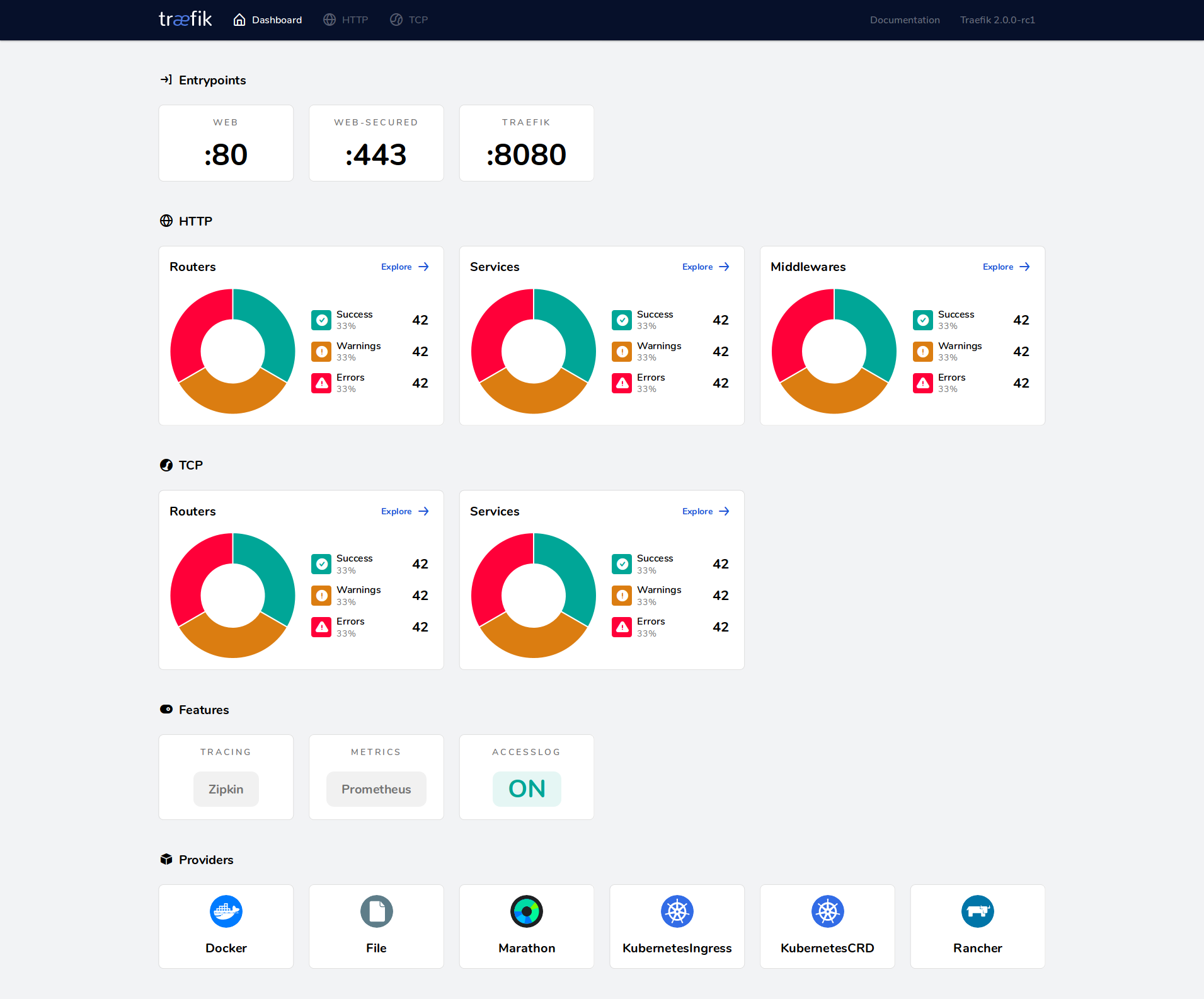 Traefik’s built-in dashboard shows routers, services, middlewares, and health status in real time.
Choose Traefik when you value dynamic configuration and operational simplicity over raw performance. Choose Nginx or HAProxy when you need maximum throughput with static configurations.
Frequently Asked Questions
Does Traefik require restarting when I add new services?
No. Traefik watches your Docker socket or Kubernetes API and updates routes in real time. New containers with Traefik labels are detected within seconds and traffic is routed immediately. This is the primary advantage over traditional proxies.
Can I use Traefik with multiple Docker Compose projects?
Yes. Create an external Docker network (docker network create proxy) and attach Traefik and all application services to it. Each project can define its own docker-compose.yml with Traefik labels — Traefik will discover them automatically as long as they share the network.
How does Traefik handle Let’s Encrypt rate limits?
Traefik stores certificates in the acme.json file and only requests new ones when they are missing or expiring. For environments with frequent container recreations, mount acme.json as a persistent volume. Let’s Encrypt production limits are 50 certificates per registered domain per week.
Is Traefik’s dashboard safe to expose?
Only with authentication. The dashboard shows your complete routing configuration, including backend services. Always apply a middleware with BasicAuth, ForwardAuth (to Authelia/Authentik), or IP whitelist before exposing it. Never use --api.insecure=true in production.
What is the difference between standard Ingress and Traefik’s IngressRoute?
Standard Kubernetes Ingress is a generic resource with limited routing options. Traefik’s IngressRoute CRD adds middleware chaining, TCP/UDP routing, weighted load balancing, traffic mirroring, and direct TLS option configuration — all without annotations.
Can I migrate from Traefik v2 to v3 without downtime?
Traefik v3 introduces breaking changes in CRD versions (traefik.containo.us → traefik.io) and removes some deprecated providers. Plan a blue-green migration: deploy v3 alongside v2, shift traffic gradually, and update your CRDs before decommissioning v2. The Traefik documentation provides a detailed migration guide.
Conclusion
Traefik earns its 63,229 GitHub stars by solving a real operational problem: dynamic service discovery in containerized environments. The combination of automatic Docker/Kubernetes discovery, built-in Let’s Encrypt, native middleware support, and a functional dashboard makes it the pragmatic choice for teams running microservices.
For hosting Traefik on production infrastructure, DigitalOcean provides a straightforward platform with managed Kubernetes and load balancers that integrate cleanly with Traefik. For dedicated server deployments at competitive pricing, consider HTStack — a cost-effective alternative for running Docker-based workloads with full control over your edge routing.
Next steps:
- Clone the official repository: ````git clone https://github.com/traefik/traefik.git```
- Deploy the Docker Compose setup from this guide
- Add your first service with Traefik labels
- Join the Traefik community for support
💬 Discuss this guide and get help on our Telegram group — share your Traefik configs, ask questions, and connect with other developers running production edge routers.
Disclosure: This article contains affiliate links to DigitalOcean and HTStack. These are services the author genuinely recommends for Traefik hosting based on their Docker/Kubernetes compatibility and pricing. Affiliate links help support the creation of free, in-depth technical guides.
Recommended Hosting & Infrastructure
Before you deploy any of the tools above into production, you’ll need solid infrastructure. Two options dibi8 actually uses and recommends: - DigitalOcean — $200 free credit for 60 days across 14+ global regions. The default option for indie devs running open-source AI tools.
- HTStack — Hong Kong VPS with low-latency access from mainland China. This is the same IDC that hosts dibi8.com — battle-tested in production.
Affiliate links — they don"t cost you extra and they help keep dibi8.com running.
Sources & Further Reading
- Traefik Official Documentation
- Traefik GitHub Repository
- Traefik v3.2 Release Notes — FastProxy Engine
- Traefik v3.3 Observability Improvements
- Traefik FastProxy Experimental Configuration
- Traefik Docker Compose Guide — SimpleHomelab
- Traefik Community Forum — Performance Benchmarks
- Nginx vs Traefik vs HAProxy Comparison — Loft.sh
- Caddy vs Traefik vs HAProxy vs Nginx — BigMike.help
{ “@context”: “https://schema.org”, “@type”: “Article”, “headline”: “Traefik: 63,229 GitHub Stars — Cloud-Native Edge Router Production Deployment Guide 2026”, “datePublished”: “2026-05-19”, “dateModified”: “2026-05-19”, “author”: { “@type”: “Organization”, “name”: “Dibi8” }, “publisher”: { “@type”: “Organization”, “name”: “Dibi8”, “logo”: { “@type”: “ImageObject”, “url”: “https://dibi8.com/logo.png" } }, “mainEntityOfPage”: { “@type”: “WebPage”, “@id”: “https://dibi8.com/resources/traefik" } }

Related Articles
- trivy-production-security-scanner-2026
- trivy-production-security-scanner-2026
- juicefs-distributed-posix-file-system-redis-s3-cloud-storage
- apple-container
- freellmapi-openai-compatible-proxy-free-llm-tiers-2026
Found this helpful? Join our Telegram community for daily AI tool updates!