OpenAI Whisper: 99.8K+ Stars
OpenAI Whisper (ASR) 대규모 약한 감독 기반의 강건한 음성 인식. WhisperX, faster-whisper, LibreTranslate와 호환. whisper 튜토리얼, whisper vs whisperx, 음성 인식 설정, whisper python, whisper docker 다룸.
- MIT
- 업데이트 2026-05-19
lang: ko slug: openai-whisper title: ‘OpenAI Whisper: 99.8K+ Stars’ description: ‘OpenAI Whisper (ASR) robust speech recognition via large-scale weak supervision. Compatible with WhisperX, faster-whisper, LibreTranslate. Covers whisper tutorial, whisper vs whisperx, speech recognition setup, whisper python, whisper docker.’ tags: [‘open-source’] date: 2026-05-19 00:00:00+08:00 lastmod: 2026-05-19 00:00:00+08:00 tech_stack: [] application_domain: Ai Tools source_version: ’’ licensing_model: Open Source license_type: MIT file_size: ’' file_md5: ’' download_url: ’' backup_url: ’' github_repo: ‘https://github.com/openai/whisper' last_maintained: ‘2026-05-19’ draft: false categories: [‘ai-tools’] aliases:
- /posts/openai-whisper/
faqs:
- q: ‘Is OpenAI Whisper free for commercial use?’ a: ‘Yes. Whisper is released under the MIT license, which permits commercial use, modification, and distribution. Because you run it on your own hardware there are no per-minute API fees; your only cost is compute (GPU or cloud instances).’
- q: ‘What is the difference between Whisper and faster-whisper?’ a: ‘faster-whisper is a re-implementation of Whisper using CTranslate2, a C++ inference engine, delivering 4-8x speedup, INT8 quantization, and built-in VAD filtering while producing identical transcription results. Use faster-whisper for production and OpenAI Whisper for research and experimentation.’
- q: ‘Can OpenAI Whisper run on a CPU?’ a: ‘Yes. All models except large-v3 run comfortably on modern CPUs; use the tiny model for near real-time transcription on laptops, or the medium model with INT8 quantization for batch processing. Expect roughly 3-5x slower inference than on a GPU.’
- q: ‘Which Whisper model size should I choose?’ a: ‘Use base for English-only quick tasks, small for daily multilingual use, medium for professional accuracy, and large-v3 when maximum accuracy is non-negotiable. The turbo model is the sweet spot for latency-sensitive production workloads, though it was not trained for translation.’
- q: ‘Does Whisper support real-time streaming and speaker diarization?’ a: ‘No. Whisper processes audio in 30-second chunks and is not designed for true real-time (<200ms latency) streaming, nor can the base model identify who spoke. For speaker labels use WhisperX or a separate diarization pipeline, and for streaming ASR consider alternatives like NVIDIA Parakeet or Moonshine v2.’
{{< resource-info >}}
Introduction #
Speech recognition is the bridge between human conversation and machine-readable data, yet most developers have wrestled with APIs that charge per minute, miss domain terminology, or fail entirely on accented speech. In late 2022, OpenAI released Whisper as an open-source MIT-licensed alternative, and the uptake was immediate — 99,800 GitHub stars later, it is the most adopted open-source ASR system in production. This guide walks through a complete Whisper setup, compares it against WhisperX, faster-whisper, and DeepSpeech, and gives you production-hardened configs you can deploy today.
What Is OpenAI Whisper? #
OpenAI Whisper is a general-purpose automatic speech recognition (ASR) model trained on 680,000 hours of multilingual and multitask supervised data. It performs speech-to-text transcription, speech translation to English, spoken language identification, and timestamped segment alignment across 99 languages. Unlike cloud-only APIs, Whisper runs entirely offline on consumer hardware, making it the backbone of transcription pipelines in healthcare, media, call centers, and accessibility tools.
How Whisper Works #
Whisper follows an encoder-decoder Transformer architecture. The audio input is converted to a log-Mel spectrogram and passed through an encoder. A decoder then predicts text tokens autoregressively, conditioned on special task tokens that tell the model whether to transcribe, translate, or detect language.
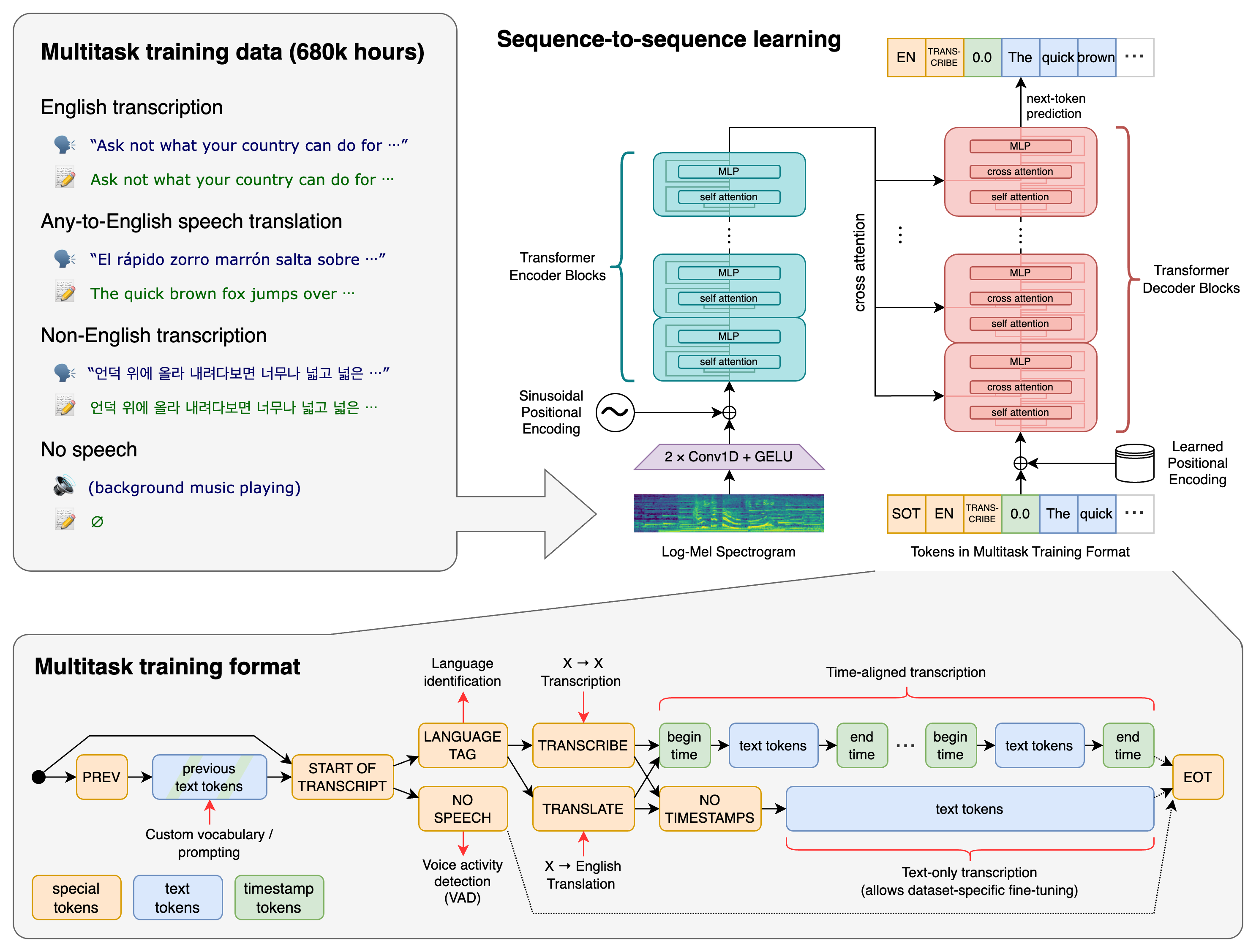
Core design decisions:
- Large-scale weak supervision: Trained on diverse web-scale audio with noisy labels rather than small, pristine datasets
- Multitask training: A single model handles transcription, translation, and language ID via task tokens
- Chunked processing: Long audio is split into 30-second segments, processed independently, then reassembled
- Conditioning on previous text: The decoder receives prior segment tokens for consistent formatting across boundaries
| Model | Parameters | English WER | Multilingual WER | VRAM (GPU) | Relative Speed |
|---|---|---|---|---|---|
| tiny | 39M | ~7.6% | ~12% | ~1 GB | ~10x |
| base | 74M | ~5.0% | ~10% | ~1 GB | ~7x |
| small | 244M | ~3.4% | ~7% | ~2 GB | ~4x |
| medium | 769M | ~2.9% | ~5% | ~5 GB | ~2x |
| large-v3 | 1.55B | ~2.4% | ~3.5% | ~10 GB | 1x |
| turbo | 809M | ~2.5% | ~3.7% | ~6 GB | ~8x |
Installation & Setup #
Python Installation #
a
s
h
python -m venv whisper-env
source whisper-env/bin/activate  # Linux/macOS
# whisper-env\Scripts\activate  # Windows

# Install OpenAI Whisper
pip install -U openai-whisper

# Verify installation
whisper --version
System Dependencies #
FFmpeg is required for audio preprocessing:
a
s
h
# Ubuntu/Debian
sudo apt update && sudo apt install ffmpeg

# macOS
brew install ffmpeg

# Verify
ffmpeg -version | head -1
GPU Acceleration (CUDA) #
a
s
h
# Check CUDA availability
python -c "import torch; print(torch.cuda.is_available())"

# Install with CUDA 12 support
pip install torch torchvision torchaudio --index-url https://download.pytorch.org/whl/cu121

# For CPU-only inference
pip install torch torchvision torchaudio --index-url https://download.pytorch.org/whl/cpu
Docker Deployment #
a
s
h
# Pull and run the official image
docker pull openai/whisper:latest

# Transcribe a file via Docker
docker run --rm \
  --gpus all \
  -v $(pwd)/audio:/audio \
  openai/whisper:latest \
  /audio/interview.mp3 \
  --model large-v3 \
  --language en \
  --output_format json

# CPU-only Docker run
docker run --rm \
  -v $(pwd)/audio:/audio \
  openai/whisper:latest \
  /audio/podcast.mp3 \
  --model base \
  --device cpu
Quick First Transcription #
h
o
n
import whisper

# Load model (downloads on first run)
model = whisper.load_model("base")

# Transcribe audio file
result = model.transcribe("audio.mp3")
print(result["text"])

# Get segments with timestamps
for segment in result["segments"]:
    print(f"[{segment['start']:.2f}s -> {segment['end']:.2f}s] {segment['text']}")
CLI Usage Examples #
a
s
h
# Basic transcription
whisper audio.mp3 --model medium --language en

# Output all formats (JSON, SRT, VTT, TXT)
whisper podcast.mp3 --model large-v3 --output_format all

# Translate non-English audio to English text
whisper french_interview.mp3 --model large-v3 --task translate

# Detect language automatically
whisper unknown.mp3 --model base --task transcribe
Integration with Popular Tools #
WhisperX (Word-Level Timestamps + Diarization) #
WhisperX wraps faster-whisper and adds phoneme-level alignment and speaker diarization. It is the tool of choice for meeting transcripts and interview processing.
a
s
h
pip install whisperx
h
o
n
import whisperx
import torch

device = "cuda" if torch.cuda.is_available() else "cpu"
audio_file = "meeting.mp3"
batch_size = 16
compute_type = "float16"

# 1. Transcribe with faster-whisper backend
model = whisperx.load_model("large-v3", device, compute_type=compute_type)
audio = whisperx.load_audio(audio_file)
result = model.transcribe(audio, batch_size=batch_size)

# 2. Align for precise word-level timestamps
model_a, metadata = whisperx.load_align_model(
    language_code=result["language"],
    device=device
)
result = whisperx.align(
    result["segments"],
    model_a,
    metadata,
    audio,
    device
)

# 3. Speaker diarization
diarize_model = whisperx.DiarizationPipeline(
    use_auth_token="YOUR_HF_TOKEN",
    device=device
)
diarize_segments = diarize_model(audio)
result = whisperx.assign_word_speakers(diarize_segments, result)

# Print speaker-labeled transcript
for segment in result["segments"]:
    speaker = segment.get("speaker", "UNKNOWN")
    start = segment["start"]
    end = segment["end"]
    text = segment["text"]
    print(f"[{start:.2f}s - {end:.2f}s] {speaker}: {text}")
faster-whisper (Production Inference) #
faster-whisper re-implements Whisper using CTranslate2, delivering 4-8x speedup with quantization support. This is the default for production APIs.
a
s
h
pip install faster-whisper
h
o
n
from faster_whisper import WhisperModel

# Load with quantization for lower memory
model = WhisperModel(
    "large-v3",
    device="cuda",
    compute_type="float16",   # Options: int8, int8_float16, float16, float32
    num_workers=4,
    cpu_threads=8
)

# Transcribe with VAD filtering
segments, info = model.transcribe(
    "podcast.mp3",
    beam_size=5,
    vad_filter=True,
    vad_parameters={
        "threshold": 0.5,
        "min_speech_duration_ms": 250,
        "min_silence_duration_ms": 500
    },
    language="en",
    condition_on_previous_text=True
)

print(f"Detected language: {info.language} (probability: {info.language_probability:.2f})")

for segment in segments:
    print(f"[{segment.start:.2f}s -> {segment.end:.2f}s] {segment.text}")
LibreTranslate Integration (Translation Pipeline) #
h
o
n
import whisper
import requests

# Transcribe non-English audio
model = whisper.load_model("medium")
audio_path = "japanese_podcast.mp3"
result = model.transcribe(audio_path, language="ja")
japanese_text = result["text"]

# Translate via LibreTranslate API
def translate(text, source="ja", target="en"):
    response = requests.post(
        "http://localhost:5000/translate",
        headers={"Content-Type": "application/json"},
        json={"q": text, "source": source, "target": target}
    )
    return response.json()["translatedText"]

english_text = translate(japanese_text)
print(f"JA: {japanese_text}")
print(f"EN: {english_text}")
FastAPI Real-Time Transcription Server #
h
o
n
from fastapi import FastAPI, UploadFile, File
from faster_whisper import WhisperModel
import tempfile
import os

app = FastAPI()
model = WhisperModel("medium", device="cuda", compute_type="float16")

@app.post("/transcribe")
async def transcribe(file: UploadFile = File(...)):
    with tempfile.NamedTemporaryFile(delete=False, suffix=".mp3") as tmp:
        tmp.write(await file.read())
        tmp_path = tmp.name

    segments, info = model.transcribe(
        tmp_path,
        beam_size=5,
        vad_filter=True
    )

    os.unlink(tmp_path)

    results = [
        {
            "start": s.start,
            "end": s.end,
            "text": s.text,
            "confidence": s.words[0].probability if s.words else None
        }
        for s in segments
    ]

    return {
        "language": info.language,
        "language_probability": info.language_probability,
        "segments": results
    }
Run with: uvicorn main:app --host 0.0.0.0 --port 8000 --workers 2
Prometheus Monitoring Integration #
h
o
n
from prometheus_client import Counter, Histogram, start_http_server
import time

TRANSCRIPTION_COUNT = Counter(
    "whisper_transcriptions_total",
    "Total transcriptions",
    ["model", "language"]
)
TRANSCRIPTION_DURATION = Histogram(
    "whisper_transcription_duration_seconds",
    "Time spent transcribing",
    ["model"]
)

def transcribe_with_metrics(audio_path, model_name="medium"):
    start = time.time()
    segments, info = model.transcribe(audio_path)
    duration = time.time() - start

    TRANSCRIPTION_COUNT.labels(model=model_name, language=info.language).inc()
    TRANSCRIPTION_DURATION.labels(model=model_name).observe(duration)

    return segments, info

# Start metrics server on port 9090
start_http_server(9090)
Benchmarks / Real-World Use Cases #
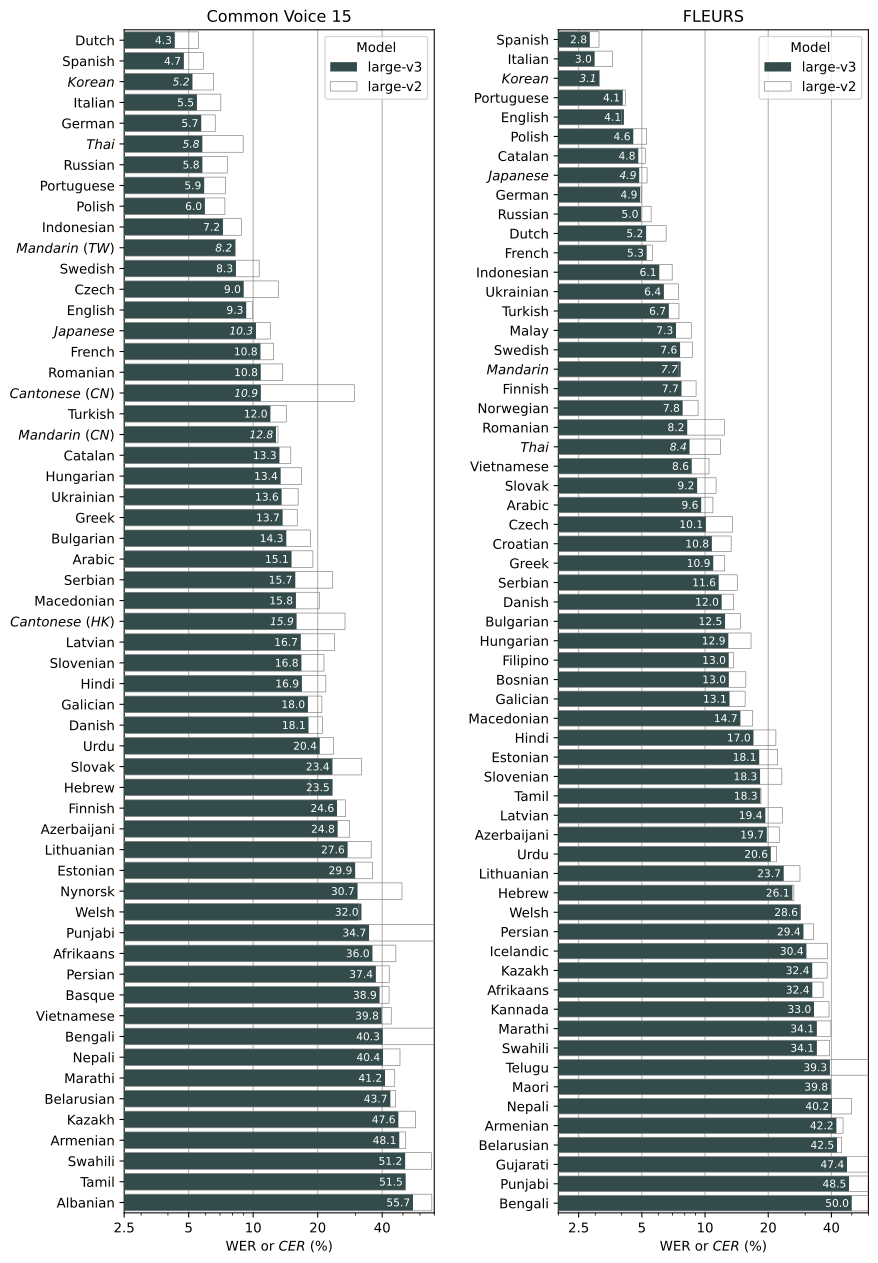
Word Error Rate Comparison (LibriSpeech test-clean) #
| Model / Engine | WER (clean) | WER (other) | Multilingual | Year |
|---|---|---|---|---|
| Whisper tiny | 7.6% | 12.0% | 12.0% | 2022 |
| Whisper base | 5.0% | 8.1% | 10.0% | 2022 |
| Whisper small | 3.4% | 5.8% | 7.0% | 2022 |
| Whisper medium | 2.9% | 5.0% | 5.0% | 2022 |
| Whisper large-v3 | 2.4% | 4.2% | 3.5% | 2024 |
| Whisper turbo | 2.5% | 4.3% | 3.7% | 2024 |
| faster-whisper (large-v3) | 2.4% | 4.2% | 3.5% | 2024 |
| WhisperX (large-v3) | 2.4% | 4.2% | 3.5% | 2024 |
| Mozilla DeepSpeech | 7.3% | 21.5% | N/A (English only) | 2020 |
Inference Speed Benchmark (1-hour audio, NVIDIA RTX 4090) #
| Engine | Model | Time | VRAM | Notes |
|---|---|---|---|---|
| OpenAI Whisper | large-v3 | ~90 min | ~10 GB | Baseline |
| faster-whisper | large-v3 | ~18 min | ~6 GB | float16, 4-8x speedup |
| faster-whisper | large-v3 | ~12 min | ~4 GB | int8 quantization |
| WhisperX | large-v3 | ~25 min | ~8 GB | Includes alignment |
| WhisperX (no diarize) | large-v3 | ~18 min | ~6 GB | Transcription only |
| OpenAI Whisper | turbo | ~12 min | ~6 GB | Distilled decoder |
Production Deployment Scenarios #
| Use Case | Recommended Model | Engine | Hardware | Daily Volume |
|---|---|---|---|---|
| Podcast transcription | large-v3 | faster-whisper | 1x A100 | 500+ hours |
| Real-time meeting notes | turbo | faster-whisper | 1x RTX 4090 | 200+ hours |
| Call center analytics | medium | faster-whisper (int8) | 2x RTX 3080 | 1000+ hours |
| Mobile/edge device | tiny.en | whisper.cpp | 8 GB RAM | Offline |
| Video subtitle generation | large-v3 | WhisperX | 1x A100 | 300+ hours |
Advanced Usage / Production Hardening #
Model Quantization for Lower Memory #
h
o
n
from faster_whisper import WhisperModel

# INT8 quantization — 2x speed, 50% less VRAM
model_int8 = WhisperModel("large-v3", device="cuda", compute_type="int8")

# INT8 with float16 activations — balanced
model_hybrid = WhisperModel("large-v3", device="cuda", compute_type="int8_float16")

# CPU with INT8
model_cpu = WhisperModel("medium", device="cpu", compute_type="int8", cpu_threads=8)
Batch Processing Pipeline #
h
o
n
import os
from concurrent.futures import ThreadPoolExecutor
from faster_whisper import WhisperModel

model = WhisperModel("medium", device="cuda", compute_type="float16")

def process_file(audio_path):
    segments, info = model.transcribe(
        audio_path,
        vad_filter=True,
        beam_size=5
    )
    text = " ".join([s.text for s in segments])
    output_path = audio_path.replace(".mp3", ".txt")
    with open(output_path, "w") as f:
        f.write(text)
    return output_path

# Process directory of audio files
audio_dir = "/data/audio/"
files = [os.path.join(audio_dir, f) for f in os.listdir(audio_dir) if f.endswith(".mp3")]

with ThreadPoolExecutor(max_workers=4) as executor:
    results = list(executor.map(process_file, files))

print(f"Processed {len(results)} files")
NGINX Load Balancing (Multi-GPU) #
i
n
x
upstream whisper_backend {
    least_conn;
    server 10.0.1.10:8000 weight=1;  # GPU 0
    server 10.0.1.10:8001 weight=1;  # GPU 1
    server 10.0.1.11:8000 weight=1;  # GPU 2
    server 10.0.1.11:8001 weight=1;  # GPU 3
}

server {
    listen 80;
    location /transcribe {
        proxy_pass http://whisper_backend;
        proxy_read_timeout 300s;
        client_max_body_size 500M;
    }
}
Health Check Endpoint #
h
o
n
from fastapi import FastAPI, HTTPException
from faster_whisper import WhisperModel
import torch

app = FastAPI()
model = WhisperModel("medium", device="cuda", compute_type="float16")

@app.get("/health")
async def health():
    gpu_available = torch.cuda.is_available()
    gpu_memory = torch.cuda.get_device_properties(0).total_memory if gpu_available else 0
    return {
        "status": "healthy",
        "gpu_available": gpu_available,
        "gpu_memory_gb": gpu_memory / (1024**3),
        "model_loaded": model is not None
    }
Redis Queue for Async Processing #
h
o
n
import redis
import json
from faster_whisper import WhisperModel
import time

r = redis.Redis(host='localhost', port=6379, db=0)
model = WhisperModel("medium", device="cuda", compute_type="float16")

def worker():
    while True:
        job = r.blpop("transcription_queue", timeout=5)
        if job:
            _, data = job
            task = json.loads(data)
            segments, info = model.transcribe(task["file_path"])
            result = {
                "job_id": task["job_id"],
                "text": " ".join([s.text for s in segments]),
                "language": info.language
            }
            r.setex(f"result:{task['job_id']}", 3600, json.dumps(result))
        time.sleep(0.1)

if __name__ == "__main__":
    worker()
Comparison with Alternatives #
| Feature | OpenAI Whisper | WhisperX | faster-whisper | DeepSpeech |
|---|---|---|---|---|
| GitHub Stars | 99,800 | 19,700 | 20,400 | 26,700 (archived) |
| License | MIT | BSD-2 | MIT | MPL-2.0 |
| Speed vs Baseline | 1x (baseline) | 0.8-1x | 4-8x | 2x |
| GPU Required | Optional | Recommended | Optional | Optional |
| Quantization | No | No | Yes (INT8/FP16) | No |
| Word Timestamps | Segment-level | Phoneme-level | Segment-level | No |
| Speaker Diarization | No | Built-in | No | No |
| Languages | 99 | 99 | 99 | English only |
| WER (LibriSpeech clean) | 2.4% (large-v3) | 2.4% | 2.4% | 7.3% |
| Active Development | Yes | Yes | Yes | No (archived Jun 2025) |
| Best For | Research, reference | Meeting transcripts | Production APIs | Legacy only |
Limitations / Honest Assessment #
Whisper is not the right tool for every speech task. Here is what the README does not tell you:
-
No streaming support: Whisper processes 30-second chunks; it is not designed for true real-time (<200ms latency) transcription. For streaming ASR, look at NVIDIA Parakeet or Moonshine v2.
-
Hallucination on silence: Large-v3 occasionally generates hallucinated text on silent segments. Use VAD filtering (built into faster-whisper) to mitigate.
-
English-centric training: While it supports 99 languages, performance on low-resource African and South Asian languages drops noticeably. Fine-tuning on target language data is often necessary.
-
Memory footprint: Large-v3 requires ~10 GB VRAM at FP32. You need quantization (faster-whisper) or CPU offloading for consumer GPUs.
-
No speaker diarization: The base Whisper cannot tell you who spoke. You need WhisperX or a separate diarization pipeline for multi-speaker identification.
-
Translation limitations: The turbo model was not trained for translation. Use medium or large-v3 for translate-to-English tasks.
Frequently Asked Questions #
1. What is the difference between Whisper and faster-whisper? #
faster-whisper is a re-implementation of Whisper using CTranslate2, a C++ inference engine. It provides 4-8x speedup, INT8 quantization, and built-in VAD filtering while producing identical transcription results. Use faster-whisper for production; use OpenAI Whisper for research and experimentation.
2. Can I run Whisper on a CPU? #
Yes. All models except large-v3 run comfortably on modern CPUs. Use the tiny model for real-time-ish transcription on laptops, or medium with INT8 quantization for batch processing. Expect 3-5x slower inference compared to GPU.
3. Which model size should I choose? #
Start with base for English-only quick tasks, small for daily multilingual use, medium for professional accuracy, and large-v3 when maximum accuracy is non-negotiable. The turbo model is the sweet spot for latency-sensitive production workloads.
4. How do I handle long audio files efficiently? #
Use faster-whisper with vad_filter=True to skip silent segments. For files longer than 1 hour, split into chunks and process in parallel. WhisperX handles long files natively and is more stable on 3+ hour audio than base Whisper.
5. Is Whisper free for commercial use? #
Yes. Whisper is released under the MIT license, which permits commercial use, modification, and distribution. There are no API fees because you run it on your own hardware. Your only cost is compute (GPU/cloud instances).
6. How does Whisper compare to cloud APIs like Google Speech-to-Text? #
Whisper large-v3 achieves comparable WER to Google Speech-to-Text on English (2.4% vs 2.1% on LibriSpeech). Whisper wins on privacy (on-premise), cost (no per-minute fees), and language coverage (99 languages vs 125 for Google, but free). Cloud APIs win on integration ecosystem and managed scaling.
7. What hardware do I need for production? #
A single NVIDIA A100 (80 GB) can run 4 large-v3 instances with float16, processing ~200 hours of audio per day. For budget setups, an RTX 4090 (24 GB) with faster-whisper handles medium and large-v3 in float16 comfortably.
Conclusion #
OpenAI Whisper remains the pragmatic choice for production speech recognition in 2026. Its 99,800 GitHub stars reflect not just popularity but ecosystem maturity: faster-whisper gives you speed, WhisperX gives you diarization, and the core model gives you accuracy across 99 languages. Start with faster-whisper and the medium model, add WhisperX when you need speaker labels, and quantize to INT8 when GPU memory is tight.
Next steps:
- Clone the repo:
git clone https://github.com/openai/whisper - Join the dibi8 developer community on Telegram for deployment tips
- Benchmark faster-whisper on your own audio data before committing to a model size
Recommended Hosting & Infrastructure #
Before you deploy any of the tools above into production, you’ll need solid infrastructure. Two options dibi8 actually uses and recommends:
- DigitalOcean — $200 free credit for 60 days across 14+ global regions. The default option for indie devs running open-source AI tools.
- HTStack — Hong Kong VPS with low-latency access from mainland China. This is the same IDC that hosts dibi8.com — battle-tested in production.
Affiliate links — they don’t cost you extra and they help keep dibi8.com running.
Sources & Further Reading #
- OpenAI Whisper GitHub Repository
- OpenAI Whisper Paper (arXiv:2212.04356)
- faster-whisper by SYSTRAN
- WhisperX by m-bain
- Whisper Model Sizes Explained
- Choosing Between Whisper Variants — Modal.com
- Comparison: WhisperX vs Faster-Whisper vs OpenAI Whisper
- Whisper API Blog — Model Comparison
💬 댓글 토론