lang: kr
slug: dify
title: ‘Dify: Build Production-Grade AI Agents Visually in 5 Minutes’
description: ‘Dify is an open-source LLM application development platform with visual workflow builder, RAG pipelines, and agent orchestration. Compatible with OpenAI, Anthropic, Ollama, Qdrant, and Weaviate. Covers Docker deployment, API integration, production hardening, and comparison with Flowise, n8n, and LangChain.’
tags: [“ai-agent”, “automation”, “guide”, “open-source”, “reference”, “tutorial”]
date: 2026-05-19 00:00:00+08:00
lastmod: 2026-05-19 00:00:00+08:00
tech_stack: []
application_domain: Llm Frameworks
source_version: ’'
licensing_model: Open Source
license_type: Apache-2.0
file_size: ’'
file_md5: ’'
download_url: ’'
backup_url: ’'
github_repo: ‘https://github.com/langgenius/dify'
last_maintained: ‘2026-05-19’
draft: false
categories: [’llm-frameworks’]
aliases:- /posts/dify/
/resources/llm-frameworks/dify/
faqs:
q: ‘What are the minimum system requirements to self-host Dify?’
a: ‘Dify requires at least 2 CPU cores, 4 GiB RAM, and 20 GB of disk, with Docker 19.03+ and Docker Compose 2.24.0+. For comfortable production use, 4+ cores, 8 GiB RAM, and a 50 GB SSD are recommended.’
q: ‘How long does it take to deploy Dify with Docker Compose?’
a: ‘After cloning the repo and copying .env.example to .env, running ‘‘docker compose up -d’’ starts 11 containers (5 core services and 6 dependencies). The first startup takes about 60-90 seconds while the API service runs database migrations.’
q: ‘Can Dify run completely offline without cloud APIs?’
a: ‘Yes. By configuring Ollama as the model provider, Dify can run local models such as Llama 3.1, Qwen 2.5, or Mistral entirely inside Docker with no external dependencies. The only limitation is that cloud LLM APIs cannot be used without internet access.’
q: ‘What is the difference between Dify’’s Chatbot and Agent app types?’
a: ‘A Chatbot app follows a fixed prompt template with optional knowledge retrieval, ideal for straightforward Q&A. An Agent app uses ReAct or Function Calling reasoning to autonomously decide which tools to call and in what order, suited to complex tasks requiring tool use and reasoning.’
q: ‘How does Dify compare to Flowise, n8n, and LangChain?’
a: ‘Dify is an AI app platform with best-in-class RAG, auto-generated APIs, and a very low learning curve for non-technical users. Flowise suits developers wanting a visual LangChain prototyping layer, n8n excels at ops-heavy automation with 400+ SaaS connectors, and LangChain offers full code-level control for sub-second latency and complex multi-agent orchestration.’
featureImage: /images/articles/dify-build-production-grade-ai-agents-vi.png
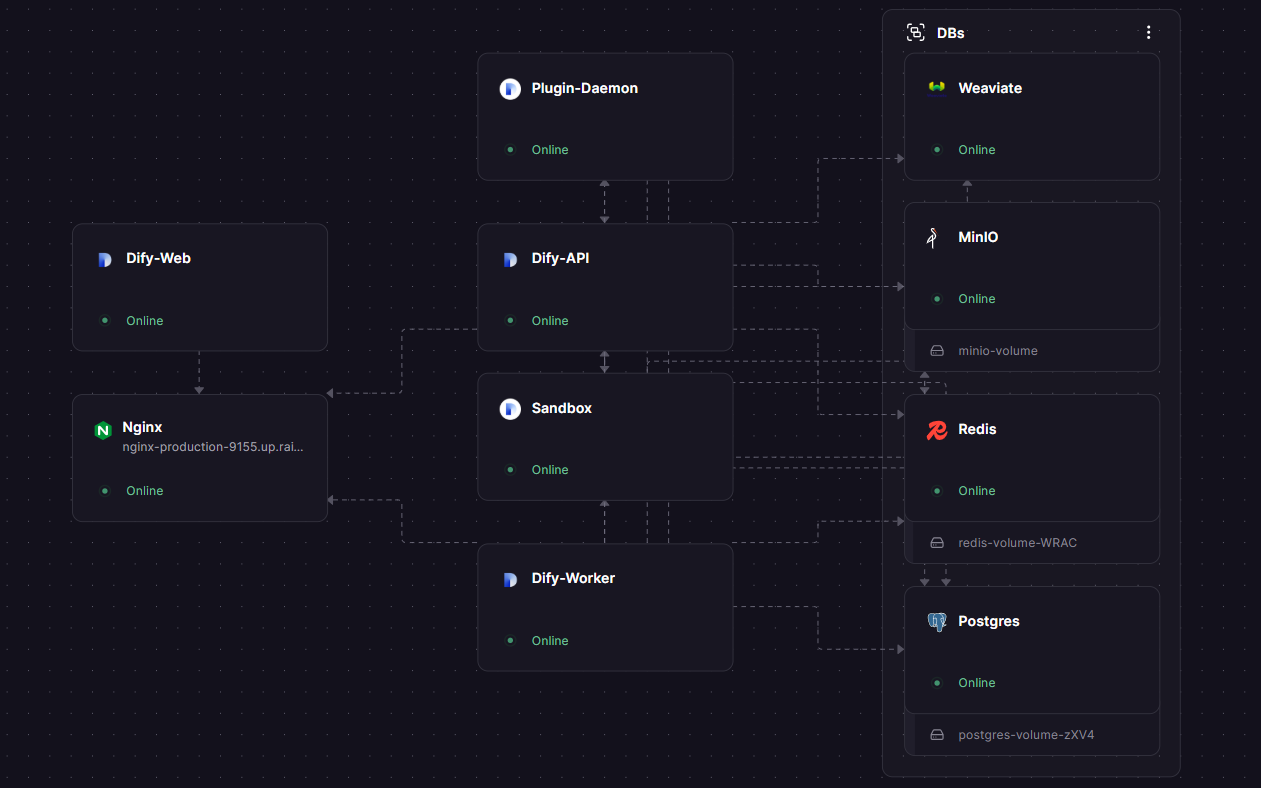
—{{< resource-info >}}Most teams ship AI chatbots the hard way. They wire Flask routes to OpenAI APIs, hand-craft prompt templates in JSON files, and build RAG pipelines from scratch with embedding models, vector stores, and chunking logic. Three months later, the prototype is unmaintainable, the product manager cannot update a prompt without a developer, and the knowledge base sync is a cron job that fails silently.Dify solves this. It is an open-source platform that packages visual workflow design, production-grade RAG, multi-model support, and API publishing into a single deployable stack. With 141,955 GitHub stars, 1,298 contributors, and releases every 2–4 weeks, Dify has become the default choice for teams that want to ship AI applications without writing orchestration boilerplate. This guide walks you through a production-ready Dify setup in under 5 minutes, then shows you how to integrate it with real tools and scale it.## What Is Dify?Dify is a production-ready platform for agentic workflow development. Think of it as the missing application layer between raw LLM APIs and end-user AI products. Dify provides a visual canvas where you drag, drop, and connect nodes — LLM calls, knowledge retrieval, HTTP requests, code execution, conditional branches — into complete AI applications.The platform is built on a Beehive (hexagonal) architecture with modular components: a Python Flask API service, a Celery worker queue, a Next.js frontend, a plugin daemon for model providers, and a secure sandbox for code execution. It supports 30+ vector databases (Weaviate, Qdrant, pgvector, Milvus), 20+ LLM providers (OpenAI, Anthropic, Azure OpenAI, AWS Bedrock, Ollama, Groq), and ships with hybrid search, re-ranking, built-in observability, and RESTful API generation out of the box.Key application types you can build:- Chatbot — Conversational AI with memory, knowledge base, and tool calling
Text Generator — Single-shot completion apps for summarization, translation, coding
Agent — Autonomous AI with ReAct, Function Calling, and Chain-of-Thought reasoning
Workflow — Multi-step visual pipelines with conditional logic and parallel execution## How Dify WorksDify’s architecture separates concerns into discrete services that communicate through well-defined APIs. Understanding this helps you debug, scale, and harden your deployment.### Architecture Overview
| Service | Port | Technology | Purpose |
|———|——|————|———|
| Web Frontend | 3000 | Next.js | Visual builder, dashboard, management UI |
| API Service | 5001 | Python Flask | REST API endpoints, business logic |
| Worker | — | Celery | Async task processing, document indexing |
| Worker Beat | — | Celery | Scheduled task dispatcher |
| Plugin Daemon | 5002 | Python | Model provider plugin runtime |
| Sandbox | 5003 | Python | Secure code execution environment |
| SSRF Proxy | — | Nginx | Security isolation for outbound requests |### Data Layer| Component | Default | Alternatives |
|———–|———|————–|
| Metadata DB | PostgreSQL 15 | AWS RDS, Cloud SQL |
| Cache/Queue | Redis 7 | AWS ElastiCache, Redis Cloud |
| Vector Store | Weaviate 1.27 | Qdrant, Milvus, pgvector |
| File Storage | Local volume | S3, MinIO, GCS |### Workflow Execution EngineDify’s workflow engine uses a DAG (Directed Acyclic Graph) execution model with parallel processing support. Each node in a workflow can run sequentially or in parallel threads, with a variable pool system that enables data sharing across nodes while maintaining isolation. The engine enforces execution limits of 500 steps per workflow and a 1,200-second timeout to prevent runaway processes.## Installation & Setup### PrerequisitesBefore you start, ensure your machine meets these requirements:| Resource | Minimum | Recommended |
|———-|———|————-|
| CPU | 2 cores | 4+ cores |
| RAM | 4 GiB | 8 GiB |
| Disk | 20 GB | 50 GB SSD |
| Docker | 19.03+ | Latest |
| Docker Compose | 2.24.0+ | Latest |### Step 1 — Clone DifyClone the latest release from GitHub:```
bas
h
git clone –branch “$(curl -s https://api.github.com/repos/langgenius/dify/releases/latest | jq -r .tag_name)” https://github.com/langgenius/dify.git
h
i
s
checks out the most recent stable tag (v1.14.2 at the time of writing).### Step 2 — Configure Environment```
bas
h
cd dify/docker
cp .env.example .env
```E
d
i
t
`.env` to set a secure secret key:```
bas
h
# Generate a cryptographically secure secret
SECRET=$(op```
bas
h
cd dify/docker
cp .env.example .env
```R
E
T
_KEY=${SECRET}/" .env
```K
e
y
variables to review in `.env`:```
bas
h
# Core se```
bas
h
# Generate a cryptographically secure secret
SECRET=$(openssl rand -hex 32)
sed -i "s/SECRET_KEY=.*/SECRET_KEY=${SECRET}/" .env
```/localhost:5001
APP_WEB_URL=http://localhost:3000# Database
DB_USERNAME=postgres
DB_PASSWORD=difyai123456
DB_HOST=db
DB_PORT=5432
DB_DATABASE=dify# Redis
REDIS_HOST=r```
bas
h
# Core settings
CONSOLE_API_URL=http://localhost:5001
CONSOLE_WEB_URL=http://localhost:3000
SERVICE_API_URL=http://localhost:5001
APP_API_URL=http://localhost:5001
APP_WEB_URL=http://localhost:3000

# Database
DB_USERNAME=postgres
DB_PASSWORD=difyai123456
DB_HOST=db
DB_PORT=5432
DB_DATABASE=dify

# Redis
REDIS_HOST=redis
REDIS_PORT=6379
REDIS_DB=0

# Vector store (Weaviate by default)
VECTOR_STORE=weaviate
WEAVIATE_ENDPOINT=http://weaviate:8080
WEAVIATE_API_KEY=WVF5YThaHlkYwhGUSmCRgsX3tD5ngdN8pkih
```### Step 4 — Initialize Admin AccountOpen your browser and navigate to:```
http://localhost/install
```Compl
e
t
e
the setup wizard with your email and password. After setup, log in at:```
http://localhost
```### Step 5 — Add Your First Model ProviderNavigate to **Settings → Model Provider** and add an API key for at least one provider. For OpenAI:1. Select "OpenAI" from the provider list
2. Paste your API key (`sk-...`)
3. Click "Save"For local development with Ollama:1. Ensure Ollama is running locally (`ollam```
bas
h
docker compose up -d
```m
the provider list
3. Set the base URL to `http://host.docker.internal:11434`
4. Select a downloaded model (e.g., `llama```
bas
h
docker compose ps
```ghtwei
g
h
t
model for testing
ollama pull llama3.1:8b
```Y
o
u
r
Dify instance is now ready to build AI applications.## Integration with Popular Tools### OpenAI / Anthropic ClaudeAdding major LLM providers is a configuration change, not a```
http://localhost/install
```P
I
key in **Settings → Model Provider**, create your first chat app:1. Go to **Studio → Create App → Chatb```
http://localhost
``` Assistant"
3. In the prompt editor, write your system prompt
4. Select your model (GPT-4o, Claude Sonnet, etc.) from the dropdown
5. Click **Publish**Access the app via API:```
bas
h
curl -X POST 'http://localhost/v1/chat-messages' \
  -H 'Authorization: Bearer YOUR_APP_API_KEY' \
  -H 'Content-Type: application/json' \
  -d '{
    "inputs": {},
    "query": "How do I reset my password?",
    "response_mode": "streaming",
    "conversation_id": "",
    "user": "user-123"
  }'
```### Ollam```
bas
h
# Pull a lightweight model for testing
ollama pull llama3.1:8b
```grat
i
o
n
lets you run local models:```
bas
h
# Start Ollama
ollama serve# Pull a model
ollama pull llama3.1:8b
ollama pull qwen2.5:14b
```I
n
Dify, go to **Settings → Model Provider → Ollama** and configure:| Field | Value |
|-------|-------|
| Model Name | `llama3.1:8b` |
| Base URL | `http://host.docker.internal:11434` |Use local models for development and switch to cloud models for production without changing your app logic.### Qdrant Vector StoreReplace Weaviate with Qdrant for better performance at scale:```
bas
h
cd dify/docker
cp envs/vectorstores/qdrant.env.example envs/```
bas
h
curl -X POST 'http://localhost/v1/chat-messages' \
  -H 'Authorization: Bearer YOUR_APP_API_KEY' \
  -H 'Content-Type: application/json' \
  -d '{
    "inputs": {},
    "query": "How do I reset my password?",
    "response_mode": "streaming",
    "conversation_id": "",
    "user": "user-123"
  }'
```   - "6333:6333"
    volumes:
      - qdrant_data:/qdrant/storage
    environment:
      - QDRANT__SERVICE__API_KEY=your-api-keyvolumes:
  qdrant_data:
```Rest
a
r
t
Dify:```
bas
h
docker compose down
docker compose up -d
```### WeaviateWeaviate is the default vector store and works out of the box. For production, use an external Weaviate cluster:```
bas
h
# In .env
VECTOR_STORE=weaviate
WEAVIATE_ENDPOINT=https://y```
bas
h
# Start Ollama
ollama serve

# Pull a model
ollama pull llama3.1:8b
ollama pull qwen2.5:14b
```r
Dify app as an MCP (Model Context Protocol) server and connect it to Claude Code:1. In your Dify app, go to **API Access → MCP Server**
2. Enable MCP publishing
3. Copy the MCP server URL
4. In Claude Code, run:```
bas
h
claude config add mcp.dify http://localhost:5001/your-mcp-endpoint
```Y
o
u
r
Dify workflows are now callable directly from Claude Code conversations.## Benchmarks / Real-World Use Cases### Performance CharacteristicsBased on community benchmarks and lo```
bas
h
cd dify/docker
cp envs/vectorstores/qdrant.env.example envs/vectorstores/qdrant.env
```-|------------------|------------------|-------------------|
| QPS (no model call) | 3 req/s | 8 req/s | 11 req/s |
| QPS (with```
bas
h
VECTOR_STORE=qdrant
QDRANT_URL=http://qdrant:6333
QDRANT_API_KEY=your-api-key
QDRANT_CLIENT_TIMEOUT=20
```| ~100 | ~500 |*Note: Actual throughput depends heavily on LLM provider latency and workflow complexity.*### Document Indexing Performance| Operation | 10```
yam
l
services:
  qdrant:
    image: qdrant/qdrant:latest
    ports:
      - "6333:6333"
    volumes:
      - qdrant_data:/qdrant/storage
    environment:
      - QDRANT__SERVICE__API_KEY=your-api-key

volumes:
  qdrant_data:
```Compari
s
o
n
(Self-Hosted Monthly)| Scale | VPS Cost | LLM Cost | Total |
|-------|----------|----------|-------|
| Dev / 1 user | $20 | $5–10 | $25–30 |
| Small team / 50 users | $40 | $50–100 | $90–140 |
| Enterprise / 500 users | $200 | ```
bas
h
docker compose down
docker compose up -d
``` Patterns**Customer Support Chatbot** — A 40-person SaaS company deployed a Dify chatbot trained on 800 pages of product documentation. Resolution rate increased from 45% t```
bas
h
# In .env
VECTOR_STORE=weaviate
WEAVIATE_ENDPOINT=https://your-cluster.weaviate.network
WEAVIATE_API_KEY=your-api-key
```a
RAG-powered assistant over 50,000 internal documents. Employees get sourced answers in 2.3 seconds on average, replacing a manual wiki search that took 5–10 minutes.**Lead Qualification Agent** — A B2B startup built a workflow that scores inbound leads using GPT-4o, queries a PostgreSQL database for historical conversion data, and routes hot leads to sales via Slack. Respo```
bas
h
claude config add mcp.dify http://localhost:5001/your-mcp-endpoint
```### Environment IsolationFor production, never use the default `.env` values. Create environment-specific configs:```
bas
h
# Production environment
cp .env .env.production
```Criti
c
a
l
changes for production:```
bas
h
# Security
SECRET_KEY=$(openssl rand -hex 48)
CONSOLE_API_URL=https://dify.yourcompany.com
CONSOLE_WEB_URL=https://dify.yourcompany.com
SERVICE_API_URL=https://dify.yourcompany.com# Database (external)
DB_HOST=your-rds-endpoint.amazonaws.com
DB_USERNAME=dify_prod
DB_PASSWORD=<strong-password># Redis (external)
REDIS_HOST=your-elasticache-endpoint
REDIS_PASSWORD=<strong-password>
REDIS_USE_SSL=true# File storage (S3)
STORAGE_TYPE=s3
S3_USE_AWS_MANAGED_IAM=false
S3_ENDPOINT=https://s3.amazonaws.com
S3_BUCKET_NAME=dify-prod-uploads
S3_ACCESS_KEY=AKIA...
S3_SECRET_KEY=...
S3_REGION=us-east-1
```### Reverse Proxy with SSLUse Nginx or Traefik for TLS termination:```
ngin
x
server {
    listen 443 ssl http2;
    server_name dify.yourcompany.com;    ssl_certificate /path/to/cert.pem;
    ssl_certificate_key /path/to/key.pem;    location / {
        proxy_pass http://localhost:3000;
        proxy_set_header Host $host;
        proxy_set_header X-Real-IP $remote_addr;
        proxy_set_header X-Forwarded-For $proxy_add_x_forwarded_for;
        proxy_set_header X-Forwarded-Proto $scheme;
    }    location /v1/ {
        proxy_pass http://localhost:5001;
        proxy_set_header Host $host;
        proxy_read_timeout 300s;
    }
}
```### Monitoring and ObservabilityDify exposes metrics via the API service. For production monitoring, set up:```
yam
l
# docker-compose.monitoring.yaml
services:
  prometheus:
    image: prom/prometheus:latest
    volumes:
      - ./prometheus.yml:/etc/prometheus/prometheus.yml
    ports:
      - "9090:9090"  grafana:
    image: grafana/grafana:latest
    ports:
      - "3001:3000"
    volumes:
      - grafana_data:/var/lib/grafana  node-exporter:
    image: prom/node-exporter:latest
    ports:
      - "9100:9100"volumes:
  grafana_data:
```K
e
y
metrics to track:| Metric | Warning Threshold | Critical Threshold |
|--------|-------------------|------------```
bas
h
# Production environment
cp .env .env.production
``` Queue Depth | > 100 | > 500 |
| Error Rate | > 1% | > 5% |
| Disk Usage | > 70% | > 85%```
bas
h
# Security
SECRET_KEY=$(openssl rand -hex 48)
CONSOLE_API_URL=https://dify.yourcompany.com
CONSOLE_WEB_URL=https://dify.yourcompany.com
SERVICE_API_URL=https://dify.yourcompany.com

# Database (external)
DB_HOST=your-rds-endpoint.amazonaws.com
DB_USERNAME=dify_prod
DB_PASSWORD=<strong-password>

# Redis (external)
REDIS_HOST=your-elasticache-endpoint
REDIS_PASSWORD=<strong-password>
REDIS_USE_SSL=true

# File storage (S3)
STORAGE_TYPE=s3
S3_USE_AWS_MANAGED_IAM=false
S3_ENDPOINT=https://s3.amazonaws.com
S3_BUCKET_NAME=dify-prod-uploads
S3_ACCESS_KEY=AKIA...
S3_SECRET_KEY=...
S3_REGION=us-east-1
```l
e
Celery workers horizontally:```
bas
h
# docker-compose.override.yaml
services:
  worker:
    deploy:
      replicas: 3
    environment:
      - CELERY_WORKER_CONCURRENCY=8  worker-beat:
    deploy:
      replicas: 1  # Keep exactly 1 beat instance
```## Comparison with Alternatives| Feature | Dify | Flowise | n8n | LangChain |
|---------|------|---------|-----|--------
---|
| **GitHub Stars** | 141,955 | 51,000 | 182,000 | 110,000 |
| **License** | Apache-2.0 | MIT | Fair-code | MIT |
| **Primary Use Case** | AI app platform | LLM prototyping | Workflow automation | Code-first framework |
| **Visual Builder** | Yes (canvas) | Yes (node graph) | Yes (linear flo```
ngin
x
server {
    listen 443 ssl http2;
    server_name dify.yourcompany.com;

    ssl_certificate /path/to/cert.pem;
    ssl_certificate_key /path/to/key.pem;

    location / {
        proxy_pass http://localhost:3000;
        proxy_set_header Host $host;
        proxy_set_header X-Real-IP $remote_addr;
        proxy_set_header X-Forwarded-For $proxy_add_x_forwarded_for;
        proxy_set_header X-Forwarded-Proto $scheme;
    }

    location /v1/ {
        proxy_pass http://localhost:5001;
        proxy_set_header Host $host;
        proxy_read_timeout 300s;
    }
}
```A
P
I
Generation** | Auto-generated | Manual | Webhook-based | Manual |
| **Evaluation Tools** | Strong (datasets) | Minimal | None | LangSmith (external) |
| **Min RAM (Self-Hosted)** | 4 GB | 1 GB | 300 MB | N/A |
| **Cloud Price (Entry)** | $59/mo | $35/mo | $24/mo | Free (library) |### When to Choose What- **Choose Dify** when you are building customer-facing AI apps, need strong RAG, want non-technical team members to manage prompts and knowledge bases, or need auto-generated APIs. Dify is the fastest path from idea to deployed AI product.
- **Choose Flowise** when you are a developer who likes LangChain abstractions and wants a visual prototyping layer. Flowise has the c```
yam
l
# docker-compose.monitoring.yaml
services:
  prometheus:
    image: prom/prometheus:latest
    volumes:
      - ./prometheus.yml:/etc/prometheus/prometheus.yml
    ports:
      - "9090:9090"

  grafana:
    image: grafana/grafana:latest
    ports:
      - "3001:3000"
    volumes:
      - grafana_data:/var/lib/grafana

  node-exporter:
    image: prom/node-exporter:latest
    ports:
      - "9100:9100"

volumes:
  grafana_data:
```l
o
w
-code tools cannot express.## Limitations / Honest AssessmentDify is not the right tool for every AI project. Here is what it is **not** good at:**1. Sub-Second Latency Workloads**
Dify's P95 latency for simple workflows is ~1.2 seconds, primarily due to database queries between nodes. If you need sub-500ms responses (e.g., real-time suggestion engines), use a code-first framework like LangGraph or deploy a dedicated FastAPI service.**2. Complex Data Structures**
The workflow canvas has shallow support for deeply nested objects. When you need complex input/output schemas with nested arrays and conditional fields, Dify forces workarounds that would not be necessary in code.**3. Heavy-Duty Workflow Automation**
Dify workflows are AI-centr```
bas
h
#!/bin/bash
# backup-dify.sh — Run daily via cron

DATE=$(date +%Y%m%d_%H%M%S)
BACKUP_DIR=/backups/dify

# PostgreSQL backup
docker exec dify-db pg_dump -U postgres dify > $BACKUP_DIR/dify_db_$DATE.sql

# Redis backup
docker exec dify-redis redis-cli BGSAVE

# File storage backup (if using local volume)
tar czf $BACKUP_DIR/dify_uploads_$DATE.tar.gz /var/lib/docker/volumes/dify_uploads/

# Upload to S3 (optional)
aws s3 sync $BACKUP_DIR/ s3://your-backup-bucket/dify/ --delete
```e
n
t
orchestration.**5. Memory-Bound Document Processing**
Dataset indexing is synchronous and can take minutes for large uploads. Document processing with very large knowledge bases (100K+ documents) shows memory pressure that requires careful worker scaling.## Frequently Asked Questions**Q: How do I install Dify on a cloud VPS?**
The process is identical to local installation. Provision a VPS with 4 GB RAM minimum (DigitalOcean, Hetzner, or AWS Lightsail work well), install Docker and Docker Compose, clone the repo, and run `docker compose up -d`. For a one-click de```
bas
h
# docker-compose.override.yaml
services:
  worker:
    deploy:
      replicas: 3
    environment:
      - CELERY_WORKER_CONCURRENCY=8

  worker-beat:
    deploy:
      replicas: 1  # Keep exactly 1 beat instance
```Q
w
e
n
2.5, or Mistral. All Dify services run inside Docker with no external dependencies required. The only limitation is that you cannot use cloud LLM APIs without internet access.**Q: How do I upgrade Dify to a new version?**
```b
a
s
h
cd dify/docker
docker compose down
git fetch --tags
git checkout $(curl -s https://api.github.com/repos/langgenius/dify/releases/latest | jq -r .tag_name)
docker compose pull
docker compose up -d
Always check the release notes for breaking changes and new required environment variables before upgrading.Q: What is the difference between Dify’s Chatbot and Agent app types?
A Chatbot app follows a fixed prompt template with optional knowledge retrieval. An Agent app uses ReAct or Function Calling reasoning to autonomously decide which tools to call and in what order. Use Chatbot for straightforward Q&A and Agent for complex tasks requiring tool use and reasoning.Q: Can I use my own embedding model instead of OpenAI’s?
Yes. Dify supports multiple embedding providers including Ollama (local), Cohere, Jina, and Hugging Face. Go to Settings → Model Provider and add your preferred embedding model. You can even use different models for embedding and generation.Q: How does Dify handle data privacy and security?
Dify is self-hosted — your data never leaves your infrastructure unless you choose to use cloud LLM APIs. All file storage, vector embeddings, and conversation history live in your PostgreSQL and vector database. The SSRF proxy isolates outbound requests, and the sandbox runs untrusted code in a restricted environment.Q: Is there a limit on how many knowledge bases or apps I can create?
No hard limits exist in the open-source version. Practical limits depend on your infrastructure: disk space for documents, vector database capacity for embeddings, and API worker throughput for queries. Most teams run 50+ apps and 20+ knowledge bases on a single 8 GB RAM instance without issues.Q: Can I contribute to Dify or build custom plugins?
Yes. Dify has an active plugin ecosystem. You can build custom model provider plugins, tool plugins, or agent strategy plugins using Python. The plugin daemon supports hot-reload during development, making the iteration loop fast. See the plugin development docs for details.### Self-Hosting NoteRunning this on your own VPS? Try DigitalOcean with $200 free credit
— enough for 2 months of moderate self-hosting to test the setup risk-free. Best for low-medium traffic; scale to dedicated when you outgrow it.## ConclusionDify fills a gap that pure frameworks and simple chatbot builders miss. It gives you a visual workflow builder with production-grade RAG, auto-generated APIs, and multi-model support in a single deployable stack. For teams shipping AI applications — not just prototyping — this combination saves weeks of integration work.In 5 minutes, you cloned Dify, started 11 containers, created an admin account, and connected your first LLM provider. From there, you can build chatbots, agents, text generators, and complex workflows — all with a visual canvas that non-technical team members can use.Action items for this week:
Deploy Dify on your infrastructure using the Docker Compose setup above
Create a knowledge base with your product documentation
Build a chatbot app and test it with the REST API
Share your deployment experience in the dibi8 developer community on TelegramThis article contains affiliate links. If you purchase through these links, we may earn a commission at no extra cost to you. This helps us maintain open-source tooling guides like this one.
Recommended Hosting & InfrastructureBefore you deploy any of the tools above into production, you’ll need solid infrastructure. Two options dibi8 actually uses and recommends:- DigitalOcean — $200 free credit for 60 days across 14+ global regions. The default option for indie devs running open-source AI tools. #
HTStack — Hong Kong VPS with low-latency access from mainland China. This is the same IDC that hosts dibi8.com — battle-tested in production.Affiliate links — they don’t cost you extra and they help keep dibi8.com running.## Sources & Further Reading1. Dify Official Documentation — https://docs.dify.ai/
💬 댓글 토론