CogVideo:12.7K 星 — 完整文字到视频设置指南 2026
CogVideo (CogVideoX) is a text and image-to-video generation model from Zhipu AI. Supports ComfyUI, Diffusers, SAT, and Wan/HunyuanVideo/Open-Sora integration. Covers installation, Docker, inference, fine-tuning, and benchmarks.
- ⭐ 35000
- Python
- Apache-2.0
- Updated 2026-05-19
Introduction #
Text-to-video generation moved from research curiosity to production tool in 2024-2025. Open-source models now compete with commercial APIs on quality while running on consumer GPUs. The problem: most repositories ship as bare model weights with scattered documentation. You spend hours piecing together inference scripts, VRAM optimization flags, and fine-tuning pipelines instead of generating video.
CogVideo from Zhipu AI solves this differently. With 12.7K GitHub stars, 36 contributors, and active releases, it ships a complete toolkit: pretrained 2B and 5B parameter models, Diffusers pipeline integration, SAT-based fine-tuning, ComfyUI nodes, and a 3D causal VAE that compresses video into efficient latent representations. This CogVideo tutorial covers everything from pip install to production deployment with quantized inference and LoRA fine-tuning — the most complete CogVideo setup guide for developers in 2026.
What Is CogVideo? #

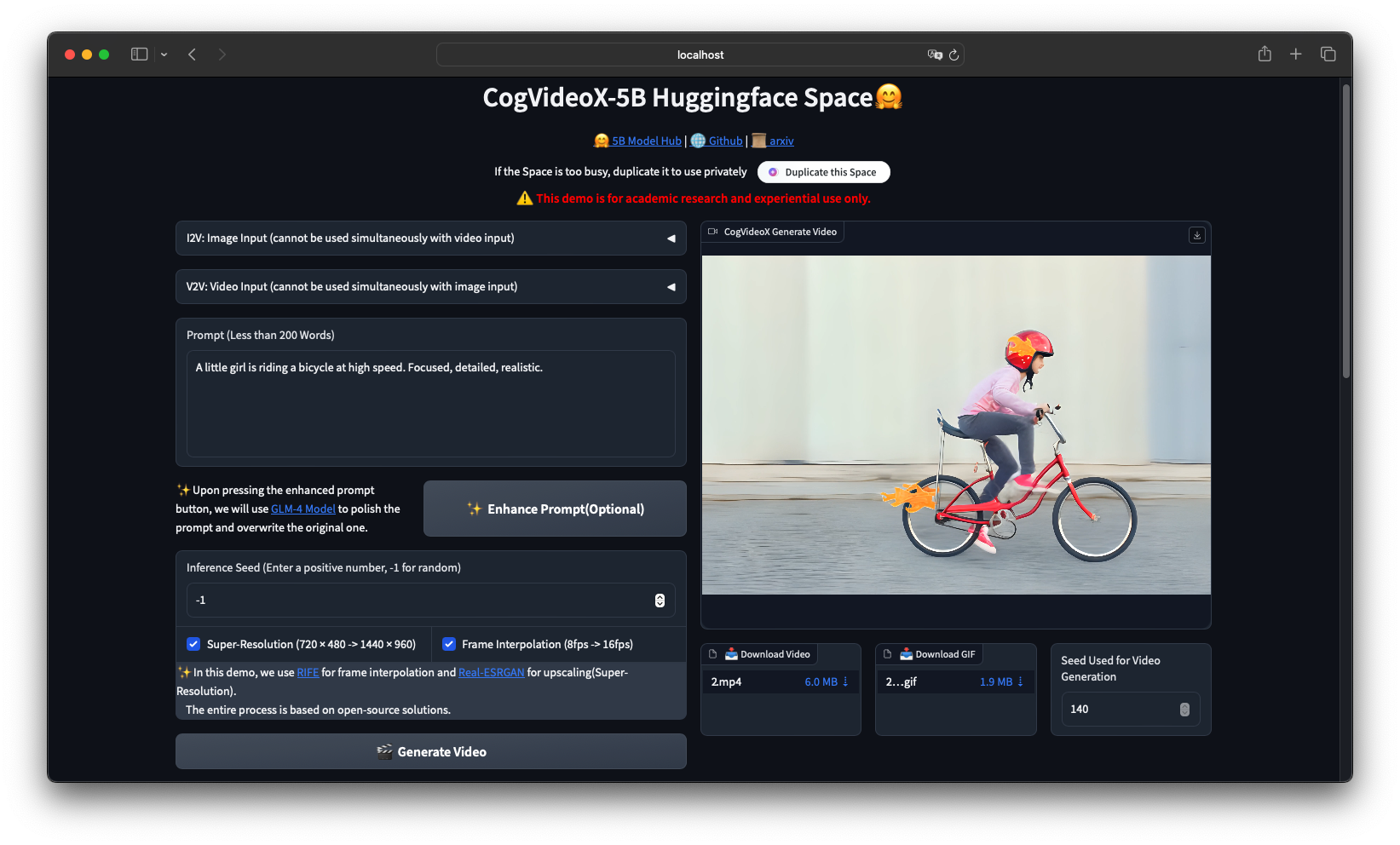
CogVideo is an open-source text to video AI generation framework developed by Zhipu AI, built on a 3D causal VAE and expert transformer architecture. The CogVideoX series (2024) succeeds the original CogVideo model published at ICLR 2023, offering 5B parameter models that generate 6-second 720p videos from text prompts or still images.
CogVideo is an open-source text-to-video and image-to-video generation framework developed by Zhipu AI, built on a 3D causal VAE and expert transformer architecture. The CogVideoX series (2024) succeeds the original CogVideo model published at ICLR 2023, offering 5B parameter models that generate 6-second 720p videos from text prompts or still images.
How CogVideo Works #
Architecture Overview #
CogVideoX uses a three-component pipeline:
- T5 Text Encoder: Encodes text prompts into dense vector representations (224-token limit for CogVideoX-5B, 226 tokens for CogVideoX1.5-5B)
- 3D Causal VAE: Compresses video spatially and temporally into latent space — 4x spatial compression and 4x-8x temporal compression depending on the model variant
- Expert Transformer (DiT): A diffusion transformer with 3D full attention that denoises latent video representations over 50 inference steps
The architecture follows the flow: Text Prompt → T5 Encoder → Latent Text Embedding → DiT Denoising → 3D VAE Decoder → MP4 Video

The CogVideoX pipeline: T5 text encoder processes the prompt, the Expert Transformer denoises latent representations, and the 3D VAE decodes to pixel-space video.
Model Variants #
| Model | Parameters | Resolution | Max Frames | VRAM (BF16) | VRAM (INT8) |
|---|---|---|---|---|---|
| CogVideoX-2B | 2B | 720 x 480 | 49 | 5 GB min | 4.4 GB |
| CogVideoX-5B | 5B | 720 x 480 | 49 | 10 GB min | 7 GB |
| CogVideoX-5B-I2V | 5B | 720 x 480 | 49 | 4 GB min | 3.6 GB |
| CogVideoX1.5-5B | 5B | 1360 x 768 | 161 (10s) | 10 GB min | 7 GB |
| CogVideoX1.5-5B-I2V | 5B | 768 x 1360 | 49 (6s) | 4 GB min | 3.6 GB |
Installation & Setup #
Prerequisites #
- Python: 3.10 - 3.12 (inclusive)
- CUDA: 12.1+ with NVIDIA driver 525+
- GPU: NVIDIA with 5GB+ VRAM for CogVideoX-2B, 10GB+ for CogVideoX-5B
- Storage: 20GB free for model weights + dependencies
Method 1: pip Install (Recommended, Under 5 Minutes) #
Step 1 — Create a virtual environment:
python3.11 -m venv cogvideo_env
source cogvideo_env/bin/activate
Step 2 — Clone the repository and install dependencies:
git clone https://github.com/zai-org/CogVideo.git
cd CogVideo
pip install -r requirements.txt
The requirements.txt installs PyTorch, Diffusers, Transformers, Accelerate, and the SAT toolkit:
torch>=2.3.0
diffusers>=0.30.0
transformers>=4.40.0
accelerate>=0.30.0
sentencepiece
opencv-python
Step 3 — Verify the installation:
import torch
from diffusers import CogVideoXPipeline

print(f"PyTorch version: {torch.__version__}")
print(f"CUDA available: {torch.cuda.is_available()}")
print(f"CUDA version: {torch.version.cuda}")
Expected output:
PyTorch version: 2.5.1+cu121
CUDA available: True
CUDA version: 12.1
Method 2: Docker Deployment (Production) #
For reproducible deployments and multi-GPU inference, use CogVideo Docker containers. This cogvideo docker approach ensures identical environments across dev and production:
FROM nvidia/cuda:12.1.0-devel-ubuntu22.04

RUN apt-get update && apt-get install -y \
    python3.11 python3-pip git wget \
    && rm -rf /var/lib/apt/lists/*

RUN pip3 install --no-cache-dir torch torchvision --index-url \
    https://download.pytorch.org/whl/cu121

WORKDIR /app
RUN git clone https://github.com/zai-org/CogVideo.git .
RUN pip3 install -r requirements.txt

ENV PYTHONUNBUFFERED=1
EXPOSE 7860

CMD ["python3", "-m", "inference.cli_demo"]
Build and run:
docker build -t cogvideo:latest .
docker run --gpus all -it --rm \
  -v $(pwd)/output:/app/output \
  -v $(pwd)/models:/app/models \
  cogvideo:latest \
  --prompt "A serene mountain lake at sunrise" \
  --model_path THUDM/CogVideoX-5B
For multi-GPU inference, add device_map="balanced" to from_pretrained() and remove enable_model_cpu_offload():
pipe = CogVideoXPipeline.from_pretrained(
    "THUDM/CogVideoX-5B",
    torch_dtype=torch.bfloat16,
    device_map="balanced"
)
Method 3: SAT Framework (Research & Fine-Tuning) #
The Swiss Army Transformer (SAT) framework is Zhipu AI’s training toolkit. Install it for fine-tuning and research:
git clone https://github.com/zai-org/CogVideo.git
cd CogVideo/sat
pip install -e .
Verify SAT installation:
from sat import get_args
print("SAT framework loaded successfully")
Integration with Popular Tools #
Hugging Face Diffusers (Recommended for Beginners) #
The Diffusers pipeline is the fastest way to generate video. Here is a complete text-to-video script:
import torch
from diffusers import CogVideoXPipeline, CogVideoXDPMScheduler
from diffusers.utils import export_to_video

# 1. Load pipeline
pipe = CogVideoXPipeline.from_pretrained(
    "THUDM/CogVideoX-5B",
    torch_dtype=torch.bfloat16
)

# 2. Set scheduler — DPM for 5B, DDIM for 2B
pipe.scheduler = CogVideoXDPMScheduler.from_config(
    pipe.scheduler.config, timestep_spacing="trailing"
)

# 3. Enable memory optimizations
pipe.enable_sequential_cpu_offload()  # Lowest VRAM
pipe.vae.enable_slicing()
pipe.vae.enable_tiling()

# 4. Generate
video = pipe(
    prompt="A majestic eagle soaring over snow-capped mountains, "
           "golden hour lighting, cinematic composition",
    num_inference_steps=50,
    guidance_scale=6.0,
    num_frames=49,  # 6 seconds at 8 fps
    height=480,
    width=720,
    generator=torch.Generator().manual_seed(42),
).frames[0]

# 5. Save
export_to_video(video, "output.mp4", fps=8)
For image-to-video with CogVideoX1.5-5B-I2V:
import torch
from diffusers import CogVideoXImageToVideoPipeline, CogVideoXDPMScheduler
from diffusers.utils import export_to_video, load_image

pipe = CogVideoXImageToVideoPipeline.from_pretrained(
    "THUDM/CogVideoX1.5-5B-I2V",
    torch_dtype=torch.float16
)
pipe.scheduler = CogVideoXDPMScheduler.from_config(
    pipe.scheduler.config, timestep_spacing="trailing"
)
pipe.enable_sequential_cpu_offload()
pipe.vae.enable_slicing()
pipe.vae.enable_tiling()

image = load_image("input_image.jpg")
video = pipe(
    image=image,
    prompt="The cat in the image slowly turns its head and blinks, "
           "soft natural lighting from a nearby window",
    height=768,
    width=1360,
    num_inference_steps=50,
    num_frames=49,
    guidance_scale=6.0,
    generator=torch.Generator().manual_seed(42),
).frames[0]

export_to_video(video, "output_i2v.mp4", fps=8)
ComfyUI Node-Based Workflow #
ComfyUI-CogVideoXWrapper enables visual node-based workflows. Install it:
cd ComfyUI/custom_nodes
git clone https://github.com/kijai/ComfyUI-CogVideoXWrapper.git
cd ComfyUI-CogVideoXWrapper
pip install -r requirements.txt
Restart ComfyUI and load the CogVideoX workflow. The wrapper supports all model variants including I2V and video-to-video.
SAT Framework Fine-Tuning #
For custom styles and concepts, fine-tune with LoRA using SAT:
Configure sat/configs/sft.yaml:
model_parallel_size: 1
experiment_name: lora-custom-style
mode: finetune
load: "{your_CogVideoX-2b-sat_path}/transformer"
train_iters: 1000
eval_interval: 100
save_interval: 100
save: ckpts
train_data: ["your_train_data_path"]
valid_data: ["your_val_data_path"]
deepseed:
  bf16:
    enabled: False  # True for 5B
  fp16:
    enabled: True   # False for 5B
Run fine-tuning on a single GPU:
cd CogVideo/sat
bash finetune_single_gpu.sh
Convert SAT LoRA weights to Hugging Face format:
python tools/export_sat_lora_weight.py \
  --sat_pt_path ckpts/lora-custom-style/1000/mp_rank_00_model_states.pt \
  --lora_save_directory ./hf_lora_weights/
Load the fine-tuned weights in inference:
pipe.load_lora_weights(
    "./hf_lora_weights/",
    weight_name="pytorch_lora_weights.safetensors",
    adapter_name="custom_style"
)
pipe.fuse_lora(components=["transformer"], lora_scale=1.0)
Prompt Optimization Pipeline #
CogVideoX is trained on long, descriptive prompts. Short prompts produce lower quality video. Use the prompt conversion script:
python inference/convert_demo.py \
  --prompt "A girl riding a bike" \
  --type "t2v"
The script calls a large language model (GLM-4 Plus or GPT-4o) to expand simple prompts into detailed descriptions. Example conversion:
Input: "A girl riding a bike"
Output: "A young woman with flowing auburn hair rides a vintage red bicycle along a cobblestone path. She wears a light summer dress that billows gently in the breeze. The path winds through a sun-dappled forest with tall oak trees casting long shadows on the ground. Golden afternoon light filters through the leaves, creating a warm, nostalgic atmosphere. She pedals at a leisurely pace, a serene smile on her face, occasionally glancing at wildflowers growing along the path edge."
For programmatic use:
from inference.convert_demo import convert_prompt

optimized_prompt = convert_prompt(
    "A cat playing with a toy mouse",
    retry_times=3,
    type="t2v"
)
print(optimized_prompt)
Quantized Inference with TorchAO #
For limited VRAM deployments, use INT8 quantization via diffusers-torchao:
pip install torchao
import torch
from diffusers import CogVideoXPipeline
from torchao.quantization import quantize_, int8_weight_only

pipe = CogVideoXPipeline.from_pretrained(
    "THUDM/CogVideoX-5B",
    torch_dtype=torch.bfloat16
)

# Quantize transformer to INT8
quantize_(pipe.transformer, int8_weight_only())

pipe.enable_sequential_cpu_offload()
pipe.vae.enable_slicing()

video = pipe(
    prompt="A robot walking through a futuristic city at night",
    num_inference_steps=50,
    num_frames=49,
).frames[0]
Quantization reduces VRAM from 10GB to approximately 7GB for CogVideoX-5B with minimal quality loss.
Benchmarks & Real-World Use Cases #
Inference Speed (Single A100 80GB) #
| Model | Precision | Steps | Time (5s video) | Time (10s video) |
|---|---|---|---|---|
| CogVideoX-2B | BF16 | 50 | ~180s | N/A |
| CogVideoX-5B | BF16 | 50 | ~1000s | N/A |
| CogVideoX1.5-5B | BF16 | 50 | ~550s (H100) | ~1000s |
| CogVideoX1.5-5B-I2V | FP16 | 50 | ~90s | N/A |
| CogVideoX1.5-5B-I2V | FP16 | 50 | ~45s (H100) | N/A |
VBench-2.0 Quality Scores #
| Dimension | CogVideoX-5B (BLADE 8-step) | CogVideoX-5B (50-step) | Wan2.1-1.3B |
|---|---|---|---|
| Overall | 0.569 | 0.534 | 0.570 |
| Human Fidelity | 0.896 | 0.871 | 0.918 |
| Controllability | 0.612 | 0.581 | 0.593 |
| Physics | 0.543 | 0.512 | 0.538 |
| Creativity | 0.587 | 0.554 | 0.571 |
Source: Video-BLADE paper (Zhejiang University, 2025)
Real-World Use Cases #
Content Creation Studios: A Tokyo-based animation studio uses CogVideoX-5B-I2V to animate concept art, cutting storyboard production time by 60%. The image-to-video pipeline turns static illustrations into 6-second motion previews.
E-commerce Product Demos: A furniture retailer generates product showcase videos from single product photos using CogVideoX1.5-5B-I2V. The model produces smooth camera orbits and natural lighting transitions at 1360 x 768 resolution.
Educational Content: A MOOC platform auto-generates demonstration videos for physics experiments from text descriptions. The CogVideoX-5B model’s strong text-following ensures accurate depiction of described physical processes.
Social Media Marketing: Marketing teams use prompt-optimized batch generation to create 50+ short video variants daily for A/B testing, running quantized inference on shared GPU servers with 16GB VRAM.
Advanced Usage / Production Hardening #
Multi-GPU Parallel Inference #
For high-throughput deployments, distribute across multiple GPUs:
import torch
from diffusers import CogVideoXPipeline

pipe = CogVideoXPipeline.from_pretrained(
    "THUDM/CogVideoX-5B",
    torch_dtype=torch.bfloat16,
    device_map="balanced"  # Auto-distribute across GPUs
)
# Do NOT call enable_model_cpu_offload() with device_map
Multi-GPU reduces per-GPU memory to approximately 24GB BF16 for CogVideoX-5B.
API Server with FastAPI #
Wrap inference in a production API:
from fastapi import FastAPI
from pydantic import BaseModel
import torch
from diffusers import CogVideoXPipeline
from diffusers.utils import export_to_video
import uuid
import os

app = FastAPI()
pipe = None

@app.on_event("startup")
async def load_model():
    global pipe
    pipe = CogVideoXPipeline.from_pretrained(
        "THUDM/CogVideoX-5B",
        torch_dtype=torch.bfloat16
    )
    pipe.enable_model_cpu_offload()
    pipe.vae.enable_slicing()

class GenerateRequest(BaseModel):
    prompt: str
    num_frames: int = 49
    guidance_scale: float = 6.0
    num_inference_steps: int = 50

@app.post("/generate")
async def generate_video(req: GenerateRequest):
    video = pipe(
        prompt=req.prompt,
        num_frames=req.num_frames,
        guidance_scale=req.guidance_scale,
        num_inference_steps=req.num_inference_steps,
        height=480,
        width=720,
    ).frames[0]

    output_id = str(uuid.uuid4())
    output_path = f"output/{output_id}.mp4"
    export_to_video(video, output_path, fps=8)

    return {"video_url": f"/videos/{output_id}.mp4", "status": "complete"}
Run with:
uvicorn api_server:app --host 0.0.0.0 --port 8000 --workers 1
VRAM Optimization Checklist #
Apply these optimizations in order based on your GPU:
- VAE Slicing: Always enable — splits large batches with negligible overhead
- VAE Tiling: Enable for resolutions above 720p — processes in patches
- Sequential CPU Offload: Use with < 12GB VRAM — moves layers to CPU between steps
- Model CPU Offload: Use with 12-16GB VRAM — faster than sequential but uses more memory
- INT8 Quantization: Use TorchAO for 7-10GB VRAM targets
- BF16 over FP32: Always use BF16 on Ampere+ GPUs — halves memory vs FP32
Monitoring with Prometheus #
Track inference metrics in production:
from prometheus_client import Counter, Histogram, start_http_server
import time

INFERENCE_COUNT = Counter('cogvideo_inferences_total', 'Total inferences')
INFERENCE_TIME = Histogram('cogvideo_inference_seconds', 'Inference latency')
VRAM_USAGE = Histogram('cogvideo_vram_bytes', 'Peak VRAM usage')

start_http_server(9090)

@INFERENCE_TIME.time()
def generate_tracked(pipe, prompt):
    INFERENCE_COUNT.inc()
    torch.cuda.reset_peak_memory_stats()
    result = pipe(prompt=prompt, num_frames=49).frames[0]
    vram = torch.cuda.max_memory_allocated()
    VRAM_USAGE.observe(vram)
    return result
Comparison with Alternatives #
| Feature | CogVideoX-5B | Wan 2.1-14B | HunyuanVideo-13B | Open-Sora 1.2 |
|---|---|---|---|---|
| Parameters | 5B | 14B | 13B | ~7B (STDiT3) |
| License | Apache-2.0 | Apache-2.0 | Apache-2.0 | Apache-2.0 |
| Max Resolution | 1360 x 768 | 1280 x 720 | 1280 x 720 | 1280 x 720 |
| Max Duration | 10 seconds | 5 seconds | 5.4 seconds | 16 seconds |
| Min VRAM (FP16) | 5 GB (2B) / 10 GB (5B) | 16 GB (1.3B) / 24 GB (14B) | 24 GB | 16 GB |
| Inference (A100) | ~1000s (5s vid) | ~846s (5s vid) | ~132s/step at 2K | ~94s/step |
| Text Alignment | Strong | Moderate | Strong | Moderate |
| Motion Quality | Moderate | Strong | Excellent | Moderate |
| I2V Support | Yes (dedicated model) | Yes | Yes | Yes |
| Fine-Tuning | LoRA + Full (SAT) | LoRA | LoRA + Full | Full only |
| ComfyUI Support | Yes (wrapper) | Yes (wrapper) | Yes (wrapper) | Yes (wrapper) |
| Quantization | INT8 via TorchAO | INT8/INT4 | INT8/INT4 | Limited |
| Multilingual Prompt | English focused | Chinese + English | Chinese + English | English |
When to choose CogVideoX: Pick it when you need precise text-following, long-form generation (up to 10s), image-to-video with dedicated I2V models, or the lowest VRAM footprint among quality models. CogVideoX1.5-5B-I2V runs on a 4GB GPU. In the cogvideo vs wan comparison, CogVideoX wins on VRAM efficiency and dedicated I2V support, while Wan 2.1 leads on motion fluidity.
When to choose Wan 2.1: Better for multilingual Chinese/English workflows and when you have 16GB+ VRAM for the 14B model. Wan 2.1 shows superior motion quality in benchmarks and faster inference on equivalent hardware.
When to choose HunyuanVideo: Best overall quality on VBench-2.0, strongest human fidelity, but requires 24GB+ VRAM for full-precision inference. The default choice when GPU memory is unlimited.
When to choose Open-Sora: For research flexibility and very long video generation (up to 16 seconds), though with lower visual quality.
Limitations / Honest Assessment #
CogVideoX has clear constraints you should know before committing:
Slow Inference: A single 5-second video takes ~1000 seconds on A100 with CogVideoX-5B at 50 steps. Wan 2.1 and HunyuanVideo are faster on equivalent hardware. The upcoming BLADE acceleration (8.89x speedup) helps but requires separate model conversion.
English-Only Prompts: CogVideoX is trained primarily on English captions. Multilingual prompts degrade compared to Wan 2.1 or HunyuanVideo which handle Chinese natively.
Human Figure Quality: VBench-2.0 human fidelity scores lag behind HunyuanVideo (0.871 vs 0.964). Human faces and body movements occasionally show artifacts.
Maximum 10 Seconds: Even CogVideoX1.5-5B tops out at 10 seconds (161 frames). For longer content, you need video extension techniques or switch to Open-Sora.
Prompt Engineering Required: The model expects long, detailed prompts (200+ words). Without prompt optimization via LLM expansion, output quality drops significantly.
No Commercial Video API: Unlike Runway or Kling, CogVideoX is self-hosted only. You manage GPU infrastructure, scaling, and queueing.
Frequently Asked Questions #
Q: What GPU do I need to run CogVideoX locally?
A: CogVideoX-2B runs on 5GB VRAM with Diffusers + sequential CPU offload. CogVideoX-5B needs 10GB minimum. CogVideoX1.5-5B-I2V works on just 4GB. For comfortable experience without CPU offloading, aim for 16GB+ VRAM (RTX 4080/4090 or A100).
Q: How do I speed up inference beyond 50 steps?
A: Use the CogVideoXDPMScheduler with timestep_spacing="trailing" and reduce steps to 25-30 for draft previews. For production speedup, apply Video-BLADE step distillation which achieves 8.89x acceleration on CogVideoX-5B at comparable quality. Enable VAE tiling and slicing, and use enable_model_cpu_offload() instead of sequential offload when VRAM allows.
Q: Can I fine-tune CogVideoX on my own dataset?
A: Yes, via two paths. SAT framework supports full-parameter fine-tuning and LoRA with custom datasets. Diffusers supports LoRA fine-tuning through train_cogvideox_lora.py. Both require A100 GPUs for 5B models — 2B models can train on single RTX 4090 with gradient checkpointing. You need 25+ videos for meaningful style or concept learning.
Q: What is the difference between CogVideoX-5B and CogVideoX1.5-5B?
A: CogVideoX1.5-5B is the November 2024 update with higher resolution support (1360 x 768 vs 720 x 480), longer video generation (up to 10 seconds vs 6 seconds), and improved frame handling (16N+1 frame formula vs 8N+1). The 1.5 series also introduces dedicated I2V models with better motion coherence from static images.
Q: How does CogVideoX compare to commercial APIs like Sora or Kling?
A: Commercial APIs offer simpler access and higher peak quality, especially for human subjects. CogVideoX wins on cost (no per-video fees), privacy (local inference), customization (LoRA fine-tuning), and reproducibility (fixed seeds). For batch content generation at scale, self-hosted CogVideoX is typically 10x cheaper than API billing.
Q: What file formats does CogVideoX output?
A: The Diffusers pipeline outputs PyTorch tensors. Use export_to_video() from diffusers.utils to save as MP4 with H.264 encoding at 8-16 FPS depending on the model. For other formats, convert the MP4 with FFmpeg:
ffmpeg -i output.mp4 -c:v libx265 -crf 23 output_h265.mp4
Q: Is there a web UI for non-technical users?
A: Yes, multiple options. The official Hugging Face Space provides online inference without setup. For local use, install ComfyUI with the CogVideoXWrapper node for a visual workflow interface. Third-party tools like Pinokio also offer one-click installations.
Conclusion #
CogVideoX delivers production-grade text-to-video generation with the flexibility of open-source deployment. From 4GB VRAM consumer GPUs to multi-A100 server clusters, the model scales across hardware tiers thanks to quantization, CPU offloading, and SAT framework fine-tuning.
Action items to get started today:
- Clone the repository:
git clone https://github.com/zai-org/CogVideo.git - Install dependencies:
pip install -r requirements.txt - Run your first generation:
python inference/cli_demo.py --prompt "Your prompt here" --model_path THUDM/CogVideoX-5B - Optimize prompts with
convert_demo.pyfor better quality - Join the CogVideo community on Discord for support and workflow sharing
For production deployments, start with the Docker setup, add FastAPI wrapping, and monitor with Prometheus. Fine-tune with SAT LoRA when you need custom styles.
Join our Telegram group for daily AI source code updates: @dibi8source
Recommended Hosting & Infrastructure #
Before you deploy any of the tools above into production, you’ll need solid infrastructure. Two options dibi8 actually uses and recommends:
- DigitalOcean — $200 free credit for 60 days across 14+ global regions. The default option for indie devs running open-source AI tools.
- HTStack — Hong Kong VPS with low-latency access from mainland China. This is the same IDC that hosts dibi8.com — battle-tested in production.
Affiliate links — they don’t cost you extra and they help keep dibi8.com running.
Sources & Further Reading #
- CogVideo GitHub Repository: https://github.com/zai-org/CogVideo
- CogVideoX-5B Model Card (Hugging Face): https://huggingface.co/THUDM/CogVideoX-5B
- CogVideoX1.5-5B Model Card: https://huggingface.co/THUDM/CogVideoX1.5-5B
- CogVideoX Paper (arXiv): https://arxiv.org/abs/2408.06072
- Diffusers Documentation: https://huggingface.co/docs/diffusers/main/en/api/pipelines/cogvideox
- Video-BLADE Acceleration Paper: https://arxiv.org/abs/2508.10774
- VBench-2.0 Benchmark Paper: https://arxiv.org/abs/2503.21755
- CogKit Fine-Tuning Framework: https://github.com/zai-org/CogKit
- ComfyUI-CogVideoXWrapper: https://github.com/kijai/ComfyUI-CogVideoXWrapper
- diffusers-torchao Quantization: https://github.com/sayakpaul/diffusers-torchao
- Wan 2.1 Repository: https://github.com/Wan-Video/Wan2.1
- HunyuanVideo Repository: https://github.com/Tencent/HunyuanVideo
- Open-Sora Repository: https://github.com/hpcaitech/Open-Sora
💬 Discussion