herdr: The Terminal Multiplexer Built for Running Many AI Agents at Once
herdr is a single Rust binary that turns your terminal into a multiplexer purpose-built for AI coding agents — detachable sessions, a socket API agents can drive themselves, and no Electron.
- ⭐ 21886
- Rust
- Apache-2.0
- Updated 2026-07-29
Orca: The ADE for Running Claude Code, Codex, and Cursor in Parallel • Claude Code Subagent Patterns
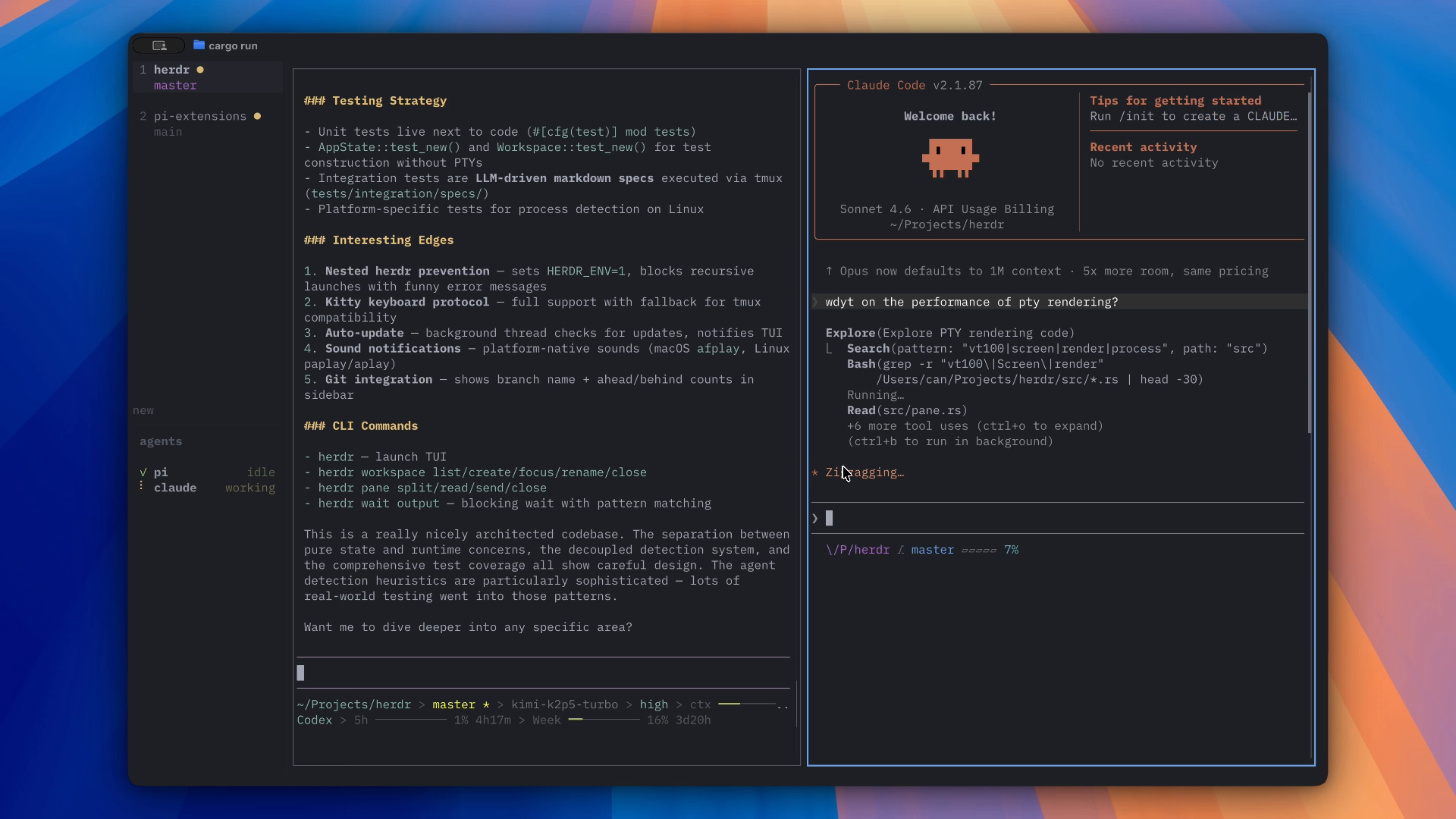
What Is herdr? #
herdr describes itself simply: “agent multiplexer that lives in your terminal.” It’s a single Rust binary — no Electron, no background daemon you have to babysit — that turns your terminal into a dashboard for running several AI coding agents side-by-side.
The pitch is narrow and specific: once you’re running more than one Claude Code, Codex, or other CLI agent at a time, plain terminal tabs stop being enough. You lose track of which agent is blocked waiting for input, which finished, and which is still grinding. herdr’s answer:
- 👀 Every agent at a glance — real terminal views, not a summarized/wrapped interpretation, showing blocked / working / done state
- 🔌 Detach and reattach anywhere — including over SSH; agents keep running after you disconnect, and sessions survive restarts
- 🤖 A socket API agents can drive themselves — agents can spawn panes, read output, and wait on each other programmatically
- ⌨️🖱️ Keyboard and mouse, both first-class — tmux-style prefix keys, plus click/drag/split
- 🧩 Plugins — extend panes and workflows via a plugin marketplace
🔗 GitHub: https://github.com/ogulcancelik/herdr 🌐 Homepage: https://herdr.dev
Written in Rust and first pushed in March 2026, herdr had already reached 21,886 GitHub stars by late July 2026 — up from roughly 16,800 two weeks earlier — with active gold sponsorship (Terminal Trove) funding full-time development.
Why a Dedicated Multiplexer for Agents? #
tmux and screen already do detach/reattach. What herdr adds is specifically shaped around agents, not humans, being the primary occupants of a pane:
- Agents need a way to signal state (blocked / working / done) that a human skimming panes can read instantly
- Agents themselves — not just the human — sometimes need to open new panes or check on siblings, which is why herdr ships a socket API rather than requiring a human at the keyboard for every action
- Sessions need to be genuinely durable — surviving a laptop sleep/reconnect or an SSH drop — since a long agent run dying because a terminal closed is a real cost
Key Features #
| Feature | Description |
|---|---|
| Real Terminal Views | See each agent’s actual terminal output, not a summarized status |
| Detach / Reattach | ctrl+b q detaches; herdr reattaches from any terminal, including over SSH |
| Socket API | Agents can spawn panes, read output, and wait on each other programmatically |
| Keyboard + Mouse | tmux-style prefix keys and click/drag/split, both first-class |
| Plugins | Extend panes and workflows via a marketplace |
| Single Binary | One Rust binary, no Electron, runs in whatever terminal you already use |
| Apache-2.0 | Fully open-source |
Install #
curl -fsSL https://herdr.dev/install.sh | sh
Or via a package manager:
brew install herdr
mise use -g herdr
Windows (beta):
powershell -ExecutionPolicy Bypass -c "irm https://herdr.dev/install.ps1 | iex"
Prebuilt binaries for other platforms are on the GitHub releases page.
Quick Start #
Run it where the work lives:
herdr
Then run your agents, split panes as needed, and walk away:
ctrl+b q— detach (agents keep running)herdr— reattach from any terminal, including over SSH
Full walkthrough in the quick start docs.
Building From Source #
git clone https://github.com/ogulcancelik/herdr
cd herdr
cargo build --release

just test        # unit tests
just check        # formatting, tests, and maintenance checks
herdr vs. Plain tmux #
| Aspect | herdr | tmux |
|---|---|---|
| Built for AI agents specifically | ✅ | ❌ (general-purpose) |
| Agent-drivable socket API | ✅ | ❌ |
| Mouse as first-class input | ✅ (click/drag/split) | Partial |
| Detach/reattach, survives restarts | ✅ | ✅ |
| Works over SSH | ✅ | ✅ |
| Plugin marketplace | ✅ | Via third-party scripts |
| Distribution | Single Rust binary | Usually a package manager install |
| License | Apache-2.0 | BSD-style |
Use Cases #
1. Running Several Coding Agents in One View #
Keep Claude Code, Codex, and a third agent each in their own pane, and glance at which one is blocked waiting on you.
2. Long Agent Runs Over SSH #
Kick off an agent on a remote box, detach, close your laptop, and reattach later from a different machine — the session and the agent keep going.
3. Agents That Manage Other Agents #
Because of the socket API, an orchestrating agent can spawn a new herdr pane for a sub-task and read its output back, without a human relaying text between panes.
Related Repositories #
| Repository | Purpose |
|---|---|
| Orca | GUI-based alternative approach — desktop ADE with parallel git worktrees instead of a terminal multiplexer |
| Claude Code | One of the agents commonly run inside herdr panes |
Related Articles #
- Orca: The ADE for Running Claude Code, Codex, and Cursor in Parallel — a GUI-first take on the same “run many agents at once” problem
- Claude Code Subagent Patterns — patterns for splitting work across agents within a single harness
Conclusion #
herdr takes a narrower, more Unix-y approach to the “run many agents at once” problem than a full desktop app: one Rust binary, tmux-familiar keybindings, and a socket API that lets agents manage each other directly. Growing from roughly 16,800 to 21,886 stars in about two weeks (as of late July 2026) suggests plenty of developers want this at the terminal layer, not just in a GUI.
Best for: Developers who already live in a terminal and want agent-aware multiplexing without adopting a full desktop app.
GitHub: https://github.com/ogulcancelik/herdr
Recommended Infrastructure for Self-Hosting #
Since herdr is built around SSH-reattachable sessions, running your agents on an always-on remote box is a natural pairing:
- DigitalOcean — $200 free credit for 60 days across 14+ global regions. A solid default host for a herdr session you reattach to from anywhere.
- HTStack — Hong Kong VPS with low-latency access from mainland China. This is the same IDC that hosts dibi8.com — battle-tested in production.
Affiliate links — they don’t cost you extra and they help keep dibi8.com running.
Last updated: 2026-07-29
💬 Discussion