HunyuanVideo: 12.1K+ Stars — Production Deployment Guide 2026
HunyuanVideo (HYV) is an open-source video generation framework by Tencent with 13B parameters. Supports ComfyUI, Diffusers, Gradio API. Covers Docker setup, FP8 quantization, multi-GPU inference, and production hardening.
- ⭐ 24379
- Python
- Apache-2.0
- Updated 2026-05-19
A video generation model that needs 60GB of VRAM for a 5-second clip at 720p is not a toy — it is infrastructure. Tencent’s HunyuanVideo, a 13-billion-parameter diffusion transformer for video generation, has accumulated over 12,100 GitHub stars and become a go-to choice for teams that need cinematic-quality video synthesis on self-hosted hardware. This hunyuanvideo tutorial walks through the complete production setup: from a hunyuanvideo Docker deployment to FP8 quantization, multi-GPU parallel inference, ComfyUI integration, and the monitoring you need when serving video generation production workloads at scale.
What Is HunyuanVideo? #
HunyuanVideo is a systematic framework for large video generation models developed by Tencent. The original release (December 2024) features a 13B-parameter Diffusion Transformer (DiT) that generates 720p video clips from text prompts or reference images. The November 2025 follow-up, HunyuanVideo-1.5, trimmed the parameter count to 8.3B while introducing the SSTA (Selective and Sliding Tile Attention) mechanism and a built-in super-resolution upscaler to 1080p. Both versions are Apache-2.0 licensed and run on Linux with NVIDIA GPUs. This hunyuanvideo setup guide covers both manual and Docker installation paths.
How HunyuanVideo Works #
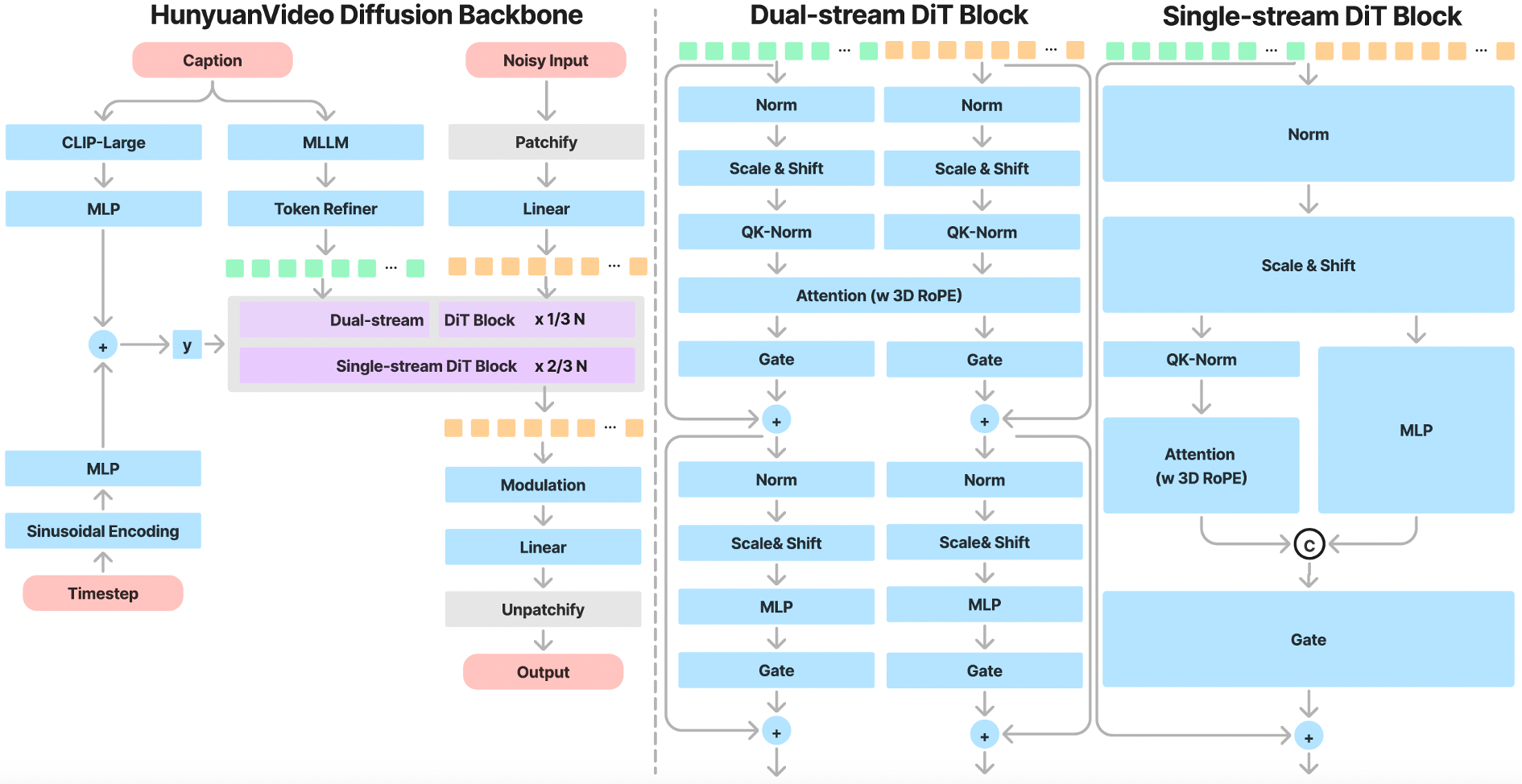
The architecture follows a latent diffusion pipeline with three major components:
Causal 3D VAE compresses input video into a latent space with 4x temporal and 8x spatial compression ratios. This reduces the token count fed into the transformer, enabling higher-resolution generation without proportional compute growth.
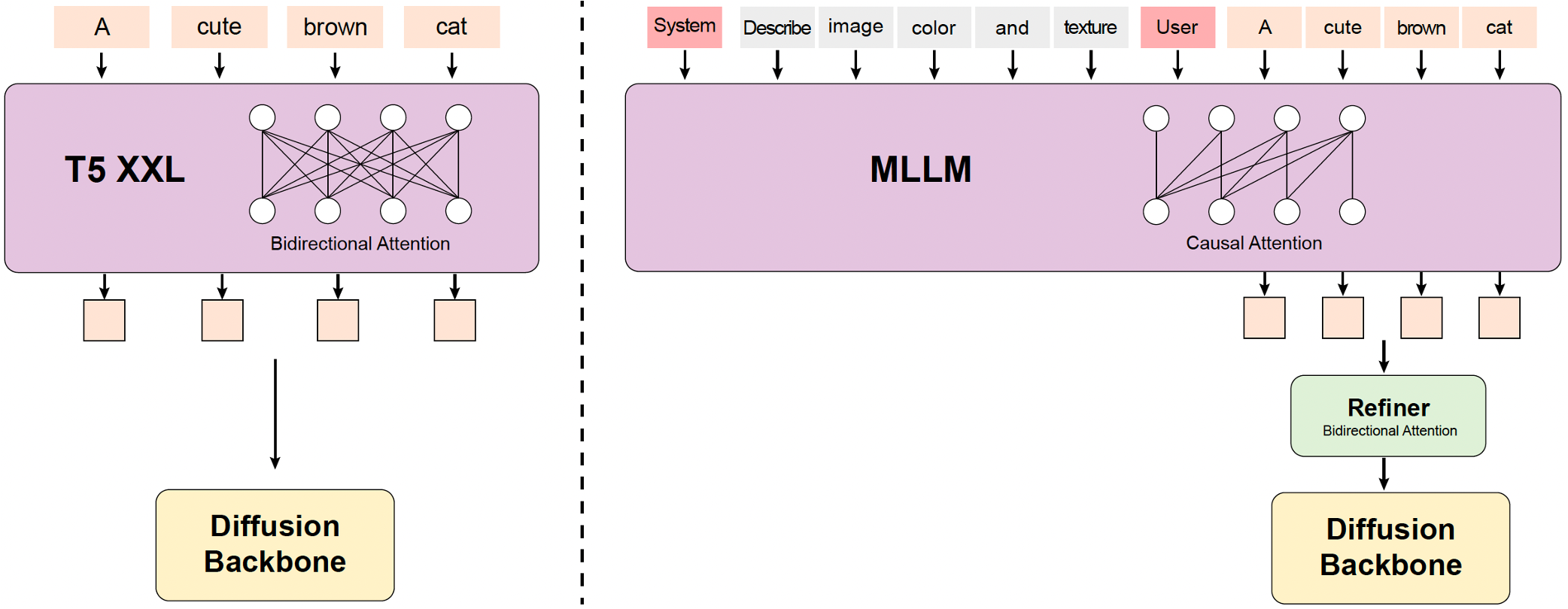
MLLM Text Encoder replaces the traditional CLIP + T5-XXL combo used in older video models. HunyuanVideo uses a Multimodal Large Language Model (specifically a fine-tuned Qwen2.5-VL variant in 1.5) with bidirectional token refinement. This produces better prompt adherence for complex scene descriptions.
Dual-stream to Single-stream DiT processes video and text tokens independently through the initial transformer blocks (dual-stream), then concatenates them for multimodal fusion in the later blocks (single-stream). This hybrid design balances modality-specific learning with cross-modal attention.

SSTA Attention (1.5 only) dynamically prunes redundant spatiotemporal key/value blocks using a sliding tile window. Compared to FlashAttention-3, this delivers a 1.87x end-to-end speedup on 10-second 720p synthesis.
Installation & Setup #
The fastest path to a working HunyuanVideo instance is Docker. For teams that need custom builds, the manual conda installation follows.
Docker Deployment (Recommended) #
# Pull the official CUDA 12 image
docker pull hunyuanvideo/hunyuanvideo:cuda_12

# Run with GPU passthrough
docker run -itd --gpus all --init --net=host --uts=host --ipc=host \
  --name hunyuanvideo \
  --security-opt=seccomp=unconfined \
  --ulimit=stack=67108864 --ulimit=memlock=-1 \
  --privileged \
  -v /mnt/models:/models \
  -p 8081:8081 \
  hunyuanvideo/hunyuanvideo:cuda_12
Manual Installation on Ubuntu #
# Clone the repository
git clone https://github.com/Tencent-Hunyuan/HunyuanVideo.git
cd HunyuanVideo

# Create conda environment
conda create -n hunyuan python==3.10.9 -y
conda activate hunyuan

# Install PyTorch with CUDA 12.4
conda install pytorch==2.6.0 torchvision==0.19.0 torchaudio==2.4.0 \
  pytorch-cuda=12.4 -c pytorch -c nvidia -y

# Install Python dependencies
python -m pip install -r requirements.txt

# Install Flash Attention v2 for acceleration
python -m pip install ninja
python -m pip install git+https://github.com/Dao-AILab/flash-attention.git@v2.6.3

# Install xDiT for multi-GPU parallel inference
python -m pip install xfuser==0.4.0
Download Model Weights #
# Install huggingface-cli
pip install huggingface_hub

# Download the main DiT weights
huggingface-cli download tencent/HunyuanVideo \
  --include "mp_rank_00_model_states.pt" \
  --local-dir ./ckpts

# Download the FP8 quantized weights (saves ~10GB VRAM)
huggingface-cli download tencent/HunyuanVideo \
  --include "mp_rank_00_model_states_fp8.pt" \
  --local-dir ./ckpts

# Download text encoder models
huggingface-cli download tencent/HunyuanVideo \
  --include "*text_encoder*" \
  --local-dir ./ckpts
First Inference Run #
conda activate hunyuan

python sample_video.py \
    --video-size 720 1280 \
    --video-length 129 \
    --infer-steps 50 \
    --prompt "A cat walks on the grass, realistic style, golden hour lighting" \
    --flow-reverse \
    --use-cpu-offload \
    --save-path ./results
The --use-cpu-offload flag is essential for GPUs with less than 80GB VRAM. It offloads model weights to system RAM when not in use, trading speed for memory.
Integration with Popular Tools #
ComfyUI (Native Nodes) #
ComfyUI added native HunyuanVideo support in early 2025. Download the repackaged model files from Comfy-Org:
# Model files go to ComfyUI/models/
# - text_encoders/clip_l.safetensors
# - text_encoders/llava_llama3_vision.safetensors
# - diffusion_models/hunyuan_video_720p_bf16.safetensors
# - vae/hunyuan_video_vae_bf16.safetensors
Load the official workflow by dragging the JSON into ComfyUI. The key nodes are HunyuanVideoSampler, HunyuanVideoDecode, and TextEncodeHunyuanVideo.
Kijai’s HunyuanVideoWrapper (Advanced) #
For FP8 inference, video-to-video, and image-to-video, use the community wrapper:
# Install via ComfyUI Manager or git
cd ComfyUI/custom_nodes
git clone https://github.com/kijai/ComfyUI-HunyuanVideoWrapper.git

# Install dependencies
cd ComfyUI-HunyuanVideoWrapper
pip install -r requirements.txt
Download the FP8 weights from Kijai/HunyuanVideo_comfy on Hugging Face and place them in ComfyUI/models/diffusion_models/.
Diffusers Pipeline #
from diffusers import HunyuanVideoPipeline
import torch

pipe = HunyuanVideoPipeline.from_pretrained(
    "tencent/HunyuanVideo-1.5",
    torch_dtype=torch.bfloat16,
    variant="fp8"
)
pipe.enable_model_cpu_offload()

video = pipe(
    prompt="A cat playing piano in a jazz club, warm lighting",
    num_frames=121,
    height=720,
    width=1280,
    num_inference_steps=30,
    guidance_scale=6.0
).frames[0]

# Save the video
import numpy as np
from PIL import Image
frames = [(f * 255).astype(np.uint8) for f in video]
frames = [Image.fromarray(f) for f in frames]
frames[0].save(
    "output.mp4",
    save_all=True,
    append_images=frames[1:],
    duration=67,
    loop=0
)
Gradio API Server #
# Start the Gradio server
python gradio_server.py --flow-reverse

# Or bind to all interfaces for remote access
SERVER_NAME=0.0.0.0 SERVER_PORT=8081 \
  python gradio_server.py --flow-reverse --use-cpu-offload
The Gradio UI exposes parameters for prompt, resolution, frame count, CFG scale, and seed. For programmatic access, inspect the network tab in your browser to find the /run/predict endpoint and replicate the JSON payload.
DigitalOcean GPU Droplets #
For teams without local GPU hardware, DigitalOcean GPU Droplets provide NVIDIA H100 and A100 instances on demand. Deploy HunyuanVideo with the following cloud-init:
#cloud-config
package_update: true
packages:
  - docker.io
  - nvidia-container-toolkit
runcmd:
  - systemctl restart docker
  - docker pull hunyuanvideo/hunyuanvideo:cuda_12
  - docker run -d --gpus all --name hunyuan \
      -p 8081:8081 -v /mnt/models:/models \
      hunyuanvideo/hunyuanvideo:cuda_12 \
      python gradio_server.py --flow-reverse --use-cpu-offload
Benchmarks / Real-World Use Cases #
Community benchmarks from RTX 4090 and datacenter GPU testing (March 2026):
| Model | Params | VRAM (720p) | Gen Time (5s, RTX 4090) | Aesthetic Quality |
|---|---|---|---|---|
| HunyuanVideo (original) | 13B | ~60GB | ~5:50 | 8.8/10 |
| HunyuanVideo-1.5 | 8.3B | ~24GB (INT8) | ~3:20 | 8.5/10 |
| Wan 2.2 | 14B | ~48GB | ~4:20 | 8.5/10 |
| LTX-Video 0.9.5 | 13B | ~16GB | ~1:30 | 7.4/10 |
| CogVideoX-5B | 5B | ~12GB | ~8:10 | 6.8/10 |
Production use cases observed in the wild:
Ad creative generation: An e-commerce team in Shenzhen generates 200+ product showcase videos daily using HunyuanVideo with a custom LoRA fine-tuned on their product catalog. They report the cinematic aesthetic reduces post-production time by 60% compared to Wan outputs.
Social media content farms: A Brazilian MCN runs HunyuanVideo on a 4xA100 node via xDiT parallel inference, producing 5-second vertical clips for TikTok and Reels. The built-in prompt rewriter ensures consistent output quality from short user prompts.
Film pre-visualization: An indie film director in Los Angeles uses the image-to-video pipeline to animate storyboard frames, cutting previz iteration time from days to hours.
Advanced Usage / Production Hardening #
FP8 Quantization for Memory Reduction #
FP8 quantization converts FP32 weights to 8-bit floating-point format, reducing GPU memory usage by approximately 10GB with minimal quality degradation.
# Download FP8 weights and scale files
huggingface-cli download tencent/HunyuanVideo \
  --include "mp_rank_00_model_states_fp8.pt" \
  --include "mp_rank_00_model_states_fp8_map.pt" \
  --local-dir ./ckpts/fp8

# Run inference with FP8
python sample_video.py \
    --dit-weight ./ckpts/fp8/mp_rank_00_model_states_fp8.pt \
    --video-size 1280 720 \
    --video-length 129 \
    --infer-steps 50 \
    --prompt "A golden retriever runs on a beach at sunset" \
    --flow-reverse \
    --use-cpu-offload \
    --use-fp8 \
    --save-path ./results
The --use-fp8 flag activates the FP8 pipeline in hyvideo/modules/fp8_optimization.py. The E4M3 format (4 exponent bits, 3 mantissa bits) preserves enough precision for inference while cutting memory by ~40%.
Multi-GPU Parallel Inference with xDiT #
For production workloads, xDiT provides Unified Sequence Parallelism that scales across multiple GPUs:
# 8-GPU parallel inference
torchrun --nproc_per_node=8 sample_video.py \
    --video-size 1280 720 \
    --video-length 129 \
    --infer-steps 50 \
    --prompt "A cinematic aerial shot of a mountain valley at dawn" \
    --flow-reverse \
    --seed 42 \
    --ulysses-degree 8 \
    --ring-degree 1 \
    --save-path ./results
Latency scaling on 1280x720, 129 frames, 50 steps:
| GPUs | Latency (sec) | Speedup |
|---|---|---|
| 1 | 1904 | 1.00x |
| 2 | 934 | 2.04x |
| 4 | 514 | 3.70x |
| 8 | 338 | 5.64x |
The --ulysses-degree and --ring-degree parameters control the parallelism strategy. Ulysses parallelism shards the attention computation; ring parallelism distributes across the sequence dimension. For most setups, maximize Ulysses first.
Production Gradio with Reverse Proxy #
# Start with production settings
SERVER_NAME=0.0.0.0 \
SERVER_PORT=8081 \
python gradio_server.py \
  --flow-reverse \
  --use-cpu-offload \
  --use-fp8 \
  --max-queue-size 10 \
  --queue-timeout 300
Behind an Nginx reverse proxy with rate limiting:
upstream hunyuan {
    server 127.0.0.1:8081;
    keepalive 32;
}

server {
    listen 443 ssl http2;
    server_name video-api.yourdomain.com;

    client_max_body_size 100M;

    location / {
        proxy_pass http://hunyuan;
        proxy_http_version 1.1;
        proxy_set_header Connection "";
        proxy_read_timeout 600s;
    }

    # Rate limit: 10 requests per minute per IP
    limit_req_zone $binary_remote_addr zone=video:10m rate=10r/m;
    limit_req zone=video burst=5 nodelay;
}
Monitoring with Prometheus #
# Add to gradio_server.py or wrap the inference call
from prometheus_client import Counter, Histogram, start_http_server
import time

inference_count = Counter('hunyuan_inferences_total', 'Total inferences')
inference_duration = Histogram('hunyuan_inference_seconds', 'Inference latency')
queue_depth = Gauge('hunyuan_queue_depth', 'Current queue depth')

@inference_duration.time()
def generate_video(prompt, height, width, frames, steps):
    inference_count.inc()
    # ... existing inference logic
    return video

# Start metrics server on port 9090
start_http_server(9090)
Security Hardening #
- Model weight integrity: Verify downloaded weights against SHA-256 checksums published on the Hugging Face model card.
- Input sanitization: Sanitize prompts before sending to the MLLM text encoder. Prompt injection can cause the text encoder to generate adversarial embeddings.
- GPU isolation: In multi-tenant environments, use NVIDIA MIG (Multi-Instance GPU) to partition A100/H100 GPUs so one user’s generation does not exhaust VRAM needed by another.
- Network isolation: Run the Gradio container on an internal VPC. Expose only through your API gateway with authentication.
Comparison with Alternatives #
| Feature | HunyuanVideo | Wan 2.2 | CogVideoX-5B | Open-Sora |
|---|---|---|---|---|
| Parameters | 13B (8.3B in 1.5) | 14B | 5B | 1.1B - 7B |
| Max resolution | 1080p (via SR) | 1080p | 720p | 720p |
| Min VRAM (720p) | 24GB (INT8) | 24GB | 12GB | 16GB |
| Text-to-Video | Yes | Yes | Yes | Yes |
| Image-to-Video | Yes (1.5) | Yes | Yes | Yes |
| License | Apache-2.0 | Apache-2.0 | Apache-2.0 | BSD-3-Clause |
| Cinematic quality | 8.8/10 | 8.5/10 | 6.8/10 | 7.0/10 |
| Gen time (5s, 4090) | 5:50 (original) | 4:20 | 8:10 | 6:00 |
| Motion realism | Excellent | Excellent | Moderate | Good |
| Bilingual prompts | Yes (CN/EN) | Yes (CN/EN) | Yes (CN/EN) | EN focused |
| Built-in upscaler | Yes (1.5) | No | No | No |
| ComfyUI support | Yes | Yes | Yes | Yes |
| Multi-GPU parallel | Yes (xDiT) | Yes (USP) | Limited | No |
In the hunyuanvideo vs wan debate, HunyuanVideo’s primary differentiator is its cinematic aesthetic and motion realism. The “house style” produces rich color grading, natural bokeh, and film-like motion out of the box. Wan 2.2 edges ahead on photorealistic human faces and fine detail. CogVideoX-5B remains the accessibility champion for 12GB GPUs, though quality lags behind. Open-Sora offers the most flexible training pipeline for researchers who want to train from scratch.
Limitations / Honest Assessment #
HunyuanVideo is not the right tool for every video generation task. Here is what it does poorly:
Speed: Even with FP8 and SSTA, HunyuanVideo is slower than Wan 2.2 and significantly slower than LTX-Video. If your workflow requires rapid iteration (hundreds of clips per hour), LTX-Video or commercial APIs are better fits.
VRAM requirements: The original 13B model needs 60GB for 720p generation. Only the 1.5 release with INT8 quantization brings this down to 24GB. Teams without A100, H100, or RTX 4090-class hardware should consider CogVideoX or cloud inference.
Prompt dependency: Short or vague prompts produce inconsistent results. The model expects detailed, structured descriptions (30-60 words) that separate subject, action, and environment. The built-in prompt rewriter helps but adds latency.
Resolution ceiling: Native generation tops out at 720p. The 1080p super-resolution network in 1.5 adds processing time and can introduce artifacts on complex textures. For native 1080p generation, commercial models like Sora or Kling remain ahead.
Clip length: Practical generation is limited to 5-10 seconds. Longer sequences require computational resources beyond even H100 specifications, and temporal consistency degrades after 10 seconds.
Linux only: There is no official Windows or macOS support. WSL2 may work but is not documented or tested by the maintainers.
Frequently Asked Questions #
Q: How much VRAM do I actually need to run HunyuanVideo?
A: The original 13B model requires 60GB GPU memory for 720p generation and 45GB for 540p. HunyuanVideo-1.5 reduces this to 24GB with INT8 quantization, or 14GB if you enable CPU offloading. The FP8 weights save approximately 10GB compared to FP16. For production, an NVIDIA A100 80GB or H100 is recommended; for experimentation, a single RTX 4090 (24GB) can run the 1.5 model with quantization.
Q: Can I run HunyuanVideo on Windows?
A: Officially, no — the project only supports Linux. Some users have reported success with WSL2 (Windows Subsystem for Linux) and CUDA pass-through, but this is not documented or supported by the Tencent team. For Windows-based teams, Docker Desktop with WSL2 backend is the most viable path, though expect to troubleshoot CUDA compatibility issues.
Q: How does HunyuanVideo compare to commercial APIs like Sora or Kling?
A: In human evaluations, HunyuanVideo outperformed Runway Gen-3 and Luma 1.6 on motion quality and overall ranking. The gap to leading commercial models (Sora 2, Kling 2.5) has narrowed substantially but remains measurable on photorealistic human subjects and complex multi-object scenes. The trade-off is cost: commercial APIs charge $0.10-0.50 per second of video, while self-hosted HunyuanVideo costs only the GPU compute time (approximately $0.14-0.21 per second on H200 cloud instances, or near-zero on owned hardware).
Q: What is the best prompt format for HunyuanVideo?
A: Use structured prompts that clearly separate subject, action, and environment. Aim for 30-60 words. Example: “A golden retriever runs along a sandy beach at sunset. Ocean waves break in the background. The dog’s fur blows in the wind. Warm golden hour lighting. Wide angle shot, cinematic color grading.” Enable the prompt rewrite feature (Normal mode for accuracy, Master mode for visual polish) to automatically expand short prompts into model-preferred descriptions.
Q: How do I speed up inference in production?
A: Combine multiple optimizations: (1) Use FP8 quantized weights to reduce memory and increase batch throughput. (2) Enable xDiT multi-GPU parallel inference — 8x A100 achieves 5.6x speedup over single-GPU. (3) Use the CFG-distilled model variant for approximately 2x speedup at a small quality cost. (4) Enable feature caching (TeaCache) to skip redundant computation across steps. (5) For 1.5, the SSTA attention mechanism provides 1.87x speedup automatically with no quality loss.
Q: Where can I get help or discuss HunyuanVideo with other users?
A: The Tencent team maintains a Discord server and WeChat group linked from the GitHub README. For English-speaking developers, the Hugging Face community forums and the ComfyUI Discord have active HunyuanVideo channels. For bug reports and feature requests, use GitHub Issues on the official repository.
Conclusion #
HunyuanVideo is a production-grade video generation framework that bridges the gap between closed-source commercial APIs and open-source accessibility. With the 1.5 release bringing 8.3B parameters, SSTA attention, and consumer-GPU compatibility, it has become a practical choice for studios and indie creators alike.
Action items to get started today:
- Clone the repo and run the Docker image on a GPU instance — the official CUDA 12 image is the fastest path.
- Download the FP8 weights and run your first 720p generation with
sample_video.py. - Integrate with ComfyUI using Kijai’s wrapper for visual workflow editing.
- Join the dibi8 Telegram group to discuss deployment strategies and share your generated videos with the community.
Some links in this article are affiliate links. We may earn a commission if you purchase services through them — this helps support the dibi8 open-source project at no extra cost to you.
Recommended Hosting & Infrastructure #
Before you deploy any of the tools above into production, you’ll need solid infrastructure. Two options dibi8 actually uses and recommends:
- DigitalOcean — $200 free credit for 60 days across 14+ global regions. The default option for indie devs running open-source AI tools.
- HTStack — Hong Kong VPS with low-latency access from mainland China. This is the same IDC that hosts dibi8.com — battle-tested in production.
Affiliate links — they don’t cost you extra and they help keep dibi8.com running.
Sources & Further Reading #
- Official Repository: https://github.com/Tencent-Hunyuan/HunyuanVideo
- HunyuanVideo-1.5 Repository: https://github.com/Tencent-Hunyuan/HunyuanVideo-1.5
- Project Page: https://aivideo.hunyuan.tencent.com
- Hugging Face Model Card: https://huggingface.co/tencent/HunyuanVideo
- ComfyUI Wiki Tutorial: https://comfyui-wiki.com/en/tutorial/advanced/hunyuan-text-to-video-workflow-guide-and-example
- Technical Report (arXiv): https://arxiv.org/abs/2412.03603
- HunyuanVideo 1.5 Technical Report: https://arxiv.org/abs/2511.18870
- xDiT Parallel Inference: https://github.com/xdit-project/xDiT
- Kijai ComfyUI Wrapper: https://github.com/kijai/ComfyUI-HunyuanVideoWrapper
- DigitalOcean GPU Droplets: https://www.digitalocean.com/products/gpu-droplets?refcode=eca87ac14ee0
💬 Discussion