nanobot: HKU's Ultra-Lightweight Self-Hosted Personal AI Agent
nanobot is an open-source, self-hosted personal AI agent framework from HKUDS with a bundled WebUI, MCP tools, long-term memory, chat-app integrations, and an OpenAI-compatible API, built around a small readable core.
- ⭐ 46336
- Python
- MIT
- Updated 2026-07-29
Orca: The ADE for Running Claude Code, Codex, and Cursor in Parallel • herdr: The Terminal Multiplexer Built for Running Many AI Agents at Once
What Is nanobot? #
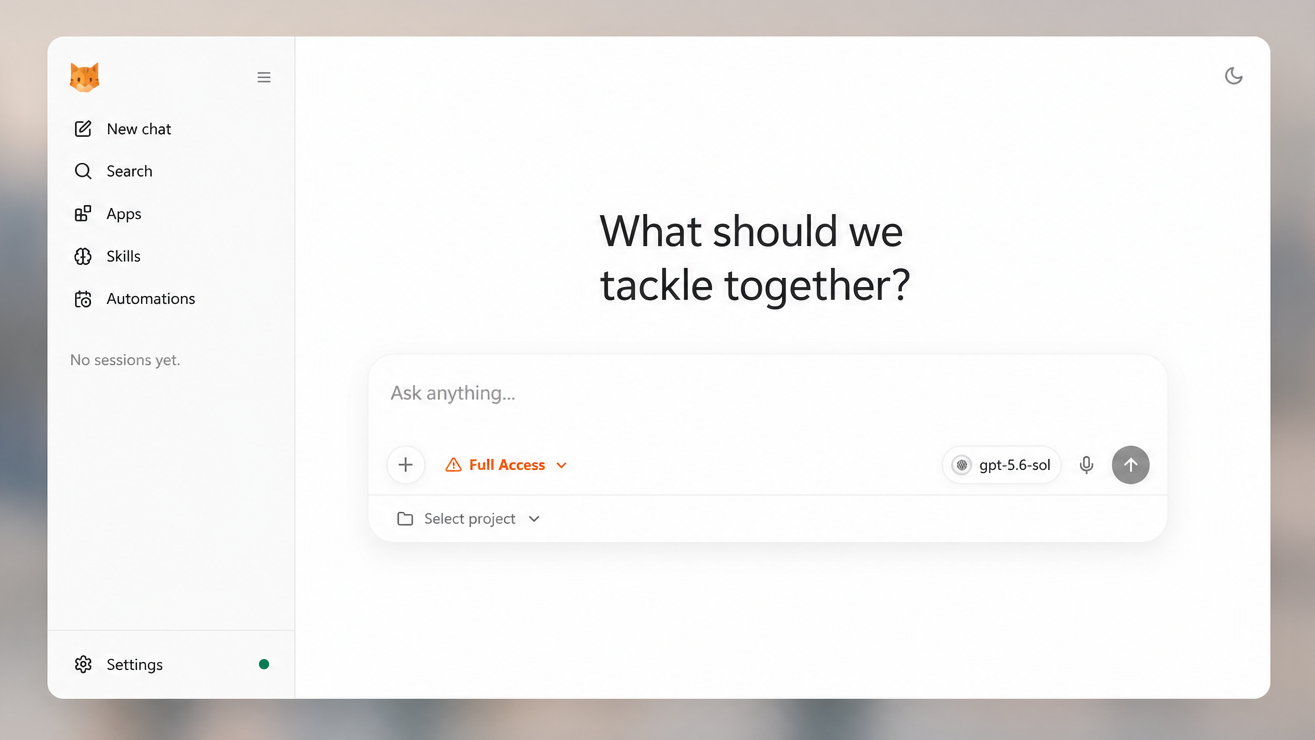
nanobot is an ultra-lightweight, open-source, self-hosted personal AI agent framework in Python from HKUDS — the same Hong Kong University Data Science lab behind Vibe-Trading, covered separately on dibi8. Where a lot of agent frameworks grow into heavy platforms, nanobot’s stated goal is the opposite: a small, readable core that still covers tools, long-term memory, MCP, model routing, multi-agent delegation, scheduled automation, and an OpenAI-compatible API.
🔗 GitHub: https://github.com/HKUDS/nanobot 🌐 Homepage: https://nanobot.wiki
First pushed in February 2026 under MIT, nanobot reached 46,300+ GitHub stars by late July 2026. Its own topic research flagged a striking discrepancy along the way: GitHub’s trending page showed it at only 635 stars at one point, versus the real API-verified count in the tens of thousands — a 7,134% undercount, the largest gap the project’s own research turned up.
What It Can Do #
- Run in a browser WebUI or terminal
- Connect to Telegram, Discord, Slack, WeChat, Feishu, Teams, Email, and Mattermost
- Use tools: files, shell, web search, web fetch, MCP, cron, image generation, and subagents
- Keep session history and long-term memory through a component the project calls Dream
- Run long-horizon goals and scheduled automations
- Expose a Python SDK and OpenAI-compatible API for custom integrations
- Deploy as a long-running local or server-side agent gateway
Install #
Requires Python 3.11+.
One-command install (macOS/Linux):
curl -fsSL https://raw.githubusercontent.com/HKUDS/nanobot/main/scripts/install.sh | sh
One-command install (Windows PowerShell):
irm https://raw.githubusercontent.com/HKUDS/nanobot/main/scripts/install.ps1 | iex
This installs/upgrades nanobot-ai from PyPI and, on a fresh desktop, launches nanobot webui so you configure your first provider in Settings → Models.
Alternative install methods:
uv tool install nanobot-ai
python -m pip install nanobot-ai
From source (requires bun or npm to build the WebUI):
git clone https://github.com/HKUDS/nanobot.git
cd nanobot
python -m pip install .
Quick Start #
Recommended first run — opens the browser workbench:
nanobot webui
Then: pick a provider/model in Settings → Models, send Hello! to verify the connection, and choose a workspace before doing real project work.
Keep it running after closing the terminal:
nanobot webui --background
nanobot gateway status
nanobot gateway logs
Prefer a gateway-first workflow (familiar if you’re coming from OpenClaw):
nanobot gateway
Terminal-only, no browser, no persistent channels:
nanobot agent
nanobot agent -m "Hello!"   # one-shot, useful for scripts
Architecture #
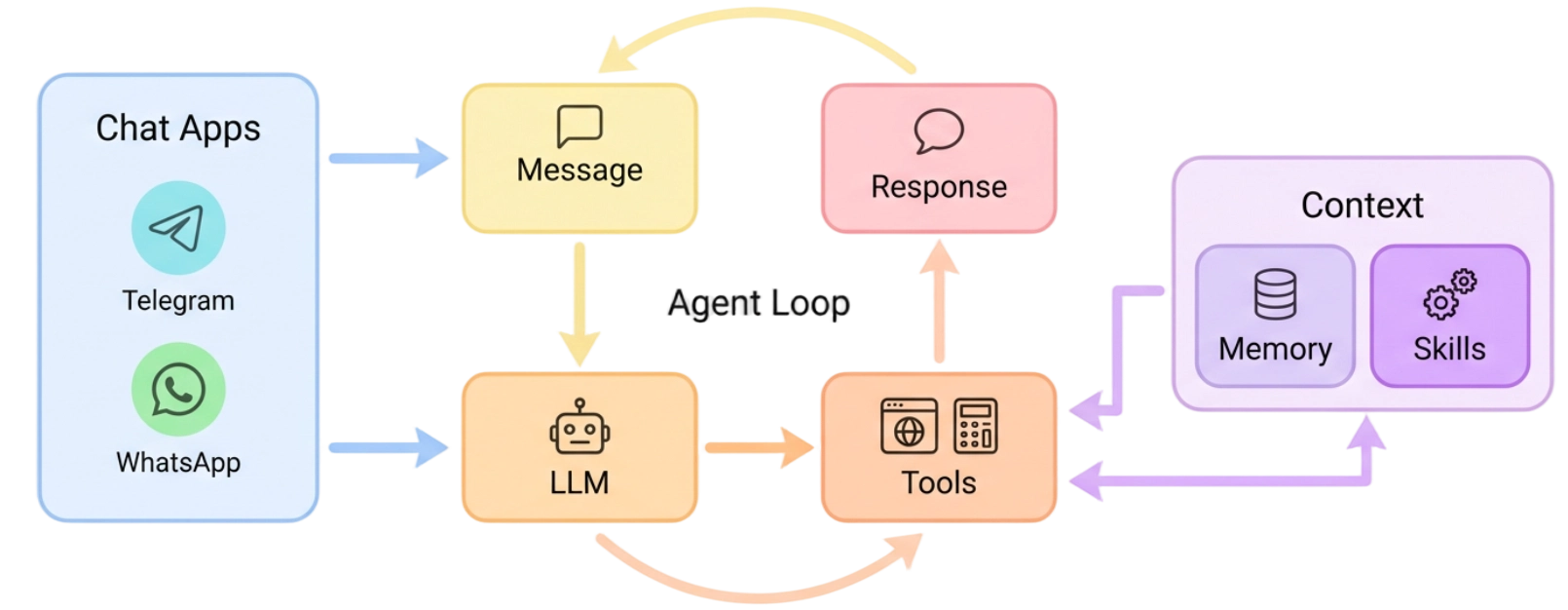
nanobot centers everything around a small agent loop: messages arrive from chat apps, the LLM decides when tools are needed, and memory or skills are pulled in only as context rather than becoming a heavyweight orchestration layer on top. The stated intent is to keep the core path readable and easy to extend without the system turning into a monolith as channels, tools, and deployment options get added.
Deployment #
One-click Render deploy is documented directly in the repo (asks for ANTHROPIC_API_KEY and a private NANOBOT_WEB_TOKEN, then provisions persistent storage — note persistent disks require a paid Render plan).
Self-hosting is documented for Docker, Docker Compose, Linux services, and macOS LaunchAgent setups.
Model & Provider Freedom #
nanobot doesn’t lock you into one LLM vendor: it supports OpenAI-compatible APIs generally, plus documented paths for local LLMs via Ollama, and vLLM or other local OpenAI-compatible servers — meaning it can run entirely offline against a self-hosted model if that’s what you want.
Use Cases #
1. A Personal Agent That Lives in Your Chat Apps #
Connect nanobot to Telegram or WeChat once, and interact with the same persistent-memory agent from your phone instead of only a desktop terminal.
2. Long-Running Automations Without a Heavy Platform #
Use nanobot gateway --background to keep scheduled tasks and channel connections alive as a lightweight service, rather than adopting a full enterprise agent platform.
3. A Fully Local, Self-Hosted Agent #
Pair nanobot with Ollama or a local vLLM server for a personal agent where nothing leaves your own infrastructure.
4. Prototyping Multi-Agent Delegation #
Use the built-in subagent tooling to experiment with delegation patterns without standing up separate orchestration infrastructure.
Related Repositories #
| Repository | Purpose |
|---|---|
| Vibe-Trading | Another HKUDS project, covered separately on dibi8 — a trading-focused research agent rather than a general personal agent |
| Claude Code | One of the OpenAI-compatible-style coding assistants nanobot can integrate alongside |
Related Articles #
- Vibe-Trading: HKU’s Open-Source Research Agent for Markets, Not a Trading Bot — another HKUDS project, in a completely different domain
- Orca: The ADE for Running Claude Code, Codex, and Cursor in Parallel — a different take on personal AI infrastructure, oriented around coding agents specifically
Conclusion #
nanobot bets that a personal AI agent framework doesn’t need to be a heavy platform to be capable — a small core, a bundled WebUI, broad chat-app reach, and full self-hosting (including fully local models) covers a lot of ground without the operational weight of larger agent platforms. Reaching 46,000+ stars from a starting point GitHub’s own trending page undercounted by over 7,000% says the “small core, self-hosted” pitch resonated once people actually found it.
Best for: Developers who want a personal AI agent they fully control — self-hosted, chat-app-reachable, and optionally fully local — without adopting a large, heavyweight agent platform.
GitHub: https://github.com/HKUDS/nanobot
Recommended Infrastructure for Self-Hosting #
nanobot is explicitly designed to be self-hosted as a long-running gateway:
- DigitalOcean
— $200 free credit for 60 days across 14+ global regions, a common choice for a persistent
nanobot gatewayinstance. - HTStack — Hong Kong VPS with low-latency access from mainland China, useful for the WeChat/Feishu chat-app integrations. This is the same IDC that hosts dibi8.com.
Affiliate links — they don’t cost you extra and they help keep dibi8.com running.
Last updated: 2026-07-29
💬 Discussion