OpenWorker: Andrew Ng's Open-Source AI Coworker That Delivers Finished Work
OpenWorker is an MIT-licensed, open-source AI coworker from Andrew Ng that runs on your desktop — bring your own model (OpenAI, Anthropic, Gemini, Kimi, or fully local via Ollama), 25+ tool connectors including MCP, approval-gated actions, and scheduled automations that deliver a finished document or reply instead of a chat transcript.
- ⭐ 13469
- Python
- TypeScript
- Rust
- MIT
- Updated 2026-08-08
BrowserOS: The Open-Source Chromium Fork That Ships Two AI Browsers • Model Context Protocol (MCP) Deep Dive
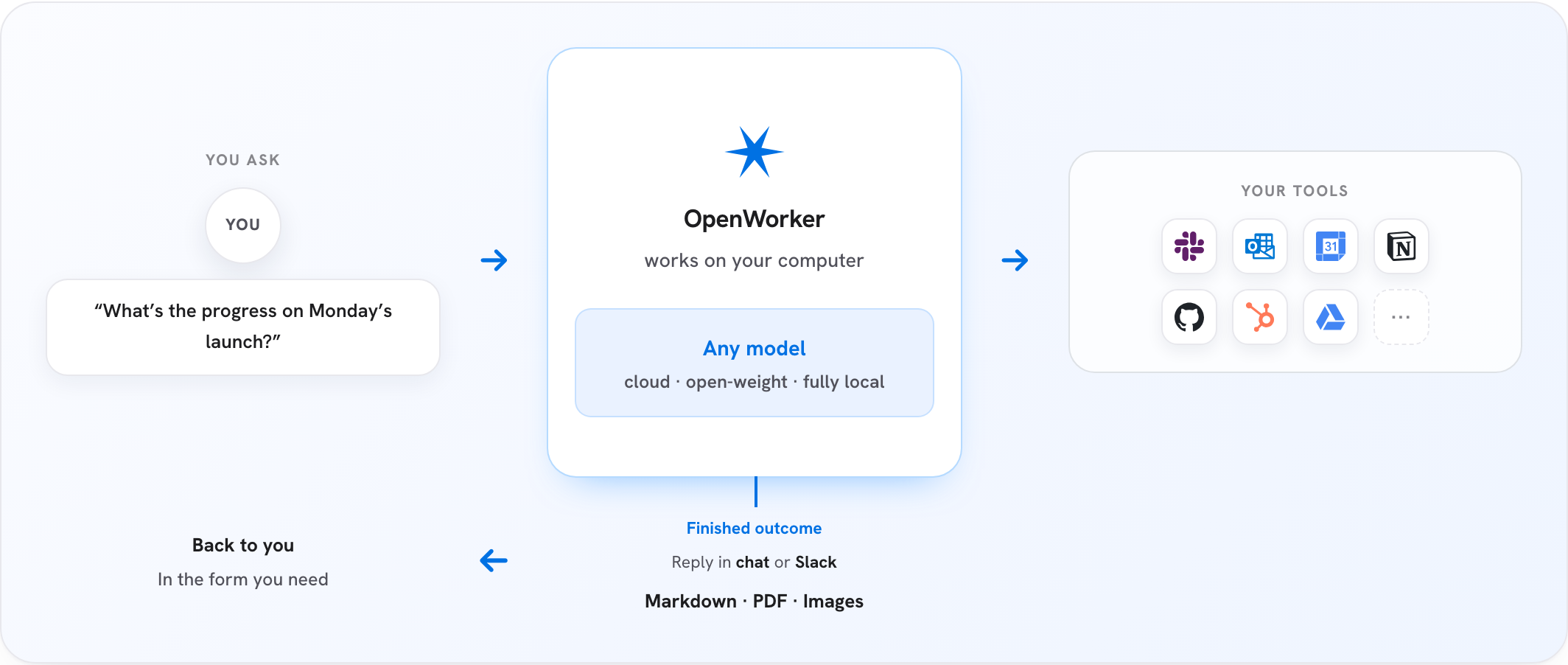
What Is OpenWorker? #
OpenWorker is an open-source AI coworker that lives on your desktop and, per its own framing, delivers finished work, not just chat: a polished document, a Slack reply with the numbers already pulled, an updated calendar, a triaged inbox. It’s built by Andrew Ng — co-founder of Coursera and Google Brain, former head of Baidu AI — and released in open beta under the MIT license.
🔗 GitHub: https://github.com/andrewyng/openworker 🌐 Site: openworker.com
At 13,400+ GitHub stars with a commit from August 1, 2026 and 8 contributor pages of history, it went from a fresh repo (created July 20, 2026) to five-figure stars in under three weeks.
How It Works #
The README lays out the loop plainly:
- You tell OpenWorker the outcome you want — “prepare a customer brief,” “untangle my calendar,” “draft a report,” “check where the release stands across Jira and GitHub.”
- It breaks the task into steps and works across your desktop, files, and connected apps.
- Before anything consequential — sending a message, changing a calendar, running a command — it checks in and you approve or redirect.
- You get the finished deliverable, not a to-do list.
The architecture, straight from the README:
┌────────────────────────────────────────────────┐
│              OpenWorker desktop app            │  native shell + GUI
├────────────────────────────────────────────────┤
│           local agent server (Python)          │  engine · tools · connectors - built on aisuite
├───────────────┬────────────────┬───────────────┤
│  your files   │   your tools   │  your model   │  everything runs with your keys,
│  & terminal   │ 25+ connectors │  any provider │  on your machine
└───────────────┴────────────────┴───────────────┘
Bring Your Own Model #
This is the detail that separates OpenWorker from most desktop-agent products: there’s no default model tied to the company. Supported providers, listed in the README:
OpenAI · Anthropic · Google Gemini · Inkling (Thinking Machines) · GLM (Z.ai) · DeepSeek · Kimi (Moonshot) · Qwen · MiniMax · Mistral · Grok (xAI) — plus open-weight models via Together and Fireworks, and fully local models via Ollama.
Paste a key, switch providers anytime. A curated list marks which models the team has verified for reliable tool-calling; anything else works “at your own risk.”
What It Can Actually Do #
- Produce real deliverables — documents, spreadsheets, reports, and web pages land as files you can open and share, not just text in a chat pane.
- Work from Slack —
@OpenWorkera channel and a session opens on your desktop; the work happens with your tools, and the reply lands back in the thread. - Use your everyday tools — 25+ built-in connectors (GitHub, Slack, Jira, Notion, Linear, HubSpot, Outlook, monday.com, Gmail, Google Calendar) plus your terminal and local files, plus anything reachable over MCP, with per-tool control.
- Run on a schedule — recurring automations like a morning brief or a weekly report, landing in the app with full transcripts.
- Ask before acting — writes, sends, and shell commands are approval-gated; unattended runs park their asks in an inbox rather than acting alone.
Privacy Model #
OpenWorker describes itself as local-first: the agent loop, conversations, connector tokens, and model keys all live in the app’s local secret store on your machine. The one cloud-touching piece is a small OAuth-brokering service for connectors — and the README notes you can skip signing in entirely and wire up connectors with manually created credentials instead.
Built on aisuite #
OpenWorker’s engine sits on top of aisuite, a separate, lighter Andrew Ng project: a unified chat-completions API across providers plus an agents layer with tools, toolkits, and MCP support. Per the README, OpenWorker actually began life inside the aisuite repo before being split into its own project — so aisuite is the lower-level piece if you’d rather build a custom harness than adopt OpenWorker’s desktop app wholesale.
Getting Started #
Prebuilt installers:
- macOS (Apple Silicon) — signed, notarized, auto-updates
- Windows 10/11 (x64) — builds aren’t code-signed yet, so SmartScreen will warn during this beta
Or run from source (Python 3.10+, Node 20+, Rust via rustup):
git clone https://github.com/andrewyng/openworker
cd openworker
bash packaging/setup_dev_env.sh
.venv/bin/openworker-server --cwd ~/some/project --port 8765
Then start the GUI (cd surfaces/gui && npm install && npm run dev) or run the full desktop shell with npm run tauri dev.
License: MIT — see LICENSE.
💬 Discussion