Orca: StableAI Parallel Agent Orchestrator for 100x Builders — 12K+ Stars
Orca by StableAI is an Agent Development Environment (ADE) for running multiple coding agents (Codex, Claude Code, OpenCode) in parallel worktrees. Desktop + mobile companion app. YC-backed.
- MIT
- Updated 2026-07-07
{{< resource-info >}}
AI coding agents are getting faster, but they are still fundamentally sequential. You give one agent a task, wait for it to finish, then give the next task. For solo developers this works. For teams building complex systems — or “100x builders” pushing the limits of what a single human can ship — sequential agents are a bottleneck.
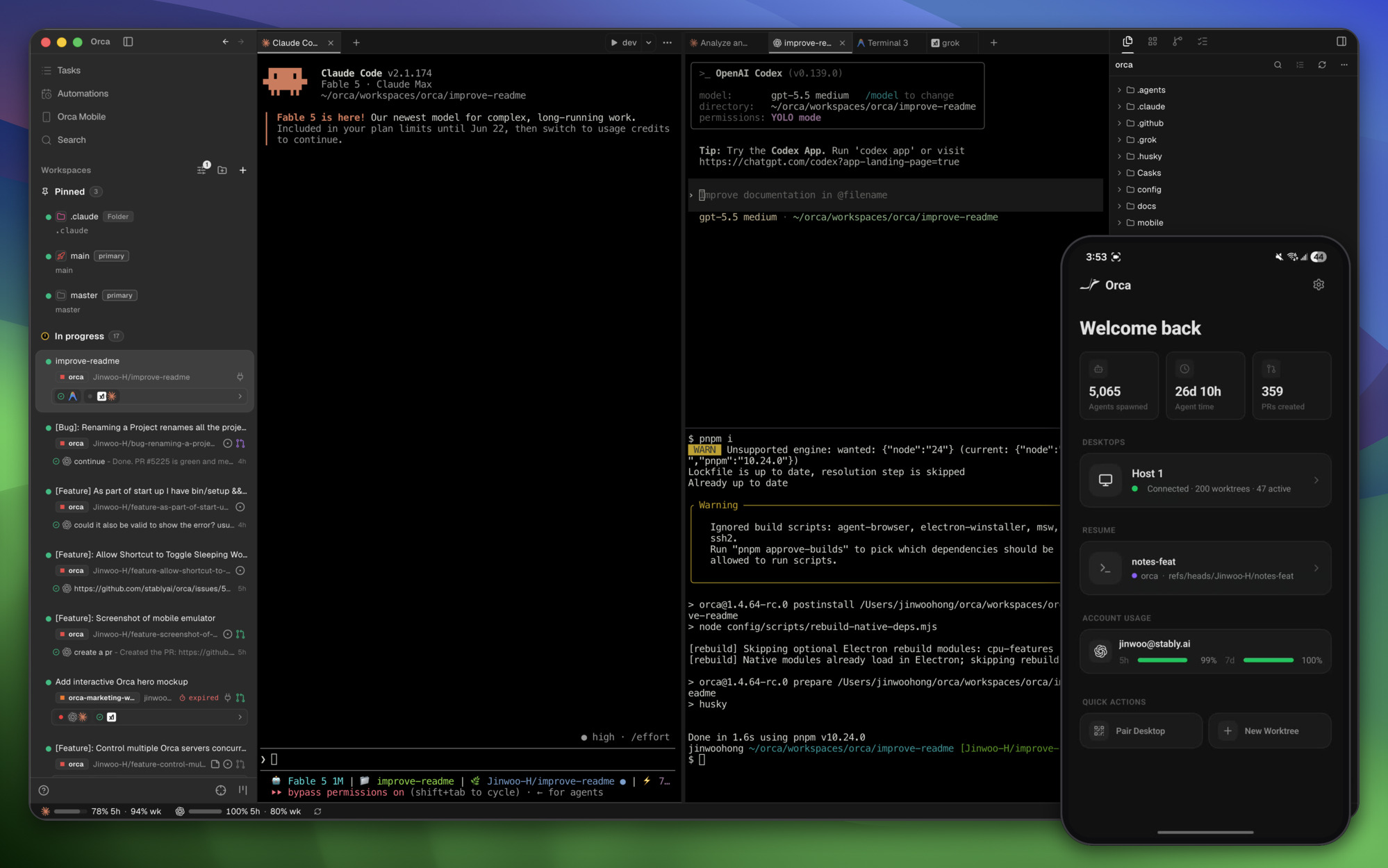
Orca by StableAI changes this by letting you run multiple coding agents in parallel, each in its own worktree, each working on a different part of your codebase simultaneously. With a desktop app, a mobile companion, and support for Codex, Claude Code, OpenCode, and more, Orca is the operating system for parallel AI-assisted development.
What Is Orca? #
Orca is an Agent Development Environment (ADE) — a purpose-built workspace for managing multiple AI coding agents working on the same project in parallel. Developed by StableAI (YC-backed) and released under the MIT license, Orca treats agents as first-class citizens in your development workflow.
The core concept is simple but powerful: instead of one agent handling your entire codebase, Orca spawns multiple agents, each assigned a specific task or module, each working in its own isolated worktree. Changes are merged automatically when agents complete their tasks.
Key Capabilities #
- Parallel agent execution — Run 2, 5, or 20 agents simultaneously on different tasks
- Worktree isolation — Each agent gets its own Git worktree, preventing merge conflicts
- Mobile companion app — Monitor and steer agents from your phone; get notified when tasks complete
- Multi-agent support — Works with Codex, Claude Code, OpenCode, Pi, and any OpenAI-compatible agent
- Cross-platform — macOS, Windows, and Linux desktop apps
- Discord integration — Real-time agent status updates in your team’s Discord channel
How Orca Works #
The Worktree Model #
Orca’s parallel execution relies on Git worktrees — a feature that lets you check out the same repository in multiple directories simultaneously, each with its own branch.
Orca Workspace: my-project
├── worktree/agent-1 (branch: orca/agent-1/refactor-auth)
│   └── Claude Code working on auth module
├── worktree/agent-2 (branch: orca/agent-2/add-payments)
│   └── Codex working on payment integration
├── worktree/agent-3 (branch: orca/agent-3/fix-bugs)
│   └── OpenCode working on bug fixes
└── main (branch: main)
    └── Your base codebase
Each agent:
- Gets its own branch derived from
main - Works on its assigned task independently
- Commits changes to its branch
- Signals completion through Orca’s status system
Agent Assignment #
Orca supports two modes of agent assignment:
Manual assignment: You create tasks, assign them to specific agents, and Orca launches them:
orca task create "Refactor auth module to use JWT" --agent claude-code
orca task create "Add Stripe payment integration" --agent codex
orca task create "Fix 15 reported bugs" --agent opencode
orca launch
Auto-assignment: Orca analyzes your codebase and task descriptions, then assigns the most suitable agent to each task based on agent capabilities and current workload.
Merge Resolution #
When agents complete their tasks, Orca handles the merge:
- Automatic merge — If worktrees don’t touch the same files, Orca merges them automatically
- Conflict detection — If agents modify the same file, Orca flags the conflict for human review
- Sequential merge — For high-risk merges, Orca can merge agents one at a time, verifying each before proceeding
Installation #
Desktop App #
Download from onOrca.dev/download:
- macOS — Universal binary (Apple Silicon + Intel)
- Windows — MSI installer
- Linux — AppImage + .deb packages
CLI Installation #
# macOS (Homebrew)
brew install stablyai/tap/orca

# npm (global)
npm install -g @stableai/orca-cli

# Docker
docker pull ghcr.io/stablyai/orca:latest
Mobile Companion App #
- iOS — App Store
- Android — Google Play
Using Orca #
Creating a Workspace #
# Initialize Orca in your project
orca init --project my-app --dir ~/projects/my-app

# Orca creates the workspace structure and installs necessary integrations
Defining Tasks #
# Create individual tasks
orca task add "Implement user registration API" \
  --agent claude-code \
  --priority high \
  --deadline "2h"

orca task add "Write unit tests for auth module" \
  --agent codex \
  --depends-on "Implement user registration API" \
  --priority medium

orca task add "Update API documentation" \
  --agent opencode \
  --priority low
Launching Agents #
# Launch all tasks
orca launch --parallel

# Launch with concurrency limit (max 3 simultaneous agents)
orca launch --max-parallel 3

# Launch in dry-run mode (shows plan without executing)
orca launch --dry-run
Monitoring Progress #
# Real-time status dashboard
orca status --watch

# View individual agent output
orca logs agent-1
orca logs agent-2

# Check task completion
orca tasks --completed
orca tasks --pending
Mobile Companion #
The Orca mobile app lets you:
- View all running agents and their current tasks
- Receive push notifications when agents complete or hit errors
- Send follow-up instructions to specific agents
- Approve or reject merge conflicts
- View code diffs agent-created
Agent Compatibility #
Orca supports a wide range of coding agents:
| Agent | Integration | Status |
|---|---|---|
| OpenAI Codex | Native | Fully supported |
| Claude Code | Native | Fully supported |
| OpenCode | Native | Fully supported |
| Pi (OpenAI) | Native | Fully supported |
| Cursor CLI | Via adapter | Supported |
| Cline | Via adapter | Supported |
| Custom OpenAI-compatible | Generic adapter | Supported |
Custom Agent Adapter #
For agents not listed above, Orca provides a generic adapter interface:
# ~/.orca/adapters/custom-agent.yaml
name: "my-custom-agent"
command: "my-agent --task $TASK --output $OUTPUT_DIR"
parse_output: true
state_detection:
  working: /processing|generating|writing/
  blocked: /waiting|need input|please/
  done: /complete|finished|done/
merge_strategy: "auto"
Comparison with Alternatives #
Orca vs GitHub Copilot Workspace #
| Feature | Orca | GitHub Copilot Workspace |
|---|---|---|
| Parallel agents | Up to 20+ | Single agent |
| Worktree isolation | Yes | No |
| Mobile companion | Yes | No |
| Agent variety | Multi-vendor | GitHub-only |
| Merge resolution | Automated | Manual |
| Price | Free (open source) | Copilot Pro ($20/mo) |
Copilot Workspace is GitHub’s answer to AI-assisted development, but it is fundamentally a single-agent system. Orca’s parallel execution model is architecturally different and significantly more powerful for complex projects.
Orca vs Devin (Cognition) #
| Feature | Orca | Devin |
|---|---|---|
| Agent count | Multiple | Single (mostly) |
| Control | Developer-directed | Autonomous |
| Transparency | Full visibility | Black box |
| Cost | Free (open source) | Expensive ($20K+/year) |
| Custom agents | Any OpenAI-compatible | Devin-only |
| Local execution | Yes | Cloud-only |
Devin is a fully autonomous AI software engineer that operates as a black box. Orca is transparent, controllable, and lets you choose which agent handles which task. For developers who want control over their AI workforce, Orca is the clear choice.
Orca vs Manual Worktree Management #
| Feature | Orca | Manual |
|---|---|---|
| Setup time | Seconds | Minutes per agent |
| Conflict detection | Automatic | Manual |
| Status tracking | Real-time dashboard | Terminal inspection |
| Merge coordination | Automated | Git commands |
| Mobile monitoring | Yes | No |
Managing worktrees manually is feasible for 2-3 agents. Beyond that, the cognitive overhead of tracking branches, merges, and agent states becomes unsustainable. Orca automates this complexity.
Performance Characteristics #
Concurrency Limits #
Orca scales from 2 to 20+ parallel agents. Practical limits depend on:
- RAM: Each agent worktree uses ~50-200 MB. 20 agents ≈ 2-4 GB total.
- API rate limits: Your AI provider’s rate limits are the real bottleneck. Orca distributes requests across agents but does not bypass provider limits.
- Disk I/O: Worktree operations are fast (hard links), but large codebases with many files may slow down worktree creation.
Merge Conflict Rate #
In practice, parallel agents working on different modules produce merge conflicts in <5% of cases. Conflicts typically occur when:
- Multiple agents modify the same utility/helper file
- Agents refactor shared interfaces (types, APIs)
- Agents update the same configuration file
Orca’s conflict detection catches these before they become problems.
Limitations #
Provider Rate Limits #
Orca does not circumvent API rate limits. If your OpenAI or Anthropic account has a 100 RPM limit, running 10 agents simultaneously means each agent gets ~10 RPM. You may need higher-tier API plans for heavy parallel usage.
Learning Curve #
Orca introduces a new mental model for development: task decomposition, parallel execution, and merge coordination. Developers used to sequential workflows may find the initial setup unfamiliar. The documentation and mobile app help reduce this friction.
Agent Quality Variance #
Not all agents are equally capable. Assigning a complex architectural task to a less capable agent (even within Orca) may produce suboptimal results. Task-to-agent matching matters.
No Built-in Code Review #
Orca focuses on execution, not review. After agents complete their tasks, you still need to review the code — either manually or with a separate review agent. This is intentional: Orca keeps execution and review separate to maintain clear responsibilities.
Editor’s Take #
Orca represents the next evolution in AI-assisted development: from one agent doing one task to many agents doing many tasks simultaneously. The worktree model is elegant because it solves the fundamental problem of parallel AI development — how do you prevent agents from stepping on each other’s toes?
By giving each agent its own isolated worktree branch, Orca ensures that parallel development is safe. Agents can refactor, add features, and fix bugs without fear of corrupting each other’s work. The automatic merge resolution handles the common case (different files), and the conflict detection handles the edge case (same files).
The mobile companion app is a thoughtful addition. In a parallel agent workflow, you are not coding — you are managing. Checking on agent progress, approving merges, sending follow-up instructions: these are supervisory tasks that benefit from being done on your phone while away from your desk. Orca’s mobile app turns your phone into an agent command center.
For “100x builders” — solo developers shipping products that would normally require a team — Orca is a force multiplier. Assign your auth module to Claude Code, your payment integration to Codex, your bug fixes to OpenCode, and come back to a merged, tested codebase. That is not science fiction; it is what Orca enables today.
The YC backing and StableAI pedigree suggest this is just the beginning. Expect to see more agent integrations, smarter auto-assignment, and possibly team collaboration features in future releases.
FAQ #
Q: How many agents can Orca run simultaneously? #
A: Orca supports 2-20+ parallel agents. The practical limit depends on your API rate limits and available RAM. Each agent worktree uses approximately 50-200 MB of memory.
Q: Does Orca work with private repositories? #
A: Yes. Orca operates on local Git repositories and does not require public access. Your API keys for agent providers are stored locally and never transmitted to Orca’s servers.
Q: Can Orca handle dependent tasks? #
A: Yes. You can define task dependencies (--depends-on), and Orca will queue dependent tasks until their prerequisites complete. This enables sequential-parallel hybrid workflows.
Q: What happens if an agent fails mid-task? #
A: Orca marks the failed agent as blocked (red) and notifies you via the dashboard and mobile app. The worktree is preserved so you can inspect what went wrong. You can reassign the task to a different agent or fix it manually.
Q: Is Orca free for commercial use? #
A: Yes. Orca is MIT-licensed and free for both personal and commercial use. There are no hidden fees, no usage limits, and no required subscriptions.
Q: Can I use Orca with team members? #
A: Currently Orca is designed for individual developers. Team collaboration features (shared workspaces, role-based access) are on the roadmap but not yet available.
More from Dibi8 #
- herdr: Terminal Agent Multiplexer for Coding Agents
- OmniRoute: Free AI Gateway with 237 Providers
- Chrome DevTools MCP: Browser Automation for Coding Agents
Sources #
Published: July 07, 2026 | Last updated: July 07, 2026 | Stars: 12,734 | License: MIT
💬 Discussion