Wan 2.1: 16.1K+ Stars
Wan 2.1 is an open suite of video foundation models by Alibaba with SOTA performance. Supports ComfyUI, Diffusers, and Gradio. Covers T2V, I2V, video editing, and text generation with 1.3B and 14B parameter variants.
- ⭐ 1347
- Python
- Apache-2.0
- Updated 2026-05-19

Introduction #
Every developer who has tried to generate video locally knows the same pain: either the model requires GPU hardware that costs more than a car, or the output looks like a slideshow from the 1990s. In early 2025, Alibaba’s Wan team dropped Wan 2.1 — a fully open-source video generation suite that changed the equation. With 16,100+ GitHub stars and a 1.3B parameter model that runs on an RTX 4090, Wan 2.1 is the most accessible high-quality video generation model available today. This guide walks through what Wan 2.1 is, how it works, how to install it, how it stacks up against HunyuanVideo, CogVideo, and Open-Sora, and how to run it in production.
What Is Wan 2.1? #
Wan 2.1 is an open and advanced large-scale video generative model suite released by Alibaba’s Wan team in February 2025. It provides text-to-video (T2V), image-to-video (I2V), video editing, text-to-image, first-last-frame-to-video (FLF2V), and video-to-audio generation capabilities. The suite ships in two parameter sizes — a 14B model for maximum quality and a 1.3B model optimized for consumer-grade GPUs. Wan 2.1 was the first open-source video model capable of generating both Chinese and English text within video frames, a capability that remains rare even in 2026.

How Wan 2.1 Works #
Architecture Overview #
Wan 2.1 is built on the Diffusion Transformer (DiT) paradigm with Flow Matching, the same architectural family used by Stable Diffusion 3 and subsequent image generation models. The architecture has three core components:
Wan-VAE (Video Variational Autoencoder): A 3D causal VAE that encodes and decodes video with 256x spatio-temporal compression. Unlike standard image VAEs, Wan-VAE preserves temporal causality — meaning frames only attend to previous frames, not future ones. This eliminates the flickering artifacts common in early video generation models. Wan-VAE can encode 1080P video of any length without losing temporal information, making it suitable for long-form video tasks beyond the base model’s 81-frame generation window.
Diffusion Transformer (DiT): The generation backbone uses a standard transformer with cross-attention for text conditioning. Each transformer block processes spatio-temporal patches and applies text guidance through T5 encoder embeddings. The MLP modulation uses a shared MLP across all blocks with per-block learned biases, an optimization that improved quality at the same parameter scale.
T5 Text Encoder: Wan 2.1 uses the UMT5-XXL text encoder for multilingual prompt understanding. This encoder was trained on both English and Chinese text, giving Wan 2.1 native bilingual understanding without prompt translation hacks.
Model Specifications #
| Model | Parameters | Resolution | VRAM (single GPU) | Typical Generation Time |
|---|---|---|---|---|
| T2V-1.3B | 1.3B | 480P | 8.19 GB | ~4 min on RTX 4090 |
| T2V-14B | 14B | 480P / 720P | 40–48 GB (480P fp8) | ~4 min on H100 (480P) |
| I2V-14B | 14B | 480P / 720P | 65–80 GB (720P) | ~10–12 min on H100 (720P) |
| FLF2V-14B | 14B | 720P | 65–80 GB | ~10–15 min on H100 |
The 14B model uses a dimension of 5120, 40 attention heads, and 40 transformer layers. The 1.3B model scales down to dimension 1536, 12 heads, and 30 layers.
Installation & Setup #
Prerequisites #
- NVIDIA GPU with CUDA support (8GB+ VRAM for 1.3B, 40GB+ for 14B)
- Python 3.10+
- CUDA 12.1+
Basic Installation #
# Clone the repository
git clone https://github.com/Wan-Video/Wan2.1.git
cd Wan2.1

# Create a virtual environment
python -m venv venv
source venv/bin/activate  # On Windows: venv\Scripts\activate

# Install dependencies (torch >= 2.4.0 required)
pip install -r requirements.txt
The requirements.txt includes:
torch>=2.4.0
torchvision>=0.19.0
opencv-python>=4.9.0.80
diffusers>=0.31.0
transformers>=4.49.0
accelerate>=1.1.1
flash_attn
gradio>=5.0.0
numpy>=1.23.5,<2
Install with Poetry (Alternative) #
# Install dependencies
poetry install

# If flash-attn fails, use no-build-isolation
poetry run pip install --upgrade pip setuptools wheel
poetry run pip install flash-attn --no-build-isolation
poetry install
Model Download #
Download models using the HuggingFace CLI:
# Install huggingface-cli
pip install "huggingface_hub[cli]"

# Download the 14B text-to-video model
huggingface-cli download Wan-AI/Wan2.1-T2V-14B --local-dir ./Wan2.1-T2V-14B

# Download the 1.3B model for consumer GPUs
huggingface-cli download Wan-AI/Wan2.1-T2V-1.3B --local-dir ./Wan2.1-T2V-1.3B

# Download the VAE
huggingface-cli download Wan-AI/Wan2.1-VAE --local-dir ./Wan2.1-VAE

# Download the text encoder
huggingface-cli download Wan-AI/Wan2.1-T5 --local-dir ./Wan2.1-T5
Or use ModelScope for faster downloads from China:
pip install modelscope
modelscope download Wan-AI/Wan2.1-T2V-14B --local_dir ./Wan2.1-T2V-14B
First Video Generation (T2V-1.3B) #
python generate.py \
  --task t2v-1.3B \
  --size 832*480 \
  --ckpt_dir ./Wan2.1-T2V-1.3B \
  --prompt "A serene mountain lake at sunrise, mist rising from the water, camera slowly panning right"
First Video Generation (T2V-14B) #
python generate.py \
  --task t2v-14B \
  --size 1280*720 \
  --ckpt_dir ./Wan2.1-T2V-14B \
  --prompt "Two anthropomorphic cats in comfy boxing gear and bright gloves fight intensely on a spotlighted stage."
Running the Gradio Web UI #
cd gradio

# Run T2V 14B with single GPU
python t2v_14B_singleGPU.py \
  --prompt_extend_method 'dashscope' \
  --ckpt_dir ./Wan2.1-T2V-14B

# Run T2V 1.3B (lighter, for consumer GPUs)
python t2v_1.3B_singleGPU.py \
  --ckpt_dir ./Wan2.1-T2V-1.3B
Integration with ComfyUI, Diffusers, and More #
ComfyUI Integration #
Wan 2.1 has native ComfyUI integration. The recommended approach uses the ComfyUI-WanVideoWrapper custom nodes by Kijai:
# Install custom nodes
cd ComfyUI/custom_nodes
git clone https://github.com/Kijai/ComfyUI-WanVideoWrapper.git
git clone https://github.com/Kosinkadink/ComfyUI-VideoHelperSuite.git
git clone https://github.com/kijai/ComfyUI-KJNodes.git

# Install node dependencies
cd ComfyUI-WanVideoWrapper
pip install -r requirements.txt
Download the model files and place them in the appropriate ComfyUI directories:
# Diffusion models -> ComfyUI/models/diffusion_models
# Wan2_1-T2V-14B_fp8_e4m3fn.safetensors
# Wan2_1-T2V-1_3B_fp32.safetensors

# Text encoders -> ComfyUI/models/text_encoders
# umt5-xxl-enc-bf16.safetensors

# VAE -> ComfyUI/models/vae
# Wan2_1_VAE_fp32.safetensors
Diffusers Integration #
Wan 2.1 is available through HuggingFace Diffusers:
import torch
from diffusers.utils import export_to_video
from diffusers import AutoencoderKLWan, WanPipeline
from diffusers.schedulers.scheduling_unipc_multistep import UniPCMultistepScheduler

# Load model
model_id = "Wan-AI/Wan2.1-T2V-14B-Diffusers"
vae = AutoencoderKLWan.from_pretrained(
    model_id, subfolder="vae", torch_dtype=torch.float32
)

# Configure scheduler
flow_shift = 5.0  # 5.0 for 720P, 3.0 for 480P
scheduler = UniPCMultistepScheduler(
    prediction_type='flow_prediction',
    use_flow_sigmas=True,
    num_train_timesteps=1000,
    flow_shift=flow_shift
)

# Build pipeline
pipe = WanPipeline.from_pretrained(
    model_id, vae=vae, torch_dtype=torch.bfloat16
)
pipe.scheduler = scheduler
pipe.to("cuda")

# Generate
prompt = (
    "A cat and a dog baking a cake together in a kitchen. "
    "The cat is carefully measuring flour, while the dog is stirring "
    "the batter with a wooden spoon. The kitchen is cozy, with sunlight "
    "streaming through the window."
)

negative_prompt = (
    "Bright tones, overexposed, static, blurred details, subtitles, "
    "style, works, paintings, images, static, overall gray, worst quality, "
    "low quality, JPEG compression residue, ugly, incomplete"
)

output = pipe(
    prompt=prompt,
    negative_prompt=negative_prompt,
    height=720,
    width=1280,
    num_frames=81,
    guidance_scale=5.0,
).frames[0]

export_to_video(output, "output.mp4", fps=16)
Multi-GPU Inference with FSDP + xDiT #
For production deployments, Wan 2.1 supports distributed inference:
# Install xDiT
pip install "xfuser>=0.4.1"

# Run on 8 GPUs
torchrun --nproc_per_node=8 generate.py \
  --task t2v-14B \
  --size 1280*720 \
  --ckpt_dir ./Wan2.1-T2V-14B \
  --dit_fsdp --t5_fsdp \
  --ulysses_size 8 \
  --prompt "Your prompt here"
Image-to-Video Generation #
python generate.py \
  --task i2v-14B \
  --size 1280*720 \
  --ckpt_dir ./Wan2.1-I2V-14B-720P \
  --image examples/i2v_input.JPG \
  --prompt "Summer beach vacation style, a white cat wearing sunglasses sits on a surfboard."
First-Last-Frame-to-Video (FLF2V) #
python generate.py \
  --task flf2v-14B \
  --size 1280*720 \
  --ckpt_dir ./Wan2.1-FLF2V-14B-720P \
  --first_frame examples/flf2v_input_first_frame.png \
  --last_frame examples/flf2v_input_last_frame.png \
  --prompt "CG animation style, a small blue bird takes off from the ground, flapping its wings."
Prompt Extension for Better Results #
Wan 2.1 includes an optional prompt extension feature that uses Qwen models to expand short prompts into detailed descriptions:
# Using local Qwen model
python generate.py \
  --task t2v-14B \
  --size 1280*720 \
  --ckpt_dir ./Wan2.1-T2V-14B \
  --prompt "A cat playing piano" \
  --use_prompt_extend \
  --prompt_extend_model Qwen/Qwen2.5-7B-Instruct

# Using DashScope API
DASH_API_KEY=your_key python generate.py \
  --task t2v-14B \
  --size 1280*720 \
  --ckpt_dir ./Wan2.1-T2V-14B \
  --prompt "A cat playing piano" \
  --use_prompt_extend \
  --prompt_extend_method 'dashscope'
Benchmarks / Real-World Use Cases #
VBench Performance #
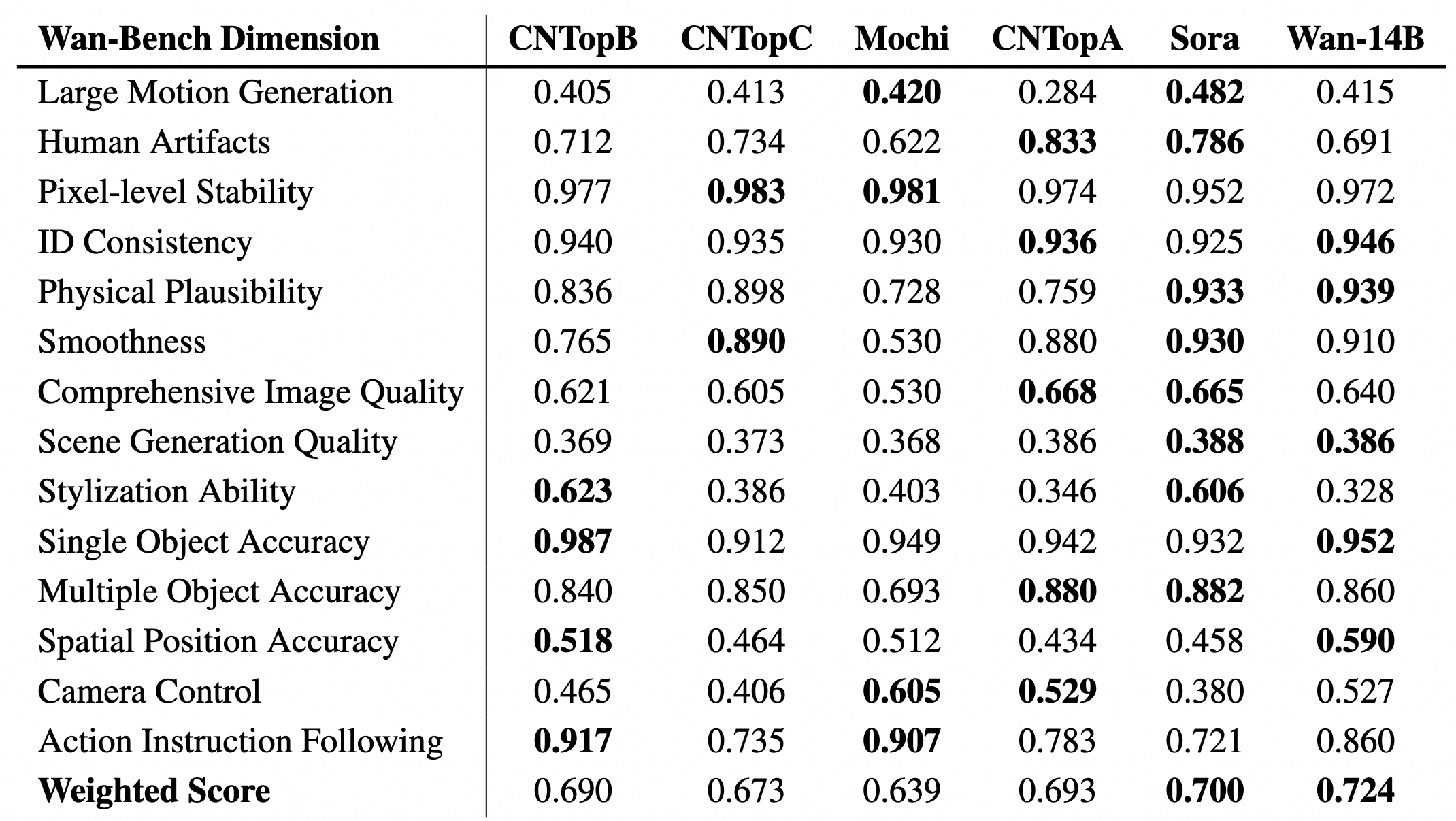
Wan 2.1 was evaluated across 14 major dimensions and 26 sub-dimensions using 1,035 internal prompts. The 14B model achieved a weighted VBench score of 0.724, outperforming both open-source and closed-source competitors at the time of release.
GPU Performance Benchmarks #
Performance across different GPUs (total time in seconds / peak GPU memory in GB):
| GPU | 1.3B 480P | 14B 480P | 14B 720P |
|---|---|---|---|
| RTX 4090 (24GB) | 281s / 8.2GB | Not supported | Not supported |
| A5000 (24GB) | 462s / 8.2GB | Not supported | Not supported |
| A40 (48GB) | 350s / 8.2GB | 1083s / 42GB | Not supported |
| A100 (80GB) | 170s / 8.2GB | 523s / 48GB | ~850s / 72GB |
| L40 (48GB) | 290s / 8.2GB | 859s / 42GB | Not supported |
| H100 (80GB) | 85s / 8.2GB | 284s / 48GB | ~580s / 72GB |
Real-World Production Costs #
For teams evaluating cloud GPU costs for video generation (as of early 2026):
| Model | Resolution | Duration | Gen Time | GPU Cost | Cost per clip |
|---|---|---|---|---|---|
| Wan 2.1 1.3B | 480P | 5s | ~4 min | RTX 4090 local | ~$0.02 (electricity) |
| Wan 2.1 14B | 480P | 5s | ~4 min | $2.50/hr (H100) | ~$0.17 |
| Wan 2.1 14B | 720P | 5s | ~10 min | $2.50/hr (H100) | ~$0.42 |
| HunyuanVideo | 720P | 5s | ~20 min | $3.49/hr (H200) | ~$0.70 |
Use Cases in Production #
Social Media Content Pipelines: A 5-second 480P clip costs approximately $0.17 on cloud H100 hardware with Wan 2.1 14B. At 100 clips per month, total cloud spend is under $20 — compared to $30–80/month for proprietary API services.
Ad Creative Prototyping: Wan 2.1’s bilingual text generation makes it ideal for East Asian markets where text overlays in Chinese or Japanese are common. No other open-source model generates Chinese characters natively in video.
Film Pre-visualization: The FLF2V (first-last-frame-to-video) task allows storyboard artists to animate between two keyframes, producing rough motion studies for scene planning.
Advanced Usage / Production Hardening #
FP8 Quantization for VRAM Reduction #
For running the 14B model on limited VRAM:
# FP8 quantization reduces VRAM by ~20%
python generate.py \
  --task t2v-14B \
  --size 832*480 \
  --ckpt_dir ./Wan2.1-T2V-14B \
  --offload_model True \
  --t5_cpu \
  --prompt "Your prompt here"
VRAM Optimization Flags #
| Flag | Description | VRAM Impact |
|---|---|---|
--offload_model True | Offload transformer to CPU between steps | -15–20GB |
--t5_cpu | Run T5 encoder on CPU | -2–3GB |
--dit_fsdp | Shard DiT across GPUs | Divides by GPU count |
--ulysses_size N | Use sequence parallelism | Linear reduction |
Docker Deployment #
FROM nvidia/cuda:12.1.0-devel-ubuntu22.04

WORKDIR /app
RUN apt-get update && apt-get install -y python3-pip git

COPY requirements.txt .
RUN pip install -r requirements.txt

COPY . .
RUN huggingface-cli download Wan-AI/Wan2.1-T2V-14B \
    --local-dir ./Wan2.1-T2V-14B

EXPOSE 7860
CMD ["python", "gradio/t2v_14B_singleGPU.py", "--ckpt_dir", "./Wan2.1-T2V-14B"]
Build and run:
docker build -t wan2.1 .
docker run --gpus all -p 7860:7860 wan2.1
Monitoring Generation Jobs #
For production deployments, wrap generation in a monitoring script:
import time
import psutil
import torch
from wan.utils.generation import generate_video

def generate_with_monitoring(prompt, **kwargs):
    process = psutil.Process()
    start_mem = process.memory_info().rss / 1024**3
    start_time = time.time()

    result = generate_video(prompt, **kwargs)

    elapsed = time.time() - start_time
    peak_mem = process.memory_info().rss / 1024**3
    gpu_mem = torch.cuda.max_memory_allocated() / 1024**3

    print(f"Generation completed in {elapsed:.1f}s")
    print(f"Peak GPU memory: {gpu_mem:.1f} GB")
    print(f"RAM delta: {peak_mem - start_mem:.1f} GB")

    return result
LoRA Fine-Tuning #
Community tools like DiffSynth-Studio support LoRA training on Wan 2.1 for style-specific video generation:
# Install DiffSynth-Studio
pip install diffsynth-studio

# Train a style LoRA
python -m diffsynth.train \
  --model_name wan2.1-t2v-14b \
  --dataset_path ./my_style_videos \
  --output_path ./wan_lora_output \
  --learning_rate 1e-4 \
  --num_train_steps 1000
Comparison with Alternatives #
| Feature | Wan 2.1 | HunyuanVideo | CogVideoX-1.5-5B | Open-Sora 2.0 |
|---|---|---|---|---|
| Parameters | 1.3B / 14B | ~13B | 5B | 7B |
| Min VRAM (T2V) | 8.19GB (1.3B) | 12GB (quantized) | 5GB (diffusers) | 24GB |
| Max Resolution | 720P | 1080P | 1360x768 | 768P |
| Max Duration | ~5s (81 frames) | ~5s | 10s | ~5s |
| Generation Speed (H100, 720P) | ~10 min | ~20 min | ~9 min | ~15 min |
| Bilingual Text | Yes (Chinese + English) | No | No | No |
| I2V Support | Yes (14B) | Yes | Yes | Yes (T2I2V) |
| Video Editing | Yes (VACE) | No | No | No |
| License | Apache-2.0 | Apache-2.0 | Apache-2.0 | Apache-2.0 |
| VBench Score | 0.724 | 0.71 | 0.68 | 0.73 |
| Motion Coherence | 8/10 | 9/10 | 7.5/10 | 8/10 |
| Consumer GPU Ready | Yes (1.3B) | Partially (quantized) | Yes (diffusers) | No |
| ComfyUI Support | Native | Community | Community | Community |
| Training Cost | Not disclosed | Not disclosed | Not disclosed | $200K |
When to Choose Each Model #
- Wan 2.1: Best overall balance of quality, speed, and accessibility. Choose if you need bilingual text, consumer GPU support (1.3B), or native ComfyUI integration.
- HunyuanVideo: Choose if maximum motion realism and visual fidelity are your top priorities, and you have access to H200-class hardware.
- CogVideoX-1.5-5B: Choose if you need the lowest possible VRAM footprint with diffusers, or 10-second clip generation.
- Open-Sora 2.0: Choose if you need a training-efficient pipeline ($200K training cost documented) or T2I2V workflow with FLUX integration.
Limitations / Honest Assessment #
Wan 2.1 is not a magic wand. Here is what the spec sheets do not tell you:
Clip length is hard-capped at ~5 seconds. The model was trained on 81 frames at 16 FPS. Attempting to generate longer clips through sliding window or autoregressive approaches produces visible drift and quality degradation after frame 81.
720P on the 14B model is H100-only. The official README states 720P support, but in practice you need 65–80GB of VRAM. An RTX 4090 (24GB) cannot run 720P even with quantization. For consumer GPUs, 480P is the realistic ceiling.
Physics simulation is limited. While motion coherence is good, complex physical interactions (fluids, cloth, rigid body collisions) exhibit artifacts. Models like Kling 2.1 handle physics-heavy scenes more convincingly.
The 1.3B model has quality trade-offs. It is fast and accessible, but prompt adherence is noticeably weaker than the 14B model. Detailed scene descriptions often get simplified or ignored.
Prompt extension adds latency. The optional Qwen-based prompt extension improves quality but adds 30–60 seconds per generation. For batch processing, this overhead compounds quickly.
Warm-up time on first run. Initial model loading and compilation can take 5–10 minutes on first inference. Subsequent generations start immediately.
Frequently Asked Questions #
Q: Can Wan 2.1 run on an RTX 3060 12GB?
The 1.3B model requires 8.19GB VRAM, so an RTX 3060 12GB can run it with FP16 precision at 480P. The 14B model will not fit. Use community GGUF or FP8 quantized versions of the 1.3B model for additional headroom.
Q: How does Wan 2.1 compare to Sora or Kling?
Closed-source models like Sora and Kling still lead in temporal consistency, physics understanding, and maximum clip length (60+ seconds). Wan 2.1’s advantage is open weights, local execution, and zero API costs. For 5-second clips, the gap has narrowed substantially — Wan 2.1 14B at 720P approaches mid-tier proprietary quality.
Q: What is the difference between the 1.3B and 14B models?
The 1.3B model is distilled from the 14B model and optimized for speed. It runs on consumer GPUs but produces softer details and weaker prompt adherence. The 14B model is the full-quality version with significantly better motion dynamics, text rendering, and scene complexity handling.
Q: Does Wan 2.1 support video-to-video editing?
Yes, through the VACE (Video Auto Content Editing) extension. VACE supports reference-to-video generation, video-to-video editing, and masked video editing. Both 1.3B and 14B VACE models are available. See the VACE User Guide for detailed instructions.
Q: Can I use Wan 2.1 commercially?
Yes. Wan 2.1 is licensed under Apache 2.0, which permits commercial use, modification, and distribution. You retain full rights to generated content. Note that this applies to the model weights and code — always review the license for any third-party dependencies.
Q: How do I reduce VRAM usage for the 14B model?
Use --offload_model True to move the transformer to CPU between diffusion steps, --t5_cpu to run the text encoder on CPU, and FP8 quantization for ~20% VRAM reduction. With all optimizations, the 14B 480P model can run on ~35GB VRAM.
Q: Why does my generated video have flickering or inconsistent motion?
Ensure you are using the Wan 2.1 VAE (not a generic VAE). Flickering usually comes from using an incompatible VAE or incorrect frame count settings. For the 14B model, use exactly 81 frames for optimal results. The flow_shift parameter should be 5.0 for 720P and 3.0 for 480P.
Q: Does Wan 2.1 work with AMD GPUs or Apple Silicon?
Official support is CUDA-only. Community ports exist for ROCm (AMD) but performance and stability vary. Apple Silicon is not recommended due to the Unified Memory architecture’s bandwidth limitations with large transformer models.
Conclusion #
Wan 2.1 delivers on a promise that few open-source video models have: production-quality output on accessible hardware. The 1.3B model democratizes video generation for hobbyists and indie creators, while the 14B model competes with proprietary services for professional workflows. With 16,100+ GitHub stars, active community contributions (ComfyUI nodes, LoRA tools, acceleration libraries), and a permissive Apache-2.0 license, Wan 2.1 is the pragmatic choice for teams building video generation pipelines in 2026.
Action items:
- Clone the repo and run the 1.3B model on your local GPU today
- Benchmark the 14B model on cloud H100 hardware for your use case
- Join the Wan Discord or GitHub Discussions for community support
- Evaluate ComfyUI integration for visual workflow development
Join the dibi8 Telegram group for weekly AI tool deep dives and production deployment tips.
Recommended Hosting & Infrastructure #
Before you deploy any of the tools above into production, you’ll need solid infrastructure. Two options dibi8 actually uses and recommends:
- DigitalOcean — $200 free credit for 60 days across 14+ global regions. The default option for indie devs running open-source AI tools.
- HTStack — Hong Kong VPS with low-latency access from mainland China. This is the same IDC that hosts dibi8.com — battle-tested in production.
Affiliate links — they don’t cost you extra and they help keep dibi8.com running.
Sources & Further Reading #
- Wan 2.1 GitHub Repository
- Wan 2.1 Technical Report (arXiv:2503.20314)
- Wan 2.1 HuggingFace Models
- ComfyUI WanVideoWrapper by Kijai
- Diffusers Wan 2.1 Documentation
- TeaCache Acceleration for Wan 2.1
- CFG-Zero Enhancement
- VACE Video Editing Guide
- GPU Cloud Guide for Video AI (Spheron)
- Open-Sora 2.0 Technical Report
💬 Discussion