TradingAgents: The 82,000-Star LLM Multi-Agent Trading Framework — A Practical 2026 Guide
TradingAgents is an open-source LLM multi-agent framework (82,254 GitHub stars, Apache-2.0) that simulates a trading firm: analyst, researcher, trader, and risk agents debate a BUY/SELL/HOLD call. Built on LangGraph. Covers install, the agent pipeline, CLI + Python API, and an honest comparison with Qlib and single-agent bots.
- ⭐ 36717
- Python
- Apache-2.0
- Updated 2026-06-02
AI-Trader: 14K⭐ Fully Automated AI Trading Agent • Jesse: The Advanced Python Crypto Trading Framework with 30+ Technical Indicators — 2026 Setup Guide
Introduction #
Most “AI trading bot” projects are a single LLM with a prompt that says “decide whether to buy.” That falls apart the moment a real decision needs a fundamentals check, a news scan, a bull-versus-bear argument, and a risk sign-off. Real trading desks do not work as one brain — they work as a team that argues.
TradingAgents takes that literally. It is an open-source framework with 82,254 GitHub stars and an Apache-2.0 license, maintained by TauricResearch, that models a trading firm as a team of specialized LLM agents who pass research down a pipeline and debate before committing to a BUY/SELL/HOLD call. This guide covers how the agent pipeline is wired, how to install and run it (CLI and Python), and an honest comparison with Qlib and single-agent bots.
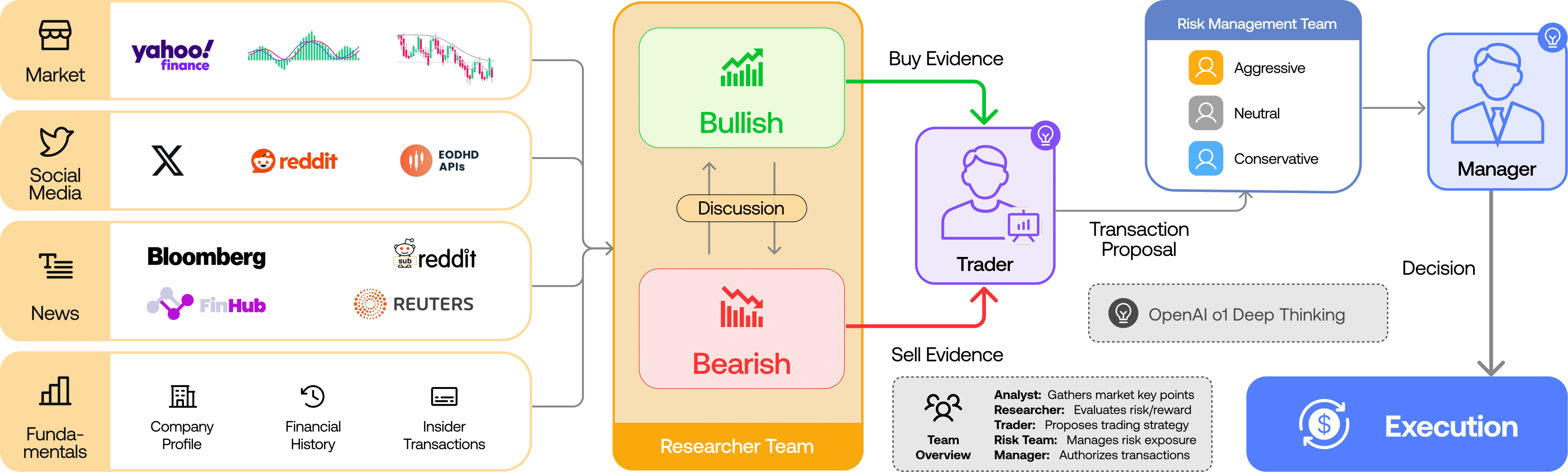
TradingAgents models a trading firm: analysts → researchers (bull vs bear) → trader → risk team → portfolio manager (source: TauricResearch/TradingAgents, via dibi8 analysis)
What Is TradingAgents? #
TradingAgents is a multi-agent LLM framework that simulates the workflow of a real trading firm to produce a researched trading decision for a given stock and date. Instead of one model guessing, specialized agents each do one job, hand their findings forward, and argue the call out before it is finalized.
It is a research framework, built by the Tauric Research community to study how LLM agents collaborate on financial reasoning — not a turnkey money-printing bot, and explicitly not financial advice. It is written in Python and built on top of LangGraph, which orchestrates the agent graph and state passing.
How TradingAgents Works #
The framework is a directed pipeline of agent teams. Each stage narrows raw data into a defensible decision.
- Analyst team — four specialists gather evidence: a fundamentals analyst (financial statements, ratios), a sentiment analyst (social/Reddit signal), a news analyst (macro + company news), and a technical analyst (price indicators like MACD, RSI).
- Research team — a bullish researcher and a bearish researcher debate the analyst findings over several rounds, surfacing the strongest case on each side.
- Trader — synthesizes the debate into a concrete trade plan (direction + reasoning).
- Risk management team — aggressive, neutral, and conservative risk agents stress-test the plan from different risk appetites.
- Portfolio manager — approves or rejects, producing the final BUY / SELL / HOLD decision.

The analyst team gathers fundamentals, sentiment, news, and technicals (source: TauricResearch/TradingAgents, via dibi8 analysis)
Each agent is an LLM call with a role-specific prompt and access to data tools. LangGraph manages the shared state so later agents see earlier agents’ output.
Deploy TradingAgents: The 82,000-Star LLM Multi-Agent Trading Framework on DigitalOceanInstallation & Setup #
TradingAgents runs on Python 3.10+. You clone the repo and install dependencies; it needs two API keys — an LLM provider (OpenAI by default) and FinnHub for financial data.
To run TradingAgents as a scheduled production job you want an always-on box — spin one up on DigitalOcean (free trial credit for new accounts), or HTStack for a low-latency Hong Kong VPS (the same IDC that hosts dibi8.com).
# 1. Clone
git clone https://github.com/TauricResearch/TradingAgents.git
cd TradingAgents

# 2. Isolated env (conda or venv)
conda create -n tradingagents python=3.10 -y && conda activate tradingagents

# 3. Install dependencies
pip install -r requirements.txt
Prefer a plain virtualenv over conda? Either works:
python -m venv .venv && source .venv/bin/activate
pip install -r requirements.txt
Set the two required API keys as environment variables:
export OPENAI_API_KEY=sk-your-key-here
export FINNHUB_API_KEY=your-finnhub-key   # free tier works for testing
Or keep them in a local .env so you do not re-export every shell:
# .env  (never commit this file)
OPENAI_API_KEY=sk-your-key-here
FINNHUB_API_KEY=your-finnhub-key
If you see KeyError: 'FINNHUB_API_KEY', the variable is not exported in the current shell. If LLM calls return 429, you are rate-limited on the OpenAI side — slow down or switch the model in config (below).
Core Usage #
The fastest path is the interactive CLI, which prompts you for a ticker and date and streams each agent’s reasoning:
python -m cli.main
For automation, drive it from Python with the TradingAgentsGraph API. You pass a ticker and a date, and get back the agents’ state plus the final decision:
from tradingagents.graph.trading_graph import TradingAgentsGraph
from tradingagents.default_config import DEFAULT_CONFIG

ta = TradingAgentsGraph(debug=True, config=DEFAULT_CONFIG.copy())
# Analyze NVDA as of a specific date (point-in-time, no look-ahead)
_, decision = ta.propagate("NVDA", "2024-05-10")
print(decision)   # -> BUY / SELL / HOLD + reasoning
You control cost and depth through the config. TradingAgents splits work between a “deep-thinking” model (heavy reasoning) and a “quick-thinking” model (cheap, high-volume calls):
config = DEFAULT_CONFIG.copy()
config["llm_provider"] = "openai"
config["deep_think_llm"] = "gpt-4o"        # used for debate / hard reasoning
config["quick_think_llm"] = "gpt-4o-mini"  # used for routine agent steps
config["max_debate_rounds"] = 2            # more rounds = deeper but pricier
config["online_tools"] = True              # pull live data vs cached
ta = TradingAgentsGraph(debug=True, config=config)
Set max_debate_rounds low while you are learning — every extra round multiplies LLM calls across the whole agent team.
You can also choose which analysts run, to trim cost when you only care about, say, fundamentals and news:
config["selected_analysts"] = ["fundamentals", "news"]  # skip sentiment + technical
ta = TradingAgentsGraph(debug=True, config=config)
To screen a watchlist, loop the call over several tickers for the same date:
watchlist = ["NVDA", "AAPL", "TSLA"]
for ticker in watchlist:
    _, decision = ta.propagate(ticker, "2024-05-10")
    print(f"{ticker}: {decision.splitlines()[0]}")   # first line = the call
The returned state holds the full debate so you can inspect why, not just what:
final_state, decision = ta.propagate("NVDA", "2024-05-10")
print(final_state["investment_debate_state"]["bull_history"])   # bull arguments
print(final_state["investment_debate_state"]["bear_history"])   # bear arguments
print(final_state["final_trade_decision"])                       # final rationale
Integration #
Because the decision step is just a Python call returning BUY/SELL/HOLD plus reasoning, TradingAgents slots into the research half of a pipeline. It does not place orders itself — you wire its output into your own execution or logging layer:
_, decision = ta.propagate("AAPL", "2024-06-01")
if "BUY" in decision:
    log_signal("AAPL", "BUY", source="tradingagents")
    # forward to your broker / paper-trading layer here
The data layer is pluggable too: FinnHub for fundamentals and news, price/indicator tools for technicals, and social sources for sentiment.
To regenerate decisions every market morning, wrap a script in cron:
# Run the watchlist screen at 08:00 on weekdays
0 8 * * 1-5 cd /opt/TradingAgents && /opt/.venv/bin/python screen_watchlist.py >> /var/log/ta.log 2>&1
You are not locked to OpenAI — point the deep/quick models at another provider through the same config:
config["llm_provider"] = "anthropic"
config["deep_think_llm"] = "claude-sonnet-4-6"
config["quick_think_llm"] = "claude-haiku-4-5"
Benchmarks & Real-World Use #
TradingAgents is used as a research testbed: you replay a historical date, let the agents reason on only the data available then (point-in-time), and study the decision and the debate transcript. Its real value is the explainability — unlike a black-box model, every call comes with the analysts’ evidence and the bull/bear arguments, which is why the project is popular for studying LLM reasoning in finance rather than as a plug-and-play earner.
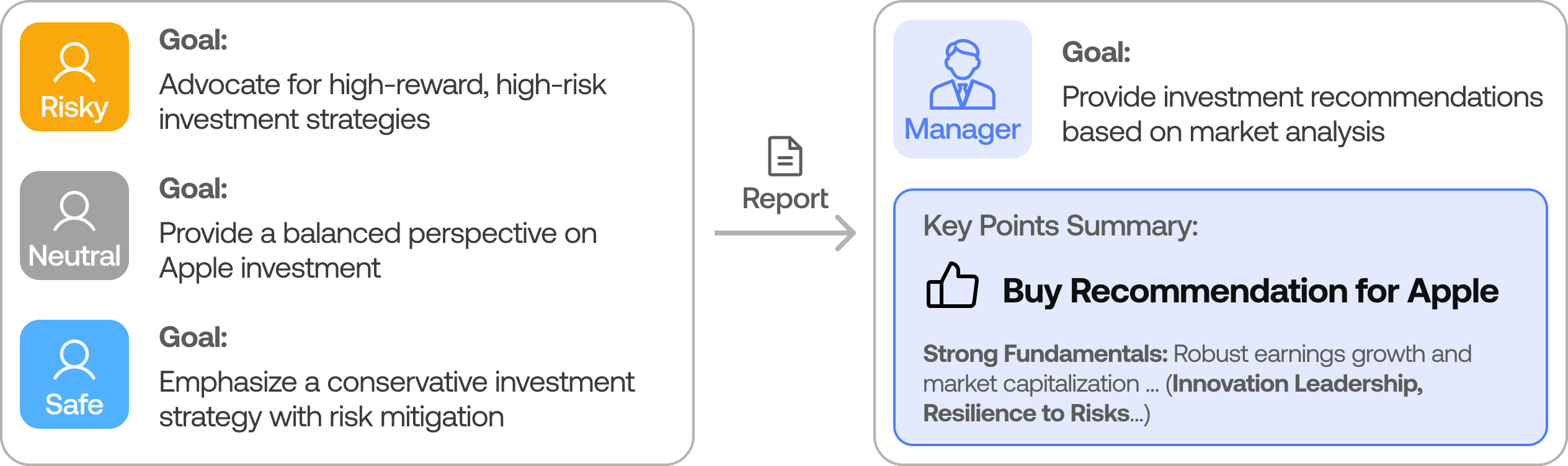
The risk team stress-tests every trade plan before the portfolio manager signs off (source: TauricResearch/TradingAgents, via dibi8 analysis)
A finished run returns a decision plus the reasoning trail — roughly:
FINAL TRANSACTION PROPOSAL: BUY
Rationale: Fundamentals analyst flags accelerating data-center revenue;
bull case (margin expansion) outweighed bear case (valuation) over 2 rounds;
risk team: neutral stance, position-size cautious. Portfolio manager: approve.
Because the transcript is captured, you can diff how the decision changes when you swap models or add debate rounds:
for rounds in (1, 3):
    config["max_debate_rounds"] = rounds
    ta = TradingAgentsGraph(config=config)
    _, d = ta.propagate("NVDA", "2024-05-10")
    print(rounds, "rounds ->", d.splitlines()[0])
Comparison with Alternatives #
See also our related open-source tools coverage.
TradingAgents, Qlib, and single-agent bots solve different problems. Here is where they actually differ.
| Feature | TradingAgents | Qlib | Single-agent LLM bot |
|---|---|---|---|
| Approach | LLM multi-agent debate | ML factor models | One LLM + prompt |
| Core unit | Analyst/researcher/trader/risk agents | LightGBM/LSTM signals | Single decision call |
| Explainability | High (full debate transcript) | Medium (feature importance) | Low |
| Data | FinnHub + news + sentiment + technicals | Point-in-time price/factor DB | Whatever you prompt |
| GitHub stars | 82,254 | 43,948 | varies |
| Built on | LangGraph | Custom Python | varies |
| Best for | Studying LLM reasoning on a trade | ML cross-sectional strategies | Quick demos |
The honest summary: if you want statistical signals over a stock universe, Qlib is purpose-built. If you want to study how an LLM team reasons to one decision with a full audit trail, TradingAgents is the more interesting tool. They are complementary, not competitors.
Limitations & Honest Assessment #
TradingAgents covers a lot, but it is not for everyone, and pretending otherwise wastes your time.
- Not financial advice, not a live trader. It outputs a researched opinion; it places no orders and makes no guarantees. The repo says so plainly.
- LLM cost adds up. A full multi-agent run with debate rounds is many LLM calls per ticker per date. Watch your OpenAI bill.
- Decision quality depends on the model. Cheap quick-think models degrade the analysis; the good results assume capable deep-think models.
- Data coverage limits. Free FinnHub tiers and sentiment sources are incomplete; gaps quietly weaken the analysis.
- Backtest carefully. It avoids look-ahead by date, but turning agent decisions into a tradable, fee-aware strategy is your job, not the framework’s.
For AI-driven crypto strategies specifically, Minara (AI + crypto) covers a different lane, and exchange-native execution runs on Binance.
Conclusion #
TradingAgents is the most interesting open-source project in 2026 for studying how a team of LLM agents reasons toward a trading decision — not because it prints money, but because it shows its work at every step. The audit trail is the product: you can see exactly which analyst raised which flag, how the bull and bear sides argued, and why the risk team sized the position the way it did. Clone it, run one ticker through the CLI, and read the full debate transcript before you trust any signal it produces.
- Join the dibi8 English Telegram group for open-source AI tool drops and quant discussion.
- Read next: related guides on dibi8.
- Spin up a research box on DigitalOcean and run your first analysis tonight.
Sources & Further Reading:
- GitHub repository: https://github.com/TauricResearch/TradingAgents
- Official docs / README: https://github.com/TauricResearch/TradingAgents#readme
- LangGraph (orchestration): https://github.com/langchain-ai/langgraph
Some links above are affiliate links. dibi8.com may earn a commission if you sign up, at no extra cost to you. Helps keep the site running and the content free.
💬 Discussion