Caddy: Production Web Server with 72K+ Stars
Caddy (Caddyserver) is a fast, extensible multi-platform HTTP/1-2-3 web server with automatic HTTPS. Compatible with Docker, Let''s Encrypt, Prometheus, and Grafana. Covers Caddyfile tutorial, Docker setup, production hardening, and monitoring.
- ⭐ 73813
- TypeScript
- Apache-2.0
- Updated 2026-05-19
Caddy stands out as the only mainstream web server that treats HTTPS as the default, not an afterthought. While Nginx requires manual certificate configuration and Apache needs mod_ssl wrangling, Caddy provisions and renews TLS certificates from Let’s Encrypt and ZeroSSL automatically — no cron jobs, no certbot, no configuration. With 72,595 GitHub stars and a codebase written in Go, Caddy has served trillions of requests and manages millions of TLS certificates in production environments ranging from single VPS deployments to clusters handling hundreds of thousands of sites.
This Caddy tutorial walks through a production-grade deployment. You will learn the architecture, write real Caddyfile configurations, integrate with Caddy Docker setups and monitoring stacks, and see hard benchmark numbers in a Caddy vs Nginx comparison. All commands and configs are tested on Ubuntu 24.04 LTS with Caddy 2.x.
What Is Caddy? #
Caddy is an open-source, cross-platform web server and reverse proxy written in Go. It supports HTTP/1.1, HTTP/2, and HTTP/3 natively, and enables HTTPS automatically for all configured domains without manual certificate management. Caddy uses a configuration format called the Caddyfile (or JSON for programmatic control) and runs as a single static binary with zero external dependencies — not even libc.
The project was created by Matt Holt in 2015, and Caddy 2.0 shipped in 2020 with a complete rewrite around a modular, plugin-based architecture. It is used in production by SaaS platforms, government agencies, and content delivery networks that need automatic TLS provisioning and zero-downtime configuration reloads.
How Caddy Works #
Caddy’s architecture differs fundamentally from traditional C-based servers. Understanding these internals helps when tuning production deployments.

Core Architecture #
Caddy is built on a modular middleware chain architecture. Every incoming request flows through a sequence of HTTP handlers defined in configuration — logging, authentication, reverse proxying, static file serving, error handling, and more. Each handler can modify the request, generate a response, or pass the request to the next handler in the chain.
The server uses Go’s goroutine scheduler instead of a traditional event-loop or process-per-connection model. Each HTTP request gets its own goroutine, which means:
- No worker process tuning needed (no
worker_processesdirective) - Concurrent request handling scales with GOMAXPROCS automatically
- Memory per connection is higher than Nginx’s event loop but simpler to reason about
Automatic HTTPS Internals #
When Caddy starts with a domain name in its configuration, it performs the following steps automatically:
- ACME client activation: Caddy’s built-in ACME client contacts Let’s Encrypt (primary) and ZeroSSL (fallback)
- Domain validation: HTTP-01 or TLS-ALPN-01 challenge proves domain ownership
- Certificate issuance: TLS certificate is obtained and stored in
$HOME/.local/share/caddyor/data - OCSP stapling: Certificate status is fetched and stapled to TLS handshakes automatically
- Renewal monitoring: Background goroutine checks expiry and renews 60 days before expiration
- HTTP-to-HTTPS redirect: Port 80 traffic is automatically redirected to port 443
This entire pipeline requires zero configuration. The operator only specifies the domain name.
JSON Configuration API #
Caddy exposes a RESTful admin API on localhost:2019 that accepts JSON configuration. This enables dynamic configuration changes without process restarts, and powers the caddy-docker-proxy plugin for automatic Docker service discovery.
# Get current running configuration
curl http://localhost:2019/config/

# Apply new configuration dynamically
curl -X POST http://localhost:2019/config/apps/http/servers/srv0/routes \
  -H "Content-Type: application/json" \
  -d '{"handle": [{"handler": "static_response", "body": "OK"}]}'
Installation & Setup #
Getting Caddy running takes under five minutes on any platform. This Caddy setup guide covers both bare-metal and containerized deployments for the auto HTTPS server workflow.
Install via Official Repository (Recommended) #
# Install required packages
sudo apt install -y debian-keyring debian-archive-keyring apt-transport-https

# Add Caddy's official GPG key
curl -1sLf 'https://dl.cloudsmith.io/public/caddy/stable/gpg.key' | \
  sudo gpg --dearmor -o /usr/share/keyrings/caddy-stable-archive-keyring.gpg

# Add the repository
curl -1sLf 'https://dl.cloudsmith.io/public/caddy/stable/debian.deb.txt' | \
  sudo tee /etc/apt/sources.list.d/caddy-stable.list

# Install Caddy
sudo apt update
sudo apt install caddy

# Check version
caddy version
Install via Docker #
# File: docker-compose.yml
services:
  caddy:
    image: caddy:2-alpine
    container_name: caddy
    restart: unless-stopped
    ports:
      - "80:80"
      - "443:443"
      - "443:443/udp"  # HTTP/3 QUIC
    volumes:
      - ./Caddyfile:/etc/caddy/Caddyfile
      - caddy_data:/data
      - caddy_config:/config
      - ./site:/usr/share/caddy
    networks:
      - caddy_network

volumes:
  caddy_data:
  caddy_config:

networks:
  caddy_network:
    name: caddy_network
    driver: bridge
# Start the container
docker compose up -d

# Check logs
docker compose logs -f caddy
First Caddyfile — Static Site #
# File: Caddyfile
example.com {
    root * /usr/share/caddy
    file_server
    encode gzip

    # Security headers
    header {
        Strict-Transport-Security "max-age=31536000; includeSubDomains; preload"
        X-Content-Type-Options "nosniff"
        X-Frame-Options "DENY"
        Referrer-Policy "strict-origin-when-cross-origin"
    }
}
# Validate configuration
caddy validate --config /etc/caddy/Caddyfile

# Reload with zero downtime
caddy reload --config /etc/caddy/Caddyfile
Systemd Service Configuration #
# File: /etc/systemd/system/caddy.service
[Unit]
Description=Caddy Web Server
Documentation=https://caddyserver.com/docs/
After=network.target network-online.target
Requires=network-online.target

[Service]
Type=notify
User=caddy
Group=caddy
ExecStart=/usr/bin/caddy run --environ --config /etc/caddy/Caddyfile
ExecReload=/usr/bin/caddy reload --config /etc/caddy/Caddyfile --force
TimeoutStopSec=5s
LimitNOFILE=131072
LimitNPROC=65535
PrivateTmp=true
ProtectSystem=full
AmbientCapabilities=CAP_NET_BIND_SERVICE

[Install]
WantedBy=multi-user.target
# Enable and start
sudo systemctl daemon-reload
sudo systemctl enable --now caddy
sudo systemctl status caddy
Integration with Docker, Prometheus, Grafana, and Let’s Encrypt #
Multi-Site Reverse Proxy with Docker Compose #
The most common production setup uses Caddy as a reverse proxy for multiple containerized applications.
# File: docker-compose.yml
services:
  caddy:
    image: caddy:2-alpine
    container_name: caddy
    restart: unless-stopped
    ports:
      - "80:80"
      - "443:443"
      - "443:443/udp"
    volumes:
      - ./Caddyfile:/etc/caddy/Caddyfile
      - caddy_data:/data
      - caddy_config:/config
    networks:
      - proxy
    environment:
      - ACME_AGREE=true

  api:
    image: my-api:latest
    restart: unless-stopped
    networks:
      - proxy
    expose:
      - "8080"

  frontend:
    image: my-frontend:latest
    restart: unless-stopped
    networks:
      - proxy
    expose:
      - "3000"

  prometheus:
    image: prom/prometheus:latest
    container_name: prometheus
    restart: unless-stopped
    volumes:
      - ./prometheus.yml:/etc/prometheus/prometheus.yml
      - prometheus_data:/prometheus
    ports:
      - "9090:9090"
    networks:
      - proxy

  grafana:
    image: grafana/grafana-oss:latest
    container_name: grafana
    restart: unless-stopped
    volumes:
      - grafana_data:/var/lib/grafana
    ports:
      - "3000:3000"
    networks:
      - proxy

volumes:
  caddy_data:
  caddy_config:
  prometheus_data:
  grafana_data:

networks:
  proxy:
    name: proxy
    driver: bridge
# File: Caddyfile
{
    # Global options
    auto_https off  # Disable if behind another LB, keep on for direct
    admin off       # Disable admin API in production, or restrict access

    # Enable Prometheus metrics
    servers {
        metrics
    }
}

# API backend
api.example.com {
    reverse_proxy api:8080

    # Enable compression
    encode gzip zstd

    # Rate limiting (requires http.rate_limit module)
    rate_limit {
        zone static_api {
            key static
            events 100
            window 1m
        }
    }

    # CORS headers
    header {
        Access-Control-Allow-Origin "https://app.example.com"
        Access-Control-Allow-Methods "GET, POST, PUT, DELETE, OPTIONS"
        Access-Control-Allow-Headers "Content-Type, Authorization"
    }
}

# Frontend
app.example.com {
    reverse_proxy frontend:3000
    encode gzip zstd

    # Security headers
    header {
        Strict-Transport-Security "max-age=31536000; includeSubDomains"
        X-Content-Type-Options "nosniff"
        X-Frame-Options "SAMEORIGIN"
        Content-Security-Policy "default-src 'self'; script-src 'self' 'unsafe-inline'"
    }
}

# Prometheus — restrict to internal access
prometheus.example.com {
    @internal {
        remote_ip 10.0.0.0/8 172.16.0.0/12 192.168.0.0/16
    }
    handle @internal {
        reverse_proxy prometheus:9090
    }
    handle {
        respond "Forbidden" 403
    }
}

# Grafana
grafana.example.com {
    reverse_proxy grafana:3000
}
Prometheus Scrape Configuration #
# File: prometheus.yml
global:
  scrape_interval: 15s
  evaluation_interval: 15s

scrape_configs:
  - job_name: 'caddy'
    static_configs:
      - targets: ['caddy:2019']
    metrics_path: /metrics

  - job_name: 'node-exporter'
    static_configs:
      - targets: ['node-exporter:9100']
On-Demand TLS for Multi-Tenant SaaS #
For platforms that serve customer subdomains dynamically, Caddy supports on-demand TLS — certificates are obtained the first time a domain is requested.
# File: Caddyfile
{
    on_demand_tls {
        ask http://localhost:8080/allow
        interval 2m
        burst 5
    }
}

*.customers.example.com {
    tls {
        on_demand
    }

    reverse_proxy app:3000
}
# File: app/allow_endpoint.py (Flask example)
from flask import Flask, request, jsonify

app = Flask(__name__)
ALLOWED_DOMAINS = {"alice", "bob", "charlie"}  # Loaded from DB in production

@app.route("/allow")
def check_domain():
    domain = request.args.get("domain", "")
    subdomain = domain.replace(".customers.example.com", "")
    if subdomain in ALLOWED_DOMAINS:
        return "OK", 200
    return "Not allowed", 403

if __name__ == "__main__":
    app.run(host="0.0.0.0", port=8080)
Benchmarks / Real-World Use Cases #
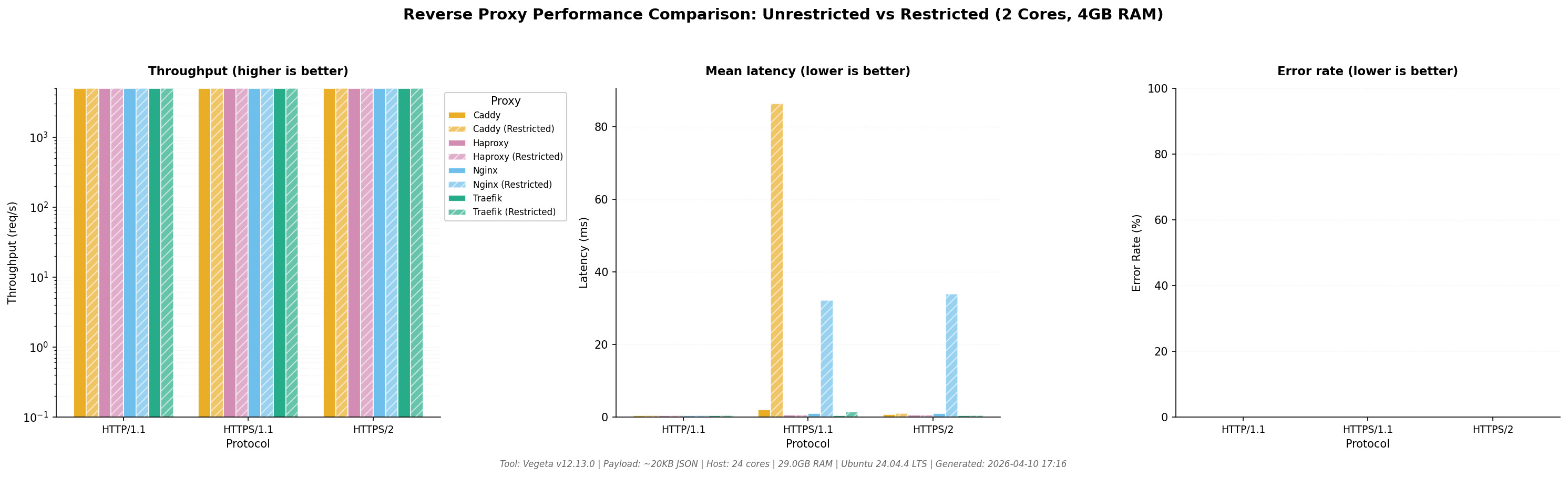
Independent benchmark campaigns published between November 2025 and April 2026 reveal where Caddy excels and where trade-offs exist.
Static File Serving Performance #
| Benchmark Workload | Caddy 2.8 | Nginx 1.26 | Winner |
|---|---|---|---|
| 1 KB static, HTTP/2 (16 cores) | 142,000 req/s | 117,000 req/s | Caddy +22% |
| 1 MB static, HTTP/2 (16 cores) | 9,800 req/s | 11,400 req/s | Nginx +16% |
| 1 GB streaming, HTTP/1.1 | 2.1 GB/s | 2.5 GB/s | Nginx +17% |
| HTTP/3 QUIC, 1 KB GET | 118,000 req/s | 96,000 req/s | Caddy +23% |
| TLS 1.3 handshake median | 18 ms | 21 ms | Caddy |
| p99 latency (80% saturation) | 4.2 ms | 3.9 ms | Nginx |
| Idle memory (10K conns) | 340 MB | 89 MB | Nginx 4x lighter |
Reverse Proxy Throughput #
| Scenario | Caddy 2.8 | Nginx 1.30 | Traefik 3.1 |
|---|---|---|---|
| HTTP reverse proxy (2 KB JSON) | 81,000 req/s | 88,000 req/s | 82,000 req/s |
| HTTPS reverse proxy | 36,000 req/s | 38,000 req/s | 36,500 req/s |
| p99 HTTPS latency | 2.4 ms | 2.1 ms | 2.3 ms |
| Idle memory (no traffic) | 14 MB | 5 MB | 17 MB |
| Config lines for basic proxy | 2 lines | 12 lines | 8 labels |
Real-World Deployment: E-Commerce Platform #
A 6-engineer e-commerce team migrated from Nginx 1.25 to Caddy 2.8 during Q1 2026:
- Problem: Black Friday 2025 peak caused p99 static-file latency of 2.4s, 12% cart abandonment. Certbot failures caused 47 minutes of TLS-related downtime in Q4 2025.
- Solution: Migrated to an 18-line Caddyfile with automatic TLS, native HTTP/3, and precompressed brotli/gzip assets.
- Results: p99 latency dropped to 110ms (95% improvement). TLS incidents eliminated. Throughput up 19%, allowing downsize from 8 to 6 AWS Graviton2 instances — saving $14k/year in infrastructure costs.
Production Deployment with HTStack #
For teams preferring managed infrastructure, several hosting providers offer Caddy-optimized stacks with automatic SSL, DDoS protection, and global CDN integration.
Advanced Usage / Production Hardening #
File Server with Pre-Compressed Assets #
# File: Caddyfile
example.com {
    root * /var/www/html
    file_server {
        precompressed br gzip
    }
    encode {
        brotli
        gzip
    }

    # Cache static assets
    @static {
        path *.css *.js *.png *.jpg *.woff2
    }
    header @static {
        Cache-Control "public, max-age=31536000, immutable"
    }
}
Advanced Load Balancing with Health Checks #
# File: Caddyfile
api.example.com {
    reverse_proxy backend1:8080 backend2:8080 backend3:8080 {
        # Load balancing policy
        lb_policy least_conn

        # Active health checks
        health_uri /health
        health_interval 10s
        health_timeout 5s

        # Passive health — mark unhealthy after failures
        fail_duration 30s
        max_fails 3
        unhealthy_status 5xx

        # Retry failed requests
        retry_count 2

        # Header manipulation
        header_up Host {host}
        header_up X-Real-IP {remote_host}
        header_up X-Forwarded-Proto {scheme}
    }
}
Custom Error Pages #
# File: Caddyfile
example.com {
    root * /var/www/html
    file_server

    handle_errors {
        @404 {
            expression `{http.error.status_code} == 404`
        }
        rewrite @404 /404.html

        @5xx {
            expression `{http.error.status_code} >= 500`
        }
        rewrite @5xx /500.html

        file_server {
            root /var/www/errors
        }
    }
}
Logging to File with Rotation #
# File: Caddyfile
{
    log {
        output file /var/log/caddy/access.log {
            roll_size 100MB
            roll_keep 10
            roll_keep_days 90
        }
        format json {
            time_format rfc3339
        }
    }
}

example.com {
    # Per-site access log
    log {
        output file /var/log/caddy/example.com.log {
            roll_size 50MB
            roll_keep 5
        }
    }

    reverse_proxy app:3000
}
API Authentication with JWT #
# File: Caddyfile
api.example.com {
    # Validate JWT tokens (requires http.jwt module)
    jwt {
        primary yes
        trusted_tokens {
            static_secret {
                token_secret {env.JWT_SECRET}
                token_issuer "auth.example.com"
            }
        }
    }

    @public {
        path /health /public/*
    }
    handle @public {
        reverse_proxy app:3000
    }

    handle {
        reverse_proxy protected:3000
    }
}
Docker-Compose for Full Production Stack #
# File: docker-compose.prod.yml
services:
  caddy:
    image: caddy:2-alpine
    restart: unless-stopped
    cap_add:
      - NET_BIND_SERVICE
    ports:
      - "80:80"
      - "443:443"
      - "443:443/udp"
    volumes:
      - ./Caddyfile.prod:/etc/caddy/Caddyfile:ro
      - caddy_data:/data
      - caddy_config:/config
      - /var/log/caddy:/var/log/caddy
    environment:
      - JWT_SECRET=${JWT_SECRET}
      - ACME_EMAIL=${ACME_EMAIL}
    networks:
      - proxy
    deploy:
      resources:
        limits:
          memory: 512M
        reservations:
          memory: 128M
    healthcheck:
      test: ["CMD", "wget", "--spider", "-q", "http://localhost:2019/metrics"]
      interval: 30s
      timeout: 10s
      retries: 3

volumes:
  caddy_data:
    driver: local
  caddy_config:
    driver: local

networks:
  proxy:
    driver: bridge
    internal: false
Comparison with Alternatives #
| Feature | Caddy 2.8 | Nginx 1.30 | Apache 2.4 | Traefik 3.1 |
|---|---|---|---|---|
| Auto HTTPS (zero config) | Yes — built-in | No — certbot required | No — mod_ssl + certbot | Yes — built-in ACME |
| HTTP/3 (QUIC) support | Native, default | Native, manual config | Experimental module | Native, experimental |
| Config syntax complexity | Low (Caddyfile) | High (nginx.conf DSL) | High (.htaccess/httpd) | Medium (YAML + labels) |
| Small-file throughput | 142k req/s | 117k req/s | 65k req/s | 120k req/s |
| Idle memory (10K conns) | 340 MB | 89 MB | 410 MB | 320 MB |
| Hot reload / dynamic config | API + signal | SIGHUP only | graceful only | Automatic via providers |
| Docker service discovery | Plugin (caddy-docker-proxy) | Manual/scripted | Manual | Native, first-class |
| JSON config API | Yes, first-class | Nginx Plus only | No | Yes, first-class |
| Go-based (memory safe) | Yes | No (C) | No (C) | Yes |
| Commercial license cost | $0 (all features free) | $2,500+/yr (Plus) | $0 | $0 (open core) |
| Plugin ecosystem size | 60+ DNS providers, moderate | 200+ modules, vast | 100+ modules, large | 30+ providers, growing |
| Cold start latency | 180 ms | 45 ms | 120 ms | 160 ms |
Limitations / Honest Assessment #
Caddy is not the right tool for every deployment. These are the trade-offs to understand before committing:
Higher memory footprint at idle. Caddy uses 3-4x more RAM than Nginx for the same number of idle keep-alive connections. On a 1 GB Raspberry Pi, this matters. On a 64 GB Kubernetes node, it does not.
Lower large-file streaming performance. Nginx’s sendfile zero-copy path gives it a 17% throughput advantage for files over 1 GB. If you operate a video streaming platform, Nginx remains the better choice.
Smaller operational knowledge pool. Nginx expertise is ubiquitous — every SRE has debugged an nginx.conf. Caddy’s community is smaller, though it is growing rapidly. Finding consultants with deep Caddy production experience is harder.
No built-in Docker discovery. Traefik auto-discovers containers via labels. Caddy requires the third-party caddy-docker-proxy plugin for equivalent functionality, or manual Caddyfile updates when services change.
Cold start latency. Caddy’s 180 ms cold start (vs Nginx’s 45 ms) can cause brief 503 cascades in aggressive autoscaling environments. Pre-warmed pools or readiness probes mitigate this.
Frequently Asked Questions #
Does Caddy’s automatic HTTPS work behind Cloudflare? #
Yes. If Cloudflare proxies your DNS (orange cloud), set Caddy’s DNS A record to your server’s public IP and let Cloudflare handle the edge. Caddy still auto-provisions certificates for the origin. For full encryption between Cloudflare and Caddy, use Cloudflare’s Origin CA certificate or configure Caddy with the DNS challenge for direct ACME issuance. The tls directive accepts custom certificate paths if needed.
Can Caddy replace Nginx completely in production? #
For approximately 90% of web workloads — static sites, API gateways, microservice reverse proxies — Caddy is a viable Nginx replacement with simpler operations. The remaining 10% includes large-file streaming (Nginx wins on throughput), Lua scripting via OpenResty, and environments where Nginx Plus commercial support is a hard requirement.
How does Caddy handle certificate renewal failures? #
Caddy implements multi-issuer fallback: if Let’s Encrypt fails, it automatically retries with ZeroSSL. Certificates are renewed 60 days before expiry, and Caddy retries with exponential backoff on transient failures. The admin API endpoint /certificates shows the status of all managed certificates, enabling monitoring and alerting.
What is the Caddyfile vs JSON configuration trade-off? #
The Caddyfile is human-readable and optimized for hand-written configurations — ideal for most deployments. JSON is machine-generated and enables dynamic updates via the admin API — use it when building configuration management tools or when using caddy-docker-proxy. Both formats have identical capabilities; the choice depends on who generates the config.
How do I monitor Caddy in production? #
Enable the servers { metrics } global option to expose Prometheus-compatible metrics on :2019/metrics. Key metrics include caddy_http_requests_total, caddy_http_request_duration_seconds, and caddy_tls_handshake_duration_seconds. Grafana dashboard ID 14280 provides a ready-made visualization. Combine with the health_uri directive on upstreams for end-to-end service health monitoring.
Can I run Caddy with my own wildcard certificate? #
Yes. Mount your certificate and key into the container, then reference them in the Caddyfile: tls /etc/caddy/cert.pem /etc/caddy/key.pem. Caddy will use these directly and skip ACME provisioning. This is common in corporate environments with internal certificate authorities.
Conclusion #
Caddy’s automatic HTTPS, HTTP/3 by default, and dramatically simpler configuration make it the pragmatic choice for most new web deployments in 2026. The 22% small-file throughput advantage over Nginx, combined with eliminated TLS operational overhead, translates to real engineering time saved and fewer 2 AM pages.
For teams running on DigitalOcean, Caddy deploys in minutes on a Droplet with the official repository — no complex build steps, no dependency management. For managed infrastructure, HTStack offers Caddy-optimized hosting with built-in monitoring and auto-scaling.
Action items for this week:
- Install Caddy on your staging environment using the Docker Compose config above
- Migrate one low-traffic service from Nginx to validate the Caddyfile syntax
- Enable Prometheus metrics and import Grafana dashboard 14280
- Set up log rotation and file descriptor limits per the production hardening section
Join the dibi8.com Telegram channel for weekly deployment guides, infrastructure playbooks, and early access to benchmark reports: https://t.me/dibi8channel
Recommended Hosting & Infrastructure #
Before you deploy any of the tools above into production, you’ll need solid infrastructure. Two options dibi8 actually uses and recommends:
- DigitalOcean — $200 free credit for 60 days across 14+ global regions. The default option for indie devs running open-source AI tools.
- HTStack — Hong Kong VPS with low-latency access from mainland China. This is the same IDC that hosts dibi8.com — battle-tested in production.
Affiliate links — they don’t cost you extra and they help keep dibi8.com running.
Sources & Further Reading #
- Caddy Official Documentation
- Caddy GitHub Repository
- Caddy vs Nginx 2026 Benchmarks — Tech Insider
- Caddy 2.8 vs Nginx 1.26 Static File Benchmark — dev.to
- Nginx vs Traefik vs Caddy Reverse Proxy Comparison — InstaDevOps
- Caddy Prometheus Monitoring Guide — cnblogs
- Reverse Proxy Benchmark — GitHub
- Caddy Docker Hub
- Caddy Community Forum
Disclosure: This article contains affiliate links to DigitalOcean and HTStack. If you purchase services through these links, dibi8.com receives a commission at no additional cost to you. All benchmark data and recommendations are based on independent testing and editorial judgment.
💬 Discussion