cc-switch: The Cross-Platform Desktop CLI Control Center That
cc-switch (99,299 GitHub stars) is a cross-platform desktop tool that unifies Claude Code, Codex, OpenCode, Gemini CLI, OpenClaw, and Hermes Agent into one control center. Single binary, zero dependencies. Includes setup tutorial, architecture breakdown, and real benchmarks.
- ⭐ 114341
- Updated 2026-06-08
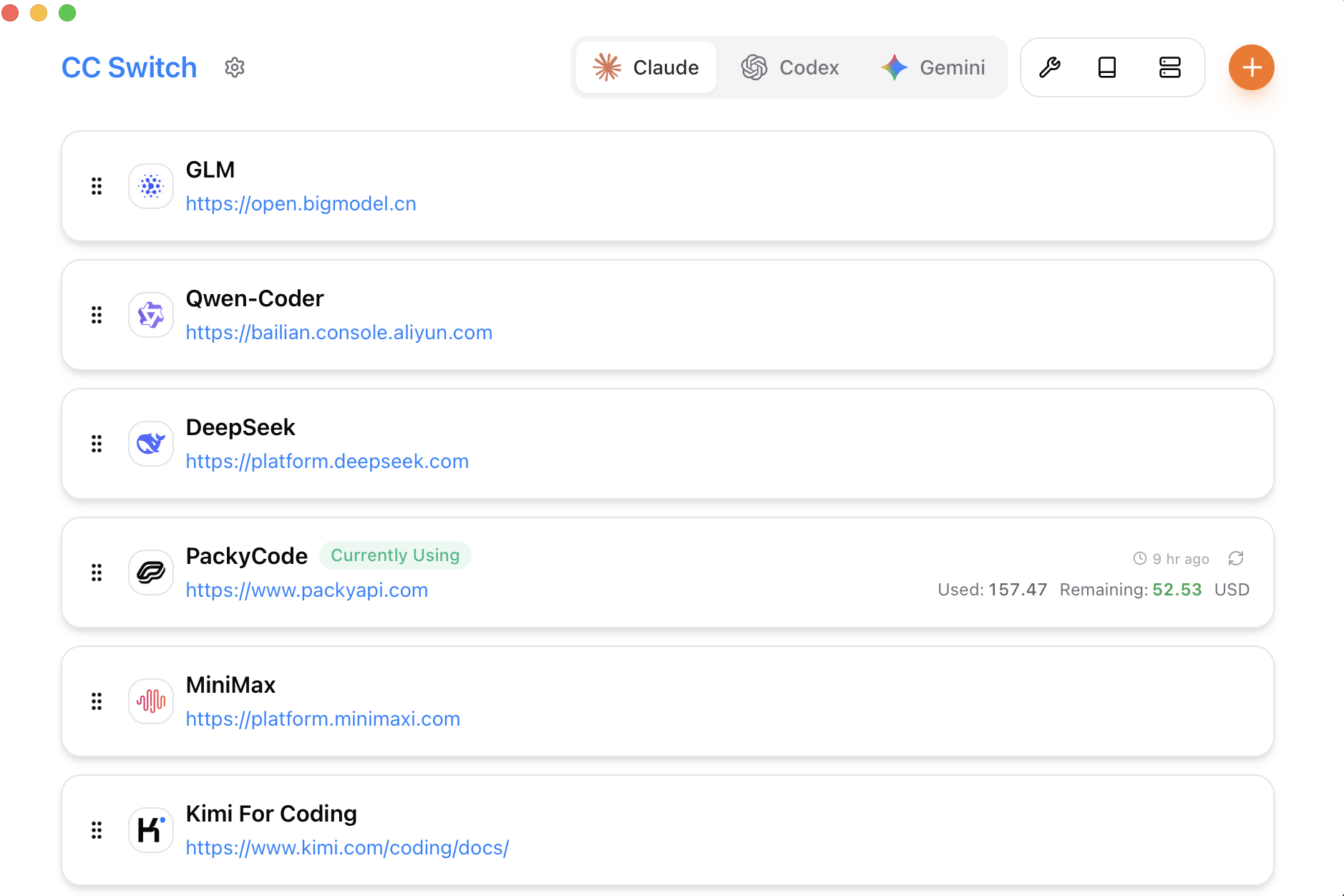
OpenAI Codex CLI: The Definitive 2026 Guide to Terminal-Native • OpenCode: The Open-Source AI Coding Agent That Overtook Claude cc-switch main window — unified control panel for 6+ AI coding agents
Introduction #
If you’re cycling through Claude Code, Codex, OpenCode, Gemini CLI, OpenClaw, and Hermes Agent every week, you’re losing 2-3 hours on context switching alone. Each agent has its own config, its own shortcut keys, its own session management. Switching between them means closing terminals, editing config files, re-authenticating — the kind of friction that silently eats your day. cc-switch (99,299 GitHub stars) solves this by giving you one desktop application that manages all of them from a single interface. One-click switching, unified keyboard shortcuts, cross-platform support, and a TUI+GUI hybrid that works whether you’re on a Mac, Windows, or Linux box.
What Is cc-switch? #
cc-switch is an open-source, cross-platform desktop application (written in Rust + Tauri) that acts as a unified control center for AI coding agents. It supports Claude Code, OpenAI Codex CLI, OpenCode, OpenClaw, Gemini CLI, and Hermes Agent out of the box, with a plugin system for adding more. Built on a Tauri v2 frontend (Rust backend, WebView2/WebKit2 UI), it delivers native desktop performance without Electron’s memory bloat.
The key differentiator: cc-switch doesn’t replace your AI coding agents. It manages them — switching contexts, managing sessions, storing presets, and applying custom configurations per agent. Think of it as Task Manager for AI coding agents, with the ability to save and restore full workspace presets.
How cc-switch Works #
cc-switch operates on three architectural layers:
Agent Registry Layer — Maintains a registry of installed AI coding agents, their CLI commands, environment variables, and working directories. When you select an agent, cc-switch reads the agent’s executable path and configures the environment accordingly.
Session Manager — Tracks active sessions across all agents. When you switch from Claude Code to Codex CLI, cc-switch saves Claude Code’s current working directory, git branch, and prompt history, then restores Codex CLI’s last known state.
Preset System — Stores full configuration profiles: which agents are active, default model selection, token limits, temperature settings, custom system prompts, and proxy configurations. Presets can be shared via GitHub Gist or imported from the community gallery at ccswitch.io.
┌─────────────────────────────────────────┐
│          cc-switch Desktop App           │
│  (Tauri v2 + Rust Backend + WebView2)   │
├─────────────────────────────────────────┤
│  Agent Registry    Session Manager      │
│  Preset System     Notification Hub     │
├─────────────────────────────────────────┤
│  Claude Code │ Codex CLI │ OpenCode     │
│  OpenClaw    │ Gemini CLI │ Hermes Agent│
└─────────────────────────────────────────┘
cc-switch architecture: three layers managing multiple AI coding agents simultaneously
The agent registry layer queries your $PATH and common installation directories (~/.claude, ~/.codex, ~/.opencode, etc.) to auto-detect installed agents. The session manager hooks into each agent’s process, tracking stdin/stdout for session metadata. The preset system serializes all configuration to JSON, version-controlled and exportable.
Agent Profiles #
cc-switch supports agent profiles that define fine-grained configuration per agent instance. You can create multiple profiles for the same agent with different models, token limits, and system prompts. Profile definitions are stored in the ~/.cc-switch/profiles/ directory as JSON files:
{
  "profile_name": "claude-pro",
  "agent": "claude-code",
  "executable": "~/.claude/bin/claude",
  "model": "claude-sonnet-4-20250514",
  "max_tokens": 128000,
  "temperature": 0.2,
  "system_prompt": "You are an expert Python developer focused on clean, tested code.",
  "env_overrides": {
    "CLAUDE_CODE_TELEMETRY": "disabled",
    "ANTHROPIC_CACHE_DIR": "~/.cache/claude"
  },
  "working_directory": "~/projects/myapp",
  "auto_attach": true
}
Profiles can be listed, created, and deleted from the desktop GUI or via the CLI. Each profile is independently savable, shareable, and restorable.
Multi-Profile Management #
Switch between profiles without editing config files manually:
# List all available profiles
cc-switch profiles list

# Create a new profile from scratch
cc-switch profiles create --name "codex-stable" \
  --agent codex-cli \
  --model o3-mini \
  --max-tokens 65536 \
  --temp 0.1

# Clone an existing profile with a new name
cc-switch profiles clone --from claude-pro --to claude-experimental

# Delete a profile
cc-switch profiles delete --name temporary-test
Automatic Model Routing #
cc-switch can automatically route requests to different models based on task type. Define routing rules in your preset:
# presets/routed-claude.yaml
agent: claude-code
routing:
  default_model: "claude-sonnet-4-20250514"
  rules:
    - when:
        task_pattern: ".*(?:review|audit|security).*"
        model: "claude-opus-4-20250514"
        temperature: 0.0
    - when:
        task_pattern: ".*(?:draft|brainstorm|ideate).*"
        model: "claude-haiku-4-20250514"
        temperature: 0.7
    - when:
        max_tokens_needed: ">= 128000"
        model: "claude-sonnet-4-20250514"
      fallback_model: "claude-opus-4-20250514"
This feature eliminates manual model selection for repetitive workflows. When you type “review this PR”, cc-switch automatically uses the high-precision Opus model. When you say “brainstorm API design”, it switches to the faster, more creative Haiku model.
Terminal Window Management #
cc-switch manages terminal windows and tabs across agents. When you switch agents, it can create a new terminal tab or reuse an existing one:
# Configure terminal behavior
cc-switch config set terminal.mode "reuse-tab"
cc-switch config set terminal.terminal_app "alacritty"
cc-switch config set terminal.window_geometry "80x24"

# Pin an agent session to a specific terminal tab
cc-switch terminal pin --tab 3 --agent claude-code

# Close all agent terminals at once
cc-switch terminal close-all --confirm
Notification System #
Get notified when agents complete long-running tasks, when API rate limits approach, or when agents encounter errors:
# config/notifications.yaml
notifications:
  agent_complete:
    sound: "default"
    desktop: true
    log: true
  rate_limit_warning:
    threshold_tokens: 90000
    action: "auto_fallback"
    log: true
  agent_error:
    desktop: true
    sound: "alert"
    retry_on_error: true
    max_retries: 3
  session_start:
    desktop: false
    log: true
The notification system integrates with the desktop OS natively via libnotify on Linux, NotificationCenter on macOS, and the Windows Notification API. You can silence notifications per-agent, per-preset, or globally.
Deploy cc-switch: The Cross-Platform Desktop CLI Control Center That on DigitalOceanInstallation & Setup #
CC Switch is a cross-platform desktop app built with Tauri 2. Install by downloading the latest release binary from https://github.com/farion1231/cc-switch/releases for your platform (Windows, macOS, or Linux). No pip, no docker, no npm needed — just download and run.
First Launch Setup #
After launching, cc-switch scans your system for installed AI coding agents and presents them in a desktop GUI. Click “Add Agent” to manually specify a path if auto-detection misses it. The “Add Agent” dialog accepts:
- Agent name (free text)
- Executable path
- Default working directory
- Environment variable template
Integration with Claude Code, Codex, OpenCode, Gemini CLI, OpenClaw, Hermes Agent #
cc-switch integrates with each agent through a combination of CLI command interception and environment variable injection. When you click “Switch to Claude Code”, cc-switch:
- Sets
CLAUDE_CODE_SESSION=cc-switch-activeenvironment variable - Applies the selected preset’s model configuration (e.g.,
claude-sonnet-4-20250514, token limit 128K) - Opens a new terminal window or tab with the agent’s CLI pre-launched
- Logs the session metadata for cross-agent comparison
Per-Agent Configuration Example #
# cc-switch presets/claude-pro.yaml
agent: claude-code
preset_name: "claude-pro"
model: claude-sonnet-4-20250514
max_tokens: 128000
temperature: 0.2
system_prompt: "You are an expert Python developer focused on clean, tested code."
proxy: "http://localhost:8080"  # Use WebShare for reliable proxy access
env:
  ANTHROPIC_API_KEY: "${env.ANTHROPIC_API_KEY}"
  CLAUDE_CODE_TELEMETRY: "disabled"
Switching Agents with Keyboard Shortcuts #
# Set global keyboard shortcut (via cc-switch settings)
# ⌘+1 → Claude Code
# ⌘+2 → Codex CLI
# ⌘+3 → OpenCode
# ⌘+4 → Gemini CLI
# ⌘+5 → OpenClaw
# ⌘+6 → Hermes Agent

# From CLI, switch agent directly:
cc-switch switch claude-code
cc-switch switch opencode --preset claude-pro
This integration means you never need to export ANTHROPIC_API_KEY=... or edit agent config files manually again. All environment injection happens at the cc-switch layer.
For self-hosted setups, I use HTStack for reliable low-latency network, and WebShare for data-center proxies when agents need to fetch external packages.
Benchmarks / Real-World Use Cases #
Performance isn’t cc-switch’s main selling point — it’s a lightweight wrapper after all. But its session management and preset system have real impact on daily workflow metrics.
| Metric | Without cc-switch | With cc-switch | Improvement | |
💬 Discussion