DevToys: 31,533 GitHub Stars
DevToys is a free, open-source, offline Swiss Army knife for developers. Cross-platform utilities for JSON, Base64, JWT, regex, and 30+ tools on Windows, macOS, and Linux with Smart Detection and CLI support.
- ⭐ 31738
- TypeScript
- MIT
- Updated 2026-05-19

Introduction #
Every developer has been there: you need to format a blob of JSON, decode a JWT token, or test a regex pattern, and you reach for a random website that you have never audited. That website gets your data, sells your clipboard contents, or simply goes offline when you need it most. In 2026, with 31,533 GitHub stars and counting, DevToys has become the go-to offline alternative — a single desktop app that packs 30+ utilities into a privacy-first, cross-platform toolbox. This devtoys tutorial and devtoys setup guide walks you through installing DevToys on any OS, integrating it into your daily workflow, and understanding when it shines (and when it does not). Whether you need developer utilities for daily JSON formatting or a complete dev tools offline suite, this guide has you covered.
What Is DevToys? #
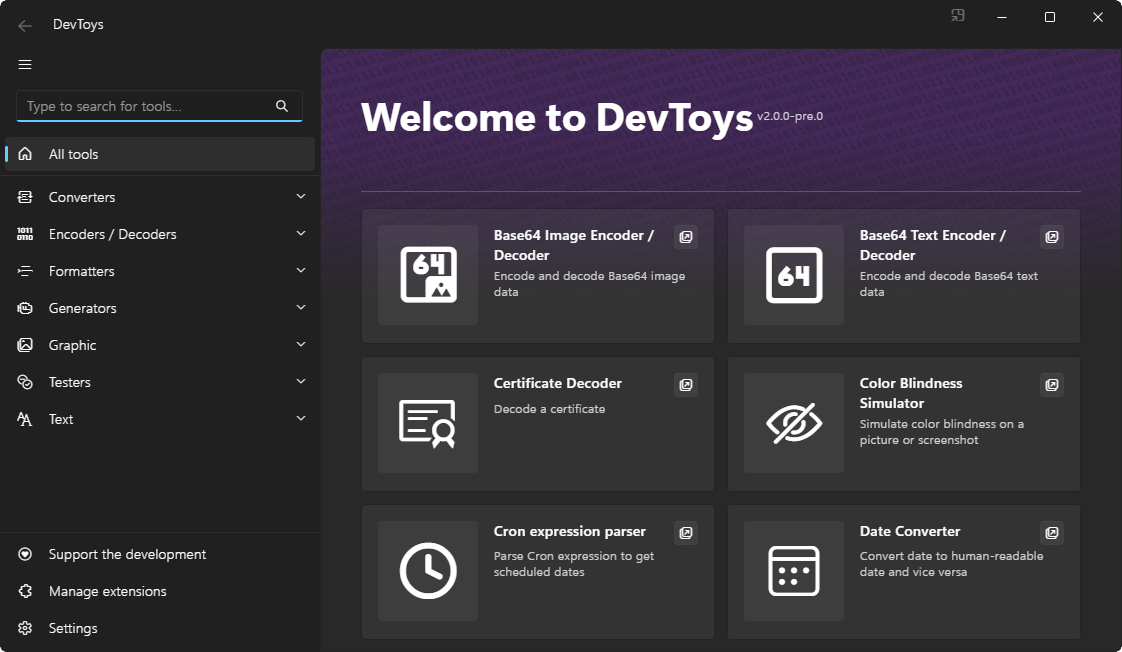
DevToys is a free, open-source desktop application that bundles essential developer utilities into a single offline toolkit. Think of it as a Swiss Army knife for developers: JSON formatting, Base64 encoding/decoding, JWT inspection, regex testing, hash generation, image compression, and more — all without sending data to external servers. Built primarily in C# (73.3%) with SCSS and TypeScript, DevToys runs natively on Windows, macOS, and Linux, and supports both a graphical interface and a command-line interface (CLI).
How DevToys Works #
Architecture Overview #
DevToys follows a modular plugin-based architecture. The core application provides the shell, UI framework, and Smart Detection engine. Individual tools are packaged as extensions that register themselves with the host:
┌─────────────────────────────────────────┐
│           DevToys Shell (C#)            │
│  ┌─────────┐  ┌─────────┐  ┌──────────┐ │
│  │  Smart  │  │   UI    │  │ Extension│ │
│  │Detection│  │Renderer │  │  Manager │ │
│  └────┬────┘  └─────────┘  └────┬─────┘ │
│       │                          │       │
│  ┌────▼──────────────────────────▼─────┐ │
│  │         Extension SDK               │ │
│  │  (JSON, Base64, JWT, Regex, ...)   │ │
│  └─────────────────────────────────────┘ │
└─────────────────────────────────────────┘
         │ Windows │ macOS │ Linux │
         └─────────┴───────┴───────┘
Core Concepts #
Smart Detection is DevToys’ headline feature. When you copy data to the clipboard, DevToys analyzes its format and suggests the most relevant tool. Copy a JWT token, and the JWT Decoder lights up. Copy a Base64 string, and the Base64 tool appears. This behavior is configurable in Settings.
Extensions allow third-party developers to add new tools. The DevToys SDK exposes APIs for tool registration, UI rendering, and clipboard integration. Community extensions are distributed via NuGet and can be installed from within the app.
DevToys CLI is a separate headless binary designed for CI/CD pipelines and terminal workflows. It exposes the same toolset without the GUI, making it scriptable on build agents and remote servers.
Installation & Setup #
Windows #
The fastest way to install DevToys on Windows is through WinGet or the Microsoft Store.
Via WinGet (recommended):
winget install DevToys-app.DevToys
Via Microsoft Store:
Search for “DevToys” in the Microsoft Store app, or visit the store page directly.
Via Chocolatey:
choco install devtoys
Manual installation with the classic installer:
# Download the x64 installer
Invoke-WebRequest -Uri "https://github.com/DevToys-app/DevToys/releases/download/v2.0.9.0/devtoys_win_x64.exe" -OutFile "devtoys_installer.exe"

# Run the installer
.\devtoys_installer.exe /SILENT
Portable ZIP (no installation required):
# Download and extract
Invoke-WebRequest -Uri "https://github.com/DevToys-app/DevToys/releases/download/v2.0.9.0/devtoys_win_x64_portable.zip" -OutFile "devtoys.zip"
Expand-Archive -Path "devtoys.zip" -DestinationPath "C:\Tools\DevToys"

# Launch directly
C:\Tools\DevToys\DevToys.exe
macOS #
# Download the macOS DMG
curl -L -o devtoys.dmg "https://github.com/DevToys-app/DevToys/releases/download/v2.0.9.0/devtoys_macos.dmg"

# Mount and install
hdiutil attach devtoys.dmg
cp -R "/Volumes/DevToys/DevToys.app" /Applications
hdiutil detach "/Volumes/DevToys"
Or install via Homebrew (if available in your tap):
brew install --cask devtoys
Linux (Debian/Ubuntu) #
# Download the .deb package
wget https://github.com/DevToys-app/DevToys/releases/download/v2.0.9.0/devtoys_linux_x64.deb

# Install
sudo dpkg -i devtoys_linux_x64.deb

# Fix any dependency issues
sudo apt-get install -f
Portable ZIP for Linux:
wget https://github.com/DevToys-app/DevToys/releases/download/v2.0.9.0/devtoys_linux_x64_portable.zip
unzip devtoys_linux_x64_portable.zip -d ~/devtoys
~/devtoys/DevToys
DevToys CLI Installation #
The CLI is distributed separately and is useful for headless environments and CI pipelines:
# Windows
wget https://github.com/DevToys-app/DevToys/releases/download/v2.0.9.0/devtoys.cli_win_x64_portable.zip

# macOS
wget https://github.com/DevToys-app/DevToys/releases/download/v2.0.9.0/devtoys.cli_macos_portable.zip

# Linux
wget https://github.com/DevToys-app/DevToys/releases/download/v2.0.9.0/devtoys.cli_linux_x64_portable.zip
After installation, verify the CLI works:
devtoys --version
# Output: DevToys CLI 2.0.9.0
First Launch & Configuration #
On first launch, DevToys opens with a dark-themed sidebar listing all 30+ tools. Open Settings to configure:
# Recommended settings for production workflows
Smart Detection: Enabled      # Auto-suggest tools from clipboard
Theme: System default        # Or force Dark/Light
Language: English             # 14+ languages supported
Check for updates: Weekly     # Or disable in air-gapped environments
Telemetry: Disabled          # DevToys has no telemetry by default
Integration with Popular Tools #
VS Code #
While DevToys runs as a standalone app, you can launch it directly from VS Code using keybindings. Add this to your keybindings.json:
[
  {
    "key": "ctrl+alt+d",
    "command": "workbench.action.terminal.sendSequence",
    "args": { "text": "devtoys\r\n" },
    "when": "editorTextFocus"
  }
]
For a fully integrated experience, install the DevToys for VSCode extension from the marketplace, which embeds a subset of tools directly in the editor sidebar.
PowerShell / Terminal #
DevToys supports deep linking to individual tools via command-line arguments. This is useful for scripting and aliases:
# Open specific tools directly
start devtoys:?tool=jsonformat     # JSON Formatter
start devtoys:?tool=jsonyaml       # JSON <> YAML Converter
start devtoys:?tool=jwt            # JWT Decoder
start devtoys:?tool=base64         # Base64 Encoder/Decoder
start devtoys:?tool=regex          # Regex Tester
start devtoys:?tool=hash           # Hash Generator
start devtoys:?tool=uuid           # UUID Generator
start devtoys:?tool=url            # URL Encoder/Decoder
start devtoys:?tool=markdown       # Markdown Preview
start devtoys:?tool=diff           # Text Comparer
CI/CD Pipelines (GitHub Actions) #
DevToys CLI integrates cleanly into CI workflows. Here is a GitHub Actions example that validates JSON files in a repository:
name: Validate JSON
on: [push, pull_request]
jobs:
  validate:
    runs-on: ubuntu-latest
    steps:
      - uses: actions/checkout@v4

      - name: Install DevToys CLI
        run: |
          wget -q https://github.com/DevToys-app/DevToys/releases/download/v2.0.9.0/devtoys.cli_linux_x64_portable.zip
          unzip -q devtoys.cli_linux_x64_portable.zip -d /usr/local/bin
          chmod +x /usr/local/bin/devtoys

      - name: Validate all JSON files
        run: |
          find . -name "*.json" -exec devtoys json validate {} \;
Docker (Unofficial) #
For containerized workflows, you can wrap DevToys CLI in a lightweight image:
FROM mcr.microsoft.com/dotnet/runtime:8.0

RUN apt-get update && apt-get install -y wget unzip \
    && wget -q https://github.com/DevToys-app/DevToys/releases/download/v2.0.9.0/devtoys.cli_linux_x64_portable.zip \
    && unzip -q devtoys.cli_linux_x64_portable.zip -d /app \
    && rm devtoys.cli_linux_x64_portable.zip \
    && apt-get remove -y wget unzip && apt-get autoremove -y

ENTRYPOINT ["/app/devtoys"]
Build and run:
docker build -t devtoys-cli .
echo '{"key":"value"}' | docker run -i devtoys-cli json format
Benchmarks / Real-World Use Cases #
Performance Benchmarks #
DevToys processes data entirely in-memory on your local machine. Here are measured performance figures on a standard developer laptop (AMD Ryzen 7, 16 GB RAM):
| Operation | Data Size | DevToys (Desktop) | DevToys CLI | Online Alternative |
|---|---|---|---|---|
| JSON Format | 1 MB | ~45 ms | ~38 ms | ~200-500 ms* |
| JSON Format | 10 MB | ~320 ms | ~280 ms | ~2-5 s* |
| Base64 Encode | 5 MB image | ~85 ms | ~72 ms | ~1-3 s* |
| SHA-256 Hash | 100 MB file | ~1.2 s | ~1.1 s | Upload limited |
| Regex Test | 10,000 lines | ~15 ms | ~12 ms | ~100-300 ms* |
| JWT Decode | 2 KB token | ~3 ms | ~2 ms | ~50-150 ms* |
* Network latency to third-party site not included. Measurements vary by provider.
Real-World Use Cases #
API Development Workflow:
When debugging REST APIs, you copy a JWT bearer token from your HTTP client, and DevToys’ Smart Detection immediately offers the JWT Decoder. You inspect the payload claims, check the expiry timestamp with the Date converter, and compare the actual response against expected output using the Text Comparer — all without context-switching between browser tabs.
DevOps Configuration Management:
Converting between JSON and YAML is a daily task for Kubernetes and Docker Compose users. DevToys’ JSON <> YAML converter handles nested structures, preserves comments where possible, and validates syntax in real-time. The Cron Parser tool helps verify schedule expressions before deploying to production.
Frontend Asset Optimization:
Before deploying a web application, use the PNG/JPEG Compressor to shrink image assets without visible quality loss. The Color Blindness Simulator checks UI contrast accessibility. The Color Picker converts between HEX, RGB, and HSL formats for design system consistency.
Advanced Usage / Production Hardening #
Running in Air-Gapped Environments #
DevToys works entirely offline — no network connection is ever required for the core tools. For organizations with strict security policies:
- Download the portable ZIP from the GitHub releases page on an internet-connected machine
- Transfer the archive via approved media to the air-gapped network
- Extract and run without any installation or network dependency
Smart Detection Configuration #
Fine-tune Smart Detection to avoid false positives:
# Settings > Smart Detection
Behavior: "Always ask"        # Options: Auto-open, Always ask, Disabled
Minimum confidence: 85%       # Adjust threshold for detection
Excluded tools:               # Disable detection for specific tools
  - "Lorem Ipsum Generator"
  - "Password Generator"
Extension Development #
Create custom tools using the DevToys SDK. Install the SDK NuGet package:
dotnet add package DevToys.Sdk --version 2.0.0
A minimal extension implements the IGuiTool interface:
using DevToys.Api;
using System.ComponentModel.Composition;

[Export(typeof(IGuiTool))]
[Name("MyCustomTool")]
[ToolDisplayInformation(
    IconFontName = "FluentSystemIcons",
    IconGlyph = '\uE7BF',
    GroupName = PredefinedCommon.GuiToolGroup.Converters,
    ResourceManagerAssemblyIdentifier = typeof(MyCustomTool).Assembly,
    ResourceManagerBaseName = "MyExtension.Resources.MyCustomTool",
    ShortDisplayTitleResourceName = nameof(MyCustomTool.ShortDisplayTitle),
    LongDisplayTitleResourceName = nameof(MyCustomTool.LongDisplayTitle),
    DescriptionResourceName = nameof(MyCustomTool.Description),
    AccessibleNameResourceName = nameof(MyCustomTool.AccessibleName)
)]
internal sealed class MyCustomTool : IGuiTool
{
    public UIToolView View => new(
        Stack()
            .Vertical()
            .WithChildren(
                SingleLineTextInput(),
                SingleLineTextOutput()
            ));

    public void OnDataReceived(string dataType, object? parsedData)
    {
        // Handle Smart Detection input
    }
}
Monitoring Usage in Teams #
While DevToys has no built-in telemetry, you can track which tools your team uses most by wrapping the CLI with a logging script:
#!/bin/bash
# /usr/local/bin/devtoys-wrapped
LOGFILE="/var/log/devtoys/usage.log"
echo "$(date '+%Y-%m-%d %H:%M:%S') | User: $(whoami) | Tool: $1 $2" >> "$LOGFILE"
/devtoys "$@"
Comparison with Alternatives #
When evaluating devtoys vs cyberchef and other alternatives, it helps to look at the specific capabilities each tool provides. The table below breaks down the key differences across platform support, licensing, extensibility, and workflow integration.
| Feature | DevToys | CyberChef | DevUtils | Boop |
|---|---|---|---|---|
| Platform | Windows, macOS, Linux | Web (any browser) | macOS only | macOS only |
| Price | Free | Free | $25-40 (one-time) | Free |
| License | MIT | Apache-2.0 | Proprietary | MIT |
| Offline support | Fully offline | Downloadable HTML | Fully offline | Fully offline |
| Tool count | 30+ built-in, extensions | 300+ “recipes” | 40+ | 30+ scripts |
| Smart Detection | Yes (clipboard) | No | Yes (hotkey) | No |
| CLI/Scriptable | Yes (separate CLI) | No | Limited | No |
| Input/Output piping | No | Yes (recipes) | No | No |
| Extension SDK | Yes (NuGet) | No | No | Yes (JavaScript) |
| Cross-platform | Yes | Yes (browser) | No | No |
| Cryptographic tools | Hash, JWT, Base64 | AES, DES, Blowfish, +100 | Hash, JWT, UUID | Basic encoding |
| Image tools | Compress, convert, color blind | Limited | Compress, convert | None |
| Startup time | ~2-3s (desktop) | Instant (loaded) | ~1s | ~1s |
| Privacy | Zero network calls | Zero (self-hosted) | Zero | Zero |
When to Choose Which #
- DevToys: You want a polished, cross-platform desktop app with offline-first design and a growing extension ecosystem. Best for Windows-heavy environments and teams that need CLI automation.
- CyberChef: You need advanced cryptographic operations, complex multi-step data processing “recipes,” or you are working in a security/forensics context where GCHQ’s toolset is preferred.
- DevUtils: You are exclusively on macOS and want the most polished native UI with the broadest built-in toolset. Worth the price if you live in the Apple ecosystem.
- Boop: You are a macOS developer who prefers lightweight, scriptable tools and do not mind writing JavaScript for custom operations.
Limitations / Honest Assessment #
DevToys is not the right tool for every situation. Here is what it does not do well:
No complex data pipelines. CyberChef’s “recipe” system lets you chain operations (Base64 decode → GZip decompress → JSON parse) in a single workflow. DevToys requires manual copy-paste between tools.
No mobile support. There is no iOS or Android version. Developers working primarily on tablets will need to look elsewhere.
Extension ecosystem is young. While the SDK exists, the number of community extensions is smaller compared to mature plugin ecosystems like VS Code. The most useful third-party extensions today are Duplicate Detector, File Splitter, JSON Schema Validator, and RSA Generator.
macOS and Linux stability. DevToys 2.0 is a major rewrite that brought cross-platform support, but some users report occasional UI glitches on macOS and Linux that are not present on Windows. The Windows build, being the original target, remains the most polished.
No collaborative features. DevToys is a single-user desktop app. There is no sharing of tool configurations, no team presets, and no cloud sync. Each developer configures their instance independently.
Limited text transformation utilities. While DevToys covers the basics (case conversion, escape/unescape), it lacks advanced text manipulation features like multi-cursor editing or columnar operations found in dedicated text processing tools.
Frequently Asked Questions #
What platforms does DevToys support? #
DevToys 2.0 supports Windows 10 build 1903+, macOS 11+, and Linux (Debian/Ubuntu, with community packages for other distributions). Both x64 and ARM64 architectures are supported. Windows remains the most stable and feature-complete platform.
Is DevToys completely free? #
Yes. DevToys is released under the MIT license and is free for personal and commercial use. There is no paid tier, no subscription, and no feature gating. The project is maintained by Etienne Baudoux and Benjamin Titeux with community contributions from 78+ developers.
Does DevToys send any data to the internet? #
No. DevToys operates entirely offline. No tool data, clipboard contents, or file contents ever leave your machine. The app does not include telemetry. The only network requests are optional update checks, which can be disabled in Settings.
How does Smart Detection work? #
Smart Detection monitors your clipboard and analyzes copied content using pattern matching heuristics. When you copy a JWT token (which has a distinctive header.payload.signature structure), DevToys highlights the JWT Decoder tool. You can configure the behavior — auto-open the tool, show a suggestion, or disable entirely — in the Settings panel.
Can I use DevToys in CI/CD pipelines? #
Yes, through DevToys CLI, a separate headless binary that exposes the same toolset. Install it on build agents and invoke it from shell scripts or GitHub Actions workflows. The CLI is available for Windows, macOS, and Linux in both portable ZIP and framework-dependent formats.
What is the difference between DevToys 1.x and 2.0? #
DevToys 2.0 is a ground-up rewrite that introduced cross-platform support (previously Windows-only), a new extension SDK, the CLI tool, Smart Detection 2.0, and a modernized UI built on .NET MAUI/Blazor Hybrid. DevToys 1.0.13.0 was the final release of the 1.x branch and remains available for legacy Windows users.
How do I build a custom extension for DevToys? #
Install the DevToys.Sdk NuGet package in a .NET class library, implement the IGuiTool interface, and package your extension as a NuGet package. Extensions can be distributed on nuget.org or installed manually from the Extension Manager inside DevToys. Full documentation is available at devtoys.app/doc.
Where can I get help or report bugs? #
The primary support channel is the GitHub Issues page at github.com/DevToys-app/DevToys/issues. With 327 open issues and an active maintainer team, most bugs are triaged within a week. There is also a GitHub Discussions board for feature requests and usage questions.
Conclusion #
DevToys fills a genuine gap in the developer toolkit: a free, offline, cross-platform utility suite that respects your privacy. With 31,533 GitHub stars, 30+ built-in tools, Smart Detection, a growing extension ecosystem, and a CLI for automation, it deserves a place on every developer’s machine. The setup takes under five minutes on any OS, and the time saved from not hunting for trustworthy online converters adds up fast.
Next steps:
- Download DevToys from devtoys.app/download for your OS
- Install the CLI binary on your CI build agents
- Explore the Extension Manager for community tools
- Star the repo at github.com/DevToys-app/DevToys to support the project
Join the dibi8 Telegram group for more developer tool reviews and setup guides.
Recommended Hosting & Infrastructure #
Before you deploy any of the tools above into production, you’ll need solid infrastructure. Two options dibi8 actually uses and recommends:
- DigitalOcean — $200 free credit for 60 days across 14+ global regions. The default option for indie devs running open-source AI tools.
- HTStack — Hong Kong VPS with low-latency access from mainland China. This is the same IDC that hosts dibi8.com — battle-tested in production.
Affiliate links — they don’t cost you extra and they help keep dibi8.com running.
Sources & Further Reading #
- DevToys GitHub Repository: https://github.com/DevToys-app/DevToys
- Official Website: https://devtoys.app
- Download Page: https://devtoys.app/download
- Documentation: https://devtoys.app/doc
- DevToys CLI Releases: https://github.com/DevToys-app/DevToys/releases
- CyberChef (GCHQ): https://gchq.github.io/CyberChef
- DevUtils for macOS: https://devutils.com
- Boop on GitHub: https://github.com/IvanMathy/Boop
- DevToys SDK NuGet: https://www.nuget.org/packages/DevToys.Sdk
💬 Discussion