ego lite: The Browser You and Your AI Agents Share, Not Fight Over
ego lite is a macOS browser (free, closed-source binary) with an MIT-licensed `ego-browser` skill that lets Claude Code, Codex, or Cursor run browser tasks in isolated Spaces alongside your own tabs, inheriting your real logins instead of driving a separate, cookie-less browser instance.
- ⭐ 7541
- JavaScript
- MIT
- Updated 2026-08-02
BrowserOS: The Open-Source Chromium Fork • Obscura: Rust Headless Browser for AI Agents
What Is ego lite? #
ego lite describes itself as “the fastest browser for AI agents to run browser automation” — but the more useful framing is simpler: it’s a browser where you and your AI agents work at the same time without getting in each other’s way. Your agent runs tasks in its own isolated Space; your own tabs stay exactly where you left them.
🔗 GitHub: https://github.com/citrolabs/ego-lite 📚 Docs: https://lite.ego.app/document
Be precise about what’s actually open source here: the ego-browser skill and the code in this repo are MIT-licensed. The ego lite browser application itself — the thing you download as a .dmg — is closed-source freeware, per the README’s own license section (“The ego lite browser is a separate, free download”). At 7,500+ GitHub stars, with a commit as recent as July 27, 2026, the open-source integration layer is active, even though the browser binary underneath it isn’t.
Platform reality check: macOS only today (Apple Silicon and Intel). Windows and Linux are on the public roadmap, not shipped.
The Problem: Automation Frameworks Give the Agent a Stranger’s Browser #
The README’s pitch against the status quo is specific: tools like Browser-Use and Vercel’s agent-browser are libraries an agent calls, but they don’t ship a browser of their own — they drive a separate instance. That means:
- Logins don’t carry over — the agent’s browser is logged out of everything you’re logged into
- You and the agent fight for tabs if you try to work in the same browser session
- Setup friction — cookies, extensions, and session state have to be reconstructed for the automation browser
ego lite’s answer is to make the browser itself the shared surface: one app, your tabs and the agent’s Space, sharing the same underlying Chrome data if you opt in.
How It Works: Spaces and ego-browser #
- Isolated Spaces per agent — each agent (or each task) gets its own fully isolated Space. You can see which Space has an agent actively running, and take it over or stop it at any time.
- Parallel by design — multiple Spaces run concurrently in the same browser: the README’s example is Claude Code enriching 10 leads across 10 Spaces while Codex scrapes 5 competitor sites in 5 more, without either colliding with your own mouse or tabs.
ego-browseras the connection layer — this is the piece that talks to your agent CLI (Claude Code, Codex, Cursor, or a custom one). It exposes the page as in-page JavaScript tools:snapshot,fill,click,wait,navigate,capture. The agent writes one JS snippet calling those tools andego-browserruns it in a single pass, instead of the “call a tool, look at the result, call another tool” loop typical of CLI-style browser automation.- Chrome data migration is opt-in — on first launch, ego lite asks once whether to migrate your Chrome logins, cookies, extensions, and bookmarks. Say yes and the agent inherits your real sessions; say no and it starts clean.
Installation & Quickstart #
Option 1: Download the macOS app directly #
# Apple Silicon
curl -L -o egolite.dmg "https://cdn.ego.app/channel/github_github_referral/setup/macos/arm64/egolite.dmg"

# Intel
curl -L -o egolite.dmg "https://cdn.ego.app/channel/github_github_referral/setup/macos/x64/egolite.dmg"
Opening the .dmg installs the app and adds the ego-browser skill to every agent’s skills directory on your machine.
Option 2: Add just the skill via npx #
npx skills add citrolabs/ego-lite
The first time your agent runs a browser task, it walks you through installing the ego lite app itself.
Option 3: Let your agent set it up #
Paste this directly into Claude Code, Codex, Cursor, or another agent that can run commands:
Set up ego lite for me: https://github.com/citrolabs/ego-lite

Read `skills/ego-browser/references/install.md` and follow the steps to install ego lite.
Run your first task #
/ego-browser follow @ego_agent on x.com for me
The agent picks up the ego-browser skill, opens the page in its own Space, reads a page Snapshot, acts on it, and reports back — your own tabs are untouched throughout.
Benchmarks: ego lite vs. agent-browser #
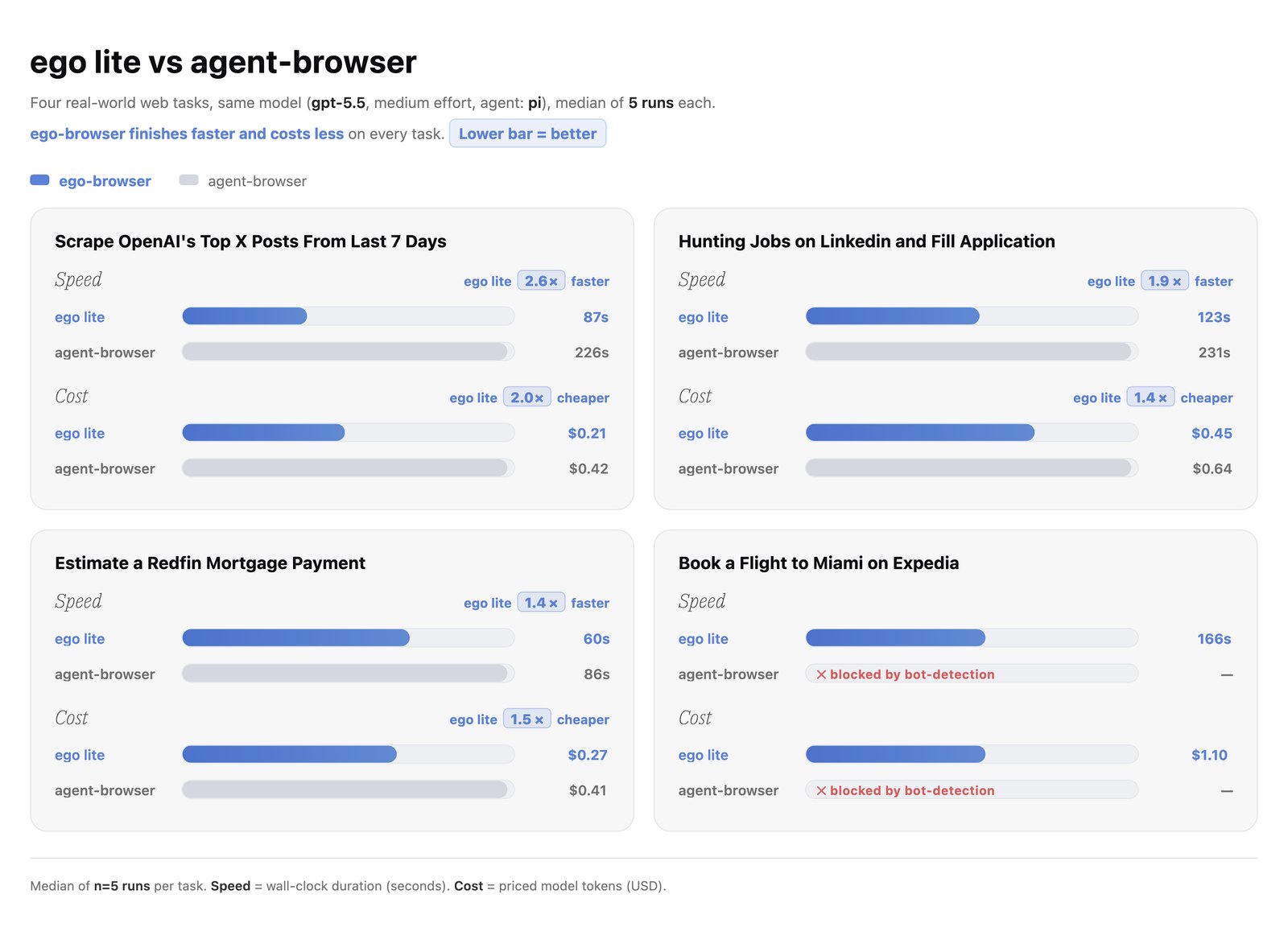
The maintainers benchmarked ego lite against Vercel’s agent-browser on four complex browser automation tasks. Their reported result: ego lite finished each task up to 2.5× faster, using substantially fewer tokens, with the gap widening on harder tasks. This tracks with the architectural claim — composing a multi-step task into one JS snippet avoids the repeated tool-call round-trips a CLI-style automation loop pays for on every step.
This is a self-reported, vendor-run benchmark, not an independently reproduced one — worth trialing on your own workload before taking the multiplier at face value.
ego lite vs. Existing Products #
| Capability | ego lite | Browser-Use | agent-browser (Vercel) | ChatGPT Atlas | Perplexity Comet |
|---|---|---|---|---|---|
| Multitask in parallel | Yes | No | No | No | No |
| Reusable skills | Yes | No | No | No | No |
| Inherits Chrome’s data | Yes | No | No | Yes | Yes |
| Same browser, separate workspace | Yes | No | No | No | No |
| Controllable by external agents | Yes | Yes | Yes | No | No |
| Data stored locally | Yes | Yes | Yes | No | No |
| Daily-use browser | Yes | No | No | Yes | Yes |
| Free | Yes | Yes | Yes | No | No |
The framing the maintainers draw: browser-automation libraries (Browser-Use, agent-browser) need a separate browser to drive; AI browsers (ChatGPT Atlas, Perplexity Comet) ship their own built-in agent and only that agent can drive them. ego lite tries to be the third thing — one browser, open to whichever external agent you already use.
Use Cases #
1. Running an Existing Coding Agent’s Browser Tasks Without Re-Authenticating #
If Claude Code or Codex needs to check something behind a login (a dashboard, an internal tool, a service you’re signed into), ego-browser lets it use your real session instead of hitting a paywall or login screen in a fresh browser instance.
2. Parallel Research or Scraping Across Multiple Sites #
Multiple Spaces run concurrently — one agent enriching leads, another scraping competitor pages — without either fighting for the same tab or clobbering your own browsing.
3. Agent-Driven Social/Web Actions From Your Real Account #
The README’s own example (following an account on x.com) is representative: tasks that need to act as you, not as a logged-out scraper, are exactly what the Chrome-data-migration option is for.
Limitations #
- macOS only — no Windows or Linux support yet, despite being on the roadmap
- The browser binary is closed-source freeware, not open source — only the integration skill is MIT-licensed
- “Experience accumulation” is marked “coming soon” in the README — the feature that’s supposed to make repeated tasks up to 5× faster over time isn’t live yet
- Benchmarks are vendor-reported, not independently verified
Related Repositories #
| Repository | Purpose |
|---|---|
| BrowserOS | A fully open-source (AGPL-3.0) Chromium fork alternative, if closed-source-binary is a dealbreaker |
| Obscura | A Rust headless browser for agents when you want a Puppeteer/Playwright-compatible drop-in instead of a desktop app |
Related Articles #
- BrowserOS: The Open-Source Chromium Fork That Ships Two AI Browsers, Not One — for a fully open-source alternative rather than a closed-source binary with an open skill layer
- Obscura: Rust Headless Browser for AI Agents — for a Puppeteer/Playwright-compatible headless option instead of a shared desktop browser
Conclusion #
ego lite targets a specific friction point in agent-driven browser automation: the gap between “the agent has a browser” and “the agent has your browser, with your logins, running next to your own tabs.” The ego-browser skill that bridges an agent CLI to the browser is genuinely MIT-licensed and inspectable; the browser application it drives is not, and is macOS-only for now. If you’re on a Mac and want an agent to act using your real sessions without a separate automation browser, it’s a reasonable trial — just go in knowing which half of the stack is actually open.
Best for: macOS users running Claude Code, Codex, or Cursor who want browser tasks to reuse real logins instead of fighting cookie-less automation, and who don’t need Windows/Linux support today.
GitHub: https://github.com/citrolabs/ego-lite
Last updated: 2026-08-02
💬 Discussion