exo: Run Frontier AI Across Your Own Devices (45K Stars)
exo turns your Macs, PCs and phones into a single cluster that runs frontier AI models locally. 45,088 GitHub stars, Apache-2.0. Covers installation, the dashboard, the OpenAI/Claude/Ollama-compatible API, real commands, and an honest comparison.
- ⭐ 46025
- TypeScript
- Apache-2.0
- Updated 2026-06-02
Introduction #
Frontier models are big. A 671B-parameter model will not fit on a single laptop, and renting enough cloud GPU to run one yourself gets expensive fast. exo takes a different route: it stitches the devices you already own — Macs, Linux boxes, even phones — into one cluster, then splits a model across them so they run inference together. With more than 45,000 stars on GitHub, it has become one of the most-watched projects for running large models on hardware you control. This guide walks through installing exo, opening the dashboard, and talking to it through its OpenAI-, Claude- and Ollama-compatible API.
What Is exo? #
exo is an open-source tool that runs frontier AI models locally by combining several devices into a single distributed cluster. Instead of forcing one machine to hold the whole model, exo shards the model’s layers across every node it discovers on your network, so a model far too large for any one device can still run.
The project is maintained by the exo-explore (exo labs) team and is released under the Apache-2.0 license, so you are free to use, inspect and modify it.
How exo Works #
Here is what exo does under the hood:
- Local execution: models run on your own devices, so prompts and data never leave your network and you avoid per-token cloud costs.
- Automatic clustering: exo discovers other devices running exo on the same network on its own — there is no config file listing nodes and no “master/worker” setup to write by hand.
- Topology-aware partitioning: exo measures the resources and latency of each node in real time and decides how to split the model’s layers across them, so a model that is too large for any single machine can still run across the cluster.
The result is that adding another Mac or PC to the network simply gives the cluster more memory and compute to work with, without you rewriting any configuration.
Installation & Setup #
If you want exo reachable around the clock (for a shared in-house endpoint, say) you will want an always-on box — spin one up on DigitalOcean (free trial credit for new accounts), or HTStack for low-latency Hong Kong VPS (the same IDC that hosts dibi8.com). For GPU-accelerated inference, note that exo currently accelerates on Apple Silicon; Linux runs CPU-only for now, with GPU support in progress.
macOS app (easiest) #
The simplest path on a Mac is the prebuilt app. Install it with Homebrew:
brew install --cask exo
Or download the latest DMG directly from https://assets.exolabs.net/EXO-latest.dmg. The app requires a recent macOS release.
Build from source (macOS or Linux) #
To run the latest code, clone the repository and start it with uv. You will need uv, Node 18+ and a nightly Rust toolchain installed first (macOS also needs Xcode, Homebrew and macmon):
git clone https://github.com/exo-explore/exo
cd exo/dashboard && npm install && npm run build && cd ..
uv run exo
If you use Nix, you can skip the prerequisites entirely:
nix run .#exo
Common error and fix #
A frequent first-run snag is the dashboard failing to load because the front-end was never built. The web UI is compiled from the dashboard/ directory, so if you cloned the repo and ran uv run exo without building it, rebuild the dashboard before launching:
cd dashboard && npm install && npm run build && cd ..
uv run exo
If you hit other issues during installation, check the official README in the repository.
- Image:
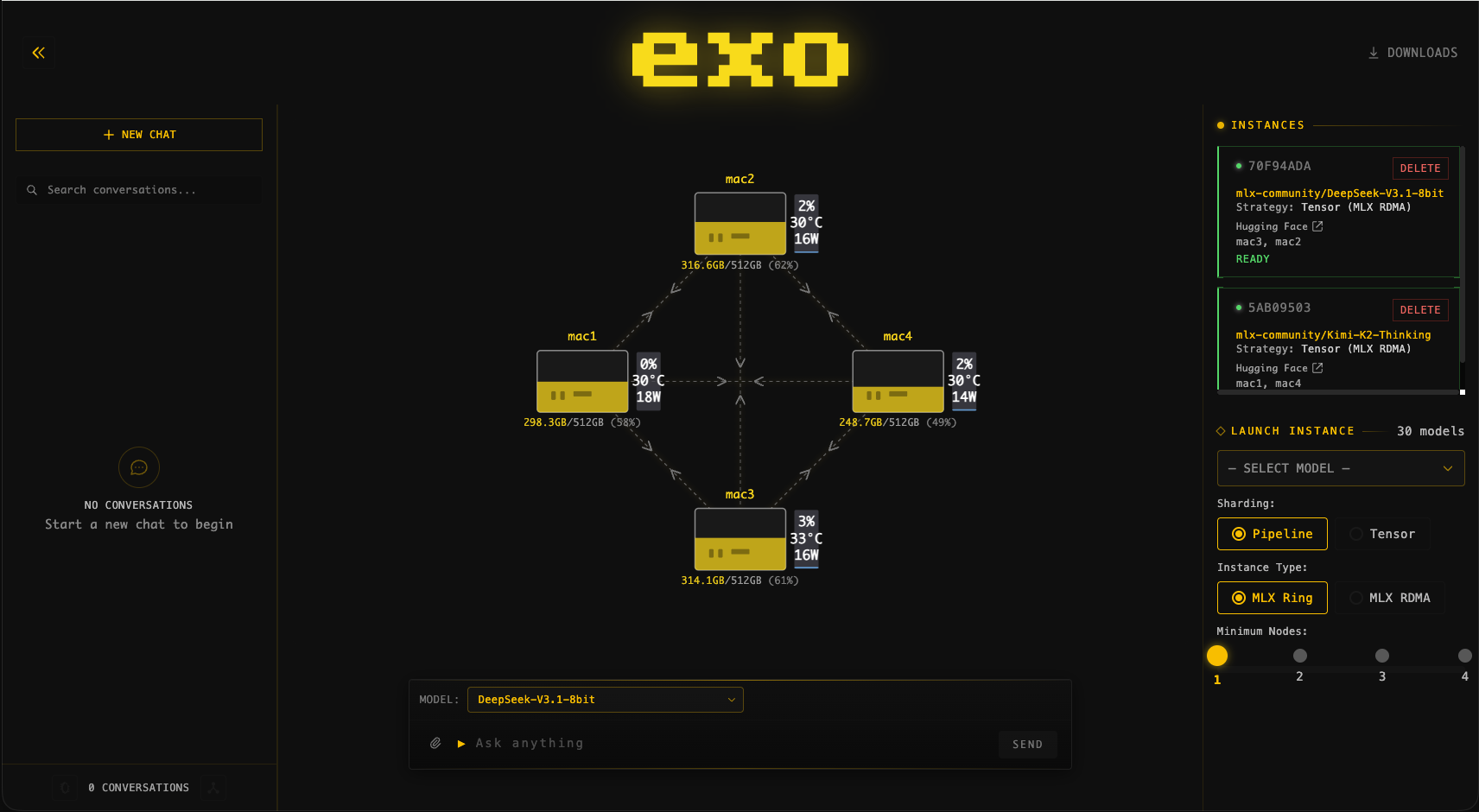
- Source: exo-explore/exo GitHub
Core Usage #
Once exo is installed, the workflow is refreshingly short: start it on each device, open the dashboard, and send requests to its API.
Starting a node #
Launch exo on every device you want in the cluster:
uv run exo
Each node automatically finds the others on the same network — there is nothing to register manually. A few flags are handy:
--no-worker: run a coordinator-only node that does not perform inference itself.--legacy-daemon: run exo in the background as a daemon.
Monitoring the cluster #
exo serves a dashboard on port 52415. Open it in a browser:
http://localhost:52415
You will see every device exo has discovered, how the current model is split across them, and live throughput and memory use.
Calling the model #
exo exposes an HTTP API that is compatible with the OpenAI, Claude (Anthropic Messages) and Ollama formats, so existing client code mostly works unchanged. A streaming chat request looks like this:
curl -X POST http://localhost:52415/v1/chat/completions \
  -H 'Content-Type: application/json' \
  -d '{"model": "model-id", "messages": [{"role": "user", "content": "prompt"}], "stream": true}'
The same endpoint understands the Claude Messages API at /v1/messages and the Ollama API at /ollama/api/chat.
Conclusion #
That is the whole loop: start a node on each device, watch the cluster come together in the dashboard, and point any OpenAI/Claude/Ollama client at it. Because the API matches formats tools already speak, swapping a hosted endpoint for your own exo cluster is often a one-line change.
Integration #
Because exo speaks the OpenAI, Claude and Ollama APIs, it drops into most existing workflows by changing only the base URL — no special SDK required.
Reusing your existing OpenAI client #
Point any OpenAI-compatible client at your local exo endpoint and it just works:
# Talk to a local exo cluster with the standard OpenAI client
from openai import OpenAI

client = OpenAI(
    base_url="http://localhost:52415/v1",
    api_key="not-needed",  # exo does not require a key for local use
)

response = client.chat.completions.create(
    model="model-id",
    messages=[{"role": "user", "content": "Summarize the exo project in one sentence."}],
)
print(response.choices[0].message.content)
Using it from a Jupyter notebook #
The same client works inside a notebook, which is convenient for quick experiments against your cluster:
# Quick test from a Jupyter notebook
from openai import OpenAI

client = OpenAI(base_url="http://localhost:52415/v1", api_key="not-needed")

response = client.chat.completions.create(
    model="model-id",
    messages=[{"role": "user", "content": "List three uses for a local AI cluster."}],
)
print(response.choices[0].message.content)
Because everything goes through a standard HTTP API, you can integrate exo with any language or framework that can make a POST request.
Benchmarks & Real-World Use #
Performance Benchmarks #
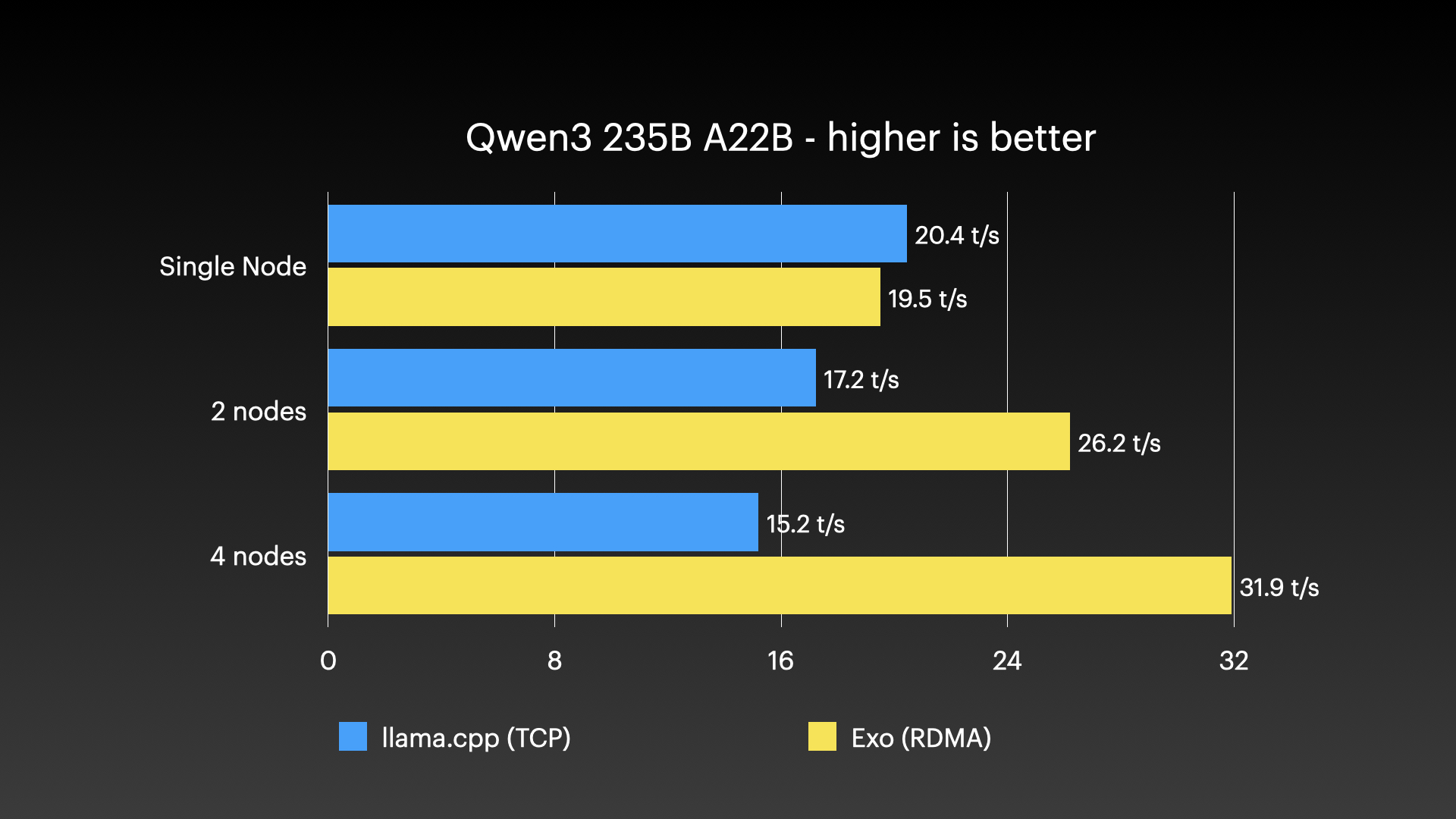
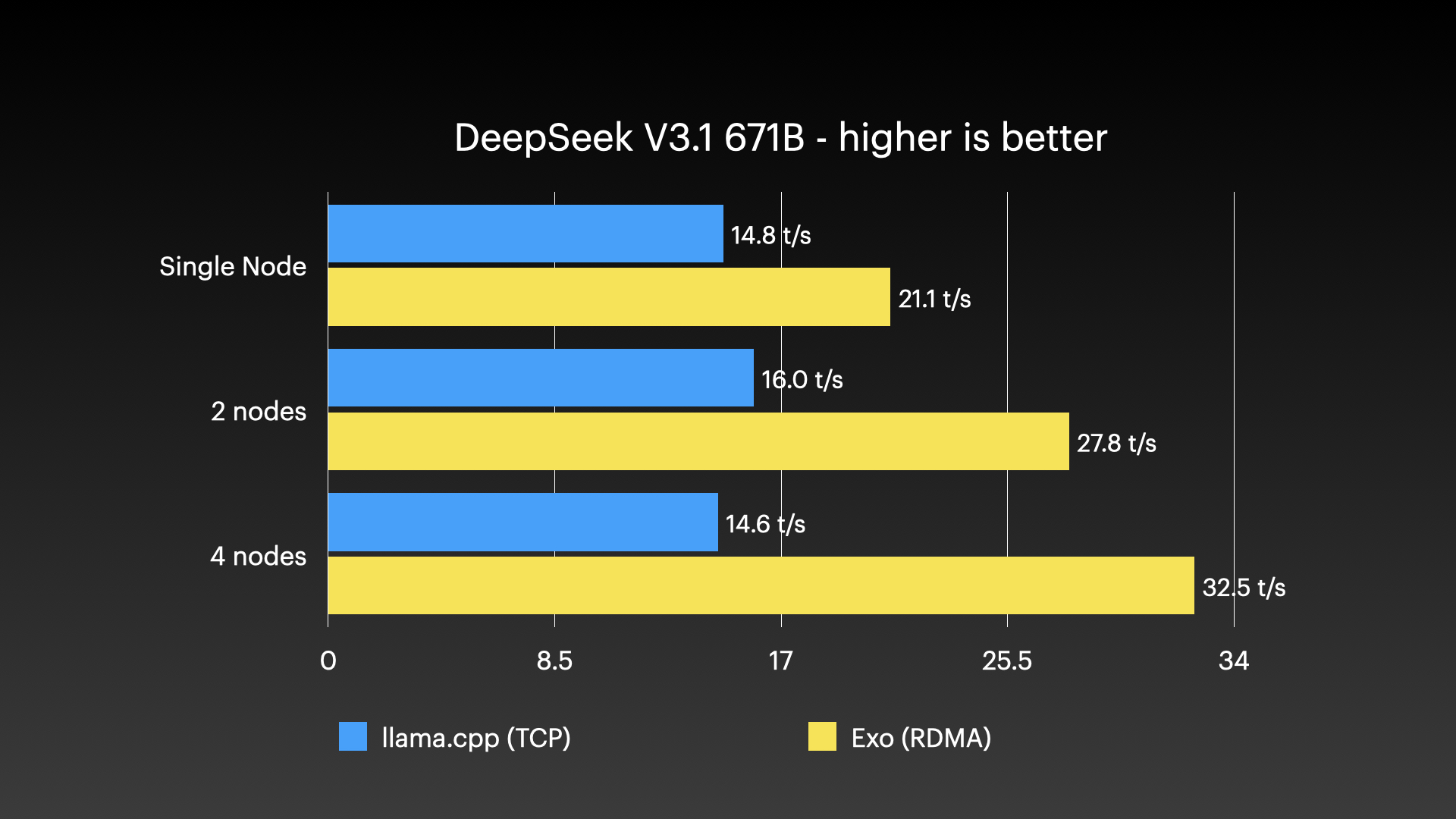
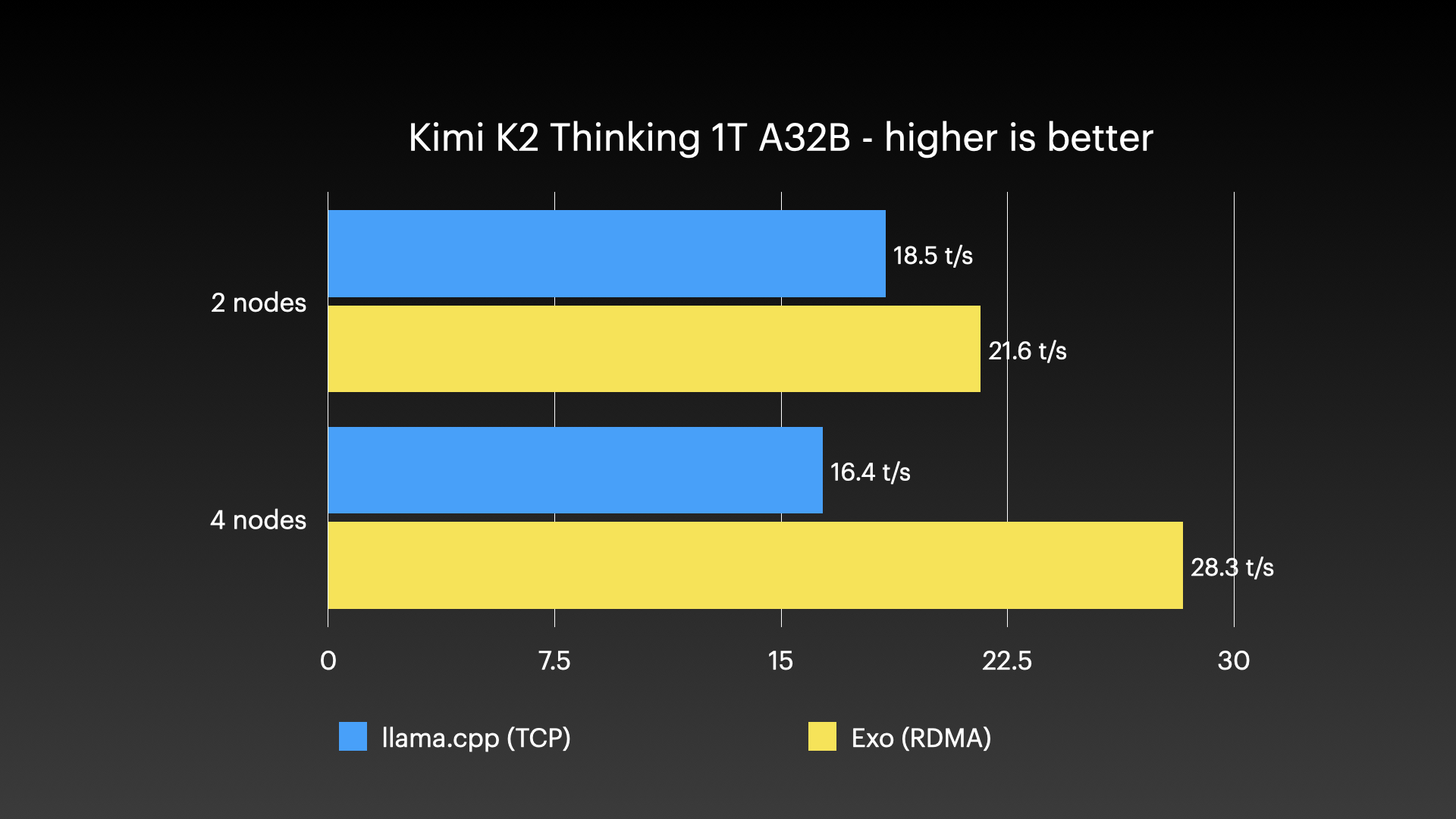
exo has been demonstrated running very large models across clusters of Apple Silicon Macs — the kind of workload that no single consumer machine could handle alone. The images below show real cluster runs:
Real-World Use Cases #
Private local inference: run frontier models on your own hardware so prompts and data stay on your network.
Running models that don’t fit on one machine: pool the memory of several devices to serve models in the hundreds of billions of parameters.
Cluster monitoring: the dashboard gives a single view of every node, how the model is sharded, and live throughput.
Drop-in API replacement: because exo mirrors the OpenAI, Claude and Ollama APIs, it can stand in for a hosted endpoint with a base-URL change.
Apple Silicon labs: teams with several Macs can chain them over Thunderbolt to build a capable inference cluster from hardware they already own.
Comparison with Alternatives #
See also our related open-source tools coverage.
exo is not the only way to run models locally, and it solves a specific problem — spreading one big model across many devices — that single-machine tools don’t. The table below sketches how it compares to two common alternatives, ollama/ollama (single-machine local serving) and ggml-org/llama.cpp (the inference engine many local tools build on).
| Feature | exo-explore/exo | ollama/ollama | ggml-org/llama.cpp |
|---|---|---|---|
| License | Apache-2.0 | MIT | MIT |
| Primary language | Python / Rust | Go | C/C++ |
| Multi-device cluster | Yes (auto-discovered) | No (single machine) | No (single machine) |
| GPU acceleration | Apple Silicon (Linux CPU for now) | NVIDIA / Apple / others | NVIDIA / Apple / CPU |
| Setup | Build from source or macOS app | One-line install | Compile from source |
| API compatibility | OpenAI + Claude + Ollama | OpenAI + native Ollama | OpenAI-compatible server |
| Best for | Models too large for one device | Easy single-box local serving | Low-level engine / embedding |
| Dashboard | Web dashboard (port 52415) | CLI + REST API | CLI / minimal server |
The honest summary: if your model fits comfortably on one machine, a single-machine tool like Ollama is simpler and well supported on more GPUs. exo earns its place when the model is too large for any one device and you want to combine several machines — especially a set of Apple Silicon Macs — into one cluster.
Limitations & Honest Assessment #
exo is genuinely useful, but it is a young and fast-moving project. A few honest caveats:
Apple Silicon is the strong path. GPU acceleration today targets Apple Silicon. Linux runs CPU-only for now (GPU support is in progress), so a Linux-GPU box will not be as fast as you might expect.
It is built for big-model clusters. If your model already fits on one machine, exo’s distributed machinery is more than you need — a single-machine tool will be simpler.
Source builds have real prerequisites. Running from source needs
uv, Node, a nightly Rust toolchain and (on macOS) Xcode and extra tools. The macOS app avoids this, but source users should expect a heavier setup than a one-line installer.Fast-moving codebase. As an actively developed project, APIs and behavior can shift between versions. Pin to a known-good commit if you need stability.
Network-dependent. Performance across a cluster depends on the link between devices; a slow network between nodes can bottleneck inference, which is why Thunderbolt connectivity matters for the fastest setups.
These tradeoffs mark where exo may not be the right fit, but they also frame its real strength: running models that simply will not run anywhere else on the hardware you already own.
Conclusion #
exo by exo-explore is a compelling tool for running frontier AI on your own hardware: over 45,000 GitHub stars, Apache-2.0 licensing, automatic clustering, and an API that already speaks OpenAI, Claude and Ollama. Its sweet spot is running models too large for any single machine by pooling several devices — Apple Silicon Macs especially. The natural next step is to install the app or clone the repo, start a node on each device, and watch the cluster assemble in the dashboard.
- Join the dibi8 English Telegram group for open-source AI tool drops.
- Read next: related guides on dibi8.
Sources & Further Reading:
- GitHub repository: https://github.com/exo-explore/exo
- Official docs / README: https://github.com/exo-explore/exo#readme
Some links above are affiliate links. dibi8.com may earn a commission if you sign up, at no extra cost to you. Helps keep the site running and the content free.
💬 Discussion