Grafana: 74,380 GitHub Stars — Docker Deployment Guide 2026
Grafana is the open-source visualization and analytics platform for monitoring. Covers Prometheus, Loki, InfluxDB, Elasticsearch integration. Includes Docker setup, production hardening, and comparison with Datadog, Kibana, New Relic.
- ⭐ 77451
- Python
- AGPL-3.0
- Updated 2026-05-19
Puppeteer: 94,300 GitHub Stars • LazyDocker: 51,092 GitHub Stars
Every production incident starts with a question: “What changed?” Without a centralized view of your metrics, logs, and traces, that question takes minutes — sometimes hours — to answer. Grafana, the open-source visualization platform with 74,380 GitHub stars, turns that question into a glanceable dashboard. This guide walks through production-grade Docker deployment, data source integration, and the hardening decisions that separate a proof-of-concept from a production-ready monitoring stack.
What Is Grafana? #
Grafana is an open-source platform for monitoring and observability that visualizes data from 100+ sources — time-series databases, log aggregators, tracing backends, and cloud APIs — in unified, shareable dashboards. Originally launched in 2014 by Torkel Ödegaard as a frontend for Graphite, Grafana has evolved into the visualization layer of choice for the LGTM stack (Loki, Grafana, Tempo, Mimir) and the broader cloud-native observability ecosystem.
How Grafana Works #
Grafana operates as a stateless visualization layer between your data sources and your operations team. It does not store metrics or logs itself; instead, it queries external data sources via their native APIs and renders the results into panels, dashboards, and alerts.
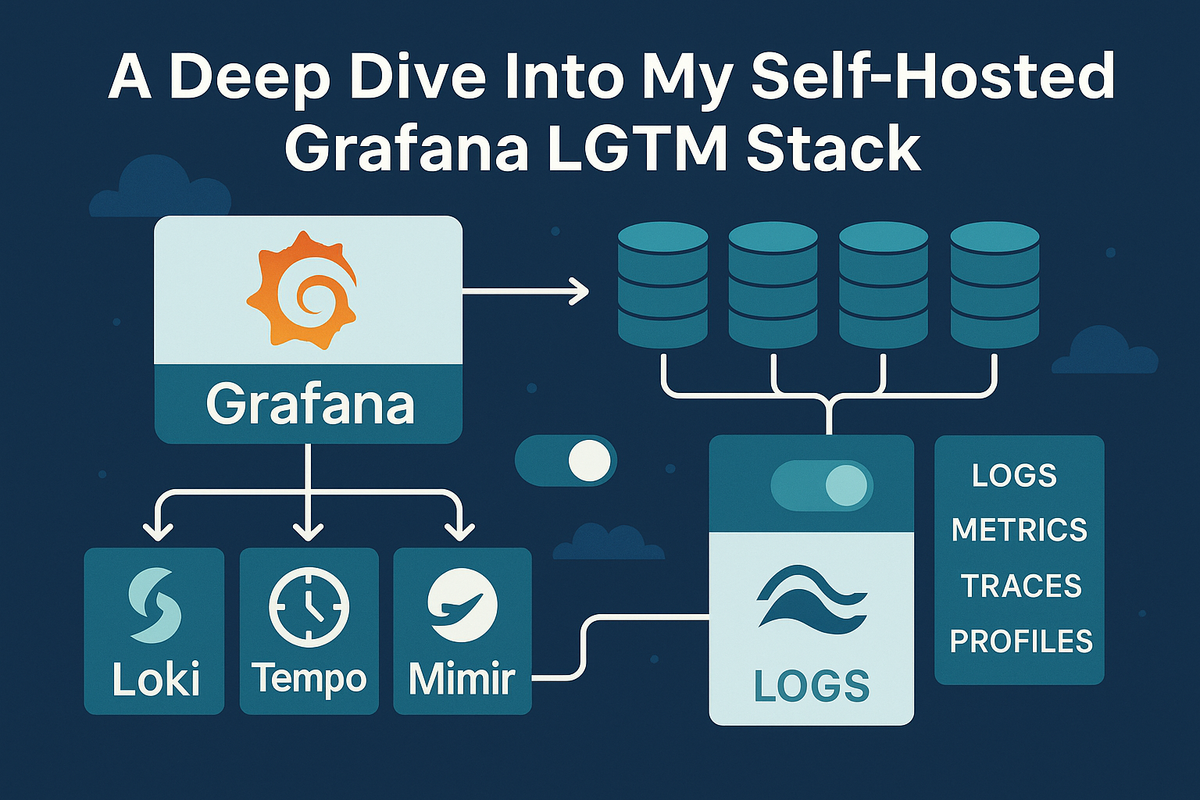
Core Architecture Components:
- Data Sources — Native plugins for Prometheus, Loki, InfluxDB, Elasticsearch, CloudWatch, Azure Monitor, and 100+ others
- Query Engine — Each panel executes queries in the native language of its data source (PromQL, LogQL, InfluxQL, Lucene)
- Alerting Engine — Evaluates alert rules against query results and routes notifications to Slack, PagerDuty, email, webhooks
- Dashboard Model — JSON-based dashboard definitions that can be version-controlled, provisioned from Git, or imported from the community library
- Authentication Layer — Supports OAuth, LDAP, SAML, and API key access for multi-tenant deployments
The typical data flow looks like this: Prometheus scrapes metrics from your applications and Node Exporter, Loki aggregates logs from Promtail or Fluentd, and Grafana queries both to render correlated dashboards where a spike in CPU (metrics) and an error spike (logs) appear side by side.
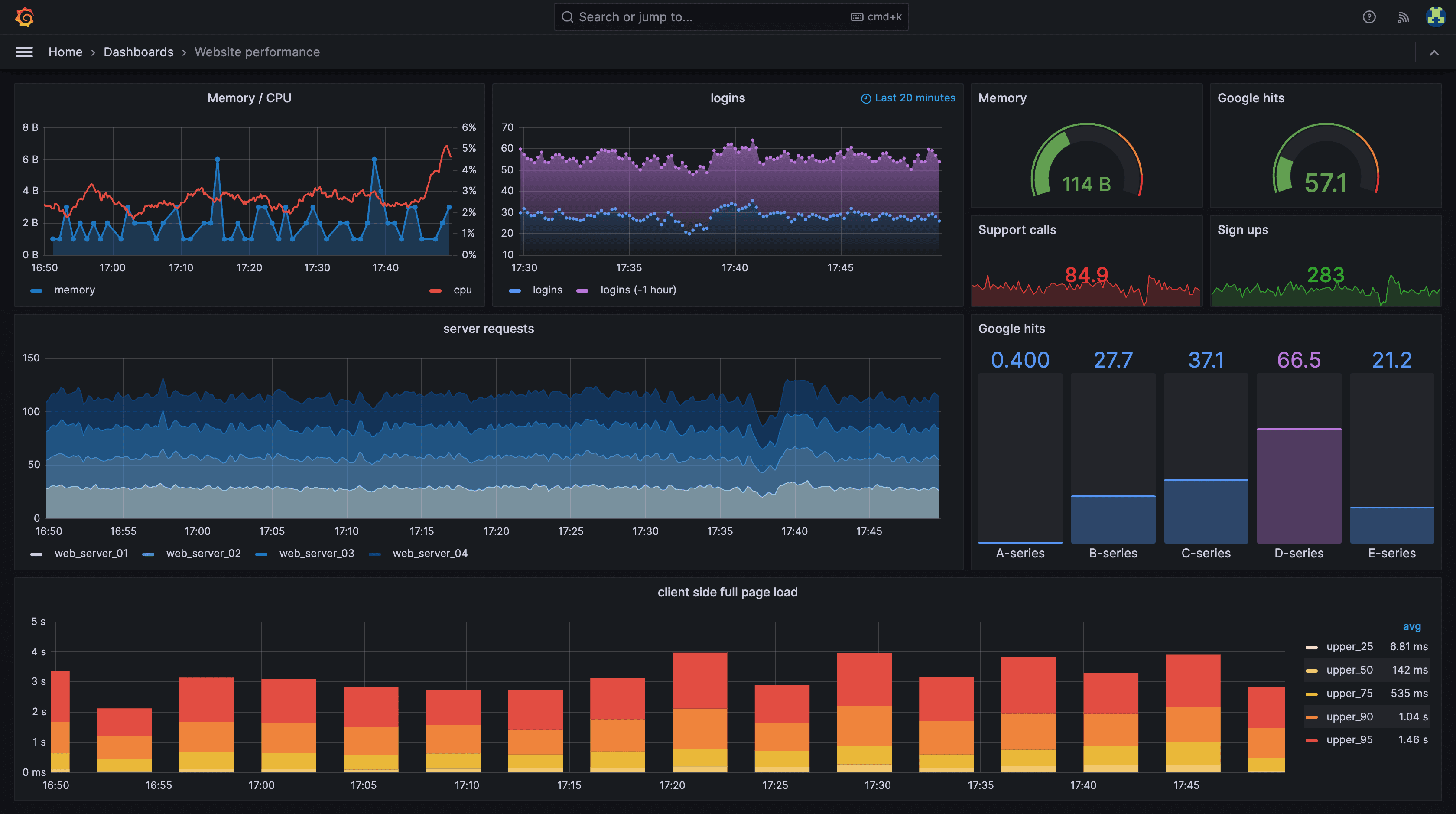
A typical production Grafana dashboard combines multiple panel types — time-series graphs for CPU/memory, stat panels for current values, log streams for real-time errors, and alert annotations for incident correlation — all querying different data sources in a single view.
Installation & Setup #
Docker CLI — Single Container (30 Seconds) #
The fastest way to get Grafana running for local exploration:
# Create a persistent volume for Grafana data
docker volume create grafana-storage

# Run the latest stable Grafana Enterprise image
docker run -d \
  -p 3000:3000 \
  --name=grafana \
  --volume grafana-storage:/var/lib/grafana \
  grafana/grafana-enterprise
Navigate to http://localhost:3000. Default credentials are admin / admin. You will be prompted to change the password on first login.
Docker Compose — Production-Ready Stack #
For a production-grade monitoring stack, combine Grafana with Prometheus and Loki. Create the following directory structure:
mkdir -p ~/grafana-stack/{prometheus,loki,grafana/provisioning/datasources,grafana/provisioning/dashboards,grafana/dashboards}
cd ~/grafana-stack
docker-compose.yml:
version: "3.8"

services:
  grafana:
    image: grafana/grafana-enterprise:11.6.0
    container_name: grafana
    restart: unless-stopped
    ports:
      - "3000:3000"
    environment:
      - GF_SECURITY_ADMIN_USER=${GRAFANA_ADMIN_USER:-admin}
      - GF_SECURITY_ADMIN_PASSWORD=${GRAFANA_ADMIN_PASSWORD:-admin}
      - GF_USERS_ALLOW_SIGN_UP=false
      - GF_SERVER_ROOT_URL=https://grafana.yourdomain.com
      - GF_INSTALL_PLUGINS=grafana-clock-panel,grafana-piechart-panel
    volumes:
      - grafana-data:/var/lib/grafana
      - ./grafana/provisioning:/etc/grafana/provisioning
      - ./grafana/dashboards:/var/lib/grafana/dashboards
    networks:
      - monitoring
    depends_on:
      - prometheus
      - loki

  prometheus:
    image: prom/prometheus:v3.2.0
    container_name: prometheus
    restart: unless-stopped
    ports:
      - "9090:9090"
    volumes:
      - ./prometheus/prometheus.yml:/etc/prometheus/prometheus.yml
      - prometheus-data:/prometheus
    command:
      - '--config.file=/etc/prometheus/prometheus.yml'
      - '--storage.tsdb.path=/prometheus'
      - '--storage.tsdb.retention.time=30d'
      - '--web.enable-lifecycle'
    networks:
      - monitoring

  loki:
    image: grafana/loki:3.4.0
    container_name: loki
    restart: unless-stopped
    ports:
      - "3100:3100"
    volumes:
      - ./loki/loki-config.yml:/etc/loki/local-config.yaml
      - loki-data:/loki
    command: -config.file=/etc/loki/local-config.yaml
    networks:
      - monitoring

  promtail:
    image: grafana/promtail:3.4.0
    container_name: promtail
    restart: unless-stopped
    volumes:
      - /var/log:/var/log:ro
      - ./loki/promtail-config.yml:/etc/promtail/config.yml
    command: -config.file=/etc/promtail/config.yml
    networks:
      - monitoring

volumes:
  grafana-data:
  prometheus-data:
  loki-data:

networks:
  monitoring:
    driver: bridge
prometheus/prometheus.yml:
global:
  scrape_interval: 15s
  evaluation_interval: 15s

scrape_configs:
  - job_name: 'prometheus'
    static_configs:
      - targets: ['localhost:9090']

  - job_name: 'node-exporter'
    static_configs:
      - targets: ['node-exporter:9100']

  - job_name: 'grafana'
    static_configs:
      - targets: ['grafana:3000']
loki/loki-config.yml:
auth_enabled: false

server:
  http_listen_port: 3100
  grpc_listen_port: 9096

ingester:
  wal:
    enabled: true
    dir: /loki/wal
  lifecycler:
    address: 127.0.0.1
    ring:
      kvstore:
        store: inmemory
      replication_factor: 1
    final_sleep: 0s
  chunk_idle_period: 5m
  chunk_retain_period: 30s

schema_config:
  configs:
    - from: 2020-05-15
      store: tsdb
      object_store: filesystem
      schema: v13
      index:
        prefix: index_
        period: 24h

storage_config:
  tsdb_shipper:
    active_index_directory: /loki/index
    cache_location: /loki/cache
  filesystem:
    directory: /loki/chunks

compactor:
  working_directory: /loki/compactor
  retention_enabled: true
  retention_delete_delay: 2h

limits_config:
  retention_period: 720h
loki/promtail-config.yml:
server:
  http_listen_port: 9080
  grpc_listen_port: 0

positions:
  filename: /tmp/positions.yaml

clients:
  - url: http://loki:3100/loki/api/v1/push

scrape_configs:
  - job_name: system-logs
    static_configs:
      - targets:
          - localhost
        labels:
          job: system-logs
          __path__: /var/log/*.log
Start the stack:
docker compose up -d
Access Grafana at http://your-server-ip:3000. Prometheus is available on port 9090, Loki on port 3100.
Provisioning Data Sources Automatically #
Instead of manually clicking through the UI to add data sources, use Grafana’s provisioning system. Create grafana/provisioning/datasources/datasources.yml:
apiVersion: 1

datasources:
  - name: Prometheus
    type: prometheus
    access: proxy
    url: http://prometheus:9090
    isDefault: true
    editable: false

  - name: Loki
    type: loki
    access: proxy
    url: http://loki:3100
    editable: false

  - name: Tempo
    type: tempo
    access: proxy
    url: http://tempo:3200
    editable: false
Restart Grafana and the data sources will appear pre-configured:
docker compose restart grafana
Integration with Prometheus, Loki, InfluxDB, and Elasticsearch #
Prometheus — Metrics Dashboard #
Prometheus is the de facto metrics source for Grafana. A typical CPU monitoring panel uses PromQL:
# CPU usage percentage
100 - (avg by(instance) (irate(node_cpu_seconds_total{mode="idle"}[5m])) * 100)

# Memory usage
100 * (1 - ((node_memory_MemAvailable_bytes or node_memory_Buffers_bytes) / node_memory_MemTotal_bytes))

# Disk usage
100 - ((node_filesystem_avail_bytes{mountpoint="/"} * 100) / node_filesystem_size_bytes{mountpoint="/"})
Import the official Node Exporter Full dashboard (ID: 1860) from the Grafana dashboard library for 115+ pre-built system metrics panels.
Loki — Log Aggregation #
Loki integrates log lines alongside metrics in the same dashboard. A LogQL query to find error lines:
# Count error logs per application
sum by(app) (rate({job="system-logs"} |= "ERROR" [5m]))

# Search for specific error patterns
{job="system-logs"} |~ "(?i)error|exception|fatal" | json | line_format "{{.message}}"
InfluxDB — Time-Series Data #
For IoT and high-cardinality metrics workloads, InfluxDB pairs well with Grafana:
-- InfluxQL example: average temperature per sensor
SELECT mean("temperature") FROM "sensors" WHERE $timeFilter GROUP BY "sensor_id", time($__interval) fill(null)
Elasticsearch — Log Search #
For teams already invested in the Elastic Stack, Grafana can query Elasticsearch indices directly:
{
  "query": {
    "bool": {
      "must": [
        { "match": { "level": "ERROR" } },
        { "range": { "@timestamp": { "gte": "now-1h" } } }
      ]
    }
  }
}
Benchmarks / Real-World Use Cases #
Performance Characteristics at Scale:
| Metric | Single Instance (Docker) | HA Pair (K8s) |
|---|---|---|
| Dashboard load time | 50-200ms | 30-100ms |
| Concurrent users | 50-100 | 500+ |
| Max data points per panel | 10,000-50,000 | 100,000+ |
| Alert rule evaluation | 1-10s | <5s |
| Memory usage | 256-512MB | 512MB-1GB per pod |
Netflix runs Grafana at massive scale across thousands of microservices, using custom data source plugins to correlate metrics from multiple internal systems. PayPal uses Grafana with Prometheus to monitor 200,000+ containers. eBay replaced a legacy commercial monitoring tool with Grafana, reducing dashboard creation time from days to hours.
A mid-size e-commerce platform (50 hosts, 2M active series) running self-hosted Grafana with Prometheus and Loki typically sees:
- Monthly infrastructure cost: $200-500 (compute + storage)
- Equivalent Datadog cost: $9,500+/month
- Dashboard creation time: 30 minutes vs. 2+ hours with custom UIs
- Mean time to detection (MTTD): Reduced by 40-60% after Grafana adoption
Advanced Usage / Production Hardening #
SSL/TLS Termination with Reverse Proxy #
Never expose Grafana directly to the internet. Use Traefik or Nginx as a reverse proxy:
# docker-compose.yml addition
  traefik:
    image: traefik:v3.3
    command:
      - "--api.insecure=true"
      - "--providers.docker=true"
      - "--entrypoints.websecure.address=:443"
      - "--certificatesresolvers.letsencrypt.acme.tlschallenge=true"
      - "--certificatesresolvers.letsencrypt.acme.email=admin@yourdomain.com"
      - "--certificatesresolvers.letsencrypt.acme.storage=/letsencrypt/acme.json"
    ports:
      - "443:443"
    volumes:
      - /var/run/docker.sock:/var/run/docker.sock:ro
      - ./letsencrypt:/letsencrypt
    networks:
      - monitoring
High Availability Setup #
For production environments requiring zero downtime:
# Grafana HA requires a shared database (PostgreSQL or MySQL)
# and multiple Grafana instances behind a load balancer

  postgres:
    image: postgres:17-alpine
    environment:
      POSTGRES_DB: grafana
      POSTGRES_USER: grafana
      POSTGRES_PASSWORD: ${DB_PASSWORD}
    volumes:
      - postgres-data:/var/lib/postgresql/data

  grafana-1:
    image: grafana/grafana-enterprise:11.6.0
    environment:
      - GF_DATABASE_TYPE=postgres
      - GF_DATABASE_HOST=postgres:5432
      - GF_DATABASE_NAME=grafana
      - GF_DATABASE_USER=grafana
      - GF_DATABASE_PASSWORD=${DB_PASSWORD}
      - GF_REMOTE_CACHE_TYPE=redis
      - GF_REMOTE_CACHE_CONNSTR=redis:6379
    depends_on:
      - postgres

Grafana’s alerting timeline dashboard visualizes alert firing patterns over time, helping teams identify noisy alerts and correlation between different alert rules during incident response.
Alerting Configuration as Code #
Define alert rules via provisioning:
# grafana/provisioning/alerting/alert-rules.yml
apiVersion: 1
groups:
  - orgId: 1
    name: infrastructure
    folder: Infrastructure
    interval: 60s
    rules:
      - uid: high-cpu-usage
        title: CPU Usage Above 80%
        condition: B
        data:
          - refId: A
            relativeTimeRange:
              from: 300
              to: 0
            datasourceUid: prometheus
            model:
              expr: 100 - (avg by(instance) (irate(node_cpu_seconds_total{mode="idle"}[5m])) * 100) > 80
        noDataState: NoData
        execErrState: Error
        for: 5m
        annotations:
          summary: "High CPU usage on {{ $labels.instance }}"
Dashboard Provisioning from Git #
Store dashboards as JSON in your repository and provision them automatically:
# grafana/provisioning/dashboards/dashboards.yml
apiVersion: 1

providers:
  - name: 'default'
    orgId: 1
    folder: ''
    type: file
    disableDeletion: false
    editable: false
    updateIntervalSeconds: 30
    options:
      path: /var/lib/grafana/dashboards
      foldersFromFilesStructure: true
Security Checklist #
- Change the default admin password immediately
- Disable user signups:
GF_USERS_ALLOW_SIGN_UP=false - Enable HTTPS with valid certificates
- Use OAuth 2.0 or LDAP for authentication in team environments
- Restrict data source proxy access to admin roles
- Enable audit logging:
GF_AUDIT_ENABLED=true - Run Grafana as a non-root user in containers
- Keep plugins updated — vulnerable plugins are a common attack vector
Comparison with Alternatives #
| Feature | Grafana | Datadog | Kibana | New Relic |
|---|---|---|---|---|
| Open Source | Yes (AGPL-3.0) | No | Yes (SSPL) | No |
| Self-Hosted Option | Yes, free | No | Yes | No |
| Data Sources | 100+ native | 750+ integrations | Elasticsearch only | 100+ |
| Metrics (Time-Series) | Excellent (Prometheus) | Excellent | Good | Good |
| Log Analysis | Good (via Loki) | Excellent | Excellent (Lucene) | Good |
| APM / Distributed Tracing | Via Tempo/Jaeger plugins | Excellent (built-in) | Via Elastic APM | Excellent |
| Dashboard Flexibility | Excellent | Good | Good | Good |
| Alerting | Good | Excellent | Basic | Good |
| Setup Complexity | Medium | Low | Medium-High | Low |
| Cost (50 hosts/month) | $0-500 self-hosted | $9,500-20,000 | $500-1,500 self-hosted | $7,500-15,000 |
| Community / Ecosystem | Massive (73K+ stars) | Large | Large (Elastic) | Medium |
When to choose what:
- Grafana — Cost-sensitive teams, Kubernetes-native environments, multi-source observability needs, platform engineering maturity
- Datadog — Enterprise teams prioritizing time-to-value, teams without dedicated platform engineers, compliance-heavy industries
- Kibana — Deep log analysis requirements, SIEM use cases, existing Elasticsearch investment
- New Relic — Full-stack APM with generous free tier (100GB/month), user-based pricing model
Limitations / Honest Assessment #
Grafana is not a silver bullet. Understand these limitations before committing:
No built-in data collection — Grafana visualizes data; it does not collect it. You still need Prometheus, Loki, or another backend. This adds operational overhead compared to all-in-one SaaS platforms.
Log search is not Lucene — Loki uses label-based filtering with regex, not full-text search like Elasticsearch. Complex log queries can be slower and less intuitive.
Alerting maturity — Grafana’s unified alerting (introduced in v8) has improved significantly but still lacks the sophistication of PagerDuty-native incident management or Datadog’s AI-driven anomaly detection.
Plugin maintenance risk — Community plugins vary in quality and maintenance cadence. A plugin abandoned by its author can block Grafana upgrades.
Setup requires expertise — The LGTM stack requires understanding of PromQL, LogQL, Alertmanager routing, and Kubernetes if running in-cluster. This is not a click-to-deploy solution.
Frequently Asked Questions #
Q1: Is Grafana completely free for commercial use?
Yes. The open-source Grafana (AGPL-3.0) is free for commercial use. Grafana Enterprise adds features like advanced RBAC, data source permissions, and enterprise support at a cost. For most teams, the OSS edition is sufficient.
Q2: Can Grafana replace Datadog entirely?
It depends. For metrics, logs, and traces visualization, Grafana with the LGTM stack covers 80-90% of Datadog’s functionality at a fraction of the cost. However, Datadog’s APM depth, AI-driven anomaly detection, and out-of-the-box integrations remain superior for teams prioritizing speed over cost.
Q3: How do I back up my Grafana dashboards?
Dashboards are stored as JSON in Grafana’s database. Use the API to export them: curl -H "Authorization: Bearer $API_KEY" http://grafana:3000/api/dashboards/uid/<uid>. For GitOps workflows, provision dashboards from JSON files in version control.
Q4: What is the difference between Grafana OSS and Grafana Enterprise?
Grafana Enterprise adds enterprise data source plugins (Snowflake, SAP HANA, ServiceNow), advanced RBAC with fine-grained access control, reporting, and premium support. The core dashboard and visualization features are identical.
Q5: How does Grafana scale for large organizations?
Grafana scales horizontally by running multiple instances behind a load balancer with a shared PostgreSQL or MySQL database. For 500+ users, deploy on Kubernetes with the official Helm chart, use Redis for session caching, and consider Grafana Mimir for long-term metrics storage.
Q6: Can I import dashboards from other tools?
Yes. Grafana supports importing from Datadog, Kibana, and other tools through community converters. The native JSON dashboard format is well-documented, and the Grafana dashboard library contains 5,000+ community-contributed dashboards ready to import by ID.
Q7: Does Grafana support real-time dashboards?
Yes, with Grafana Live (WebSocket-based streaming) and the new Scenes framework. Refresh intervals can be set as low as 5 seconds for near real-time monitoring. For true real-time, use streaming data sources.
Conclusion #
Grafana earns its 74,380 GitHub stars by solving a concrete problem — unifying observability data from disparate sources into dashboards that teams actually want to use. The Docker-based deployment covered in this guide gets a production-grade monitoring stack running in under 30 minutes. For teams willing to invest in operational expertise, the cost savings over SaaS alternatives are substantial.
Next steps:
- Clone the Grafana GitHub repository and explore the codebase
- Deploy the Docker Compose stack from this guide on your infrastructure
- Import dashboard ID
1860(Node Exporter Full) for immediate system visibility - Join the Grafana community forums for support
- Follow the dibi8 Telegram group for weekly dev tool deep dives
This article contains affiliate links. If you purchase hosting through DigitalOcean or HTStack using our links, we earn a commission at no extra cost to you. This helps fund our open-source tooling reviews.
Recommended Hosting & Infrastructure #
Before you deploy any of the tools above into production, you’ll need solid infrastructure. Two options dibi8 actually uses and recommends:
- DigitalOcean — $200 free credit for 60 days across 14+ global regions. The default option for indie devs running open-source AI tools.
- HTStack — Hong Kong VPS with low-latency access from mainland China. This is the same IDC that hosts dibi8.com — battle-tested in production.
Affiliate links — they don’t cost you extra and they help keep dibi8.com running.
Sources & Further Reading #
- Grafana Official Docker Documentation
- Grafana Provisioning Guide
- Grafana GitHub Repository
- LGTM Stack Architecture
- Prometheus Node Exporter Dashboard #1860
- Grafana vs Datadog Pricing Analysis 2026
- Datadog Official Pricing
- New Relic Pricing
- DigitalOcean — Cloud VPS Hosting
- HTStack — Managed Cloud Servers
💬 Discussion