graphify: Turn Any Codebase Into a Queryable Knowledge Graph for Claude Code
graphify is a /graphify skill for Claude Code, Cursor, Codex, and Gemini CLI that maps code, docs, PDFs, and more into a local, LLM-free knowledge graph you query instead of grepping through files.
- ⭐ 97712
- Python
- Apache-2.0
- Updated 2026-07-29
Compound Engineering: Orchestrate Claude Code, Codex • Orca: The ADE for Running Claude Code, Codex, and Cursor in Parallel
What Is graphify? #
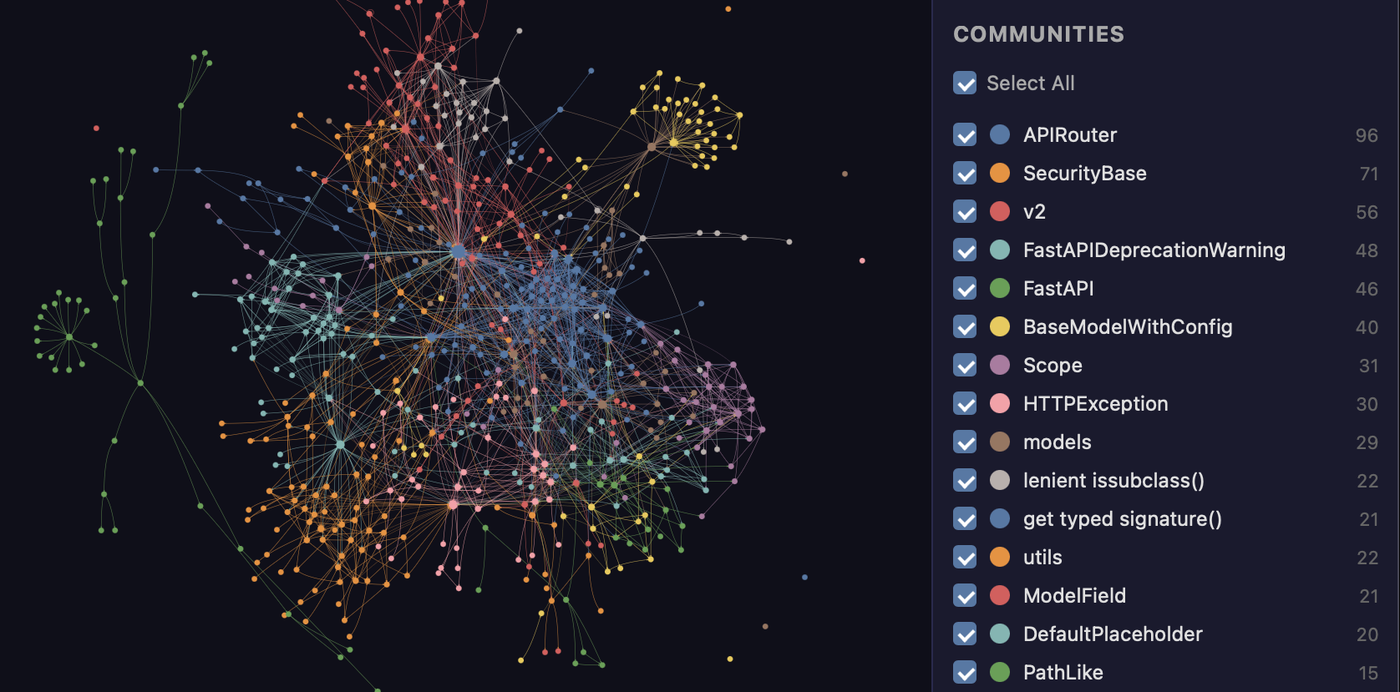
graphify answers a question every AI coding agent eventually runs into: once a codebase gets big, grepping and re-reading files on every prompt gets slow and lossy. graphify’s fix is to build a knowledge graph of the whole project once — code, docs, SQL schemas, configs, PDFs, images, even video — and let the agent query it instead of re-reading everything.
🔗 GitHub: https://github.com/Graphify-Labs/graphify 🌐 Homepage: https://www.graphify.com
Built by Graphify Labs (Y Combinator S26) and first pushed in April 2026, graphify had already reached 97,700+ GitHub stars by late July 2026 — one of the fastest-growing dev tools of the year, and notably undercounted on GitHub’s own trending page (which showed only ~8,590 at one point the project’s own topic research caught, versus the real API-verified count).
Three things it’s careful to state up front:
- Code parsing is fully local — tree-sitter AST parsing, deterministic, no LLM call, nothing leaves your machine. Only the optional semantic pass over docs/PDFs/media calls a backend.
- Every edge is labeled
EXTRACTED(explicit in the source) orINFERRED(resolved by graphify), so you know what’s certain versus derived. - It’s not a vector index — no embeddings, no vector store. A real graph you can traverse, trace paths in, and ask “what connects to what.”
Get Started (30 Seconds, Per the Project) #
uv tool install graphifyy      # install the CLI (or: pipx install graphifyy)
graphify install               # register the skill with your AI assistant
Then, inside your AI assistant:
/graphify .
That produces three outputs:
graphify-out/
├── graph.html       open in any browser — click nodes, filter, search
├── GRAPH_REPORT.md  key concepts, surprising connections, suggested questions
└── graph.json       the full graph — query it anytime without re-reading your files
Works in Claude Code, Cursor, Codex, Gemini CLI, GitHub Copilot, and 15+ other assistants.
Naming note: the PyPI package is
graphifyy(double-y) — the CLI command itself is stillgraphify. The project explicitly flags that othergraphify*-named PyPI packages aren’t affiliated.
Querying the Graph #
Once built, you ask questions instead of reading files:
graphify explain "APIRouter"
graphify path "FastAPI" "ModelField"
graphify query "what connects auth to the database?"
The project’s own example run against the FastAPI codebase returns a real node with its source location, community cluster, connection count, and each connection tagged EXTRACTED or INFERRED — and a 3-hop path between two specific classes, traced edge by edge.
What It Does #
| Capability | What you get |
|---|---|
| God nodes | The most-connected concepts in the codebase — what everything flows through |
| Communities | The graph auto-clustered into subsystems (Leiden algorithm), with LLM-free labels |
| Cross-file links | calls / imports / inherits / mixes_in resolved across roughly 40 languages via tree-sitter |
| Query / path / explain | Ask a plain-language question, trace a path between two things, or explain one concept |
| Rationale + doc refs | # NOTE: / # WHY: comments and ADR/RFC citations become first-class linked nodes |
| Beyond code | Docs, PDFs, images, and video/audio map into the same graph |
| Local-first | Code parsing needs no LLM and sends nothing off-machine; only the docs/media semantic pass calls a backend, and only if configured |
Common Commands #
/graphify .                        # build graph for current folder
/graphify ./docs --update          # re-extract only changed files
/graphify . --cluster-only         # rerun clustering without re-extracting
/graphify . --wiki                 # build a markdown wiki from the graph

/graphify query "what connects auth to the database?"
/graphify path "UserService" "DatabasePool"
/graphify explain "RateLimiter"

/graphify add https://arxiv.org/abs/1706.03762   # fetch a paper and add it to the graph

graphify hook install              # auto-rebuild the graph on every git commit
graphify prs --triage              # AI ranks your PR review queue against the graph
graphify prs --conflicts           # flags PRs sharing graph communities — merge-order risk
Benchmarks (Per the Project’s Own Published Results) #
| Benchmark | Metric | graphify | Comparison |
|---|---|---|---|
| LOCOMO (n=300) | recall@10 | 0.497 | mem0 0.048, supermemory 0.149 |
| LOCOMO (n=300) | QA accuracy | 45.3% | supermemory 49.7%, mem0 27.3% |
| LongMemEval-S (n=50) | QA accuracy | 76% | tied with dense RAG |
| Graph build | LLM credits | 0 | per-token cost for most competing systems |
The project states every system ran on the same harness with the same model and budget, scored by an LLM judge cross-validated against a second judge (90.6% agreement, Cohen’s kappa 0.81). Full methodology and reproduction commands are in the project’s own BENCHMARKS.md — these numbers are self-reported, not independently reproduced here.
Install #
Requires Python 3.10+.
# macOS (Homebrew)
brew install python@3.12 uv
# Ubuntu/Debian
sudo apt install python3.12 python3-pip pipx
# Windows
winget install astral-sh.uv
Then install the package itself:
uv tool install graphifyy
graphify install
Ignoring Files #
graphify respects .gitignore automatically, and merges in an optional .graphifyignore (same syntax, ! negation supported) that always excludes more, never re-includes something .gitignore already excluded:
# .graphifyignore
node_modules/
dist/
*.generated.py

# only index src/, ignore everything else
*
!src/
!src/**
Use Cases #
1. Orienting an AI Agent in an Unfamiliar Codebase #
Run /graphify . once on a large repo, and let the agent query graph.json for structure instead of repeatedly re-reading files across a session.
2. Tracing How Two Systems Connect #
graphify path "ModuleA" "ModuleB" gives an explicit hop-by-hop chain instead of manually chasing imports across files.
3. Auditing PR Merge-Order Risk #
graphify prs --conflicts flags open PRs that touch the same graph communities, surfacing likely merge conflicts before they happen.
4. Building Docs From the Codebase Itself #
/graphify . --wiki generates a markdown wiki directly from the extracted graph rather than hand-written documentation drifting out of sync.
Related Repositories #
| Repository | Purpose |
|---|---|
| Claude Code | One of the primary assistants graphify installs into as a skill |
| tree-sitter | The parsing library graphify’s local, LLM-free code analysis is built on |
Related Articles #
- Compound Engineering: Orchestrate Claude Code, Codex — another skill-based approach to structuring AI coding workflows
- Orca: The ADE for Running Claude Code, Codex, and Cursor in Parallel — a different layer of AI-coding infrastructure (orchestration vs. codebase understanding)
Conclusion #
graphify treats “does the AI actually understand this codebase” as a graph problem rather than a search problem — local, deterministic tree-sitter parsing feeding a real traversable graph, with every edge labeled by how certain it is. Nearly 100,000 stars within four months, and a GitHub trending page that undercounted it by roughly 10x at one point, both point to real, fast-growing demand for this specific approach over plain RAG/vector search for code.
Best for: Developers working in large or unfamiliar codebases with an AI coding assistant, who want the assistant to query a structured map of the project instead of repeatedly re-reading files.
GitHub: https://github.com/Graphify-Labs/graphify
Recommended Infrastructure for Self-Hosting #
If your team wants to serve one shared graph over HTTP instead of running graphify locally per-developer:
- DigitalOcean — $200 free credit for 60 days across 14+ global regions, a straightforward host for a team-shared graph server.
- HTStack — Hong Kong VPS with low-latency access from mainland China. This is the same IDC that hosts dibi8.com — battle-tested in production.
Affiliate links — they don’t cost you extra and they help keep dibi8.com running.
Last updated: 2026-07-29
💬 Discussion