Hoppscotch: 79,200 GitHub Stars
Hoppscotch (HOPP) is an open-source API development ecosystem. Docker, GitHub Actions, Node.js, Vue.js compatible. Covers hoppscotch tutorial, self-hosting, CLI automation, and comparison vs alternatives.
- ⭐ 76051
- Open Source
- MIT
- Updated 2026-05-19
Introduction #
Every developer who has waited eight seconds for Postman to launch, stared at a frozen sync bar, or accidentally committed production credentials to a shared workspace knows the pain. API testing tools have become bloated, enterprise-locked, and increasingly hostile to individual developers and small teams. In 2026, a growing number of engineers are switching to Hoppscotch — an open-source API development ecosystem with 79,200 GitHub stars, 5.9 million monthly requests processed, and a philosophy that API tools should be fast, free, and fully under your control. This article is a hoppscotch tutorial covering installation, Docker setup, CLI automation, and a data-driven comparison against Postman, Insomnia, and Bruno.
What Is Hoppscotch? #
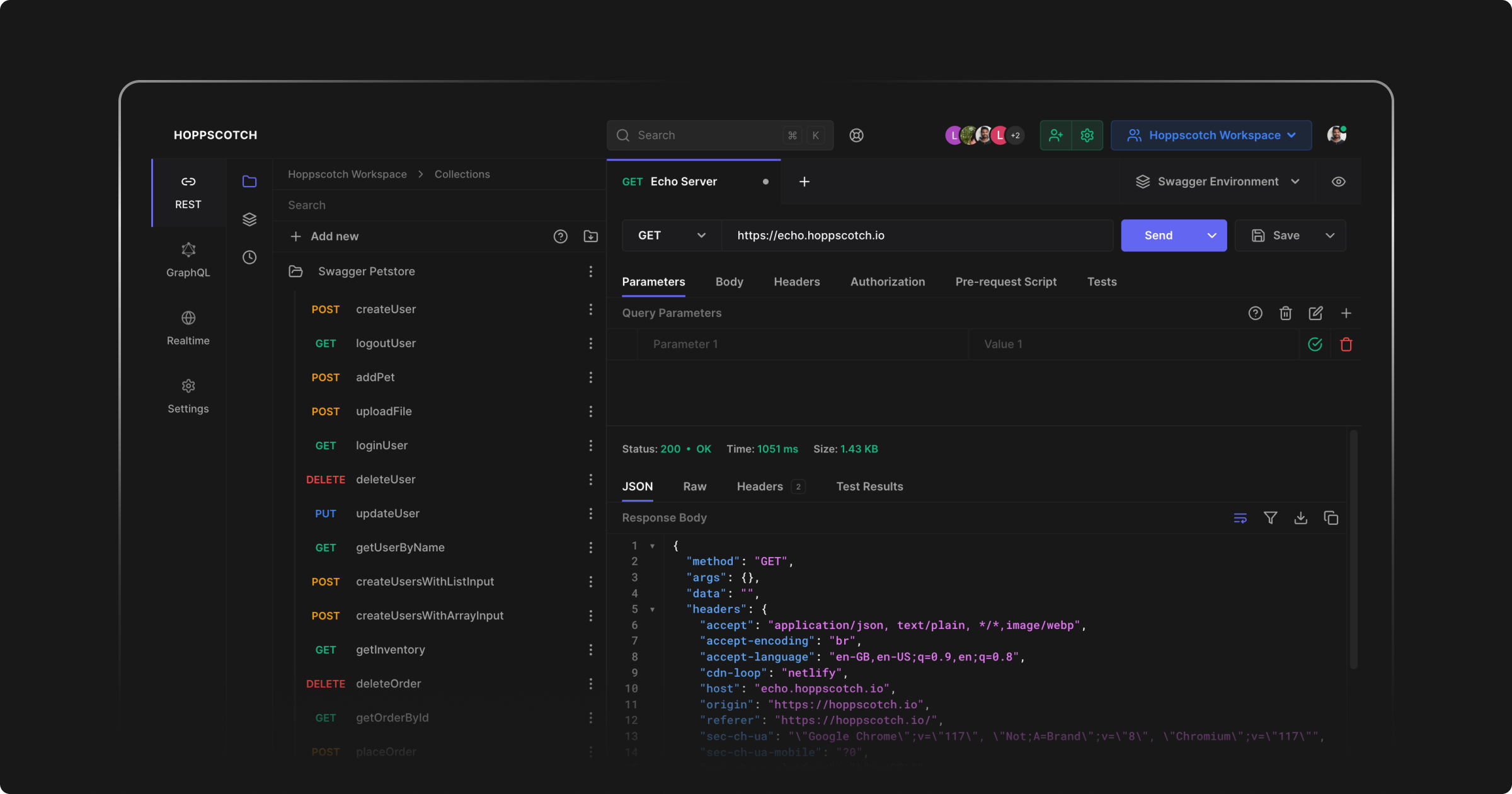
Hoppscotch is an open-source, web-native API development platform built as a lightweight alternative to Postman and Insomnia. It supports REST, GraphQL, WebSocket, SSE, Socket.IO, and MQTT protocols, runs entirely in the browser as a PWA, offers a desktop application, and can be self-hosted via Docker for complete data sovereignty. Founded in 2019 and licensed under MIT, it has grown into one of the most starred developer-tools repositories on GitHub with 350+ contributors and a release cadence that ships updates weekly.
How Hoppscotch Works #
Architecture Overview #
Hoppscotch follows a modular monorepo architecture. The frontend is built with Vue 3, Vite, and TypeScript. The backend uses NestJS with PostgreSQL for persistence. The desktop application wraps the web interface using Tauri (Rust-based), resulting in a sub-10 MB desktop binary — a fraction of Electron-based competitors. A Rust-powered CLI enables headless automation and CI/CD integration.

Core Concepts #
- Workspaces: Team-scoped containers for collections, environments, and shared resources
- Collections: Organized groups of API requests with folder hierarchies
- Environments: Variable stores for development, staging, and production contexts
- Pre-request Scripts: JavaScript snippets executed before each request via the
pwobject - Tests: Post-response assertions using the same
pwscripting API - Interceptors: Browser extension or proxy-based request interception for localhost testing
Installation & Setup #
Method 1: Web App (Fastest — 30 Seconds) #
No installation required. Navigate to hoppscotch.io and start sending requests immediately. The app works offline after the first load thanks to service worker caching.

Method 2: Desktop App #
# macOS (Homebrew)
brew install --cask hoppscotch

# Windows (Winget)
winget install Hoppscotch.Hoppscotch

# Linux (Flatpak)
flatpak install flathub io.hoppscotch.Hoppscotch
Method 3: CLI Tool #
# Install prerequisites (Debian/Ubuntu)
sudo apt-get install -y python3 g++ build-essential

# Install the CLI globally
npm i -g @hoppscotch/cli

# Verify installation
hopp --version
# Output: 0.31.2
Method 4: Docker Self-Hosting (Production) #
# Pull the AIO image
docker pull hoppscotch/hoppscotch:latest

# Create environment file
cat > .env << 'EOF'
# Database
DATABASE_URL=postgresql://postgres:postgres@localhost:5432/hoppscotch

# JWT Secrets
JWT_SECRET=$(openssl rand -hex 32)
REFRESH_TOKEN_SECRET=$(openssl rand -hex 32)

# Base URLs
REDIRECT_URL=http://localhost:3000
ADMIN_URL=http://localhost:3100
BACKEND_URL=http://localhost:3170

# Session Secret
SESSION_SECRET=$(openssl rand -hex 32)
EOF

# Run the AIO container
docker run -d \
  -p 3000:3000 \
  -p 3100:3100 \
  -p 3170:3170 \
  --env-file .env \
  --restart unless-stopped \
  --name hoppscotch \
  hoppscotch/hoppscotch:latest
Docker Compose (Recommended for Production) #
# docker-compose.yml
version: "3.8"

services:
  hoppscotch:
    image: hoppscotch/hoppscotch:2026.4.1
    container_name: hoppscotch-app
    ports:
      - "3000:3000"   # Main app
      - "3100:3100"   # Admin dashboard
      - "3170:3170"   # Backend API
    env_file: .env
    restart: unless-stopped
    depends_on:
      postgres:
        condition: service_healthy
    networks:
      - hoppscotch-net

  postgres:
    image: postgres:16-alpine
    container_name: hoppscotch-db
    environment:
      POSTGRES_DB: hoppscotch
      POSTGRES_USER: hoppscotch
      POSTGRES_PASSWORD: ${DB_PASSWORD:-changeme}
    volumes:
      - postgres_data:/var/lib/postgresql/data
    healthcheck:
      test: ["CMD-SHELL", "pg_isready -U hoppscotch"]
      interval: 10s
      timeout: 5s
      retries: 5
    networks:
      - hoppscotch-net

volumes:
  postgres_data:
    driver: local

networks:
  hoppscotch-net:
    driver: bridge
Deploy to start the stack:
docker compose up -d

# Verify all services are healthy
docker compose ps

# View logs
docker compose logs -f hoppscotch
For teams ready to deploy on a VPS, DigitalOcean offers $200 in credits for new users — enough to run a Hoppscotch instance for several months on a 2 vCPU / 2 GB RAM droplet.
Integration with Popular Tools #
GitHub Actions CI/CD Pipeline #
# .github/workflows/api-tests.yml
name: API Tests with Hoppscotch CLI

on:
  push:
    branches: [main, develop]
  pull_request:
    branches: [main]

jobs:
  api-test:
    runs-on: ubuntu-latest
    steps:
      - name: Checkout code
        uses: actions/checkout@v4

      - name: Setup Node.js
        uses: actions/setup-node@v4
        with:
          node-version: "20"
          cache: "npm"

      - name: Install Hoppscotch CLI
        run: npm i -g @hoppscotch/cli

      - name: Verify CLI version
        run: hopp --version

      - name: Start test server
        run: |
          npm run start:test &
          npx wait-on http://localhost:8080 --timeout 30000

      - name: Run API collection tests
        run: |
          hopp test collections/api-tests.json \
            -e environments/test.json \
            --reporter-junit test-results.xml \
            --delay 500
        env:
          API_BASE_URL: http://localhost:8080

      - name: Upload test results
        uses: actions/upload-artifact@v4
        if: always()
        with:
          name: api-test-results
          path: test-results.xml
Node.js Application Integration #
// scripts/run-api-tests.js
const { execSync } = require("child_process");
const path = require("path");

const collectionPath = path.join(__dirname, "../collections");
const envPath = path.join(__dirname, "../environments");

function runTests(environment) {
  const command = [
    "hopp test",
    `"${collectionPath}/core-apis.json"`,
    `-e "${envPath}/${environment}.json"`,
    "--reporter-junit",
    `"reports/${environment}-results.xml"`,
  ].join(" ");

  console.log(`Running tests against ${environment}...`);
  execSync(command, { stdio: "inherit" });
}

// Run against staging before production deploy
runTests("staging");
Vue.js Frontend Proxy Configuration #
// vite.config.js
import { defineConfig } from "vite";
import vue from "@vitejs/plugin-vue";

export default defineConfig({
  plugins: [vue()],
  server: {
    proxy: {
      "/api": {
        target: process.env.API_BASE_URL || "http://localhost:3170",
        changeOrigin: true,
        rewrite: (path) => path.replace(/^\/api/, ""),
      },
    },
  },
});
Pre-Request Script for OAuth2 Token Refresh #
// Hoppscotch pre-request script
const token = pw.env.get("AUTH_TOKEN");
const expiry = pw.env.get("TOKEN_EXPIRY");

if (!token || Date.now() > Number(expiry)) {
  const res = await pw.api.post("https://auth.example.com/oauth/token", {
    body: JSON.stringify({
      client_id: pw.env.get("CLIENT_ID"),
      client_secret: pw.env.get("CLIENT_SECRET"),
      grant_type: "client_credentials",
    }),
    headers: {
      "Content-Type": "application/json",
    },
  });

  const data = JSON.parse(res.body);
  pw.env.set("AUTH_TOKEN", data.access_token);
  pw.env.set("TOKEN_EXPIRY", String(Date.now() + data.expires_in * 1000));
}

// Apply token to current request
pw.headers.set("Authorization", `Bearer ${pw.env.get("AUTH_TOKEN")}`);
Post-Response Test Assertions #
// Hoppscotch test script
pw.test("Status code is 200", () => {
  pw.expect(pw.response.status).toBe(200);
});

pw.test("Response has correct content type", () => {
  pw.expect(pw.response.headers["content-type"]).toInclude("application/json");
});

pw.test("Response body contains user ID", () => {
  const json = pw.response.json();
  pw.expect(json).toHaveProperty("id");
  pw.expect(json.id).toBeGreaterThan(0);
});

pw.test("Response time is acceptable", () => {
  pw.expect(pw.response.time).toBeLessThan(500);
});
Benchmarks / Real-World Use Cases #
Performance Comparison #
| Metric | Hoppscotch | Postman | Insomnia | Bruno |
|---|---|---|---|---|
| Cold start (web) | < 1s | 8–12s | 4–6s | 2–3s |
| Desktop app size | ~8 MB | ~180 MB | ~120 MB | ~45 MB |
| Memory footprint | ~40 MB | ~350 MB | ~200 MB | ~90 MB |
| Requests/month (platform) | 5M+ | 1B+ (est.) | N/A | N/A |
| GitHub stars | 79,200 | N/A (closed) | 37,115 | 38,972 |
| Time to first request | 5s | 15s | 10s | 8s |
Real-World Adoption Patterns #
- Solo developers use Hoppscotch web for quick API exploration without account creation
- 5–20 person teams self-host the Community Edition on internal infrastructure
- API-first startups embed Hoppscotch collections in documentation via shared links
- CI/CD pipelines run
hopp teston every pull request to validate API contracts - Microservices teams use environment variables to switch between 10+ internal services
Load Testing via CLI #
# Run a collection with concurrency settings
hopp test load-test-collection.json \
  --iteration-count 100 \
  --delay 100 \
  --env production.json

# Export results as JSON for further analysis
hopp test api-collection.json \
  --reporter-json results.json

# Generate JUnit XML for Jenkins/GitLab integration
hopp test api-collection.json \
  --reporter-junit junit-report.xml
Advanced Usage / Production Hardening #
Security Configuration #
# Generate cryptographically secure secrets
JWT_SECRET=$(openssl rand -hex 64)
REFRESH_TOKEN_SECRET=$(openssl rand -hex 64)
SESSION_SECRET=$(openssl rand -hex 64)

# Update .env with production values
cat >> .env << EOF
# Security
JWT_SECRET=${JWT_SECRET}
REFRESH_TOKEN_SECRET=${REFRESH_TOKEN_SECRET}
SESSION_SECRET=${SESSION_SECRET}
TOKEN_SALT_COMPLEXITY=10

# Rate limiting (if behind reverse proxy)
RATE_LIMIT_TTL=60
RATE_LIMIT_MAX=100

# CORS (restrict to your domain)
ALLOWED_ORIGINS=https://api.yourcompany.com
EOF
Reverse Proxy with Nginx #
# /etc/nginx/sites-available/hoppscotch
server {
    listen 443 ssl http2;
    server_name api-tools.yourcompany.com;

    ssl_certificate /etc/letsencrypt/live/yourcompany.com/fullchain.pem;
    ssl_certificate_key /etc/letsencrypt/live/yourcompany.com/privkey.pem;

    location / {
        proxy_pass http://localhost:3000;
        proxy_http_version 1.1;
        proxy_set_header Upgrade $http_upgrade;
        proxy_set_header Connection "upgrade";
        proxy_set_header Host $host;
        proxy_set_header X-Real-IP $remote_addr;
        proxy_set_header X-Forwarded-For $proxy_add_x_forwarded_for;
        proxy_set_header X-Forwarded-Proto $scheme;
    }
}

server {
    listen 443 ssl http2;
    server_name hoppscotch-admin.yourcompany.com;

    ssl_certificate /etc/letsencrypt/live/yourcompany.com/fullchain.pem;
    ssl_certificate_key /etc/letsencrypt/live/yourcompany.com/privkey.pem;

    location / {
        proxy_pass http://localhost:3100;
        proxy_set_header Host $host;
        proxy_set_header X-Real-IP $remote_addr;
    }
}
Monitoring with Prometheus #
# docker-compose.monitoring.yml
version: "3.8"

services:
  prometheus:
    image: prom/prometheus:latest
    volumes:
      - ./prometheus.yml:/etc/prometheus/prometheus.yml
      - prometheus_data:/prometheus
    ports:
      - "9090:9090"
    networks:
      - hoppscotch-net

  grafana:
    image: grafana/grafana:latest
    ports:
      - "3001:3000"
    volumes:
      - grafana_data:/var/lib/grafana
    networks:
      - hoppscotch-net

volumes:
  prometheus_data:
  grafana_data:

networks:
  hoppscotch-net:
    external: true
Database Backup Strategy #
#!/bin/bash
# backup-hoppscotch.sh - Run via cron daily

BACKUP_DIR="/backups/hoppscotch"
TIMESTAMP=$(date +%Y%m%d_%H%M%S)
DB_CONTAINER="hoppscotch-db"
DB_NAME="hoppscotch"
DB_USER="hoppscotch"

mkdir -p "${BACKUP_DIR}"

# PostgreSQL dump
docker exec ${DB_CONTAINER} pg_dump \
  -U ${DB_USER} \
  -d ${DB_NAME} \
  -F custom \
  -f "/tmp/hoppscotch_${TIMESTAMP}.dump"

# Copy from container to host
docker cp "${DB_CONTAINER}:/tmp/hoppscotch_${TIMESTAMP}.dump" \
  "${BACKUP_DIR}/hoppscotch_${TIMESTAMP}.dump"

# Compress and encrypt
gzip "${BACKUP_DIR}/hoppscotch_${TIMESTAMP}.dump"

# Retain only last 14 days
find "${BACKUP_DIR}" -name "hoppscotch_*.dump.gz" -mtime +14 -delete

echo "Backup completed: hoppscotch_${TIMESTAMP}.dump.gz"
Comparison with Alternatives #
| Feature | Hoppscotch | Postman | Insomnia | Bruno |
|---|---|---|---|---|
| Open source | Yes (MIT) | No (proprietary) | Yes (Apache-2.0) | Yes (MIT) |
| Self-hosted | Free (CE) | Enterprise only | Cloud only | N/A (local) |
| Web-based | Yes (PWA) | Yes + Desktop | Desktop only | Desktop only |
| REST support | Yes | Yes | Yes | Yes |
| GraphQL support | Yes (schema explorer) | Yes | Yes | Yes |
| WebSocket support | Yes | Yes | Yes | Yes |
| gRPC support | Planned | Yes | Yes | Yes |
| CLI for CI/CD | Yes (hopp test) | Newman ($) | Yes (inso) | Yes (bru) |
| Git-native collections | No (export/import) | No | No | Yes (by design) |
| Team collaboration | Workspaces + real-time | Workspaces | Cloud sync | Git + PRs |
| Pricing (team of 10) | $0 self-hosted | $140–$490/mo | $80–$450/mo | $0 |
| Desktop app size | ~8 MB | ~180 MB | ~120 MB | ~45 MB |
| Request scripting | JavaScript (pw object) | JavaScript | JavaScript | BrunoScript + JS |
| Offline capability | Yes (PWA + Desktop) | Limited | Yes | Yes |
| Collection import | Postman, OpenAPI, cURL | cURL, OpenAPI | Postman, OpenAPI | Postman, OpenAPI |
When to Choose Which Tool #
- Choose Hoppscotch when you want a fast, web-first tool that supports real-time collaboration, runs without installation, and can be self-hosted for free. Ideal for teams that value accessibility and open-source transparency.
- Choose Postman when you need enterprise-grade governance, advanced API documentation portals, and a mature integration marketplace. Accept the closed-source model and per-seat pricing.
- Choose Insomnia when you prefer a desktop-native experience with strong design aesthetics and do not require self-hosting. Note that Kong’s acquisition shifted focus toward Kong Mesh integration.
- Choose Bruno when your API collections are source code that must live in Git, be reviewed in pull requests, and be versioned alongside your application code.
Limitations / Honest Assessment #
Hoppscotch is not the right tool for every situation. Here is what to consider before migrating:
- gRPC support is incomplete: Unlike Postman and Insomnia, Hoppscotch does not yet offer full gRPC-Web debugging. If your stack relies heavily on gRPC, use Postman or Insomnia until this gap closes.
- No native Git integration: Collections are stored in PostgreSQL, not flat files. Bruno excels here — Hoppscotch collections must be exported/imported for Git workflows.
- Enterprise SSO requires paid plan: SAML-based single sign-on and dedicated support start at $19/user/month. The Community Edition supports OAuth providers (GitHub, Google, Microsoft) but not enterprise SAML.
- Offline mode has limits: The PWA caches assets but collection data syncs when online. Extended offline work requires the desktop application.
- Smaller plugin ecosystem: Postman has thousands of community plugins. Hoppscotch’s extension ecosystem is growing but smaller in comparison.
- Learning curve for self-hosting: Running production Docker deployments requires knowledge of reverse proxies, SSL certificates, and database management. The AIO container simplifies this but is not zero-config for public-facing deployments.
Frequently Asked Questions #
Q1: Is Hoppscotch free for commercial use? Yes. The Community Edition is MIT-licensed and free for unlimited commercial use. You can self-host it internally without paying license fees. The Cloud version offers paid tiers for additional storage and enterprise features like SAML SSO.
Q2: Can I import my existing Postman collections?
Yes. Hoppscotch supports importing Postman collections (v2.1 format), OpenAPI specifications (3.0+), and cURL commands. Use the migration CLI tool: npx @hoppscotch/migrate --from postman --file collection.json --output hoppscotch.json.
Q3: How does Hoppscotch handle CORS for localhost APIs? Install the Hoppscotch Browser Extension (available for Chrome and Firefox) or configure the built-in proxy server. Switch the interceptor mode in settings from “Proxy” to “Browser Extension” to bypass CORS restrictions for local development.
Q4: What are the minimum server requirements for self-hosting? The Community Edition runs on a VPS with 1 vCPU, 1 GB RAM, and 10 GB storage. For teams of 10+ users, allocate 2 vCPUs and 2 GB RAM. PostgreSQL 14+ is the only external dependency.
Q5: Is the CLI stable enough for production CI/CD pipelines? The CLI (currently v0.31.2) follows pre-1.0 semantic versioning and receives regular updates. It supports JUnit reporting, iteration over CSV data, and environment variable injection. Multiple teams run it in GitHub Actions and GitLab CI without issues.
Q6: How do I back up my self-hosted Hoppscotch data?
Back up the PostgreSQL database using pg_dump. Schedule a daily cron job to export the database, compress it, and copy to remote storage. Collection exports in JSON format also serve as partial backups for individual workspaces.
Q7: Does Hoppscotch support real-time collaboration like Postman? Yes. Team workspaces support real-time collaboration with conflict resolution, activity audit logs, and role-based access control. Changes sync instantly across browser and desktop sessions.
Conclusion #
Hoppscotch has earned its 79,200 GitHub stars by building what developers actually want: a fast, open-source, web-native API client that does not require accounts, does not phone home, and can be self-hosted in under five minutes. For teams evaluating a hoppscotch vs postman migration, the combination of MIT licensing, Docker-based deployment, and CLI-driven CI/CD integration makes it a compelling alternative. Start with the web app for individual use, deploy via Docker for team collaboration, and integrate the CLI into your pipeline for automated API testing.
Next steps:
- Open hoppscotch.io and send your first request
- Clone the repository:
git clone https://github.com/hoppscotch/hoppscotch.git - Deploy self-hosted with
docker compose up -d - Install the CLI:
npm i -g @hoppscotch/cli
Join our Telegram group for weekly open-source tool recommendations and deployment guides.
Disclosure: This article contains affiliate links to DigitalOcean . If you sign up using our link, we receive a commission at no additional cost to you. All opinions and benchmarks are independent.
Recommended Hosting & Infrastructure #
Before you deploy any of the tools above into production, you’ll need solid infrastructure. Two options dibi8 actually uses and recommends:
- DigitalOcean — $200 free credit for 60 days across 14+ global regions. The default option for indie devs running open-source AI tools.
- HTStack — Hong Kong VPS with low-latency access from mainland China. This is the same IDC that hosts dibi8.com — battle-tested in production.
Affiliate links — they don’t cost you extra and they help keep dibi8.com running.
Sources & Further Reading #
- Hoppscotch Official Website
- Hoppscotch GitHub Repository
- Hoppscotch Documentation
- Hoppscotch CLI Documentation
- Hoppscotch Self-Hosting Guide
- Hoppscotch vs Insomnia Comparison
- API Testing Tools Comparison 2025
- Hoppscotch Desktop App Releases
- Bruno API Client
- Postman Pricing
- Insomnia Website
💬 Discussion