Netdata: Real-Time Monitoring with 78K+ Stars
Netdata (ND) is a high-performance real-time monitoring agent with per-second metrics and visualization. Compatible with Docker, Kubernetes, Prometheus, and Grafana. Covers netdata tutorial, netdata setup, real time monitoring, netdata vs prometheus, and netdata performance tuning.
- ⭐ 79539
- TypeScript
- GPL-3.0
- Updated 2026-05-19
Introduction #
Most monitoring tools show you what happened 30 seconds ago. By then, the microburst that killed your database connection pool is already gone — leaving only a cryptic log entry and an angry pager. Netdata closes that gap with per-second metrics, sub-2-second visualization latency, and a single binary that installs in under 60 seconds. With 78,874 GitHub stars and a GPL-3.0 license, it is one of the most popular open-source monitoring agents in production today. This guide walks through a complete Netdata setup — from a single-node Docker deployment to a streaming Kubernetes cluster — with real performance-tuning configurations you can apply immediately.
What Is Netdata? #
Netdata is a distributed real-time monitoring agent that collects, stores, and visualizes system and application metrics with per-second granularity. Unlike traditional polling-based systems that sample every 15–60 seconds, Netdata runs directly on each node, capturing thousands of metrics locally and streaming them to central parents when needed. Written in C (54.2%), Go (29%), and Rust (8.5%), it is designed for minimal resource overhead: under 5% CPU and ~150 MB RAM per node in default configuration.
How Netdata Works #
Netdata’s architecture follows an edge-first, distributed model. Each node runs an independent agent that auto-discovers 800+ integrations without configuration files.


Core components:
- Data Collection Layer: Built-in collectors for CPU, memory, disk, network, containers, databases, and applications. No external dependencies like Telegraf or Exporters required.
- Database Engine (dbengine): A custom high-performance time-series store using ~0.5 bytes per sample with tiered storage for long-term retention.
- ML Anomaly Detection: 18 unsupervised ML models per metric run at the edge, achieving consensus-based anomaly detection with 99% false-positive reduction.
- Streaming & Parent-Child: Any agent can act as a “parent” to aggregate metrics from child nodes, enabling horizontal scaling without central bottlenecks.
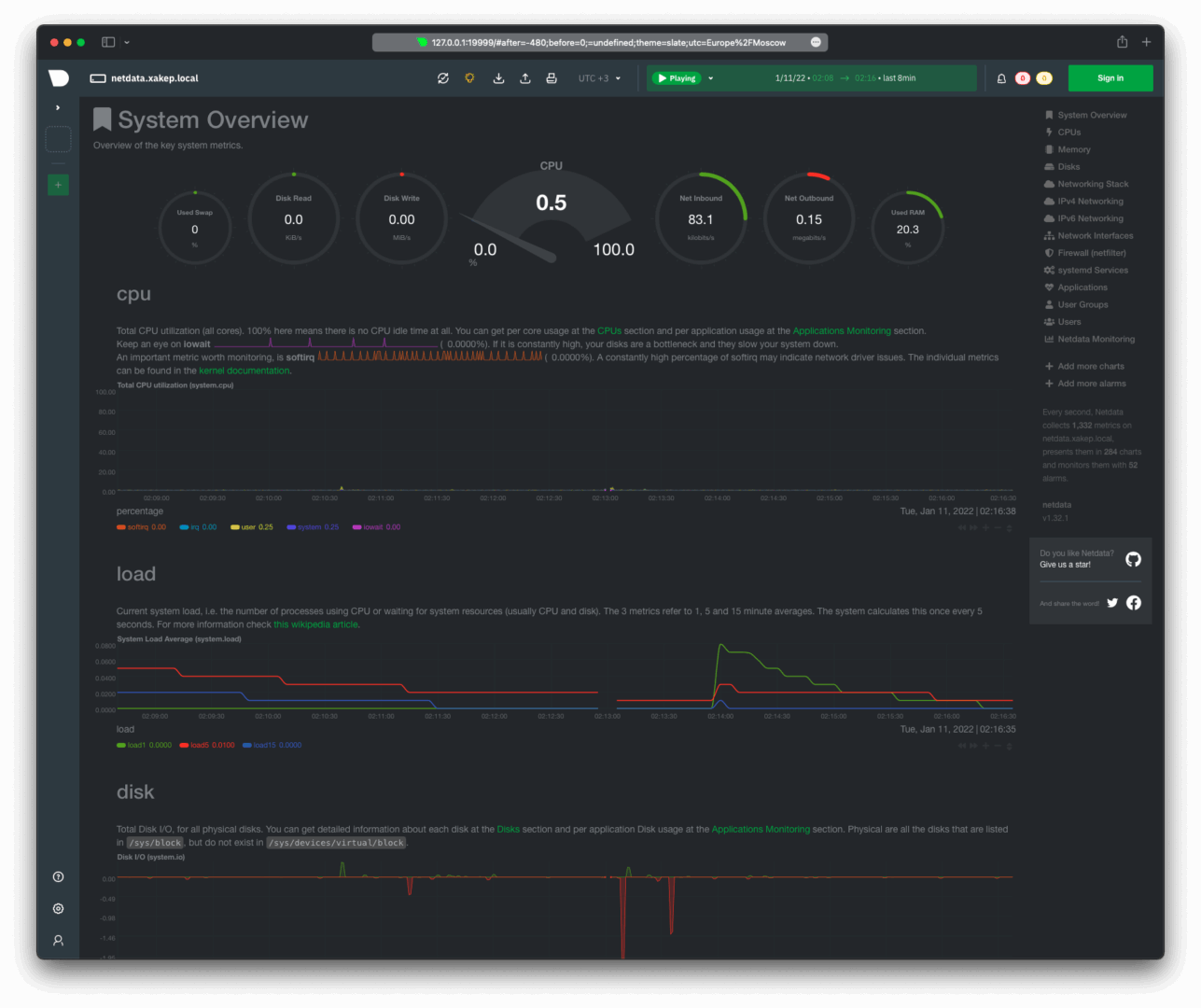
- Web Dashboard: Embedded static-threaded web server serves real-time charts directly from the agent on port 19999.
Installation & Setup #
One-Line Install (Linux) #
The fastest way to get Netdata running:
# Install Netdata with all defaultscurl -Ss https://get.netdata.cloud/kickstart.sh | sudo bash
Verify the installation:
sudo systemctl status netdata
# Active: active (running) since ...
Access the local dashboard at http://localhost:19999.
Docker Deploy #
For containerized environments:
docker run -d --name=netdata \
  -p 19999:19999 \
  -v /proc:/host/proc:ro \
  -v /sys:/host/sys:ro \
  -v /var/run/docker.sock:/var/run/docker.sock:ro \
  --cap-add SYS_PTRACE \
  --security-opt apparmor=unconfined \
  netdata/netdata:latest
Docker Compose (Production-Ready) #
version: '3.8'
services:
  netdata:
    image: netdata/netdata:v2.5.0
    container_name: netdata
    hostname: "netdata-${HOSTNAME}"
    ports:
      - "19999:19999"
    restart: unless-stopped
    cap_add:
      - SYS_PTRACE
      - SYS_ADMIN
    security_opt:
      - apparmor:unconfined
    volumes:
      - /proc:/host/proc:ro
      - /sys:/host/sys:ro
      - /etc/os-release:/host/etc/os-release:ro
      - /var/run/docker.sock:/var/run/docker.sock:ro
      - netdata-config:/etc/netdata
      - netdata-lib:/var/lib/netdata
      - netdata-cache:/var/cache/netdata
    environment:
      - NETDATA_CLAIM_TOKEN=${NETDATA_CLAIM_TOKEN}
      - NETDATA_CLAIM_URL=https://app.netdata.cloud
      - NETDATA_CLAIM_ROOMS=${NETDATA_CLAIM_ROOMS}
volumes:
  netdata-config:
  netdata-lib:
  netdata-cache:
Kubernetes Helm Install #
# Add the Netdata Helm repository
helm repo add netdata https://netdata.github.io/helmchart/
helm repo update

# Install with default values
helm install netdata netdata/netdata \
  --namespace monitoring \
  --create-namespace
Verify the pods:
kubectl get pods -n monitoring
# NAME                    READY   STATUS
# netdata-parent-0        1/1     Running
# netdata-child-xxx       1/1     Running
Generate Current Config #
Download the running configuration to customize:
# Download current effective config
curl -o /etc/netdata/netdata.conf http://localhost:19999/netdata.conf
# Or use the edit-config script
sudo /etc/netdata/edit-config netdata.conf
Integration with Popular Tools #
Prometheus Remote Write #
Export Netdata metrics to Prometheus for long-term storage and PromQL queries:
sudo /etc/netdata/edit-config exporting.conf
[prometheus:remote_write]
    enabled = yes
    destination = prometheus:9090
    remote write URL path = /api/v1/write
    data source = average
    prefix = netdata
    send charts matching = *
    send hosts matching = *
Restart Netdata:
sudo systemctl restart netdata
Grafana Dashboard #
While Netdata has a built-in dashboard, many teams prefer Grafana for centralized visualization. Add Netdata as a Prometheus data source in Grafana:
# datasource.yaml in Grafana
apiVersion: 1
datasources:
  - name: Netdata-Prometheus
    type: prometheus
    url: http://netdata:19999/api/v1/allmetrics?format=prometheus
    access: proxy
    isDefault: false
    jsonData:
      timeInterval: "1s"
Kubernetes DaemonSet (Advanced) #
For full host-level visibility on every K8s node:
apiVersion: apps/v1
kind: DaemonSet
metadata:
  name: netdata
  namespace: monitoring
spec:
  selector:
    matchLabels:
      app: netdata
  template:
    metadata:
      labels:
        app: netdata
    spec:
      hostNetwork: true
      hostPID: true
      containers:
        - name: netdata
          image: netdata/netdata:v2.5.0
          ports:
            - containerPort: 19999
              hostPort: 19999
          securityContext:
            capabilities:
              add: [SYS_PTRACE, SYS_ADMIN]
          volumeMounts:
            - name: proc
              mountPath: /host/proc
              readOnly: true
            - name: sys
              mountPath: /host/sys
              readOnly: true
            - name: docker-sock
              mountPath: /var/run/docker.sock
              readOnly: true
      volumes:
        - name: proc
          hostPath:
            path: /proc
        - name: sys
          hostPath:
            path: /sys
        - name: docker-sock
          hostPath:
            path: /var/run/docker.sock
PostgreSQL Monitoring #
Enable the PostgreSQL collector in go.d/postgres.conf:
jobs:
  - name: local
    dsn: 'postgres://netdata_monitor:password@localhost:5432/postgres'
    collect:
      - database_statistics
      - table_statistics
      - index_statistics
      - replication_statistics
    timeout: 2
Test the collector:
sudo /etc/netdata/edit-config go.d/postgres.conf
# Restart to apply
sudo systemctl restart netdata
Nginx Monitoring #
Monitor Nginx stub_status and access logs:
# /etc/netdata/go.d/nginx.conf
jobs:
  - name: local
    url: http://localhost/stub_status

  - name: access_log
    path: /var/log/nginx/access.log
    parser:
      type: ltsv
Benchmarks / Real-World Use Cases #
Resource Footprint Comparison #
The University of Amsterdam published a peer-reviewed study (ICSOC 2023) ranking Netdata as the most energy-efficient monitoring tool for Docker-based systems. Independent benchmarks confirm:
| Scenario | Netdata | Prometheus + Node Exporter | Zabbix Agent |
|---|---|---|---|
| CPU Overhead (%) | 1–5% | 5–15% | 10–20% |
| RAM per Node | 100–150 MB | 200–500 MB | 150–300 MB |
| Collection Interval | 1 second | 15–60 seconds | 30–60 seconds |
| Startup Time | < 60 seconds | 30–60 minutes | 2–4 hours |
| Metrics per Node | 2,000+ | 500–1,000 | 1,000–2,000 |
| Config Required | Zero | Moderate | Extensive |
Streaming Scale Benchmarks #
Netdata’s parent-child streaming architecture scales horizontally:
- Single Parent: 1 million+ samples/second ingestion, ~3.5 GB RAM
- 10 Child Nodes: 20k metrics each, 1-second retention for 7 days, 12 GB disk
- Active-Active Cluster: Unlimited horizontal scaling with full data replication
- Ephemeral Nodes: Stream metrics to parents, retain data after node termination
Real-World Deployment: 500-Node K8s Cluster #
A mid-size SaaS company running 500 Kubernetes nodes uses:
- 5 Netdata parents (active-active) across 3 availability zones
- 500 child agents via DaemonSet, each running in RAM mode (~50 MB)
- Tiered storage: 1-second for 7 days, 1-minute for 1 month, 1-hour for 1 year
- Total parent storage: 25 GB per parent (125 GB cluster-wide)
- Alert routing via Netdata Cloud to PagerDuty and Slack
Advanced Usage / Production Hardening #
Performance Tuning: netdata.conf #
The default configuration is optimized for standalone use. For production systems, tune the database engine and disable unnecessary collectors.
Minimal footprint (production child nodes):
[global]
    # Run with lowest priority to avoid impacting applications
    process scheduling policy = batch
    process nice level = 19
    # Reduce threads on constrained nodes
    libuv worker threads = 4

[db]
    # Use RAM-only mode for child nodes streaming to parents
    mode = ram
    retention = 3600
    # Single tier is sufficient for local buffering
    storage tiers = 1

[ml]
    # Disable ML on child nodes — run on parents
    enabled = no

[health]
    # Disable local alerting on child nodes
    enabled = no

[web]
    # Bind only to localhost for security
    bind to = 127.0.0.1
    allow connections from = localhost

[plugins]
    # Disable unused collectors to reduce CPU/RAM
    ebpf = no
    perf = no
    nfacct = no
    fping = no
    ioping = no
    tc = no
    idlejitter = no
    debugfs = no
    systemd-journal = no
Parent node with tiered storage (central monitoring):
[db]
    mode = dbengine
    storage tiers = 3
    dbengine page cache size = 1.4GiB

    # Tier 0: 1-second resolution, 7 days
    update every = 1
    dbengine tier 0 retention size = 12GiB
    dbengine tier 0 retention time = 7d

    # Tier 1: 1-minute resolution, 1 month
    dbengine tier 1 update every iterations = 60
    dbengine tier 1 retention size = 4GiB
    dbengine tier 1 retention time = 1mo

    # Tier 2: 1-hour resolution, 1 year
    dbengine tier 2 update every iterations = 60
    dbengine tier 2 retention size = 2GiB
    dbengine tier 2 retention time = 1y

[ml]
    enabled = yes
    # 18 ML models per metric, trains every 3 hours
    train every = 10800
    number of models per dimension = 18

[health]
    enabled = yes
    # Run health checks every 10 seconds
    run at least every seconds = 10

[web]
    # Expose to network for dashboard access
    bind to = *
    # Restrict access to internal networks
    allow connections from = 10.* 192.168.* 172.16.* 172.17.*
Streaming Configuration: stream.conf #
On child nodes (/etc/netdata/stream.conf):
[stream]
    enabled = yes
    destination = tcp:netdata-parent.monitoring.svc.cluster.local:19999
    api key = YOUR_API_KEY_HERE
    timeout seconds = 60
    default port = 19999
    send charts matching = *
    buffer size bytes = 1048576
    reconnect delay seconds = 5
    initial clock resync iterations = 60
On the parent (/etc/netdata/stream.conf):
[API_KEY]
    enabled = yes
    default memory mode = dbengine
    health enabled by default = yes
Security Hardening #
Enable TLS for the web interface:
[web]
    tls version = 1.3
    ssl key = /etc/netdata/ssl/key.pem
    ssl certificate = /etc/netdata/ssl/cert.pem
    # Require TLS for all connections
    bind to = *=dashboard|registry|badges|management|streaming|netdata.conf|readable|writable
Monitoring Netdata Itself #
Track the agent’s own resource usage:
# View internal metrics
curl -s http://localhost:19999/api/v1/info | jq '.version, .hog'

# Check dbengine statistics
curl -s http://localhost:19999/api/v1/data?chart=netdata.dbengine_main_page_stats
Comparison with Alternatives #
| Feature | Netdata | Prometheus | Datadog | Zabbix |
|---|---|---|---|---|
| Collection Interval | 1 second | 15–60 seconds | 15 seconds | 30–60 seconds |
| Agent RAM | 100–150 MB | 200–500 MB | 200–400 MB | 150–300 MB |
| Agent CPU | 1–5% | 5–15% | 3–8% | 10–20% |
| Setup Time | < 60 seconds | 30–60 min | 10–20 min | 2–4 hours |
| Auto-Discovery | 800+ integrations | Limited | 600+ integrations | Template-based |
| Built-in Dashboard | Yes (real-time) | No (PromQL only) | Yes | Yes (dated) |
| ML Anomaly Detection | 18 models/metric | No (requires extra) | Yes | Limited |
| Long-Term Storage | Tiered dbengine | 15 days default | Cloud | External DB |
| Licensing | GPL-3.0 (free) | Apache-2.0 (free) | $15/host/month | GPL-2.0 (free) |
| Alert Routing | Built-in + Cloud | Alertmanager | Built-in | Built-in |
| Kubernetes Native | Yes (Helm chart) | Yes (operator) | Yes (operator) | Limited |
When to choose what:
- Netdata: Single-node visibility, real-time troubleshooting, resource-constrained environments, teams that need zero-config monitoring.
- Prometheus: Cloud-native metric aggregation, complex PromQL queries, long-term storage with Thanos/VictoriaMetrics.
- Datadog: Enterprise-wide observability (metrics + logs + traces + APM), managed SaaS with SOC 2 compliance.
- Zabbix: Mixed infrastructure (network gear + servers + SNMP), organizations needing agent + agentless monitoring.
Limitations / Honest Assessment #
Netdata is not the right tool for every monitoring scenario:
- No centralized multi-host view without Netdata Cloud: The open-source agent dashboards are per-node. For a unified view across 100+ nodes, you either need Netdata Cloud (SaaS) or a parent streaming setup with external visualization.
- Limited long-term storage in default config: The dbengine defaults to ~256 MB disk per tier. For years of retention at scale, you need explicit tiered storage configuration or an external TSDB like VictoriaMetrics.
- Alerting pipeline less flexible than Alertmanager: While Netdata has built-in health checks and notifications, complex routing trees, silencing, and on-call rotation require Netdata Cloud or integration with PagerDuty/OpsGenie.
- Not a full observability platform: Netdata focuses on metrics. For distributed tracing, structured logging, and APM, pair it with Jaeger, Loki, or OpenTelemetry.
- Windows support is newer: The Windows agent is functional but has fewer collectors than Linux. For Windows-centric environments, verify collector coverage before deploying.
Frequently Asked Questions #
Q: How much RAM does Netdata actually use in production?
On a child node streaming to a parent, ~50 MB with the RAM-mode configuration shown above. On a parent storing 7 days of 1-second data for 10 nodes, expect 2.5–3.5 GB RAM with a 1.4 GB page cache. The agent auto-tunes cache sizes based on available system memory.
Q: Can I run Netdata without Netdata Cloud?
Yes. The open-source agent is fully functional without any cloud connection. Use parent-child streaming for centralized aggregation and access dashboards directly on any agent at port 19999. Netdata Cloud adds unified dashboards, mobile apps, and advanced alert routing but is not required.
Q: How does Netdata compare to Prometheus + Grafana?
Netdata excels at real-time, per-node visibility with zero configuration. Prometheus excels at metric aggregation across dynamic, ephemeral fleets with PromQL. Many teams run both: Netdata on every node for real-time troubleshooting, Prometheus for cluster-level aggregation and long-term trending. Netdata can export metrics to Prometheus via OpenMetrics format.
Q: What is the maximum scale Netdata can handle?
A single parent node can ingest 1+ million samples/second. For horizontal scaling, deploy active-active parent clusters. There is no theoretical limit — the architecture is distributed by design. The Netdata Cloud SaaS handles millions of nodes.
Q: How do I back up Netdata’s database and configuration?
Configuration lives in /etc/netdata/ and can be version-controlled (Git, Ansible, Puppet). The dbengine database in /var/cache/netdata/ is self-healing and does not require manual backup — streaming to multiple parent nodes provides natural redundancy. For critical environments, run active-active parent pairs.
Q: Does Netdata support custom application metrics?
Yes. Use the built-in StatsD server (port 8125), the OpenMetrics endpoint, or write a custom collector in Python or Go. The go.d.plugin framework supports building new collectors with minimal boilerplate.
Conclusion #
Netdata delivers on a promise most monitoring tools fail to keep: immediate, per-second visibility with negligible resource overhead. For teams running Docker, Kubernetes, or bare-metal infrastructure, it is the fastest path from “nothing” to “monitoring everything.” The streaming architecture scales from a single Raspberry Pi to a multi-region Kubernetes cluster, and the GPL-3.0 license means zero licensing costs.
Action items:
- Run the one-line installer on your most critical server today
- Deploy the Helm chart on your Kubernetes cluster
- Configure parent-child streaming for production hardening
- Tune
netdata.conffor your resource constraints using the configs above
Join the Netdata community on Telegram for real-time support and discussions with 5,000+ engineers.
Affiliate disclosure: This article contains affiliate links for DigitalOcean and HTStack. If you purchase hosting services through these links, dibi8.com may receive a commission at no additional cost to you.
Recommended Hosting & Infrastructure #
Before you deploy any of the tools above into production, you’ll need solid infrastructure. Two options dibi8 actually uses and recommends:
- DigitalOcean — $200 free credit for 60 days across 14+ global regions. The default option for indie devs running open-source AI tools.
- HTStack — Hong Kong VPS with low-latency access from mainland China. This is the same IDC that hosts dibi8.com — battle-tested in production.
Affiliate links — they don’t cost you extra and they help keep dibi8.com running.
Sources & Further Reading #
- Netdata GitHub Repository — 78,874 stars, GPL-3.0
- Official Documentation
- Netdata Helm Chart Reference
- Deployment Strategies & Parent-Child Streaming
- RAM Requirements & Sizing Guide
- Long-Term Data Retention Configuration
- Scaling Without Limits — Horizontal Architecture
- University of Amsterdam Energy Efficiency Study
- Netdata vs Zabbix Official Comparison
- Release Notes & Changelog
💬 Discussion