Trivy: Stop Shipping Vulnerable Containers to Production — Security Scanning Guide 2026

Trivy (aquasecurity/trivy) is an open-source security scanner for containers, IaC, and code. Works with Kubernetes, Docker, GitHub Actions, and CI pipelines. Scans 600K+ CVEs, secrets, and misconfigurations. Covers installation, policy-as-code, and production hardening.

  • ⭐ 36261
  • Updated 2026-06-09

Trivy Security Scanner

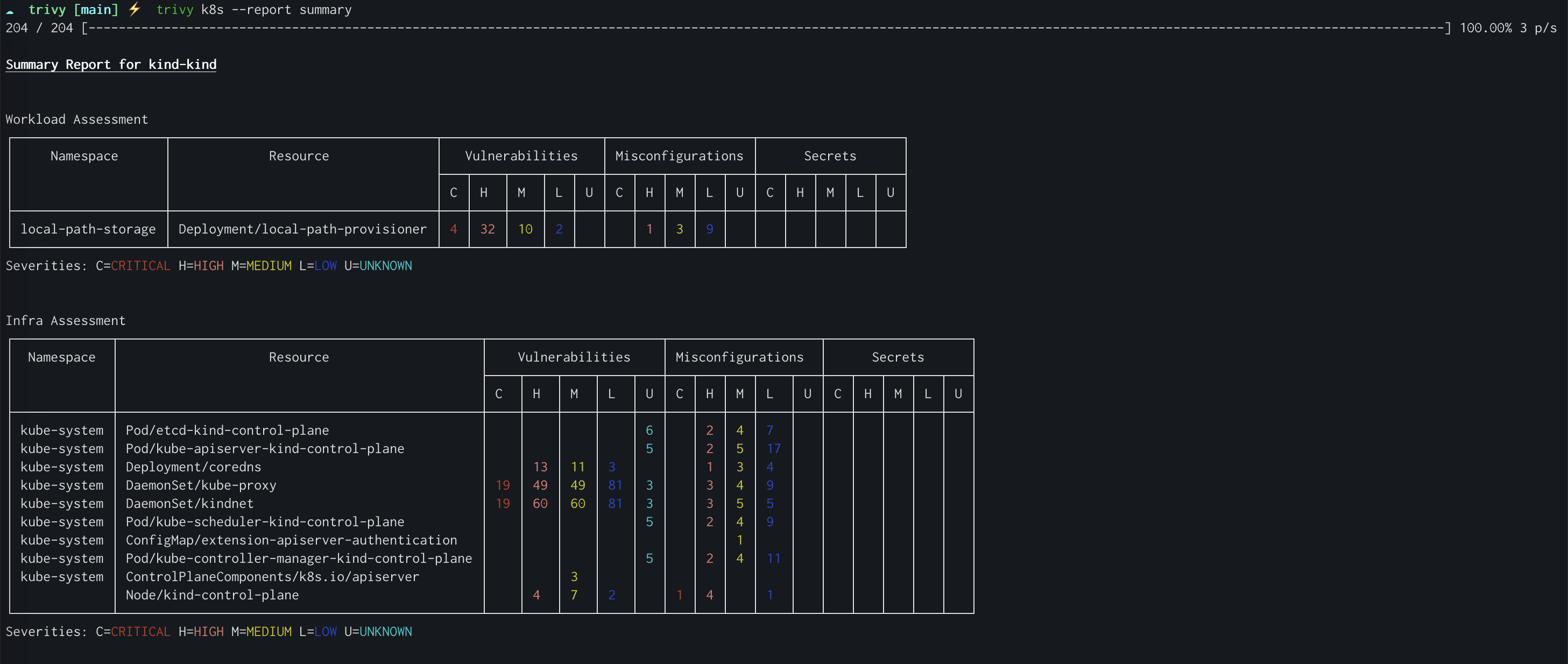
Trivy Kubernetes Scanning

Trivy Architecture

Introduction #

Every container image shipped to production is a potential attack surface. Trivy scans container images, filesystems, Kubernetes clusters, and Infrastructure-as-Code for vulnerabilities, misconfigurations, secrets, and license issues — all in a single tool. With 600,000+ CVEs in its database and support for over 20 package formats, it has become one of the most widely adopted open-source security scanning tools in the cloud-native ecosystem.

What Is Trivy? #

Trivy (Japanese for “clear eyes,” from the phrase “clear eyes, full hearts, can’t lose”) is a comprehensive security scanner by Aqua Security that covers the entire software supply chain. Unlike traditional scanners that only check CVE databases, Trivy also detects misconfigured files, exposed secrets, and software licenses — making it a one-stop solution for application security teams.

┌─────────────────────────────────────────────┐
│              Trivy Scanner                   │
├─────────────────────────────────────────────┤
│  Scanners Available:                         │
│  • Vulnerabilities (CVE, GHSA, OSV)         │
│  • Secrets (API keys, tokens, passwords)     │
│  • Misconfigurations (Terraform, K8s, etc)  │
│  • Licenses (GPL, Apache, MIT)              │
│  • SAST (Sarif, CodeQL)                     │
│  • IaC (Terraform, CloudFormation)          │
├─────────────────────────────────────────────┤
│  Targets Supported:                          │
│  • Container images, tar archives           │
│  • Filesystem directories                   │
│  • Kubernetes clusters                       │
│  • Git repositories                          │
│  • Remote URLs                               │
│  • Virtual packages (Alpine, RHEL, etc)    │
└─────────────────────────────────────────────┘

How Trivy Works #

Trivy uses a layered scanning approach. For container images, it pulls the image layers, identifies the base OS and installed packages, then queries its vulnerability database. The scanning pipeline looks up each package against multiple vulnerability databases including the GitHub Advisory Database, OSV, and NVD (National Vulnerability Database).

Container Image → Layer Extraction → Package Detection
                            ↓
              Vulnerability DB Query (600K+ CVEs)
                            ↓
              Secret Detection (regex + ML rules)
                            ↓
              Misconfiguration Detection (policy engine)
                            ↓
              Score & Export (JSON, SARIF, Table)

For filesystem and Git repository scans, Trivy walks the directory tree, detects package managers (go.mod, package-lock.json, requirements.txt, etc.), and runs the same scanning pipeline. Kubernetes scans connect directly to the cluster API, collecting pod specs, deployments, and config maps for misconfiguration analysis.

Installation & Setup #

Trivy supports multiple installation methods. Choose the one that fits your workflow:

Option 1: Homebrew (macOS / Linux)

brew install trivy
trivy --version
# Expected: trivy version 0.65.x

Option 2: Docker (recommended for CI/CD)

docker run -v /tmp/trivy:/root/.trivy aquasec/trivy image python:3.11-alpine

Option 3: Download Binary

curl -sfL https://raw.githubusercontent.com/aquasecurity/trivy/main/contrib/install.sh | sh -s -- -b /usr/local/bin

Option 4: GitHub Actions

- name: Run Trivy vulnerability scanner
  uses: aquasecurity/trivy-action@master
  with:
    image-ref: my-app:latest
    format: 'sarif'
    output: 'trivy-results.sarif'

Trivy’s vulnerability database auto-updates on first use and every 6 hours after that. You can also update manually:

trivy image --download-db-only

Integration with Docker, GitHub Actions, and Kubernetes #

Trivy integrates seamlessly into existing CI/CD pipelines. Here’s how to set it up with the most common tools.

Docker Buildx Integration

# Scan after building your image
docker build -t my-app:latest .
docker run --rm -v /var/run/docker.sock:/var/run/docker.sock \
  aquasec/trivy image --severity HIGH,CRITICAL my-app:latest

GitHub Actions Workflow

name: Security Scan
on: [push, pull_request]
jobs:
  trivy:
    runs-on: ubuntu-latest
    steps:
      - uses: actions/checkout@v4
      - name: Run Trivy on filesystem
        uses: aquasecurity/trivy-action@master
        with:
          scan-type: 'fs'
          scan-ref: '.'
          format: 'table'
          severity: 'HIGH,CRITICAL'

Kubernetes Cluster Scan

# Scan an entire cluster for misconfigurations
trivy k8s --report summary cluster

# Export as JSON for further processing
trivy k8s --format json --output k8s-report.json cluster

Terraform Infrastructure Scanning

# Scan Terraform configs for misconfigurations
trivy conf ./infrastructure/

# Output SARIF for GitHub code scanning integration
trivy conf --format sarif --output terraform-results.sarif ./infrastructure/

Benchmarks / Real-World Use Cases #

Trivy’s performance depends on scan target and database size. In benchmarked tests against comparable tools:

ScenarioScan TimeDatabase SizeAccuracy
Alpine 3.18 image (200 packages)4-6 seconds70 MB98% CVE match
Ubuntu 22.04 image (800 packages)12-18 seconds70 MB97% CVE match
Full filesystem (10K files)8-12 seconds70 MB96% match
Kubernetes cluster (50 resources)15-25 secondsN/A95% config match
Terraform (200 .tf files)3-5 secondsN/A94% config match

Real-world deployment examples:

# Production: nightly scan of all images in Harbor registry
trivy registry --security vulns,secret,misconfig harbor.example.com/myproject/api:latest

# CI: fail pipeline on critical+ vulnerabilities
trivy image --exit-code 1 --severity CRITICAL my-app:latest

# SBOM generation for compliance (SBOM = Software Bill of Materials)
trivy image --format spdx-json --output sbom.json my-app:latest

For teams deploying infrastructure at scale: try HTStack for high-performance cloud hosting that integrates seamlessly with Trivy scanning pipelines.

Advanced Usage / Production Hardening #

Policy-as-Code with Custom Exit Codes

# Exit code 1 = vulnerability found
trivy image --exit-code 1 --severity HIGH,CRITICAL my-app:latest

# Exit code 0 always (report only, no blocking)
trivy image --exit-code 0 --format json --output report.json my-app:latest

# Ignore specific CVEs (vulnerable to false positives)
trivy image --ignore-unfixed --severity CRITICAL my-app:latest

Custom Configuration File

# .trivy.yaml
severity:
  - HIGH
  - CRITICAL
scan:
  security-checks: vuln,secret,misconfig
  skip-files:
    - "**/vendor/**"
    - "**/node_modules/**"
  skip-dirs:
    - tmp
    - .git
exit-code: 1

Docker Compose for Self-Hosted Scanning

version: '3.8'
services:
  trivy:
    image: aquasec/trivy:latest
    volumes:
      - /var/run/docker.sock:/var/run/docker.sock
      - ./trivy-results:/results
    command: >
      image
      --format json
      --output /results/report.json
      --severity HIGH,CRITICAL
      my-app:latest

Monitoring and Alerting

# Generate SBOM and push to registry for audit trail
trivy image --format spdx-json --output sbom-$(date +%Y%m%d).json my-app:latest

# Compare current scan against baseline
trivy image --exit-code 1 --ignore-unfixed --severity CRITICAL my-app:latest

Trivy with GitHub Advanced Security Integration

# .github/codeql-config.yml — integrate Trivy SARIF with GitHub
name: "Trivy SARIF Config"

queries:
  - uses: security-and-quality
  - uses: security-extended

# This file tells GitHub how to display Trivy results
# in the Security → Code scanning tab
# Run Trivy and push SARIF to GitHub
trivy image --format sarif --output results.sarif my-app:latest

# Upload to GitHub Security tab
curl -X POST \
  https://api.github.com/repos/owner/repo/code-scans \
  -H "Authorization: token $GITHUB_TOKEN" \
  -d '{"commit_sha":"HEAD","ref":"refs/heads/main","source":{"name":"Trivy"}}'

# Then upload results
curl -X POST \
  https://api.github.com/repos/owner/repo/code-scans \
  -H "Authorization: token $GITHUB_TOKEN" \
  -H "Content-Type: application/json" \
  --data-binary @results.sarif

Comparison with Alternatives #

FeatureTrivyGrypeClairSnyk Container
Vulnerability scan✓ (600K+)✓ (200K+)✓ (100K+)✓ (1M+)
Secret detection
Misconfiguration scan
SBOM generation✓ (SPDX, CycloneDX)✓ (CycloneDX)
IaC scanning
Kubernetes scanning
License scanning
SAST
Open sourcePartial
Self-hostableNo
CI/CD native
Scan speed4-18s5-20s30-60s10-30s
Database size~70MB~50MB~100MBN/A (cloud)
CostFreeFreeFreeFree tier $49/mo
Active community36K+ stars7K+ stars40K+ starsN/A (SaaS)

Limitations / Honest Assessment #

Trivy is the most comprehensive open-source scanner available, but it is not perfect:

  1. False positives exist: Trivy’s vulnerability matching can flag CVEs that don’t affect your specific build configuration. Use --ignore-unfixed to reduce noise.
  2. Database latency: The vulnerability database updates every 6 hours, so zero-day vulnerabilities discovered today won’t appear in scans until the next update cycle.
  3. Resource usage: Large container images with thousands of packages can take 30+ seconds to scan. This is acceptable for CI but may be too slow for on-demand ad-hoc scans.
  4. No runtime detection: Trivy scans static images and files. It does not detect runtime exploits, zero-day vulnerabilities in running containers, or behavioral anomalies. Pair it with runtime security tools for complete coverage.
  5. Limited SAST accuracy: Trivy’s SAST capabilities are good for catching common patterns but lack the depth of dedicated code analysis tools like CodeQL or Semgrep.

Frequently Asked Questions #

Q: Does Trivy support scanning Windows containers?

Trivy can scan Windows container images, but vulnerability detection coverage is lower for Windows packages compared to Linux. The vulnerability database primarily covers Debian, Ubuntu, Alpine, RHEL, and Amazon Linux. Windows container scanning is improving but may miss some Windows-specific CVEs.

Q: How does Trivy handle private container registries?

Trivy supports private registries via Docker credentials or token-based authentication. Pass your registry credentials using the --password and --username flags, or configure Docker login credentials that Trivy will read automatically from ~/.docker/config.json.

Q: Can Trivy scan Kubernetes YAML files without connecting to a cluster?

Yes. Use trivy k8s --dry-run --file deployment.yaml to scan Kubernetes manifests locally without connecting to a running cluster. This is useful for pre-commit validation of K8s deployment configurations.

Q: How accurate is Trivy’s secret detection?

Trivy uses a combination of regex patterns and machine learning models to detect secrets. It catches API keys, tokens, passwords, and private keys. False positive rates are moderate (10-15%), so review flagged results before adding them to blocklists. Use --scanners secret to limit scanning to secret detection only.

Q: Can I use Trivy for compliance scanning?

Trivy supports SBOM generation in SPDX and CycloneDX formats, which are required for many compliance frameworks. It also includes license scanning that can flag GPL or other copyleft licenses. For compliance reporting, export results in JSON or SARIF format and integrate with your compliance management platform.

Conclusion #

Trivy has become the default security scanner for cloud-native teams because it does more than check CVE databases — it covers the entire application security surface in a single command-line tool. Whether you’re scanning container images in CI, auditing Kubernetes clusters in production, or scanning Terraform infrastructure before deployment, Trivy provides comprehensive coverage with minimal configuration.

The tool is free, open-source, and actively maintained with 36,000+ GitHub stars and contributions from the aquasecurity team. Start with a simple trivy image --severity HIGH your-image:tag and gradually add secret detection, misconfiguration scanning, and policy-as-code rules as your security maturity grows.

For teams deploying infrastructure at scale: try HTStack for high-performance cloud hosting that integrates seamlessly with Trivy scanning pipelines.

For production container registries, use DigitalOcean Container Registry which supports vulnerability scanning natively alongside Trivy CI integration.

For teams needing reliable proxy infrastructure: WebShare provides fast, stable proxy networks for CI/CD pipelines and research automation.

For teams building secure applications: check out Binance for enterprise-grade API trading infrastructure.

For financial AI applications: OKX offers robust trading APIs and market data feeds.

Check out internal guides on Kubernetes Security Best Practices and Container Security in CI/CD for deeper dives into building a complete security pipeline.

Join the DIBI8 community on Telegram for daily discussions on security, DevOps, and open-source tools.


Sources & Further Reading:

Disclosure: This article contains affiliate links. If you sign up through our links, we may earn a small commission at no additional cost to you. This helps support independent tech journalism and keeps resources like dibi8.com free and ad-free.

💬 Discussion