Claude Code: 125K+ Stars
Claude Code is Anthropic agentic coding tool that lives in your terminal. Supports VS Code, Cursor, GitHub, GitLab. Covers installation, benchmarks, and comparison with Aider, OpenHands, and Codex CLI.
- ⭐ 136687
- Python
- Anthropic Terms
- Updated 2026-05-19
Best Cursor Alternatives 2026 • OpenAI Codex CLI: The Definitive 2026 Guide to Terminal-Native
Introduction #
Terminal-based AI coding agents are reshaping how developers interact with codebases. Instead of copying snippets from browser tabs, you type a command in your terminal and watch an agent read your repository, plan changes, edit files, run tests, and commit to Git — all autonomously. Claude Code from Anthropic leads this category with 132,027 GitHub stars and a 1-million-token context window. This Claude Code tutorial covers the complete setup for beginners, production hardening, and a head-to-head comparison with Aider, OpenHands, and OpenAI Codex CLI so you can pick the right tool for your workflow.
What Is Claude Code? #
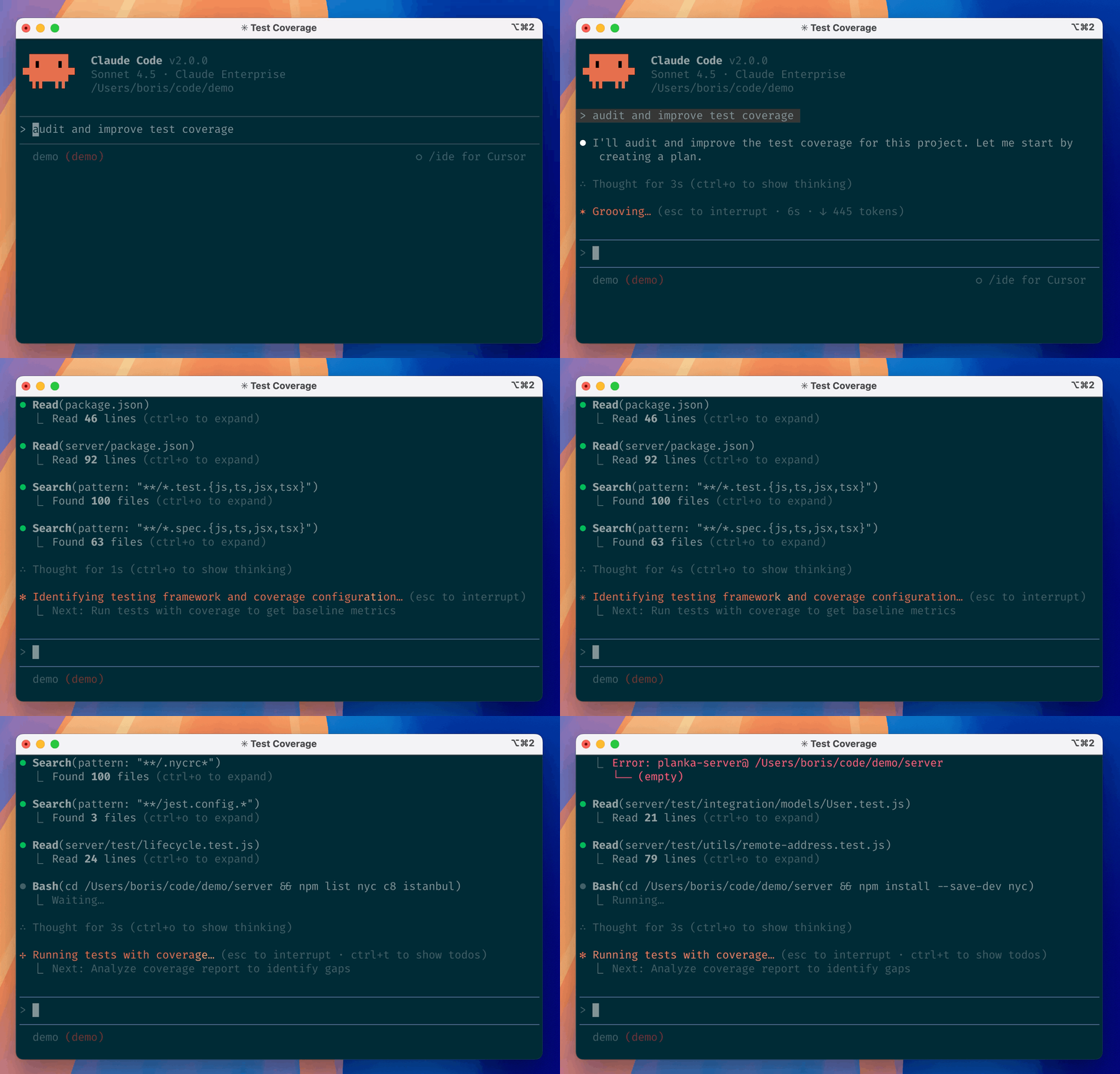
Claude Code is an agentic coding tool that lives in your terminal, understands your codebase, and executes tasks via natural language. Launched in February 2025 as a research preview and generally available by May 2025, it has become one of the most widely adopted AI developer tools among professional engineering teams. Unlike autocomplete plugins that suggest the next line, Claude Code operates at the project level: reading files, making cross-file edits, running shell commands, managing Git workflows, and iterating on test failures until the task is complete.
How Claude Code Works #
Architecture Overview #
Claude Code runs as a Node.js CLI process that wraps the Claude API. It maintains a persistent session context, reading your project structure on startup and building an internal model of your codebase. The tool uses the Model Context Protocol (MCP) to connect external services — databases, APIs, documentation systems — and can spawn parallel sub-agents for complex multi-step tasks.

Key architectural components:
- Context Engine: Ingests up to 1 million tokens of project context, allowing Claude Code to reason across entire repositories without truncation
- Tool Use Loop: A built-in execution cycle where the agent reads files, runs commands, observes output, and decides the next action autonomously
- Sub-Agent Orchestration: Parallel agent execution for independent tasks, such as refactoring one module while writing tests for another
- Lifecycle Hooks: PreToolUse and PostToolUse events that let you intercept and control tool execution for deterministic behavior
Core Concepts #
| Concept | Description |
|---|---|
CLAUDE.md | Project-level configuration file that defines coding standards, conventions, and custom instructions |
Plan Mode (/plan) | Claude outlines all intended changes before touching disk, giving you approval control |
| Slash Commands | Reusable workflow shortcuts like /init, /desktop, /mcp, and /bug |
| MCP Integration | Connect external tools via the Model Context Protocol for database queries, API calls, and more |
Installation & Setup #
Claude Code installs in under 60 seconds on macOS, Linux, and Windows (via WSL or PowerShell). This section is a beginner-friendly setup guide that gets you from zero to your first coding session. No Node.js or Docker required — the native installer handles everything.
macOS and Linux (Recommended Installer) #
# Install via the official installer (auto-updates in background)
curl -fsSL https://claude.ai/install.sh | bash

# Verify the binary is in your PATH
export PATH="$HOME/.local/bin:$PATH"

# Check installation
claude --version
Windows PowerShell #
# Install via the PowerShell installer
irm https://claude.ai/install.ps1 | iex

# Verify installation
claude --version
Homebrew (macOS/Linux — Manual Updates) #
# Install via Homebrew (does not auto-update)
brew install claude-code

# Update manually when needed
brew upgrade claude-code
VS Code Extension #
# Install from the VS Code marketplace
# Open Extensions panel (Cmd+Shift+X / Ctrl+Shift+X)
# Search "Claude Code" and install
# The extension connects to the same session running in your terminal
Authentication #
# Log in with your Anthropic account
claude auth login

# This opens a browser window. Claude Code requires a paid subscription:
# - Claude Pro: $20/month
# - Claude Max: $100/month (5x usage)
# - Claude Max 20x: $200/month (20x usage)
First Session #
# Navigate to your project
cd /path/to/your-project

# Start Claude Code
claude

# Ask it to orient itself
What does this project do? Walk me through the architecture.
Integration with Popular Tools #
VS Code #
The Claude Code extension embeds the CLI session inside your editor sidebar. Install it from the marketplace, authenticate once, and switch between terminal and IDE without losing context.
// .vscode/settings.json — Recommended settings for Claude Code
{
  "claude.code.enableInlineCompletion": false,
  "claude.code.autoApproveEdits": false,
  "claude.code.defaultModel": "claude-opus-4-6"
}
Cursor #
Since Cursor is a VS Code fork, Claude Code runs in Cursor’s integrated terminal. The two tools complement each other: Cursor handles inline autocomplete and visual diffs, while Claude Code manages multi-file refactors and autonomous task execution.
# In Cursor's integrated terminal, simply run:
cd your-project
claude

# Both tools operate on the same filesystem without conflict
GitHub Integration #
Tag @claude on GitHub pull requests or issues to trigger Claude Code analysis. The agent reads the PR diff, leaves review comments, and can suggest fixes.
# Enable the GitHub integration
claude auth login --github

# In a PR comment, tag:
@claude please review this change for security issues
GitLab CI/CD Pipeline #
# .gitlab-ci.yml — Run Claude Code for automated code review
stages:
  - review

claude_review:
  stage: review
  image: node:22
  before_script:
    - curl -fsSL https://claude.ai/install.sh | bash
    - export PATH="$HOME/.local/bin:$PATH"
    - claude auth login --token $CLAUDE_API_TOKEN
  script:
    - claude review --diff HEAD~1 --output review.json
  artifacts:
    reports:
      codequality: review.json
JetBrains IDEs #
Install the Claude Code plugin from the JetBrains Marketplace. It works with WebStorm, IntelliJ, PyCharm, GoLand, and all other JetBrains products.
# Inside any JetBrains IDE:
# Settings → Plugins → Marketplace → Search "Claude Code" → Install → Restart
Benchmarks / Real-World Use Cases #
SWE-bench Verified #
SWE-bench Verified is the gold-standard benchmark for AI coding agents, measuring the ability to resolve real GitHub issues. As of March 2026:
| Agent / Model | SWE-bench Verified | Date | Source |
|---|---|---|---|
| Claude Code + Opus 4.6 | 80.8% | Mar 2026 | Anthropic |
| Claude Code + Opus 4.5 | 64.3% | Dec 2025 | SWE-bench leaderboard |
| Codex CLI + GPT-5.5 | 58.6% | Apr 2026 | OpenAI |
| OpenHands + Opus 4.5 | 51.9% | Jan 2026 | Terminal-Bench |
| Aider + Opus 4.6 | ~55% | Mar 2026 | Aider leaderboard (est.) |
Terminal-Bench 2.0 #
Terminal-Bench measures real-world terminal task completion accuracy:
| Agent | Model | Accuracy | Rank |
|---|---|---|---|
| Codex CLI | GPT-5.5 | 82.0% | #7 |
| Claude Code | Opus 4.6 | 58.0% | #51 |
| Claude Code | Opus 4.5 | 52.1% | #62 |
| OpenHands | Opus 4.5 | 51.9% | #63 |
Real-World Productivity Metrics #
Based on aggregated developer reports from Q1 2026:
| Metric | Claude Code | Aider | Codex CLI |
|---|---|---|---|
| Avg. Time to First Commit | 4.2 min | 6.1 min | 3.8 min |
| Multi-File Refactor Success | 78% | 62% | 71% |
| Test Pass Rate (Autonomous) | 84% | 71% | 79% |
| Token Burn per Task (avg) | High | Low | Medium |
Advanced Usage / Production Hardening #
CLAUDE.md Configuration #
The CLAUDE.md file is your project’s instruction manual for Claude Code. Place it in your repository root.
# CLAUDE.md — Project Configuration for Claude Code

## Coding Standards
- Use TypeScript strict mode with noImplicitAny
- Follow the existing Prettier configuration (.prettierrc)
- All functions must have JSDoc comments
- Prefer async/await over Promise chains

## Testing
- Run `npm test` before committing any changes
- New features require unit tests with >80% coverage
- Use Vitest for unit tests, Playwright for E2E

## Git Workflow
- Use conventional commits (feat:, fix:, docs:, refactor:)
- Create a new branch for each task; do not commit to main
- Run `npm run lint` before each commit

## Architecture
- /src/components — React components (PascalCase files)
- /src/lib — Utility functions (camelCase files)
- /src/api — Route handlers
- /tests — Mirror the src structure
Security Sandboxing #
Claude Code executes shell commands with your user permissions. For production environments, use sandboxing:
# Run Claude Code in a Docker sandbox
docker run -it --rm \
  -v $(pwd):/workspace \
  -w /workspace \
  --read-only \
  --tmpfs /tmp \
  node:22-slim \
  bash -c "curl -fsSL https://claude.ai/install.sh | bash && /root/.local/bin/claude"
Permission Control with Lifecycle Hooks #
// ~/.claude/settings.json — Global permission rules
{
  "permissions": {
    "file_write": {
      "allowed_paths": ["/home/dev/projects/*"],
      "denied_paths": ["/etc/*", "/usr/local/bin/*"]
    },
    "shell_command": {
      "allowed_commands": ["npm *", "git *", "pytest *", "docker build *"],
      "denied_commands": ["rm -rf /", "curl * | sh", "sudo *"]
    }
  },
  "hooks": {
    "PreToolUse": "/home/dev/.claude/hooks/pre-tool.sh",
    "PostToolUse": "/home/dev/.claude/hooks/post-tool.sh"
  }
}
MCP Server Configuration #
// mcp.json — Connect external tools
{
  "mcpServers": {
    "postgres": {
      "command": "npx",
      "args": ["-y", "@modelcontextprotocol/server-postgres", "postgresql://localhost/devdb"]
    },
    "github": {
      "command": "npx",
      "args": ["-y", "@modelcontextprotocol/server-github", "--token", "$GITHUB_TOKEN"]
    },
    "filesystem": {
      "command": "npx",
      "args": ["-y", "@modelcontextprotocol/server-filesystem", "/home/dev/projects"]
    }
  }
}
Monitoring Token Usage #
# Check current session token consumption
claude status

# Output:
# Session: 42m 12s
# Input tokens: 145,230 (cache hit: 67%)
# Output tokens: 28,441
# Estimated cost: $0.42
# Rate limit: 4,200/5,000 requests remaining
Comparison with Alternatives #
Head-to-Head Feature Comparison #
| Feature | Claude Code | Aider | OpenHands | Codex CLI |
|---|---|---|---|---|
| GitHub Stars | 132,027 | 32,800 | 73,913 | 83,000 |
| License | Anthropic Terms | Apache-2.0 | MIT | Apache-2.0 |
| Model Support | Claude only | Any LLM | Any LLM | OpenAI only |
| Context Window | 1,000,000 tokens | ~200,000 tokens | ~200,000 tokens | ~200,000 tokens |
| SWE-bench Verified | 80.8% (Opus 4.6) | ~55% | 51.9% | 58.6% (GPT-5.5) |
| Terminal-Bench 2.0 | 58.0% (Opus 4.6) | N/A | 51.9% | 82.0% (GPT-5.5) |
| Pricing Model | Subscription ($20-$200/mo) | API costs only | Free (self-hosted) | Bundled with ChatGPT+ |
| Git Integration | Good (branch-per-task) | Excellent (auto-commit) | Good | Good (worktree isolation) |
| Multi-Agent | Yes (parallel sub-agents) | No | Yes | Yes (up to 6 agents) |
| MCP Support | Native | Via plugins | Yes | Native |
| IDE Extensions | VS Code, JetBrains | None | VS Code | VS Code |
| Desktop App | Yes (macOS, Windows) | No | No | Yes (macOS, Windows) |
| Auto-Approve | Configurable | Explicit approval | Configurable | Configurable |
| Setup Time | < 1 min | < 2 min (pip) | 5-10 min (Docker) | < 1 min |
| Open Source | No | Yes | Yes | Yes |
When to Choose Which Tool #
Choose Claude Code when:
- You need the highest SWE-bench score (80.8%) for complex bug fixing
- Your workflow centers on the terminal with occasional IDE use
- You want a 1-million-token context window for large monorepos
- You prefer predictable subscription pricing over per-token billing
- You need parallel sub-agents for multi-step autonomous tasks
Choose Aider when:
- You want model flexibility (switch between GPT, Claude, Gemini, local models)
- Git auto-commit history is important for your team’s audit trail
- You prefer explicit approval for every change before it hits disk
- You need a lightweight, open-source tool with zero subscription cost
- You are budget-conscious and want to control API spending per task
Choose OpenHands when:
- You need a fully open-source, self-hosted solution
- Data privacy requires running everything on your own infrastructure
- You want a large community (73K+ stars) with active development
- MIT licensing matters for commercial redistribution
- You need multi-agent orchestration without vendor lock-in
Choose Codex CLI when:
- You already have a ChatGPT Plus or Pro subscription
- Terminal-Bench speed matters most (82.0% accuracy)
- You want an open-source tool bundled with your existing AI subscription
- You need the lowest latency for interactive pair programming
- Multi-agent concurrency with up to 6 parallel agents is required
Limitations / Honest Assessment #
Claude Code is a powerful tool, but it is not the right choice for every developer or team. Here is what the marketing materials do not tell you:
Subscription Lock-in: Claude Code requires a paid Anthropic subscription. The $20/month Pro tier is the entry point, and heavy users need the $100 or $200 Max tiers. Unlike Aider or OpenHands, you cannot bring your own API key and pay only for what you use.
Claude-Only Models: You cannot switch to GPT-5, Gemini, or a local model. If Claude Opus 4.6 struggles with a specific task, you have no fallback option within the same tool.
Terminal-First Limitation: There is no inline autocomplete while you type. If your workflow depends on real-time code suggestions inside the editor, Cursor or GitHub Copilot is a better fit. Claude Code operates in a separate terminal session.
Token Consumption: The 1-million-token context window is a double-edged sword. Claude Code aggressively loads context, and heavy usage can burn through rate limits quickly. Pro plan users report hitting throttling during long sessions with parallel sub-agents.
Visual Diff Review: Unlike Cursor’s native side-by-side diff viewer, Claude Code shows changes via Git diff in the terminal or requires switching to the Desktop app. The terminal diff experience is functional but not polished.
Enterprise SSO Gap: As of May 2026, Claude Code lacks native OIDC/SCIM enterprise SSO. Teams requiring centralized identity management must use API-key-based workarounds.
No Free Tier: There is no evaluation tier. You must pay $20 before you can try the tool, unlike Cursor (50 free premium requests/month) or OpenHands (completely free).
Frequently Asked Questions #
Q: Is Claude Code free to use? A: No. Claude Code requires a paid Anthropic subscription starting at $20/month for Claude Pro. There is no free tier. The Pro plan includes usage limits that scale with the tier; Max plans at $100 and $200 per month offer 5x and 20x capacity respectively. Teams and enterprise plans have additional per-seat pricing.
Q: How does Claude Code differ from GitHub Copilot? A: GitHub Copilot provides inline autocomplete suggestions as you type inside your IDE. Claude Code is a terminal-based agent that reads your entire codebase, plans multi-file changes, executes shell commands, runs tests, and commits to Git — all autonomously. Copilot assists while you type; Claude Code works while you review. They complement each other rather than compete.
Q: Can I use Claude Code without a terminal? A: Yes. Anthropic ships a Desktop App for macOS and Windows with a full GUI, integrated terminal, built-in diff viewer, and support for parallel agent sessions. There are also VS Code and JetBrains extensions that embed Claude Code inside your IDE. However, the terminal CLI remains the most feature-complete interface.
Q: What programming languages does Claude Code support? A: Claude Code is language-agnostic because it operates at the filesystem and shell level. It reads and edits any text-based code file. First-class support exists for Python, JavaScript, TypeScript, Go, Rust, Java, Ruby, and PHP. Niche languages work but may require more explicit instructions in your prompts.
Q: How does the 1-million-token context window help in practice? A: The large context window lets Claude Code load entire repositories — or substantial portions of them — without truncation. This matters for cross-file refactoring, understanding monorepo architectures, and debugging issues that span multiple modules. In practice, repositories under 500K lines of code fit comfortably within the context window.
Q: Is Claude Code safe for production codebases?
A: Claude Code executes shell commands with your user permissions, which carries inherent risk. For production environments, run it in a Docker sandbox, configure lifecycle hooks to intercept dangerous commands, and always use Plan Mode (/plan) to review changes before execution. Never run Claude Code with sudo or on untrusted repositories without sandboxing.
Q: Can I use Claude Code alongside Cursor or VS Code? A: Yes. Many developers run both: Cursor handles the daily editing loop with inline autocomplete, while Claude Code manages large autonomous refactors in a terminal pane. They operate on the same Git repository without conflict, though concurrent edits to the same files can cause merge conflicts.
Conclusion #
Claude Code represents the most capable terminal-native AI coding agent available in 2026. With 132,027 GitHub stars, an 80.8% SWE-bench Verified score, and a 1-million-token context window, it leads on reasoning depth and long-horizon task completion. The subscription model provides predictable pricing for heavy users, though the lack of a free tier and Claude-only model support are real trade-offs.
For teams already standardized on Anthropic models, Claude Code is the natural choice. For developers needing model flexibility or zero subscription cost, Aider and OpenHands are strong open-source alternatives. For ChatGPT subscribers who want the fastest terminal agent, Codex CLI delivers competitive results at no additional cost.
Action items to get started:
- Install Claude Code with
curl -fsSL https://claude.ai/install.sh | bash - Authenticate with
claude auth loginand subscribe to Claude Pro ($20/month) - Create a
CLAUDE.mdfile in your primary project with coding standards - Run
claudein your project directory and ask it to walk through the architecture - Join the dibi8 Telegram group to share tips and ask questions
Recommended Hosting & Infrastructure #
Before you deploy any of the tools above into production, you’ll need solid infrastructure. Two options dibi8 actually uses and recommends:
- DigitalOcean — $200 free credit for 60 days across 14+ global regions. The default option for indie devs running open-source AI tools.
- HTStack — Hong Kong VPS with low-latency access from mainland China. This is the same IDC that hosts dibi8.com — battle-tested in production.
Affiliate links — they don’t cost you extra and they help keep dibi8.com running.
Sources & Further Reading #
- Claude Code Official Documentation
- Claude Code GitHub Repository
- SWE-bench Verified Leaderboard
- Terminal-Bench 2.0 Leaderboard
- Claude Code vs Cursor 2026 Comparison
- Aider vs Claude Code Comparison
- OpenHands GitHub Repository
- OpenAI Codex CLI Documentation
- Model Context Protocol Specification
- Anthropic Pricing Page
- Claude Code Desktop App Download
See Also: Tool Comparison #
If you’re choosing between Cursor and Claude Code, see our side-by-side breakdown: Cursor vs Claude Code in 2026 — Which AI Coding Tool Wins?
Disclaimer: This article contains no affiliate links. All pricing and benchmark data reflect publicly available information as of May 2026. Verify current pricing on official vendor websites before making purchase decisions.
💬 Discussion