Mastra: 24K+ Stars — TypeScript AI Framework That Cuts Token
Mastra is a TypeScript-native AI framework for building AI-powered applications and agents from the Gatsby team. Covers Mastra vs LangChain, installation, workflows, RAG, memory, observability, benchmarks, and production hardening.
- ⭐ 43195
- TypeScript
- Apache-2.0
- Updated 2026-05-19
Most AI frameworks are built for Python. If your stack runs on TypeScript and Node.js, you either bridge languages or accept a sub-par developer experience. That changed when the Gatsby team launched Mastra — a TypeScript-native framework for building AI agents that reached 24,050 GitHub stars by May 2026 and is now used in production at Replit, PayPal, and Sanity. This article covers everything you need to install Mastra, build your first agent, and understand how its Observational Memory reduces token costs by 4-10x compared to traditional RAG approaches.
What Is Mastra? #
Mastra is an open-source TypeScript framework for building AI-powered applications and agents. It provides a unified toolkit that covers agents, workflows, RAG pipelines, memory systems, evaluation frameworks, and observability — all with first-class TypeScript types. Unlike Python-first frameworks ported to JavaScript, Mastra was built from the ground up for the TypeScript ecosystem. It sits on top of the Vercel AI SDK for low-level model interactions and adds the higher-level abstractions that production AI applications require.

The core idea is simple: agents handle open-ended conversational tasks with tool access, workflows manage deterministic multi-step processes, RAG grounds responses in your data, memory persists context across conversations, and evals measure quality. All six primitives ship in @mastra/core and work together through consistent Zod-typed APIs.
How Mastra Works — Architecture and Core Concepts #
Mastra’s architecture revolves around six building blocks that mirror what production AI systems actually need:
Agents #
Agents are the primary actors. You give them instructions, a model, and access to tools. They decide what to call, when to stop, and how to respond. Agents expose .generate() for complete responses and .stream() for real-time token streaming — essential for chat UIs where users expect to see responses form progressively.
Workflows #
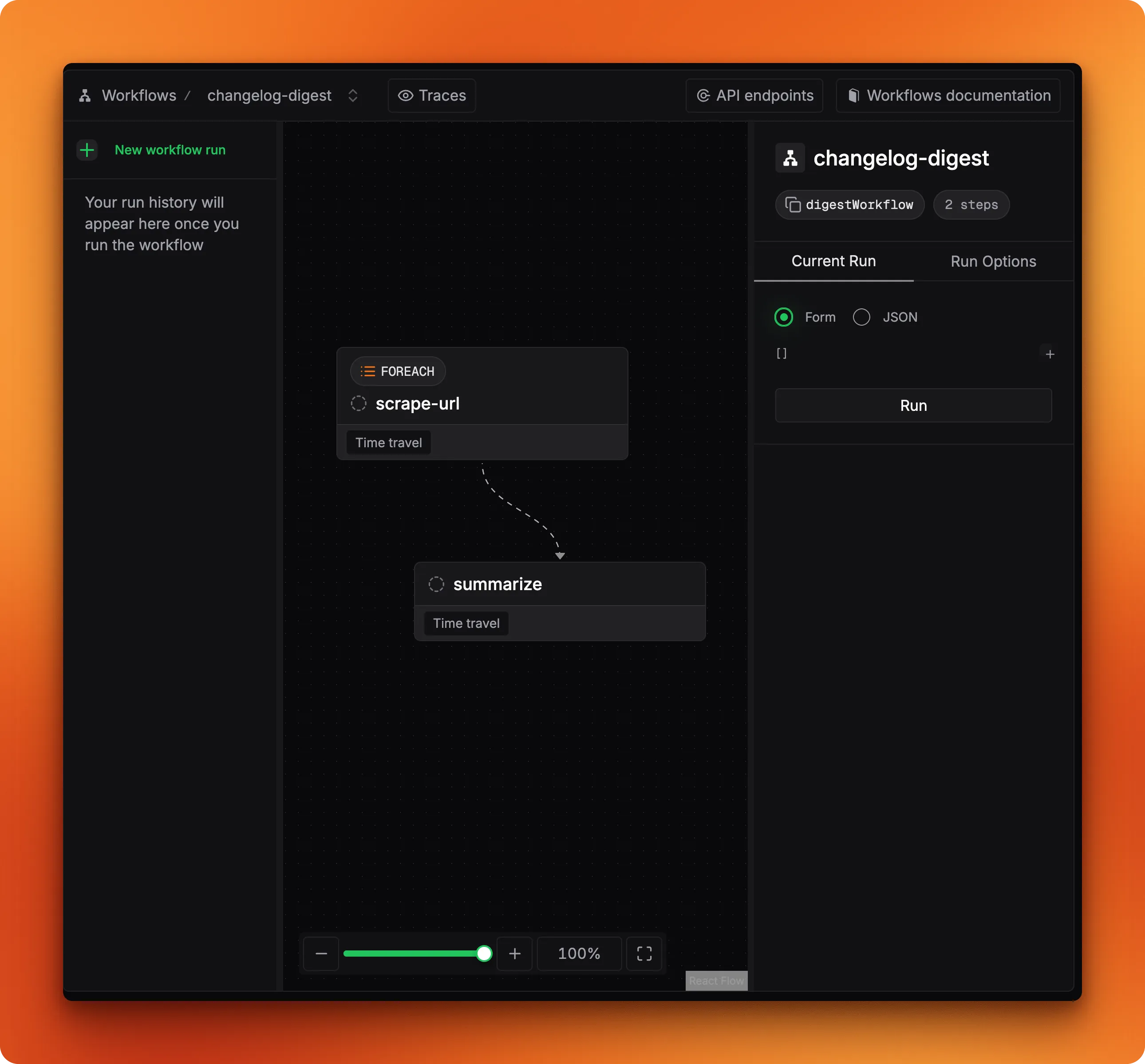
Workflows provide deterministic orchestration for multi-step operations where you need explicit control. Built on XState, they support branching, parallel execution, loops, and human-in-the-loop patterns where execution pauses for approval before resuming.
RAG (Retrieval-Augmented Generation) #
Mastra’s RAG pipeline handles document chunking, embedding generation, vector storage, similarity search, and reranking. It works with Pinecone, Qdrant, ChromaDB, pgvector, and many other vector databases.
Memory #
The memory system includes conversation history (raw message storage), semantic recall (embedding-based similarity search), working memory (structured facts and preferences as a Markdown scratchpad), and the standout feature — Observational Memory — which compresses old conversations into dense observations, cutting token costs by 4-10x.
Tools #
Tools are typed functions defined with Zod schemas that agents can invoke. They provide structured interfaces to external APIs, databases, and services. Mastra also supports the Model Context Protocol (MCP) for connecting to external tool ecosystems with over 10,000 available MCP servers.
Evals #
Evaluation frameworks track agent quality through model-graded, rule-based, and statistical methods. You can assess relevance, faithfulness, toxicity, tone consistency, and define custom metrics.
// Core Mastra architecture — all six primitives in one setup
import { Mastra } from '@mastra/core';
import { openai } from '@ai-sdk/openai';

const mastra = new Mastra({
  agents: {
    supportAgent,
    researchAgent,
  },
  workflows: {
    ticketPipeline,
  },
  storage: new PgStorage({ connectionString: process.env.DATABASE_URL }),
  vectorStore: new PgVector(connectionString),
  telemetry: otel,
});
Installation and Setup — Under 5 Minutes #
Mastra requires Node.js 22.13.0 or later. The recommended path is the CLI wizard, which scaffolds a complete project with the right package structure, configuration files, and example code.
Step 1: Create a New Project #
# Scaffold a new Mastra project with the interactive CLI
npm create mastra@latest

# The wizard prompts for:
# - Project name
# - Components (agents, workflows, RAG, memory)
# - LLM provider (OpenAI, Anthropic, Google, etc.)
# - Whether to include example code
Step 2: Manual Installation (Alternative) #
If you prefer to add Mastra to an existing project:
# Install core package with Zod for schema validation
npm install @mastra/core@latest zod@^4

# Install your preferred LLM provider from the AI SDK
npm install @ai-sdk/openai

# Optional: vector store, memory, and deployer packages
npm install @mastra/pg @mastra/memory @mastra/deployer-vercel
Step 3: Environment Setup #
# .env — Mastra loads these automatically at runtime
OPENAI_API_KEY=sk-xxxx
DATABASE_URL=postgresql://user:pass@localhost:5432/mastra
Step 4: Project Structure #
my-mastra-project/
├── src/
│   └── mastra/
│       ├── agents/
│       │   └── support.ts
│       ├── tools/
│       │   └── search.ts
│       ├── workflows/
│       │   └── ticket.ts
│       └── index.ts
├── .env
├── package.json
└── tsconfig.json
Step 5: Launch Mastra Studio #
# Start the local development UI at localhost:4111
npx mastra dev

# Studio lets you chat with agents, inspect tool calls,
# view memory state, visualize workflows, and iterate on prompts
Building Your First Agent — Real Code Examples #
Basic Agent with Tools #
// src/mastra/agents/support.ts
import { Agent } from '@mastra/core';
import { openai } from '@ai-sdk/openai';
import { createTool } from '@mastra/core';
import { z } from 'zod';

const searchTool = createTool({
  id: 'search-docs',
  description: 'Search internal documentation',
  inputSchema: z.object({
    query: z.string().describe('The search query'),
  }),
  execute: async ({ context }) => {
    // Your search implementation
    const results = await searchInternalDocs(context.query);
    return { results };
  },
});

export const supportAgent = new Agent({
  name: 'SupportAgent',
  instructions: `You are a technical support agent. Answer questions
    using the search tool. Be concise and cite sources.`,
  model: openai('gpt-4o'),
  tools: { searchTool },
});
Agent with Structured Output #
// Get typed objects instead of plain text
const result = await supportAgent.generate(
  'Classify this support ticket: "Cannot deploy to Vercel"',
  {
    output: z.object({
      category: z.enum(['deployment', 'billing', 'bug', 'feature']),
      priority: z.enum(['low', 'medium', 'high', 'critical']),
      summary: z.string(),
      actionItems: z.array(z.string()),
    }),
  }
);

// result.object is fully typed — TypeScript knows the shape
console.log(result.object.priority); // 'high' | 'low' | 'medium' | 'critical'
Streaming Responses #
// Stream tokens in real-time for chat UIs
const stream = await supportAgent.stream(
  'How do I configure environment variables?'
);

for await (const chunk of stream.textStream) {
  process.stdout.write(chunk); // Write tokens as they arrive
}
Multi-Step Workflow with Branching #
// src/mastra/workflows/ticket.ts
import { Workflow, Step } from '@mastra/core';
import { z } from 'zod';

const classifyStep = new Step({
  id: 'classify',
  inputSchema: z.object({ ticketText: z.string() }),
  outputSchema: z.object({ category: z.string(), priority: z.string() }),
  execute: async ({ input, mastra }) => {
    const agent = mastra.getAgent('supportAgent');
    const result = await agent.generate(
      `Classify: ${input.ticketText}`,
      { output: z.object({ category: z.string(), priority: z.string() }) }
    );
    return result.object;
  },
});

const escalateStep = new Step({
  id: 'escalate',
  outputSchema: z.object({ escalated: z.boolean() }),
  execute: async ({ input }) => {
    // Escalate to senior engineer
    await sendSlackAlert(`High priority: ${input.ticketText}`);
    return { escalated: true };
  },
});

const autoRespondStep = new Step({
  id: 'auto-respond',
  outputSchema: z.object({ sent: z.boolean() }),
  execute: async ({ input }) => {
    // Send automated response
    await sendAutoReply(input.ticketText);
    return { sent: true };
  },
});

export const ticketPipeline = new Workflow({
  name: 'ticket-pipeline',
  triggerSchema: z.object({ ticketText: z.string() }),
})
  .step(classifyStep)
  .then(escalateStep, {
    when: { 'classify.priority': 'high' },
  })
  .then(autoRespondStep, {
    when: { 'classify.priority': ['low', 'medium'] },
  });
Parallel Workflow Execution #
// Run steps in parallel with .after()
import { Workflow, Step } from '@mastra/core';

const stepA = new Step({ id: 'fetch-user', /* ... */ });
const stepB = new Step({ id: 'fetch-orders', /* ... */ });
const stepC = new Step({ id: 'fetch-preferences', /* ... */ });
const stepD = new Step({ id: 'combine', /* ... */ });

const parallelWorkflow = new Workflow({
  name: 'parallel-fetch',
  triggerSchema: z.object({ userId: z.string() }),
})
  .step(stepA)
  .step(stepB)
  .step(stepC)
  .after(stepA, stepB, stepC)
  .step(stepD); // stepD runs only after A, B, and C all complete
Integration with Next.js, Node.js, and Vercel AI SDK #
Next.js Integration #
// app/api/agent/route.ts — Expose agents as API routes in Next.js
import { mastra } from '@/mastra';
import { NextResponse } from 'next/server';

export async function POST(req: Request) {
  const { message } = await req.json();
  const agent = mastra.getAgent('supportAgent');

  const stream = await agent.stream(message);

  return new Response(stream.textStream, {
    headers: { 'Content-Type': 'text/event-stream' },
  });
}
Node.js Server with Hono #
# Mastra bundles a Hono HTTP server when you build
npx mastra build

# Output goes to .mastra/output/
# The Hono server exposes agents, workflows, and memory as REST endpoints

npx mastra start
# Server running on http://localhost:4111
Vercel AI SDK Integration #
Mastra is built on the Vercel AI SDK. You can drop down to the SDK for low-level control:
// Mastra uses AI SDK providers under the hood
import { openai } from '@ai-sdk/openai';
import { anthropic } from '@ai-sdk/anthropic';
import { google } from '@ai-sdk/google';

// Switch providers with one-line changes
const agent = new Agent({
  name: 'MultiProviderAgent',
  instructions: 'You are a helpful assistant.',
  model: openai('gpt-4o'), // or anthropic('claude-sonnet-4') or google('gemini-2.0-pro')
  tools: { searchTool, calcTool },
});
MCP (Model Context Protocol) Integration #
// Connect to any MCP server — 10,000+ available
import { MCPClient } from '@mastra/core';

const mcpClient = new MCPClient({
  servers: {
    slack: {
      command: 'npx',
      args: ['-y', '@modelcontextprotocol/server-slack'],
      env: { SLACK_BOT_TOKEN: process.env.SLACK_TOKEN },
    },
    github: {
      command: 'npx',
      args: ['-y', '@modelcontextprotocol/server-github'],
      env: { GITHUB_PERSONAL_ACCESS_TOKEN: process.env.GITHUB_TOKEN },
    },
  },
});

// MCP tools become available to your agent automatically
const tools = await mcpClient.tools();
const agent = new Agent({
  name: 'MCPAgent',
  model: openai('gpt-4o'),
  tools, // All MCP tools are now available
});
Benchmarks and Real-World Use Cases #
Token Cost Reduction — The 4-10x Claim #
Mastra’s Observational Memory is the headline feature for production economics. Here’s how the numbers break down:
The Problem: Traditional RAG-based memory systems dynamically retrieve different context on every turn. Each retrieval changes the prompt prefix, invalidating the prompt cache. With Anthropic and OpenAI both offering 90% discounts on cached prompt tokens, every cache miss represents a 10x cost penalty on the cached portion.
The Solution: Observational Memory divides context into two blocks — compressed observations (append-only until reflection runs) and raw recent messages. The observations block stays consistent across turns, making it fully cacheable.
Compression Ratios by Workload #
| Workload Type | Compression Ratio | Example Scenario |
|---|---|---|
| Text-only conversations | 3-6x | Customer support chat |
| Tool-call-heavy agents | 5-40x | Browser automation, coding agents |
| Agents with large screenshots/files | 10-40x | Playwright DOM snapshots |
LongMemEval Benchmark Results #
| Memory System | GPT-4o Score | GPT-5-mini Score |
|---|---|---|
| Mastra Observational Memory | 84.23% | 94.87% |
| Mastra RAG (baseline) | 80.05% | — |
| Traditional conversation history | ~72% | — |
A browser automation agent that captures Playwright screenshots can compress 200,000 tokens of session history down to 5,000-15,000 tokens of observations — a 15-30x reduction.
Developer Experience Benchmark #
| Framework | DX Score (1-10) | Setup Time | Time to First Agent |
|---|---|---|---|
| Mastra | 9/10 | < 5 min | Minutes |
| LangChain (Python) | 5/10 | 15-30 min | Hours |
| CrewAI | 6/10 | 10-15 min | 30 min |
| Vercel AI SDK | 7/10 | < 5 min | Hours (manual wiring) |
Source: NextBuild production benchmark, December 2025
Production Deployments #
- Replit: Uses Mastra for AI-powered code generation and editing features
- PayPal: Customer-facing AI agents for payment support
- Sanity: Content workflows and AI-assisted editing
- WorkOS: Enterprise identity and access automation
- Elastic: Search and observability AI features
Advanced Usage — Production Hardening #
Memory Configuration with Observational Memory #
import { Mastra } from '@mastra/core';
import { ObservationalMemory } from '@mastra/memory';
import { PgStorage } from '@mastra/pg';

const mastra = new Mastra({
  agents: { supportAgent },
  memory: new ObservationalMemory({
    storage: new PgStorage({ connectionString: process.env.DATABASE_URL }),
    observerModel: openai('gpt-4o-mini'), // Runs Observer agent
    reflectorModel: openai('gpt-4o-mini'), // Runs Reflector agent
    compressionInterval: 5, // Compress every 5 messages
  }),
});
RAG Pipeline Setup #
import { MastraRAG } from '@mastra/rag';
import { openai } from '@ai-sdk/openai';
import { PgVector } from '@mastra/pg';

const rag = new MastraRAG({
  embedder: openai.embedding('text-embedding-3-small'),
  vectorStore: new PgVector({
    connectionString: process.env.DATABASE_URL,
    dimension: 1536,
  }),
  chunkSize: 512,
  chunkOverlap: 50,
});

// Index documents
await rag.index(documentBatch);

// Query with similarity search
const results = await rag.query('How do I configure SSO?', { topK: 5 });
Observability with OpenTelemetry #
import { Mastra } from '@mastra/core';
import { NodeSDK } from '@opentelemetry/sdk-node';

const otel = new NodeSDK({
  traceExporter: new OTLPTraceExporter({
    url: 'https://api.honeycomb.io/v1/traces',
  }),
});

const mastra = new Mastra({
  agents: { supportAgent },
  workflows: { ticketPipeline },
  telemetry: otel,
});

// Traces appear in your observability platform automatically
// Every agent call, tool execution, and workflow step is instrumented
Guardrails and Safety #
import { Agent } from '@mastra/core';
import { createGuardrail } from '@mastra/core';

const promptInjectionGuard = createGuardrail({
  id: 'no-prompt-injection',
  check: async ({ input }) => {
    const suspicious = /ignore previous|disregard instructions/i.test(input);
    return { passed: !suspicious, message: suspicious ? 'Injection detected' : undefined };
  },
});

const piiGuard = createGuardrail({
  id: 'no-pii',
  check: async ({ output }) => {
    const hasPii = /\b\d{3}-\d{2}-\d{4}\b/.test(output); // SSN pattern
    return { passed: !hasPii, message: hasPii ? 'PII leak detected' : undefined };
  },
});

const agent = new Agent({
  name: 'SafeAgent',
  model: openai('gpt-4o'),
  tools: { searchTool },
  guardrails: [promptInjectionGuard, piiGuard],
});
Human-in-the-Loop #
import { Workflow, Step } from '@mastra/core';

const humanApprovalStep = new Step({
  id: 'await-approval',
  outputSchema: z.object({ approved: z.boolean() }),
  execute: async ({ suspend }) => {
    // Suspend workflow and wait for human input
    const { approved } = await suspend({ reason: 'Refund exceeds $500' });
    return { approved };
  },
});

// Workflow resumes when human approves via Studio or API call
const refundWorkflow = new Workflow({
  name: 'refund-pipeline',
  triggerSchema: z.object({ amount: z.number(), orderId: z.string() }),
})
  .step(validateStep)
  .then(humanApprovalStep)
  .then(processRefundStep, { when: { 'await-approval.approved': true } });
Docker Deployment #
# Dockerfile for production deployment
FROM node:22-slim

WORKDIR /app
COPY package*.json ./
RUN npm ci --only=production

COPY . .
RUN npx mastra build

EXPOSE 4111
CMD ["node", ".mastra/output/index.mjs"]
# docker-compose.yml
version: '3.8'
services:
  mastra:
    build: .
    ports:
      - "4111:4111"
    environment:
      - OPENAI_API_KEY=${OPENAI_API_KEY}
      - DATABASE_URL=postgresql://postgres:postgres@db:5432/mastra
    depends_on:
      - db

  db:
    image: pgvector/pgvector:pg17
    environment:
      POSTGRES_USER: postgres
      POSTGRES_PASSWORD: postgres
      POSTGRES_DB: mastra
    volumes:
      - pgdata:/var/lib/postgresql/data

volumes:
  pgdata:
Comparison with Alternatives #
| Feature | Mastra | LangChain | CrewAI | Vercel AI SDK | |—|—|—|—| —| | Primary Language | TypeScript (99.2%) | Python (also JS) | Python | TypeScript | | GitHub Stars | 24,050 | 117,000 | 39,200 | N/A (part of Vercel) | | Setup Time | < 5 min | 15-30 min | 10-15 min | < 5 min (manual wiring) | | Agent Abstractions | Native Agent class | Chain/Agent classes | Role-based crew | Manual composition | | Workflow Engine | XState-based, durable | LangGraph (graph) | Sequential/hierarchical | None | | Memory System | Observational Memory (4-10x cost reduction) | ConversationBufferMemory | Short-term only | Manual | | Type Safety | Zod throughout, full TS | Partial in JS version | Python type hints | Zod supported | | Observability | Built-in + OTEL | LangSmith (SaaS) | Built-in basic | Vercel platform | | MCP Support | Native | Via adapter | Limited | Via integration | | Multi-Agent | Supervisor pattern | LangGraph multi-agent | Core feature | Manual | | Best For | TS teams, Next.js, Node.js | Python teams, complex graphs | Python multi-agent prototyping | React/Next.js UI-heavy apps | | LLM Providers | 40+ | 100+ | 20+ | 10+ | | Production Users | Replit, PayPal, Sanity | Uber, LinkedIn | Startups, agencies | Vercel-hosted apps | | Deployment | Any Node.js server, Vercel, CF Workers | LangSmith Cloud, self-hosted | Self-hosted, CrewAI Cloud | Vercel (optimal) |
Limitations — Honest Assessment #
Mastra is not the right tool for every situation. Here is what the framework is NOT good at:
Python Ecosystem Lock-In: If your entire data science stack is Python — pandas, NumPy, PyTorch, Jupyter — Mastra forces you to bridge two languages. The framework is TypeScript-only. For teams deeply invested in Python, LangChain or CrewAI remain more natural choices.
Smaller Integration Ecosystem: LangChain has 100+ LLM integrations and 50+ vector stores. Mastra supports 40+ providers and covers the major vector databases, but if you need an obscure model or a niche vector store, you may need to write custom integration code.
Younger Project, Higher Churn: Mastra hit v1.0 in January 2026. The API has stabilized but breaking changes still occur more frequently than in LangChain’s mature ecosystem. Budget time for version upgrades.
No Native Visual Workflow Builder: Unlike n8n or Langflow, Mastra has no drag-and-drop workflow designer. Everything is code. For non-technical team members who need to modify workflows, this is a barrier.
Community Size: At 24K stars, Mastra’s community is active but significantly smaller than LangChain’s. You will find fewer Stack Overflow answers, fewer third-party tutorials, and a narrower selection of blog posts covering edge cases.
Limited UI Components: While Mastra Studio provides a development playground, it does not ship production UI components like chat widgets. You still need to build the frontend yourself or pair Mastra with the Vercel AI SDK’s UI libraries.
Frequently Asked Questions #
Q: Does Mastra require TypeScript knowledge? Yes, Mastra is TypeScript-native. Basic familiarity with TypeScript, async/await, and Zod schemas is expected. If your team only knows Python, the learning curve for TypeScript plus Mastra will be steeper than using LangChain directly.
Q: How does Mastra’s Observational Memory compare to LangChain’s memory classes? LangChain provides ConversationBufferMemory, ConversationSummaryMemory, and vector-based retrieval. These work but either consume full context window or rely on vector search that invalidates prompt caches. Mastra’s Observational Memory compresses context into cacheable observations, achieving 4-10x cost reduction while scoring higher on LongMemEval benchmarks (84.23% vs 80.05% for RAG).
Q: Can I deploy Mastra on DigitalOcean or AWS instead of Vercel?
Yes. Mastra is fully open-source and deploys to any Node.js runtime. Build with mastra build, then run the output on DigitalOcean App Platform, AWS ECS, Google Cloud Run, or any Docker host. Deployers exist for Vercel and Cloudflare Workers, but they are optional.
Q: What LLM providers does Mastra support? Mastra supports 40+ providers through the Vercel AI SDK: OpenAI, Anthropic, Google, Mistral, Cohere, xAI, DeepSeek, Fireworks, Together, and many more. Switching providers is a one-line code change.
Q: How does Mastra handle errors and retries in production? Mastra workflows include configurable retry policies with exponential backoff at the step level. Agents have built-in timeout handling. The observability integration (OpenTelemetry) traces every call, making it straightforward to identify and debug failures in production.
Q: Is Mastra free for commercial use? Yes. Mastra is licensed under Apache 2.0 and free for commercial use. Mastra Cloud (managed hosting) offers paid tiers, but the core framework is fully open-source and self-hostable at no cost.
Q: How do I add memory to an existing Mastra agent? Pass a memory instance when creating the Mastra instance. The agent automatically tracks conversation threads per user. For multi-turn conversations, initialize memory with a storage backend (PostgreSQL, libSQL, or MongoDB) and the agent handles the rest.
Conclusion #
Mastra fills a clear gap in the AI framework landscape — a production-grade, TypeScript-native toolkit that lets JavaScript developers build agents without leaving their ecosystem. The 4-10x token cost reduction from Observational Memory is not marketing hype; it is a measurable production advantage backed by LongMemEval benchmarks. The framework’s DX score of 9/10 and sub-5-minute setup time make it the fastest path from idea to deployed agent for TypeScript teams.
If you are building AI features into a Next.js application, Node.js service, or any TypeScript project, Mastra deserves a serious evaluation. Start with npm create mastra@latest, build a workflow, and measure the token cost difference for yourself.
Action items:
- Clone the Mastra repo and run the quickstart:
npm create mastra@latest - Join the Mastra Discord community (5,500+ members)
- Explore the official documentation
- Follow the Mastra GitHub repository for updates
Some links in this article are affiliate links. If you sign up for DigitalOcean through our referral link, we may earn a commission at no extra cost to you. This helps fund independent technical research.
Recommended Hosting & Infrastructure #
Before you deploy any of the tools above into production, you’ll need solid infrastructure. Two options dibi8 actually uses and recommends:
- DigitalOcean — $200 free credit for 60 days across 14+ global regions. The default option for indie devs running open-source AI tools.
- HTStack — Hong Kong VPS with low-latency access from mainland China. This is the same IDC that hosts dibi8.com — battle-tested in production.
Affiliate links — they don’t cost you extra and they help keep dibi8.com running.
Sources and Further Reading #
- Mastra Official Website
- Mastra GitHub Repository
- Mastra Documentation
- Mastra Course - Learn to Build AI Agents
- Mastra Tutorial: Changelog Tracker with Firecrawl
- Mastra Observational Memory Deep Dive
- ByteIota: Mastra TypeScript AI Framework Analysis
- Mastra vs LangChain Comparison on xpay
- CrewAI vs Mastra Comparison on respan.ai
- Top JavaScript/TypeScript Gen AI Frameworks for 2026
- Mastra Workshop: Build Your Own Coding Agent
- Mastra Observational Memory Workshop
- LangChain GitHub Repository
- CrewAI GitHub Repository
- Vercel AI SDK Documentation
💬 Discussion