Promptfoo: Test, Evaluate & Red-Team Your LLM Prompts
Promptfoo is an open-source CLI and library for evaluating and red-teaming LLM apps. Compare GPT, Claude, Gemini, and DeepSeek with simple declarative configs that plug into your CLI and CI/CD. This 2026 guide covers install, promptfooconfig.yaml, assertions, and red teaming.
- ⭐ 23003
- Python
- MIT
- Updated 2026-06-02
prompts.chat: 163k+ Prompts – The Open-Source Prompt Library • Headroom: Compress LLM Inputs by 60-95%
Introduction #
If you build with models like GPT, Claude, Gemini, or DeepSeek, you know that “looks good in the playground” is not the same as “works reliably in production.” Promptfoo is an open-source CLI and library for evaluating and red-teaming LLM applications. It replaces the trial-and-error approach with declarative test configs you can run locally and wire into CI/CD. In this guide we’ll install it, write a promptfooconfig.yaml, run an evaluation, compare models, and kick off a red-team scan.
What Is Promptfoo? #
Promptfoo is a CLI and library for evaluating and red-teaming LLM apps. You describe your prompts, the providers (models) you want to run them against, and a set of test cases with assertions. Promptfoo runs every prompt through every test case, checks the assertions, and gives you a side-by-side view of how each model performed.
Its core capabilities are:
- Evaluation — run prompts across multiple providers and grade outputs with assertions (exact match, contains, semantic similarity, LLM-graded rubrics, and more).
- Model comparison — compare GPT, Claude, Gemini, DeepSeek, and others on the same inputs.
- Red teaming — generate adversarial test cases to probe your app for vulnerabilities before shipping.
- CI/CD integration — declarative configs run anywhere your terminal does, including GitHub Actions.
The project is written in TypeScript, distributed under the MIT license, and maintained by the promptfoo team.
How Promptfoo Works #
The workflow is config-first:
Declarative configuration — a single
promptfooconfig.yamldefines yourprompts,providers, andtests. No glue code required for the common cases.Command line interface (CLI) —
promptfoo evalruns the evaluation. It prints a results table to your terminal and stores results locally.Local web viewer —
promptfoo viewopens a local web UI that visualizes the eval results so you can compare outputs cell by cell.
Here’s a minimal promptfooconfig.yaml:
# promptfooconfig.yaml
description: "GPT vs Claude on a couple of prompts"

prompts:
  - "What is the capital of {{country}}?"
  - "Explain quantum mechanics in one sentence."

providers:
  - openai:gpt-4o-mini
  - anthropic:messages:claude-3-5-sonnet-20241022

tests:
  - vars:
      country: France
    assert:
      - type: contains
        value: Paris
This config runs both prompts against both providers. For the first prompt it substitutes {{country}} and asserts that the output contains “Paris.” API keys are read from environment variables (for example OPENAI_API_KEY and ANTHROPIC_API_KEY), not stored in the config.
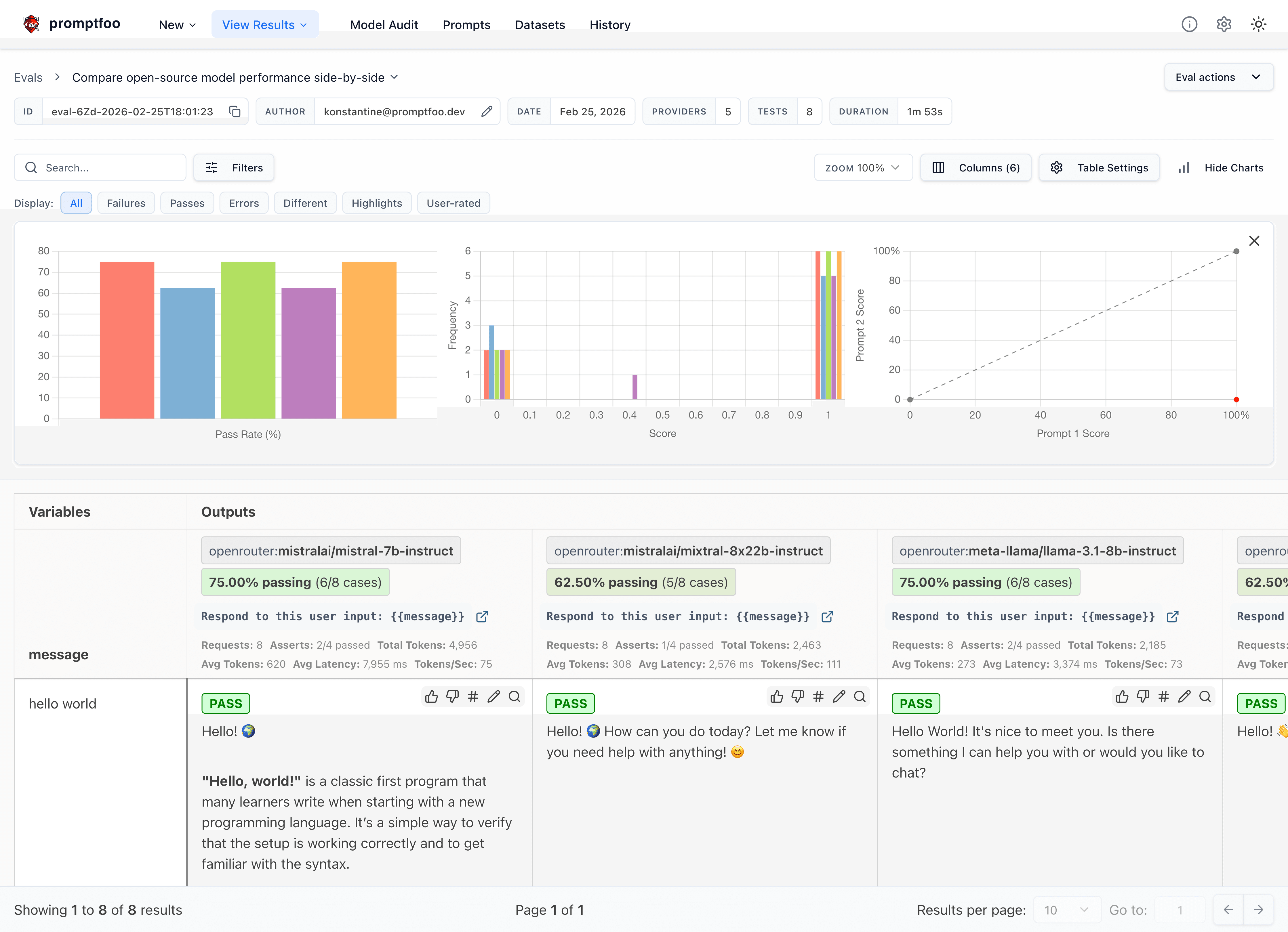
- Source Code: promptfoo GitHub

promptfoo self-grading view (source: promptfoo/promptfoo repo, via dibi8 analysis)
Deploy Promptfoo: Test, Evaluate & Red-Team Your LLM Prompts on DigitalOceanInstallation & Setup #
If you want to run promptfoo as a scheduled production job, you’ll want an always-on box — spin one up on DigitalOcean (free trial credit for new accounts), or HTStack for a low-latency Hong Kong VPS (the same IDC that hosts dibi8.com).
Promptfoo needs Node.js ^20.20.0 or >=22.22.0. Check your version:
node -v
If you need Node.js, grab it from the official website.
Install #
The fastest way to try promptfoo is with no install at all:
npx promptfoo@latest init --example getting-started
To install it globally instead, pick whichever fits your environment:
# npm
npm install -g promptfoo

# Homebrew
brew install promptfoo

# pip
pip install promptfoo
Set your API key #
Promptfoo reads provider credentials from environment variables. For OpenAI:
export OPENAI_API_KEY=sk-abc123
Use the matching variable for whichever provider you’re testing (for example ANTHROPIC_API_KEY for Claude). If you forget to set the key, you’ll see an authentication error from the provider when you run an eval — set the variable and re-run.
Running your first evaluation #
After init, you’ll have a promptfooconfig.yaml in your directory. Run the eval and open the viewer:
promptfoo eval
promptfoo view
promptfoo eval prints the results to your terminal; promptfoo view opens a local web UI for a richer side-by-side comparison. If you get stuck, check the documentation or open an issue on GitHub.
Core Usage #
Example 1: A simple assertion #
Create a config that checks an expected substring:
# promptfooconfig.yaml
description: "Basic prompt test"

prompts:
  - "What is the capital of {{country}}?"

providers:
  - openai:gpt-4o-mini

tests:
  - vars:
      country: France
    assert:
      - type: contains
        value: Paris
Run it:
promptfoo eval
Promptfoo executes the test case and reports whether the assertion passed.
Example 2: Comparing models with multiple assertion types #
You can list several providers and mix assertion types — exact, semantic, and LLM-graded:
# promptfooconfig.yaml
description: "GPT vs Claude comparison"

prompts:
  - "Answer concisely: {{question}}"

providers:
  - openai:gpt-4o
  - anthropic:messages:claude-3-5-sonnet-20241022

defaultTest:
  assert:
    - type: llm-rubric
      value: does not describe itself as an AI, model, or chatbot

tests:
  - vars:
      question: "What is the meaning of life?"
    assert:
      - type: similar
        value: "It depends on the person"
        threshold: 0.6
Run the same command and promptfoo view to compare both models cell by cell:
promptfoo eval
Example 3: Running in a CI/CD pipeline #
Promptfoo runs anywhere your terminal does. Here’s a GitHub Actions workflow that fails the build if assertions fail:
# .github/workflows/eval.yml
name: Promptfoo Eval

on:
  push:
    branches: [ main ]
  pull_request:
    branches: [ main ]

jobs:
  eval:
    runs-on: ubuntu-latest
    steps:
      - name: Checkout repository
        uses: actions/checkout@v4

      - name: Set up Node.js
        uses: actions/setup-node@v4
        with:
          node-version: '22'

      - name: Run promptfoo eval
        env:
          OPENAI_API_KEY: ${{ secrets.OPENAI_API_KEY }}
        run: npx promptfoo@latest eval
This runs your evaluation on every push and pull request, catching regressions before they merge.
Red Teaming #
Beyond plain evaluation, promptfoo can generate adversarial test cases to probe your app for vulnerabilities such as prompt injection, jailbreaks, and unsafe outputs. The red-team workflow has its own subcommands:
# Launch the setup UI to configure your target and attack types
npx promptfoo@latest redteam setup

# Or configure without the GUI
promptfoo redteam init --no-gui

# Generate adversarial cases and run them against your target
promptfoo redteam run

# View the findings report
promptfoo redteam report
The report groups findings by vulnerability category and severity, with suggested mitigations.
Benchmarks & Real-World Use #
Promptfoo is widely used for prompt and model evaluation. Rather than relying on a single leaderboard, the point of the tool is that you benchmark on your own prompts and test cases — the numbers that matter are the ones from your application, not a generic suite.
A typical workflow looks like this:
npx promptfoo@latest eval && npx promptfoo@latest view
Run your full test set across the candidate models, then open the viewer to see exactly which prompts and which cases each model passed or failed. Because the config is declarative, the same suite runs locally during development and in CI on every commit.
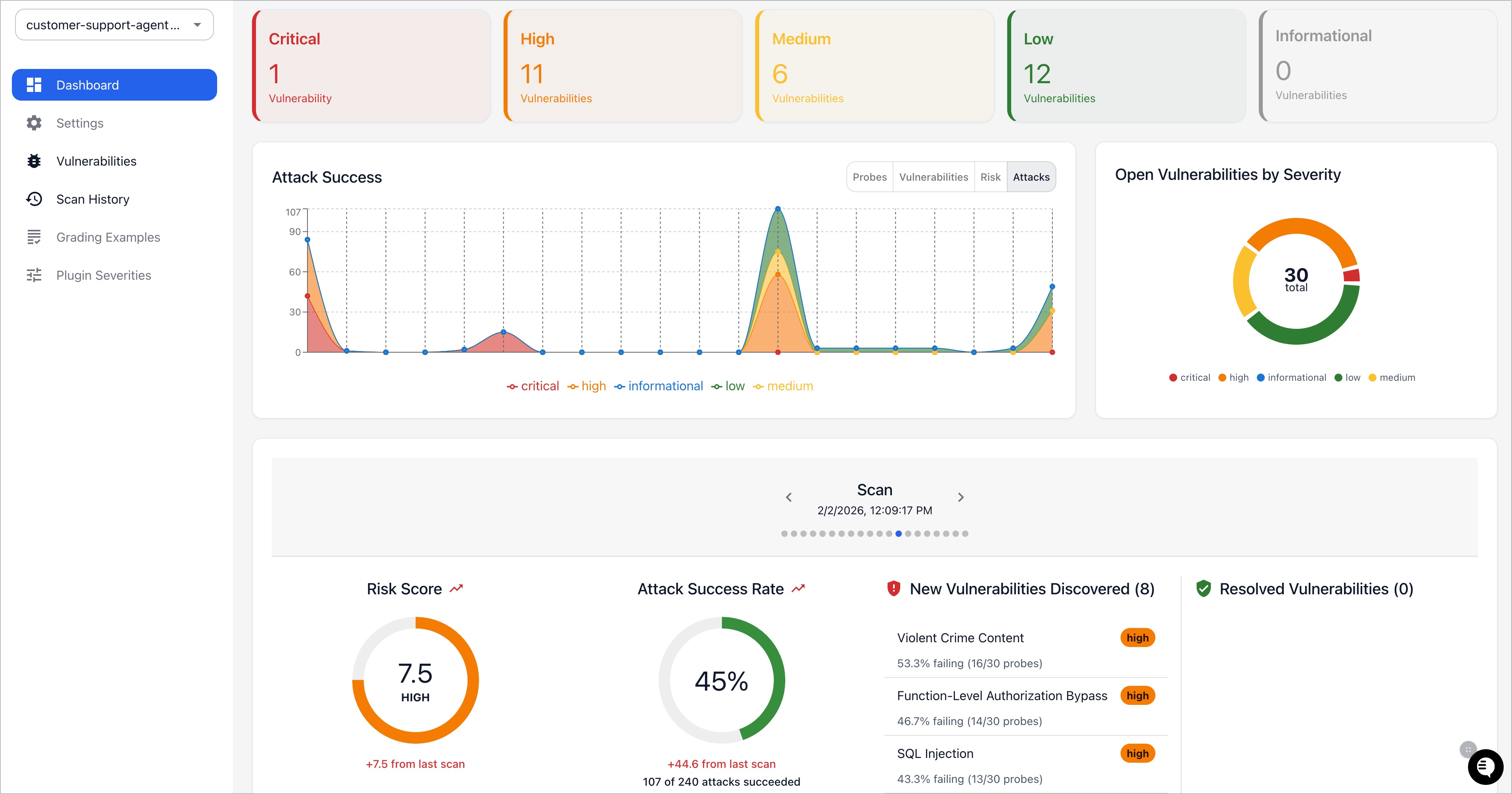
promptfoo red team dashboard (source: promptfoo/promptfoo repo, via dibi8 analysis)
Comparison with Alternatives #
See also our related open-source tools coverage.
When you’re choosing an LLM evaluation and red-teaming tool, promptfoo’s combination of a declarative config, local-first workflow, and built-in red teaming is its main draw.
| Feature | promptfoo |
|---|---|
| Stars | 21,825 |
| License | MIT |
| Maintainer | promptfoo |
| Language | TypeScript |
| Default branch | main |
| Config style | Declarative promptfooconfig.yaml (prompts / providers / tests / assert) |
| Interfaces | CLI (promptfoo eval / view) plus library use |
| Model coverage | GPT, Claude, Gemini, DeepSeek, and many more providers |
| Red teaming | Built in (promptfoo redteam subcommands) |
| CI/CD | Runs in any terminal; first-class GitHub Actions usage |
Detailed breakdown #
- Stars — promptfoo has roughly 21,825 stars on GitHub, a strong signal of adoption among LLM developers.
- Declarative configs — defining tests in
promptfooconfig.yamlkeeps your evaluation suite versioned alongside your code, so the same checks run locally and in CI.
Limitations & Honest Assessment #
Promptfoo is a capable tool, but it’s worth knowing the tradeoffs:
- Config grows with complexity — the declarative format is great for the common case, but large suites with many providers, dynamic vars, and custom assertions get verbose. You’ll often factor prompts and test cases into separate files.
- You bring your own model access — promptfoo orchestrates evals but relies on your provider API keys and quotas. Costs and rate limits are on you.
- Eval runs cost tokens and time — a broad suite across several providers makes a lot of API calls. On large test sets that adds up in both latency and spend.
- Assertion design takes thought — LLM-graded rubrics (
llm-rubric) and semantic checks are powerful but non-deterministic; getting reliable, meaningful assertions takes iteration. - Actively evolving — promptfoo ships frequently. That means fast improvements, but also occasional breaking changes; pin a version in CI for stability.
These are the kinds of considerations to weigh before standardizing on it.
Conclusion #
Promptfoo turns prompt and model testing from guesswork into a repeatable, version-controlled process. With a single promptfooconfig.yaml, you can evaluate prompts, compare GPT, Claude, Gemini, and DeepSeek on your own data, and red-team your app for vulnerabilities — all from the CLI and inside CI/CD. The best next step is to run npx promptfoo@latest init --example getting-started, point it at your prompts, and open the viewer to see how your models actually perform.
Large-scale scraping needs rotating proxies — WebShare is the standard choice.
- Join the dibi8 English Telegram group for open-source AI tool drops.
- Read next: related guides on dibi8.
Sources & Further Reading:
- GitHub repository: https://github.com/promptfoo/promptfoo
- Official docs / README: https://github.com/promptfoo/promptfoo#readme
Some links above are affiliate links. dibi8.com may earn a commission if you sign up, at no extra cost to you. Helps keep the site running and the content free.
💬 Discussion