TencentDB Agent Memory: A Team-Level Memory Hub, Not Just Per-Agent Recall
TencentDB Agent Memory is Tencent's MIT-licensed memory hub for AI agent teams, turning conversations, docs, and code into four governed, shareable memory assets — Chat Memory, Skill, Wiki, and CodeGraph — with a layered L0-L3 distillation pipeline and a reported +59% PersonaMem score.
- ⭐ 10663
- Node.js
- MIT
- Updated 2026-08-02
AI Agent Memory: Letta vs Mem0 vs A-Mem • Hermes Agent: Self-Improving AI Agent
What Is TencentDB Agent Memory? #
TencentDB Agent Memory starts from a specific question the maintainers state directly: “How do you reduce repetitive work when using Agents?” If project context has already been explained once, a new session shouldn’t need it re-explained. If a document’s already been read, the next agent shouldn’t start from page one. TencentDB Agent Memory’s answer is a Memory Hub that extracts, governs, and routes four types of reusable memory assets across a team of agents — not just a single agent’s own conversation history.
🔗 GitHub: https://github.com/TencentCloud/TencentDB-Agent-Memory
MIT licensed, at 10,600+ GitHub stars, with a commit from July 29, 2026, it’s a Tencent Cloud project still explicitly labeled “Team Memory Beta” — evolving quickly rather than a finished, stable product.
Four Memory Assets, Not One Chat Log #
| Chat History | Standard RAG | TencentDB Agent Memory | |
|---|---|---|---|
| Cross-session user understanding | Partial | Partial | Chat Memory |
| Distilled executable experience | No | No | Skill |
| Document structure & relationships | No | Chunk retrieval only | Wiki + Link Graph |
| Code call graphs & impact scope | No | Text match only | CodeGraph |
| Ownership / Version / Status | No | No | Yes |
| Team sharing & Agent loadout | No | No | Yes |
| Private / Team / ACL | No | Partial | Yes |
The framing the maintainers draw: RAG answers “what can be found?” — TencentDB Agent Memory also answers “who can use it, which version is valid, and which Agent should receive it.”
The four asset types #
- 🧠 Chat Memory — preferences, facts, decisions, and interaction history. Each agent gets its own automatically on creation. Distilled layer by layer: L0 Conversation → L1 Atom → L2 Scenario → L3 Persona.
- ⚡ Skill — a reusable procedure extracted from completed work, with versions, resource files, trigger boundaries, execution steps, and validation rules — private by default, shareable with the team after review.
- 📖 Wiki — documents, specs, and runbooks turned into structured, link-graphed pages, explicitly inspired by Andrej Karpathy’s “LLM Wiki” concept.
- 🕸️ CodeGraph — indexes code symbols, files, call relationships, and impact paths, so an agent can check callers/callees and impact scope before modifying code.
Installation #
git clone https://github.com/TencentCloud/TencentDB-Agent-Memory.git
cd TencentDB-Agent-Memory/deploy/global-images
cp .env.example .env
$EDITOR .env       # Fill in two sets of LLM parameters (memory group + proxy group)
./start-all.sh     # Launches memory-core + memory-hub + proxy in one command
start-all.sh starts all three services (memory-core, memory-hub, proxy) together and prints a one-liner you can paste directly into Claude when it finishes. The panel is then reachable at http://localhost:8125.
Migrating from an older v1.x/v0.x install has a dedicated tool (v2 → v3); new installs can skip it.
Cold Start: Import What You Already Have #
Rather than starting a new agent team from zero, existing assets can be imported directly:
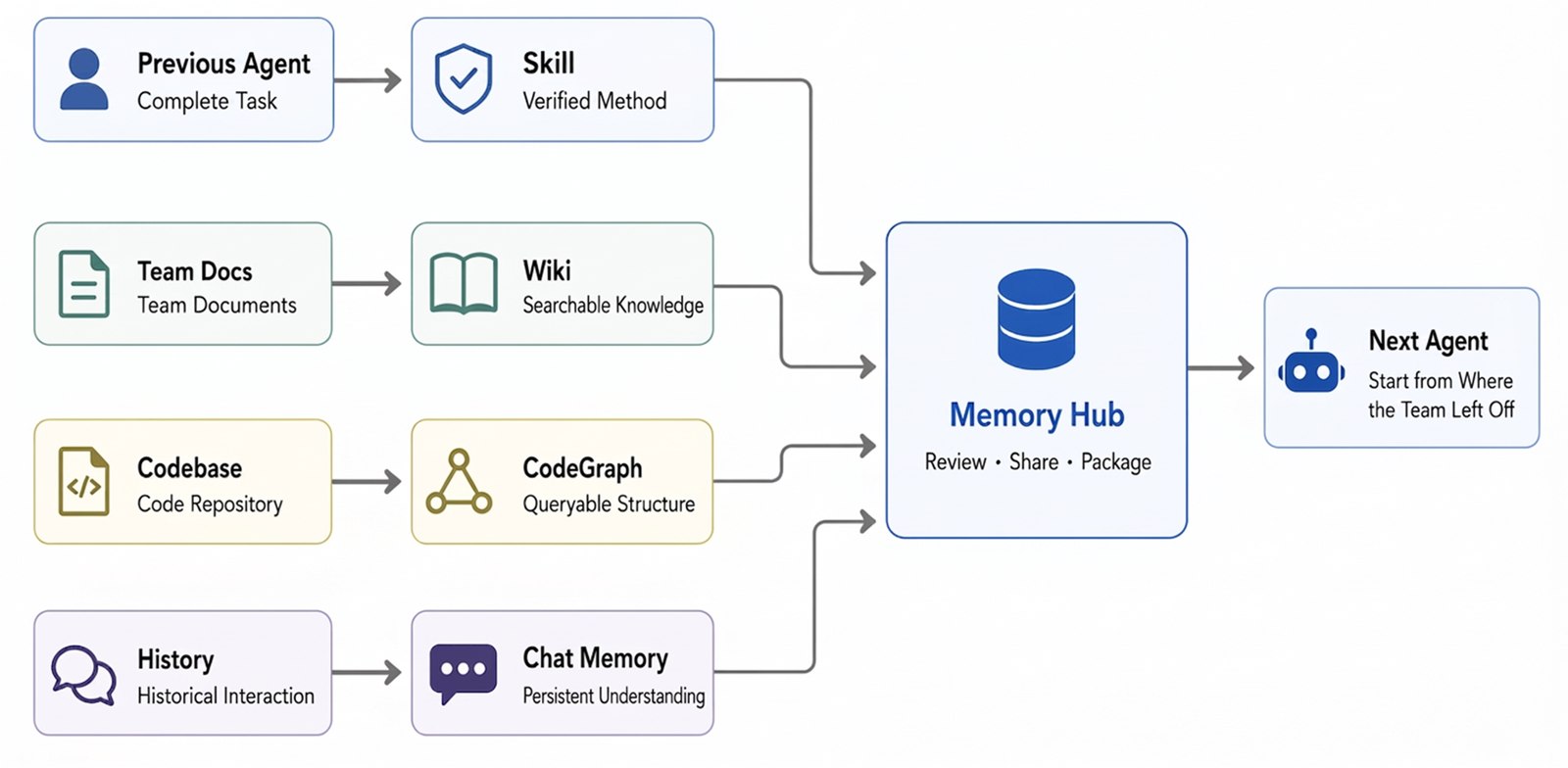
- Codebases → CodeGraph automatically indexes symbols, files, call relationships, and impact paths
- Documents & files → Wiki automatically generates structured, link-graphed pages
- Conversation sessions → Skills and Chat Memory are automatically extracted as reusable assets
Team Play: Building an Agent Team, Not Four Chat Windows #
The README’s own worked example is a “one-person company” with role-specific agents:
Tiny but Serious Inc.
├── You      · Set goals / Make decisions
├── Scout    · Research / Find opportunities
├── Builder  · Write code / Build products
├── Reviewer · Test / Find issues
└── Agent Memory · Preserve the team's experience
Each role gets a different loadout of memory assets — not everything, just what that role needs:
Scout:     User-interview Chat Memory, Market-research Wiki, Competitive-analysis Skill
Builder:   Product Wiki, Project CodeGraph, Feature-Delivery Skill
Reviewer:  Historical-incident Chat Memory, Project CodeGraph, Release-Checklist Skill
The pitch: you’re not opening four disconnected chat windows, you’re assembling a squad that inherits the team’s accumulated experience — and a small team’s experience can keep compounding rather than resetting with every new session.
Governance: Private by Default, Sharing Is Explicit #
| Visibility | Semantics |
|---|---|
private | Only the Owner can read — not even team admins |
team | Team members can read; Owner/Admin can manage |
restricted | Precise access via User / Role / Agent ACL |
agent | Targeted equipping of specific agents on the same team |
New Chat Memory and Skills are private by default — sharing is an explicit action, not a default leak. This matters once a “memory hub” is holding real decisions and preferences: you can assign a Release Skill only to the Release Agent, an Architecture Wiki to all development agents, and CodeGraph specifically to Coder and Reviewer agents.
Technical Implementation #
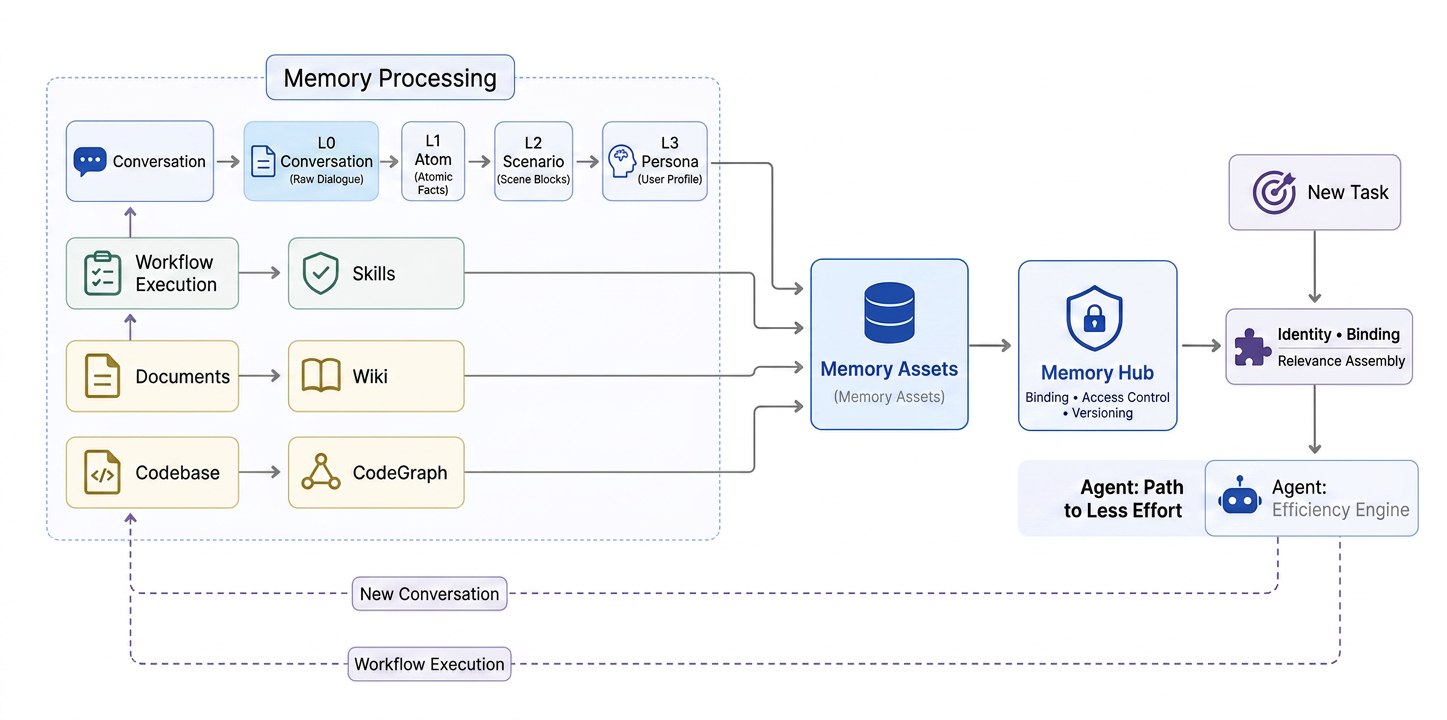
The stated design goal isn’t “store everything” — it’s what’s worth keeping, who can use it, and how to retrieve less while retrieving the right thing.
Layered memory, not flat records #
| Layer | What it stores | Primary use |
|---|---|---|
| L0 Conversation | Raw conversations, full context | Verify exact wording, timestamps, sources |
| L1 Atom | Extracted facts, preferences, constraints, events | Precise recall of actionable information |
| L2 Scenario | Knowledge blocks organized by project/scenario | Quickly restore a working context |
| L3 Core / Persona | Long-term profiles, stable patterns | Rapid entry into a user’s/team’s context |
Retrieval is layered too: L2/L3 provide a fast context bootstrap by default; when specific facts are needed, it falls back to BM25 + vector retrieval + RRF (Reciprocal Rank Fusion) across L1/L0, with results capped by item count, character budget, and timeout to keep memory from overwhelming the context window.
Memory as loadout, not global prompt injection #
Chat Memory, Skill, Wiki, and CodeGraph are all registered uniformly as Memory Assets, and access is resolved via Fixed Binding + ACL — narrowing by Team, User, Agent, and visibility first, then retrieving based on the current query. Switching an agent or framework means re-equipping assets, not retraining.
Tool-based access, not wholesale injection #
Agents discover capabilities via /v3/tools/list, then call /v3/tools/call to read specific Wiki pages, source code, or impact paths — documents and code are part of memory, but they stay as on-demand tools rather than being dumped into context wholesale.
Benchmark #
| Benchmark | Without | With | Relative improvement |
|---|---|---|---|
| PersonaMem | 48% | 76% | +59% |
PersonaMem tests whether an agent correctly understands and applies user information after extended interactions. This is a single benchmark reported by the maintainers, not an independently reproduced result — a useful signal, not a guarantee it generalizes to your own workload.
Limitations (From the Project’s Own Notes) #
- Async processing delay — Wiki and CodeGraph build asynchronously; allow time before they reach
readystatus - CodeGraph is public-repo-first — private repositories and SSH credentials are “still being refined,” not fully supported yet
- Manual asset binding — the Hub supports manual binding today; fully automated memory routing is still under iteration
- Limited framework support today — OpenClaw, Hermes Agent, and SDK integration are supported now; broader cross-framework migration is on the roadmap, not shipped
Use Cases #
1. Onboarding a New Agent (or Teammate) Without Re-Explaining Everything #
Import existing docs, codebase, and past agent conversation sessions once — new team members and new agents both start from the “save file” instead of relearning the project from scratch.
2. Role-Scoped Agent Teams #
Give a Reviewer agent CodeGraph and historical-incident Chat Memory, but not the Scout’s market-research Wiki — the loadout model keeps each agent’s context relevant instead of dumping everything into every agent.
3. Governed Knowledge Sharing Across a Team #
private/team/restricted/agent visibility lets an individual’s working notes stay private by default while explicitly promoting genuinely reusable Skills and Wiki pages to the team.
4. Pre-Change Impact Analysis #
CodeGraph’s call-relationship and impact-path indexing lets an agent check what else might break before modifying shared code — closer to what a careful human reviewer would do than a plain text-match RAG lookup.
Related Repositories #
| Repository | Purpose |
|---|---|
| Hermes Agent | One of the two natively-supported agent frameworks; TencentDB Agent Memory’s Skill module builds on part of Hermes Agent’s own Skill code |
| CodeGraph (colbymchenry) | The pre-indexed code-graph project TencentDB Agent Memory’s own CodeGraph asset module is built on |
Related Articles #
- AI Agent Memory: Letta vs Mem0 vs A-Mem — for comparing single-agent memory frameworks against this team-level hub approach
- Hermes Agent: Self-Improving AI Agent — one of the frameworks TencentDB Agent Memory integrates with directly
Conclusion #
TencentDB Agent Memory targets a problem most agent-memory tools don’t: not “how does one agent remember one user,” but “how does a team of agents share governed, versioned experience without leaking everything to everyone.” The L0-L3 layered distillation, the four distinct asset types (especially Skill and CodeGraph, which go beyond what chat-log RAG models), and the explicit-sharing-by-default governance make it a more structured answer than most single-agent memory libraries — at the cost of currently narrower framework support (OpenClaw, Hermes, SDK) and features still labeled beta or roadmap.
Best for: Teams running multiple agents (or agent + human teams) who need governed, shareable memory — not solo users who just want one agent to remember one conversation history.
GitHub: https://github.com/TencentCloud/TencentDB-Agent-Memory
Last updated: 2026-08-02
💬 Discussion