lang: vi
slug: cogvideo
title: ‘CogVideo: 12.7K Stars — Complete Text-to-Video Setup Guide 2026’
description: ‘CogVideo (CogVideoX) is a text and image-to-video generation model from Zhipu AI. Supports ComfyUI, Diffusers, SAT, and Wan/HunyuanVideo/Open-Sora integration. Covers installation, Docker, inference, fine-tuning, and benchmarks.’
tags: [“ai-tools”, “guide”, “open-source”, “reference”, “tutorial”, “video-generation”]
date: 2026-05-19 00:00:00+08:00
lastmod: 2026-05-19 00:00:00+08:00
tech_stack: []
application_domain: Ai Tools
source_version: ’'
licensing_model: Open Source
license_type: Apache-2.0
file_size: ’'
file_md5: ’'
download_url: ’'
backup_url: ’'
github_repo: ‘https://github.com/zai-org/CogVideo'
last_maintained: ‘2026-05-19’
draft: false
categories: [‘ai-tools’]
aliases:
/posts/cogvideo/
faqs:
q: ‘What GPU do I need to run CogVideoX locally?’
a: ‘CogVideoX-2B runs on 5GB VRAM with Diffusers plus sequential CPU offload, while CogVideoX-5B needs 10GB minimum. CogVideoX1.5-5B-I2V works on just 4GB, and 16GB+ VRAM (RTX 4080/4090 or A100) gives a comfortable experience without CPU offloading.’
q: ‘What is the difference between CogVideoX-5B and CogVideoX1.5-5B?’
a: ‘CogVideoX1.5-5B is the November 2024 update with higher resolution (1360x768 vs 720x480), longer videos (up to 10 seconds vs 6 seconds), and improved frame handling (16N+1 vs 8N+1 frame formula). The 1.5 series also adds dedicated I2V models with better motion coherence from static images.’
q: ‘How long does CogVideoX-5B take to generate a video?’
a: ‘On a single A100 80GB at 50 steps, CogVideoX-5B takes about 1000 seconds for a 5-second video, making it slower than Wan 2.1 or HunyuanVideo on equivalent hardware. Video-BLADE step distillation offers up to 8.89x speedup but requires separate model conversion.’
q: ‘Can I fine-tune CogVideoX on my own dataset?’
a: ‘Yes, via two paths: the SAT framework supports full-parameter fine-tuning and LoRA, while Diffusers supports LoRA through train_cogvideox_lora.py. The 5B models require A100 GPUs, 2B models can train on a single RTX 4090 with gradient checkpointing, and you need 25+ videos for meaningful style or concept learning.’
q: ‘Does CogVideoX support languages other than English for prompts?’
a: ‘No, CogVideoX is trained primarily on English captions, so multilingual prompts degrade in quality compared to Wan 2.1 or HunyuanVideo, which handle Chinese natively. The model also expects long, detailed prompts of 200+ words for best results, so prompt optimization via LLM expansion is recommended.’
Turn text and images into cinematic video with Zhipu AI’s open-source diffusion transformer. From zero to production in under 30 minutes.
IntroductionText-to-video generation moved from research curiosity to production tool in 2024-2025. Open-source models now compete with commercial APIs on quality while running on consumer GPUs. The problem: most repositories ship as bare model weights with scattered documentation. You spend hours piecing together inference scripts, VRAM optimization flags, and fine-tuning pipelines instead of generating video.CogVideo from Zhipu AI solves this differently. With 12.7K GitHub stars, 36 contributors, and active releases, it ships a complete toolkit: pretrained 2B and 5B parameter models, Diffusers pipeline integration, SAT-based fine-tuning, ComfyUI nodes, and a 3D causal VAE that compresses video into efficient latent representations. This CogVideo tutorial covers everything from pip install to production deployment with quantized inference and LoRA fine-tuning — the most complete CogVideo setup guide for developers in 2026.
—## What Is CogVideo?
CogVideo is an open-source text to video AI generation framework developed by Zhipu AI, built on a 3D causal VAE and expert transformer architecture. The CogVideoX series (2024) succeeds the original CogVideo model published at ICLR 2023, offering 5B parameter models that generate 6-second 720p videos from text prompts or still images.CogVideo is an open-source text-to-video and image-to-video generation framework developed by Zhipu AI, built on a 3D causal VAE and expert transformer architecture. The CogVideoX series (2024) succeeds the original CogVideo model published at ICLR 2023, offering 5B parameter models that generate 6-second 720p videos from text prompts or still images.—## How CogVideo Works### Architecture OverviewCogVideoX uses a three-component pipeline:1. T5 Text Encoder: Encodes text prompts into dense vector representations (224-token limit for CogVideoX-5B, 226 tokens for CogVideoX1.5-5B) #
3D Causal VAE: Compresses video spatially and temporally into latent space — 4x spatial compression and 4x-8x temporal compression depending on the model variant
Expert Transformer (DiT): A diffusion transformer with 3D full attention that denoises latent video representations over 50 inference stepsThe architecture follows the flow: Text Prompt → T5 Encoder → Latent Text Embedding → DiT Denoising → 3D VAE Decoder → MP4 Video
> The CogVideoX pipeline: T5 text encoder processes the prompt, the Expert Transformer denoises latent representations, and the 3D VAE decodes to pixel-space video.### Model Variants| Model | Parameters | Resolution | Max Frames | VRAM (BF16) | VRAM (INT8) |
|—|—|—|—|—|—|
| CogVideoX-2B | 2B | 720 x 480 | 49 | 5 GB min | 4.4 GB |
| CogVideoX-5B | 5B | 720 x 480 | 49 | 10 GB min | 7 GB |
| CogVideoX-5B-I2V | 5B | 720 x 480 | 49 | 4 GB min | 3.6 GB |
| CogVideoX1.5-5B | 5B | 1360 x 768 | 161 (10s) | 10 GB min | 7 GB |
| CogVideoX1.5-5B-I2V | 5B | 768 x 1360 | 49 (6s) | 4 GB min | 3.6 GB |—## Installation & Setup### Prerequisites- Python: 3.10 - 3.12 (inclusive)
CUDA: 12.1+ with NVIDIA driver 525+
GPU: NVIDIA with 5GB+ VRAM for CogVideoX-2B, 10GB+ for CogVideoX-5B
Storage: 20GB free for model weights + dependencies### Method 1: pip Install (Recommended, Under 5 Minutes)Step 1 — Create a virtual environment:```
bas
h
python3.11 -m venv cogvideo_env
source cogvideo_env/bin/activate
tep2 — Clonetherepositoryandinstalldependencies:```
bas
h
git clone https://github.com/zai-org/CogVideo.git
cd CogVideo```bashgitclonehttps://github.com/zai-org/CogVideo.gitcdCogVideopipinstall-rrequirements.txt```ccelera
t
e
, and the SAT toolkit:```torch>=2.3.0diffusers>=0.30.0transformers>=4.40.0accelerate>=0.30.0sentencepieceopencv-python```S
t
e
p
3 — Verify the installation:```pythonimporttorchf```
torch>=2.3.0
diffusers>=0.30.0
transformers>=4.40.0
accelerate>=0.30.0
sentencepiece
opencv-python
```ble:{torch.cuda.is_available()}")
print(f"CUDAversion:{torch.version.cuda}")
```Expec
t
e
d
output:```
PyTorch version: 2.5.1+cu121
```pyt
h
o
n
import torch
from diffusers import CogVideoXPipeline
print(f"PyTorchversion:{torch.__version__}")
print(f"CUDAavailable:{torch.cuda.is_available()}")
print(f"CUDAversion:{torch.version.cuda}")```h
ensures identical environments across dev and production:```dockerfileFROMnvidia/cuda:12.1.0-devel-ubuntu22.04RUNapt-getupdate&&apt-getinstall-y\python3.11python3-pipgitwget\&&rm-rf/var/lib/apt/```
PyTorch version: 2.5.1+cu121
CUDA available: True
CUDA version: 12.1
```https://download.pytorch.org/whl/cu121WORKDIR/appRUNgitclonehttps://github.com/zai-org/CogVideo.git.
RUNpip3install-rrequirements.txtENVPYTHONUNBUFFERED=1EXPOSE7860CMD["python3","-m","inference.cli_demo"]```Bu
i
l
d
and run:```bashdockerbuild-tcogvideo:latest.
dockerru```dockerfileFROMnvidia/cuda:12.1.0-devel-ubuntu22.04RUNapt-getupdate&&apt-getinstall-y\python3.11python3-pipgitwget\&&rm-rf/var/lib/apt/lists/*RUNpip3install--no-cache-dirtorchtorchvision--index-url\https://download.pytorch.org/whl/cu121WORKDIR/appRUNgitclonehttps://github.com/zai-org/CogVideo.git.
RUNpip3install-rrequirements.txtENVPYTHONUNBUFFERED=1EXPOSE7860CMD["python3","-m","inference.cli_demo"]``` SAT Framework (Research & Fine-Tuning)The Swiss Army Transformer (SAT) framework is Zhipu AI's training toolkit. Install it for fine-tuning and research:```bashgitclonehttps://github.com/zai-org/CogVideo.gitcdCogVideo/satpipinstall-e.
```Ver
i
f
y
SAT installation:```pythonfromsatimportget_argsprint("SAT framework loaded successfully")```---## Integration with Popular Tools### Hugging Face Diffusers (Recommended for Beginners)The Diffusers pipeline i```bashdockerbuild-tcogvideo:latest.
dockerrun--gpusall-it--rm\-v$(pwd)/output:/app/output\-v$(pwd)/models:/app/models\cogvideo:latest\--prompt"A serene mountain lake at sunrise"\--model_pathTHUDM/CogVideoX-5B```peli
n
e
.from_pretrained(
"THUDM/CogVideoX-5B",
torch_dtype=torch.bfloat16
)# 2. Set scheduler — DPM for 5B, DDIM for 2B
pipe.scheduler = CogVideoXDPMScheduler.from_config(
pipe.scheduler.config, timestep_spacing="trailing"
)# 3. Enable memory optimizations
pipe.enable_sequential_cpu_offload() # Lowest VRAM
pipe.vae.enable_slicing()
pipe.vae.e```pythonpipe=CogVideoXPipeline.from_pretrained("THUDM/CogVideoX-5B",torch_dtype=torch.bfloat16,device_map="balanced")```n
g
, cinematic composition",
num_inference_steps=50,
guidance_scale=6.0,
num_frames=49, # 6 seconds at 8 fps
height=480,
width=720,
generator=torch.Generator().manual_seed(42),
).frames[0]# 5. Save
export_to_video(video, "output.mp4", fps=8)
```Forimage-to-videowithCogVideoX1```
bas
h
git clone https://github.com/zai-org/CogVideo.git
cd CogVideo/sat
pip install -e .
```eoXDPMSchedulerfromdiffusers.utilsimportexport_to_video,load_imagepipe=CogVideoXImageToVideoPipeline.from_```
pytho
n
from sat import get_args
print("SAT framework loaded successfully")
```.scheduler=CogVideoXDPMScheduler.from_config(pipe.scheduler.config,timestep_spacing="trailing")pipe.enable_sequential_cpu_offload()pipe.vae.enable_slicing()pipe.vae.enable_tiling()image=load_image("input_image.jpg")video=pipe(image=image,prompt="```
pytho
n
import torch
from diffusers import CogVideoXPipeline, CogVideoXDPMScheduler
from diffusers.utils import export_to_video
# 1. Load pipeline
pipe = CogVideoXPipeline.from_pretrained(
"THUDM/CogVideoX-5B",
torch_dtype=torch.bfloat16
)
# 2. Set scheduler — DPM for 5B, DDIM for 2B
pipe.scheduler = CogVideoXDPMScheduler.from_config(
pipe.scheduler.config, timestep_spacing="trailing"
)
# 3. Enable memory optimizations
pipe.enable_sequential_cpu_offload() # Lowest VRAM
pipe.vae.enable_slicing()
pipe.vae.enable_tiling()
# 4. Generate
video = pipe(
prompt="Amajesticeaglesoaringoversnow-cappedmountains,"
"goldenhourlighting,cinematiccomposition",
num_inference_steps=50,
guidance_scale=6.0,
num_frames=49, # 6 seconds at 8 fps
height=480,
width=720,
generator=torch.Generator().manual_seed(42),
).frames[0]
# 5. Save
export_to_video(video, "output.mp4", fps=8)
```: "{your_CogVideoX-2b-sat_path}/transformer"
train_iters: 1000
eval_interval: 100
save_interval: 100
save: ckpts
train_data: ["your_train_data_path"]
valid_data: ["your_val_data_path"]deepseed:bf16:enabled:False# True for 5Bfp16:enabled:True# False for 5B```R
u
n
fine-tuning on a single GPU:```bashcdCogVideo/satbashfinetune_single_gpu.sh```Conv
e
r
t
SAT LoRA weights to Hugging Face format:```bashpythontools/export_sat_lora_weight.py\--sat_pt_pathckpts/lora-custom-style/1000/mp_rank_00_model_states.pt\--lora_save_directory./hf_lora_weights/```L
o
a
d
the fine-tuned weights in inference:```pythonpipe.load_lora_weights("./hf_lora_weights/",weight_name="pytorch_lora_weights.safetensors",adapter_name="custom_style")pipe.fuse_lora(components=["transformer"],lora_scale=1.0)```### Prompt Optimization PipelineCogVideoX is trained on long, descriptive prompts. Short prompts produce lower quality video. Us```pythonimporttorchfromdiffusersimportCogVideoXImageToVideoPipeline,CogVideoXDPMSchedulerfromdiffusers.utilsimportexport_to_video,load_imagepipe=CogVideoXImageToVideoPipeline.from_pretrained("THUDM/CogVideoX1.5-5B-I2V",torch_dtype=torch.float16)pipe.scheduler=CogVideoXDPMScheduler.from_config(pipe.scheduler.config,timestep_spacing="trailing")pipe.enable_sequential_cpu_offload()pipe.vae.enable_slicing()pipe.vae.enable_tiling()image=load_image("input_image.jpg")video=pipe(image=image,prompt="The cat in the image slowly turns its head and blinks, ""soft natural lighting from a nearby window",height=768,width=1360,num_inference_steps=50,num_frames=49,guidance_scale=6.0,generator=torch.Generator().manual_seed(42),).frames[0]export_to_video(video,"output_i2v.mp4",fps=8)```ptimiz
e
d
_prompt
= convert_prompt(
"A cat playing with a toy mouse",
retry_times=3,
type="t2v"
)
print(optimized_prompt)
```### Quantized Inference with TorchAOFor limited VRAM deployments, use INT8 quantization via diffusers-torchao:```bashpipinstalltorchao
pytho
n
import torch
from diffusers import CogVideoXPipeline
from torchao.quantization import quantize_, int8_weight_onlypipe = CogVideoXPipeline.from_pretrained(
“THUDM/CogVideoX-5B”,
torch_dtype=torch.bfloat16
)# Quantize transformer to INT8
quantize_(pipe.transformer, int8_weight_only())pipe.enable_sequential_cpu_offload()
pipe.vae.enable_slicing()video = pipe(
prompt=“A robot walking through a futuristic city at night”,
num_inference_steps=50,
num_frames=49,
).frames[0]
i
o
n
reduces VRAM from 10GB to approximately 7GB for CogVideoX-5B with minimal quality loss.---## Benchmarks & Real-World Use Cases### Inference Speed (Single A100 80GB)| ```
bas
h
cd ComfyUI/custom_nodes
git clone https://github.com/kijai/ComfyUI-CogVideoXWrapper.git
cd ComfyUI-CogVideoXWrapper
pip install -r requirements.txt
```~1000s | N/A |
| CogVideoX1.5-5B | BF16 | 50 | ~550s (H100) | ~1000s |
| CogVideoX1.5-5B-I2V | FP16 | 50 | ~90s | N/A |
| CogVideoX1.5-5B-I2V | FP16 | 50 | ~45s (H100) | N/A |### VBench-2.0 Quality Scores| Dimension | CogVideoX-5B (BLADE 8-step) | CogVideoX-5B (50-step) | Wan2.1-1.3B |
|---|---|---|---|
| Overall | 0.569 | 0.534 | 0.570 |
| Human Fidelity | 0.896 | 0.871 | 0.918 |
| Controllability |```
yam
l
model_parallel_size: 1
experiment_name: lora-custom-style
mode: finetune
load: "{your_CogVideoX-2b-sat_path}/transformer"
train_iters: 1000
eval_interval: 100
save_interval: 100
save: ckpts
train_data: ["your_train_data_path"]
valid_data: ["your_val_data_path"]
deepseed:
  bf16:
    enabled: False  # True for 5B
  fp16:
    enabled: True   # False for 5B
```a
t
i
c
illustrations into 6-second motion previews.**E-commerce Product Demos**: A furniture retailer generates product showcase videos from single product photos using CogVideoX1.5-5B-I2V. The model produces smooth camera orbits and natural lighting transitions at 1360 x 768 resolution.**Educational Content**: A MOOC platform auto-generates demonstration videos for physics experiments from ```
bas
h
cd CogVideo/sat
bash finetune_single_gpu.sh
```-following ensures accurate depiction of described physical processes.**Social Media Marketing**:```
bas
h
python tools/export_sat_lora_weight.py \
  --sat_pt_path ckpts/lora-custom-style/1000/mp_rank_00_model_states.pt \
  --lora_save_directory ./hf_lora_weights/
```6GB
VRAM.---## Advanced Usage / Production Hardening### Multi-GPU Parallel InferenceFor high-throughput deployments, distribute across multiple GPUs:```
pytho
n
import torch
from diffusers import Co```
pytho
n
pipe.load_lora_weights(
    "./hf_lora_weights/",
    weight_name="pytorch_lora_weights.safetensors",
    adapter_name="custom_style"
)
pipe.fuse_lora(components=["transformer"], lora_scale=1.0)
```fflo
a
d
() with device_map
```Mul
t
i
-GPU reduces per-GPU memory to approximately 24GB BF16 for CogVideoX-5B.### API Server with FastAPIWrap inference in a production API:```
pytho
n
from fastapi import FastAPI
from pydantic import BaseModel
import torch
from diffusers import CogVideoXPipeline
from diffusers.utils import export_to_video
import uuid
import osa```
bas
h
python inference/convert_demo.py \
  --prompt "A girl riding a bike" \
  --type "t2v"
```p
i
p
e
= CogVideoXPipeline.from_pretrained(
        "THUDM/CogVideoX-5B",
        torch_dtype=torch.bfloat16
    )
    pipe.enable_model_cpu_offload()
    pipe.vae.enable_slicing()class GenerateRequest(BaseModel):
    prompt: str
    num_frames: int = 49
    guidance_scale: float = 6.0
    num_inference_steps: int = 50@app.post("/generate")
async def generate_video(req: GenerateRequest):
    video = pipe(
        prompt=req.prompt,
        num_frames=req.num_frames,
        guidance_scale=req.guidance_scale,
        num_inference_steps=req.num_inference_steps,
        height=480,
        width=720,
    ).frames[0]    output_id = str(uuid.uuid4())
    output_path = f"output/{output_id}.mp4"
    export_to_video(video, output_path, fps=8)    return {"video_url": f"/v```
pytho
n
from inference.convert_demo import convert_prompt

optimized_prompt = convert_prompt(
    "A cat playing with a toy mouse",
    retry_times=3,
    type="t2v"
)
print(optimized_prompt)
```n
order based on your GPU:1. **VAE Slicing**: Always enable — splits large batches with negligible overhead
2. **VAE Tiling**: Enable for resolutions above 720p — processes in patches
3. **Sequential CPU Offload**: Use with < 12GB VRAM — moves layers to CPU between steps
4. **Model CPU Offload**: Use w```
bas
h
pip install torchao
```sequent
i
a
l
but uses more ```
pytho
n
import torch
from diffusers import CogVideoXPipeline
from torchao.quantization import quantize_, int8_weight_only

pipe = CogVideoXPipeline.from_pretrained(
    "THUDM/CogVideoX-5B",
    torch_dtype=torch.bfloat16
)

# Quantize transformer to INT8
quantize_(pipe.transformer, int8_weight_only())

pipe.enable_sequential_cpu_offload()
pipe.vae.enable_slicing()

video = pipe(
    prompt="A robot walking through a futuristic city at night",
    num_inference_steps=50,
    num_frames=49,
).frames[0]
```P
e
a
k
VRAM usage')start_http_server(9090)@INFERENCE_TIME.time()
def generate_tracked(pipe, prompt):
    INFERENCE_COUNT.inc()
    torch.cuda.reset_peak_memory_stats()
    result = pipe(prompt=prompt, num_frames=49).frames[0]
    vram = torch.cuda.max_memory_allocated()
    VRAM_USAGE.observe(vram)
    return result
```---## Comparison with Alternatives| Feature | CogVideoX-5B | Wan 2.1-14B | HunyuanVideo-13B | Open-Sora 1.2 |
|---|---|---|---|---|
| **Parameters** | 5B | 14B | 13B | ~7B (STDiT3) |
| **License** | Apache-2.0 | Apache-2.0 | Apache-2.0 | Apache-2.0 |
| **Max Resolution** | 1360 x 768 | 1280 x 720 | 1280 x 720 | 1280 x 720 |
| **Max Duration** | 10 seconds | 5 seconds | 5.4 seconds | 16 seconds |
| **Min VRAM (FP16)** | 5 GB (2B) / 10 GB (5B) | 16 GB (1.3B) / 24 GB (14B) | 24 GB | 16 GB |
| **Inference (A100)** | ~1000s (5s vid) | ~846s (5s vid) | ~132s/step at 2K | ~94s/step |
| **Text Alignment** | Strong | Moderate | Strong | Moderate |
| **Motion Quality** | Moderate | Strong | Excellent | Moderate |
| **I2V Support** | Yes (dedicated model) | Yes | Yes | Yes |
| **Fine-Tuning** | LoRA + Full (SAT) | LoRA | LoRA + Full | Full only |
| **ComfyUI Support** | Yes (wrapper) | Yes (wrapper) | Yes (wrapper) | Yes (wrapper) |
| **Quantization** | INT8 via TorchAO | INT8/INT4 | INT8/INT4 | Limited |
| **Multilingual Prompt** | English focused | Chinese + English | Chinese + English | English |**When to choose CogVideoX**: Pick it when you need precise text-following, long-form generation (up to 10s), image-to-video with dedicated I2V models, or the lowest VRAM footprint among quality models. CogVideoX1.5-5B-I2V runs on a 4GB GPU. In the **cogvideo vs wan** comparison, CogVideoX wins on VRAM efficiency and dedicated I2V support, while Wan 2.1 leads on motion fluidity.**When to choose Wan 2.1**: Better for multilingual Chinese/English workflows and when you have 16GB+ VRAM for the 14B model. Wan 2.1 shows superior motion quality in benchmarks and faster inference on equivalent hardware.**When to choose HunyuanVideo**: Best overall quality on VBench-2.0, strongest human fidelity, but requires 24GB+ VRAM for full-precision inference. The default choice when GPU memory is unlimited.**When to choose Open-Sora**: For research flexibility and very long video generation (up to 16 seconds), though with lower visual quality.---## Limitations / Honest AssessmentCogVideoX has clear constraints you should know before committing:1. **Slow Inf```
pytho
n
import torch
from diffusers import CogVideoXPipeline

pipe = CogVideoXPipeline.from_pretrained(
    "THUDM/CogVideoX-5B",
    torch_dtype=torch.bfloat16,
    device_map="balanced"  # Auto-distribute across GPUs
)
# Do NOT call enable_model_cpu_offload() with device_map
```e
o
X
is trained primarily on English captions. Multilingual prompts degrade compared to Wan 2.1 or HunyuanVideo which handle Chinese natively.3. **Human Figure Quality**: VBench-2.0 human fidelity scores lag behind HunyuanVideo (0.871 vs 0.964). Human faces and body movements occasionally show artifacts.4. **Maximum 10 Seconds**: Even CogVideoX1.5-5B tops out at 10 seconds (161 frames). For longer content, you need ```
pytho
n
from fastapi import FastAPI
from pydantic import BaseModel
import torch
from diffusers import CogVideoXPipeline
from diffusers.utils import export_to_video
import uuid
import os

app = FastAPI()
pipe = None

@app.on_event("startup")
async def load_model():
    global pipe
    pipe = CogVideoXPipeline.from_pretrained(
        "THUDM/CogVideoX-5B",
        torch_dtype=torch.bfloat16
    )
    pipe.enable_model_cpu_offload()
    pipe.vae.enable_slicing()

class GenerateRequest(BaseModel):
    prompt: str
    num_frames: int = 49
    guidance_scale: float = 6.0
    num_inference_steps: int = 50

@app.post("/generate")
async def generate_video(req: GenerateRequest):
    video = pipe(
        prompt=req.prompt,
        num_frames=req.num_frames,
        guidance_scale=req.guidance_scale,
        num_inference_steps=req.num_inference_steps,
        height=480,
        width=720,
    ).frames[0]

    output_id = str(uuid.uuid4())
    output_path = f"output/{output_id}.mp4"
    export_to_video(video, output_path, fps=8)

    return {"video_url": f"/videos/{output_id}.mp4", "status": "complete"}
**Q: Can I fine-tune CogVideoX on my own dataset?**A: Yes, via two paths. SAT framework supports full-parameter fine-tuning and LoRA with custom datasets. Diffusers supports LoRA fine-tuning through train_cogvideox_lora.py. Both require A100 GPUs for 5B models — 2B models can train on single RTX 4090 with gradient checkpointing. You need 25+ videos for meaningful style or concept learning.**Q: What is the difference between CogVideoX-5B and CogVideoX1.5-5B?**A: CogVideoX1.5-5B is the November 2024 update with higher resolution support (1360 x 768 vs 720 x 480), longer video generation (up to 10 seconds vs 6 seconds), and improved frame handling (16N+1 frame formula vs 8N+1). The 1.5 series also introduces dedicated I2V models with better motion coherence from static images.**Q: How does CogVideoX compare to commercial APIs like Sora or Kling?**A: Commercial APIs offer simpler access and higher peak quality, especially for human subjects. CogVideoX wins on cost (no per-video fees), privacy (local inference), customization (LoRA fine-tuning), and reproducibility (fixed seeds). For batch conten```
bas
h
uvicorn api_server:app –host 0.0.0.0 –port 8000 –workers 1
API billing.**Q: What file formats does CogVideoX output?**A: The Diffusers pipeline outputs PyTorch tensors. Use `export_to_video()` from `diffusers.utils` to save as MP4 with H.264 encoding at 8-16 FPS depending on the model. For other formats, convert the MP4 with FFmpeg:```
bas
h
ffmpeg -i output.mp4 -c:v libx265 -crf 23 output_h265.mp4
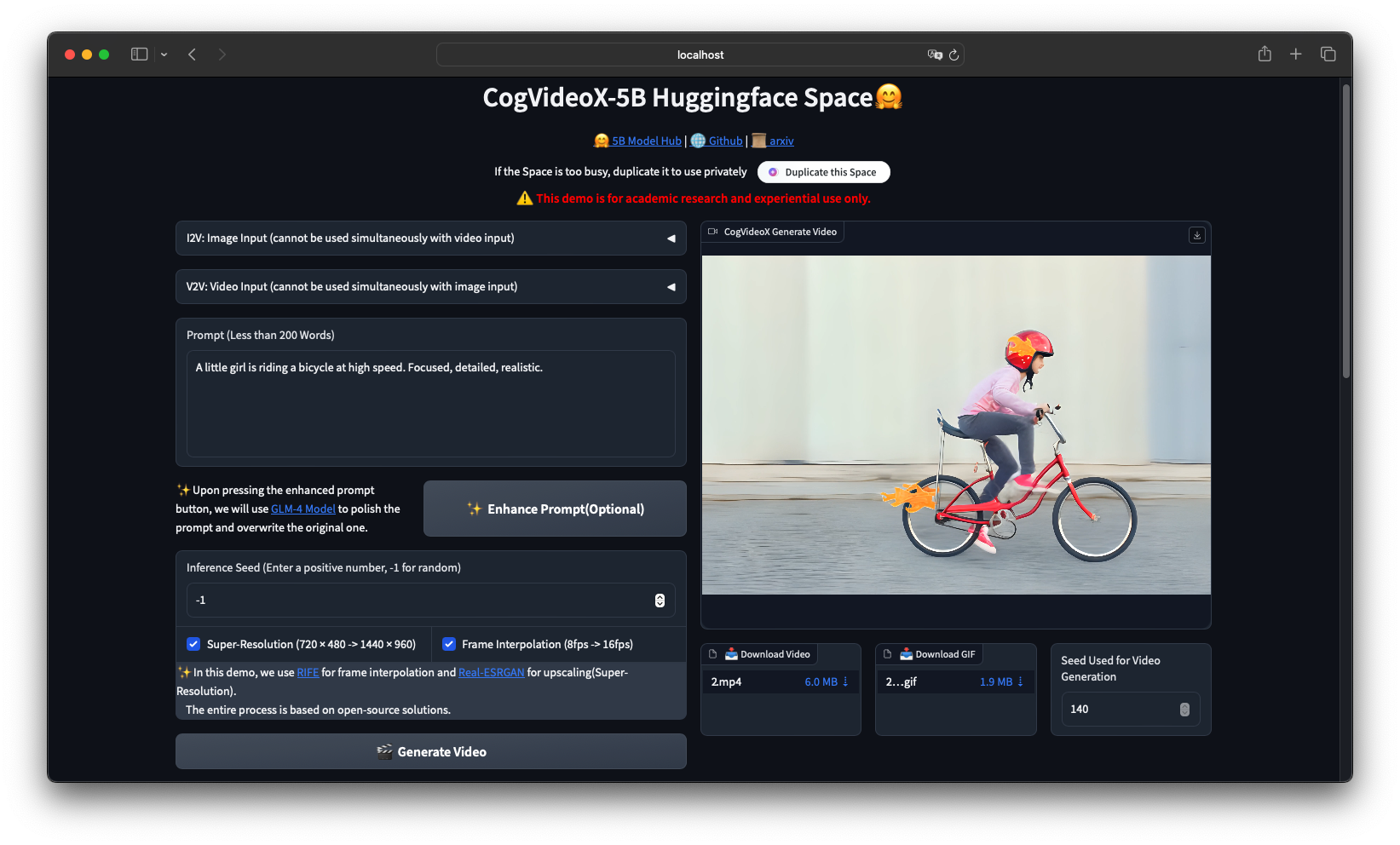
```**Q: Is there a web UI for non-technical users?**A: Yes, multiple options. The official Hugging Face Space provides online inference without setup. For local use, install ComfyUI with the CogVideoXWrapper node for a visual workflow interface. Third-party tools like Pinokio also offer one-click installations.---## ConclusionCogVideoX delivers pro```
pytho
n
from prometheus_client import Counter, Histogram, start_http_server
import time

INFERENCE_COUNT = Counter('cogvideo_inferences_total', 'Total inferences')
INFERENCE_TIME = Histogram('cogvideo_inference_seconds', 'Inference latency')
VRAM_USAGE = Histogram('cogvideo_vram_bytes', 'Peak VRAM usage')

start_http_server(9090)

@INFERENCE_TIME.time()
def generate_tracked(pipe, prompt):
    INFERENCE_COUNT.inc()
    torch.cuda.reset_peak_memory_stats()
    result = pipe(prompt=prompt, num_frames=49).frames[0]
    vram = torch.cuda.max_memory_allocated()
    VRAM_USAGE.observe(vram)
    return result
```y
5. Join the CogVideo community on [Discord](https://github.com/zai-org/CogVideo#-join-our-community) for support and workflow sharingFor production deployments, start with the Docker setup, add FastAPI wrapping, and monitor with Prometheus. Fine-tune with SAT LoRA when you need custom styles.**Join our Telegram group for daily AI source code updates:** [@dibi8source](https://t.me/dibi8source)---


## Recommended Hosting & InfrastructureBefore you deploy any of the tools above into production, you'll need solid infrastructure. Two options dibi8 actually uses and recommends:- **DigitalOcean
** — $200 free credit for 60 days across 14+ global regions. The default option for indie devs running open-source AI tools.
- **HTStack
** — Hong Kong VPS with low-latency access from mainland China. This is the same IDC that hosts dibi8.com — battle-tested in production.*Affiliate links — they don't cost you extra and they help keep dibi8.com running.*## Sources & Further Reading- CogVideo GitHub Repository: https://github.com/zai-org/CogVideo
- CogVideoX-5B Model Card (Hugging Face): https://huggingface.co/THUDM/CogVideoX-5B
- CogVideoX1.5-5B Model Card: https://huggingface.co/THUDM/CogVideoX1.5-5B
- CogVideoX Paper (arXiv): https://arxiv.org/abs/2408.06072
- Diffusers Documentation: https://huggingface.co/docs/diffusers/main/en/api/pipelines/cogvideox
- Video-BLADE Acceleration Paper: https://arxiv.org/abs/2508.10774
- VBench-2.0 Benchmark Paper: https://arxiv.org/abs/2503.21755
- CogKit Fine-Tuning Framework: https://github.com/zai-org/CogKit
- ComfyUI-CogVideoXWrapper: https://github.com/kijai/ComfyUI-CogVideoXWrapper
- diffusers-torchao Quantization: https://github.com/sayakpaul/diffusers-torchao
- Wan 2.1 Repository: https://github.com/Wan-Video/Wan2.1
- HunyuanVideo Repository: https://github.com/Tencent/HunyuanVideo
- Open-Sora Repository: https://github.com/hpcaitech/Open-Sora<!--auto-references-->
## References & Sources- [CogVideo](https://github.com/zai-org/CogVideo)
- [ComfyUI-CogVideoXWrapper](https://github.com/kijai/ComfyUI-CogVideoXWrapper)
- [CogKit](https://github.com/zai-org/CogKit)
- [diffusers-torchao](https://github.com/sayakpaul/diffusers-torchao)
- [Wan 2.1](https://github.com/Wan-Video/Wan2.1)
- [HunyuanVideo](https://github.com/Tencent/HunyuanVideo)
- [Open-Sora](https://github.com/hpcaitech/Open-Sora)
- [Hugging Face Diffusers (CogVideoX docs)](https://huggingface.co/docs/diffusers/main/en/api/pipelines/cogvideox)
```b
a
s
h
ffmpeg -i output.mp4 -c:v libx265 -crf 23 output_h265.mp4


💬 Bình luận & Thảo luận