lang: vi slug: demucs title: ‘Demucs: Music Source Separation with 10K+ Stars’ description: ‘Demucs is a hybrid spectrogram and waveform source separation model by Meta AI. Compatible with Ultimate Vocal Remover, RVC, GPT-SoVITS. Covers demucs tutorial, demucs vs uvr, demucs docker setup, and production benchmarks.’ tags: [“open-source”] date: 2026-05-19 00:00:00+08:00 lastmod: 2026-05-19 00:00:00+08:00 tech_stack: [] application_domain: Ai Tools source_version: ’' licensing_model: Open Source license_type: MIT file_size: ’' file_md5: ’' download_url: ’' backup_url: ’' github_repo: ‘https://github.com/facebookresearch/demucs' last_maintained: ‘2026-05-19’ draft: false categories: [‘ai-tools’] aliases:- /posts/demucs/ faqs:
- q: ‘What is the difference between htdemucs and htdemucs_ft?’ a: ‘htdemucs_ft is fine-tuned per source with extra training data and the shift trick enabled by default, achieving about 0.7 dB higher SDR (7.8 dB vs 7.1 dB on MUSDB18-HQ). The tradeoff is that it runs roughly 4x slower and uses about 50% more VRAM (~7.8 GB vs ~5.2 GB).’
- q: ‘What hardware do I need to run Demucs?’ a: ‘Demucs runs on CPU but an NVIDIA GPU with 6+ GB VRAM is strongly recommended; htdemucs needs about 5.2 GB and htdemucs_ft about 8 GB. A 4-minute song separates in under a minute on GPU versus 5 to 20 minutes on CPU-only.’
- q: ‘Can I use Demucs commercially?’ a: ‘Yes. Demucs is MIT-licensed, which permits commercial use, modification, and distribution without restrictions, and separated stems can be used in commercial productions. The license covers the code and models only, not the copyright of the music you process.’
- q: ‘Is Demucs still maintained?’ a: ‘The original facebookresearch/demucs repository was archived by Meta on January 1, 2025, but original author Alexandre Defossez maintains an active fork at adefossez/demucs. The latest stable release is v4.1.0.’
- q: ‘How do I separate just the vocals from a song with Demucs?’ a: ‘Run demucs –two-stems=vocals song.mp3, which outputs an isolated vocals track plus an instrumental made by mixing drums, bass, and other. A 4-minute song processes in under 30 seconds on GPU, making it ideal for karaoke track generation.’
featureImage: /images/articles/demucs-music-source-separation-with-10k.png
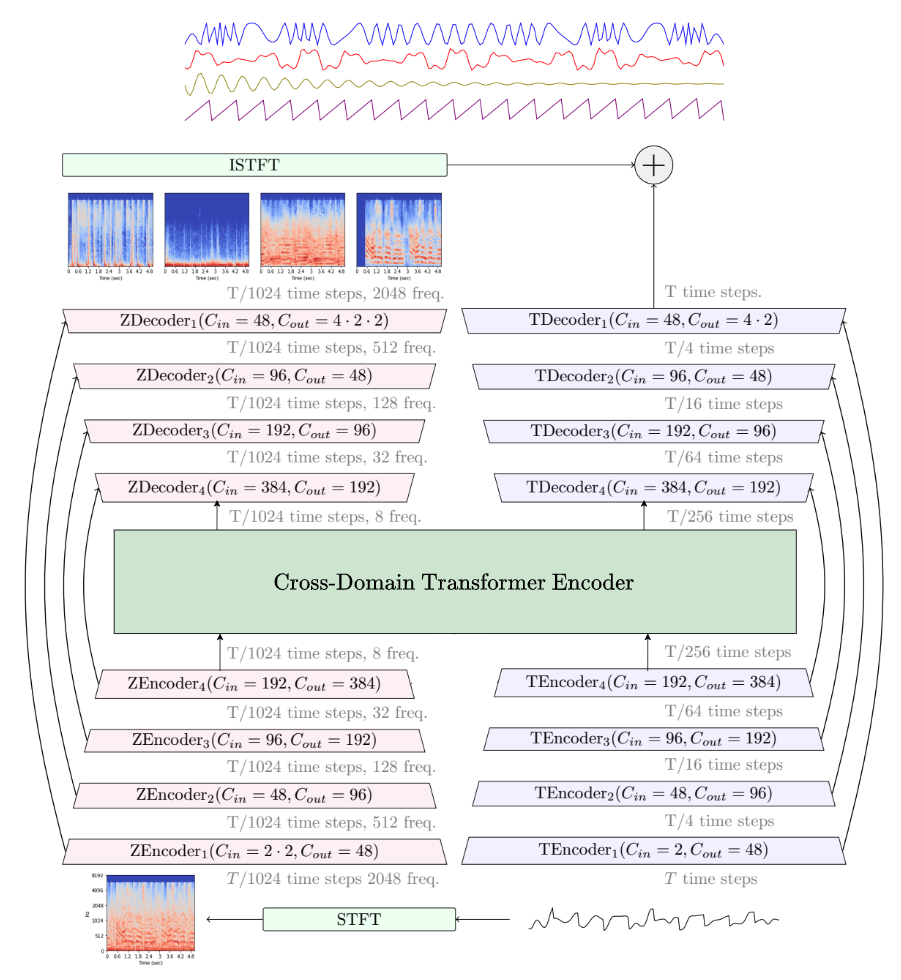
—{{< resource-info >}}Separating a mixed song into individual instrument tracks — vocals, drums, bass, and others — used to require the original multitrack studio files. That changed when deep learning models learned to “unmix” finished audio. Today, musicians, producers, and developers use these tools for karaoke creation, sample isolation, remix preparation, and voice conversion pipelines. Among the open-source options, one model dominates the conversation: Demucs, Meta’s hybrid transformer architecture with over 10,000 GitHub stars and top-ranked benchmarks on the MUSDB18-HQ dataset.This guide walks through what Demucs is, how it works, how to install it locally, how it compares to Spleeter and Ultimate Vocal Remover, and how to integrate it into real production workflows.## What Is Demucs?Demucs (Deep Extractor for Music Sources) is an open-source music source separation model developed by Meta AI Research. It takes a stereo audio mixture as input and outputs isolated “stems” — typically vocals, drums, bass, and a catch-all “other” track containing guitars, keyboards, and remaining instruments.The project lives at facebookresearch/demucs on GitHub, where it has accumulated over 10,100 stars and 1,500 forks. The repository was archived by Meta on January 1, 2025, but the original author Alexandre Defossez maintains an active fork at adefossez/demucs. The latest stable release is v4.1.0, and the entire project is MIT-licensed.What sets Demucs apart from earlier tools is its hybrid approach: it processes audio simultaneously in the time domain (raw waveform) and the frequency domain (spectrogram), then fuses both representations. This dual-domain processing preserves phase information that pure spectrogram methods lose, resulting in cleaner separation with fewer metallic artifacts.## How Demucs Works### Architecture OverviewThe current generation of Demucs — officially called Hybrid Transformer Demucs (HTDemucs) — builds on a U-Net convolutional backbone augmented with transformer layers. The architecture operates in three conceptual stages:1. Encoder: The input waveform passes through both a time-domain encoder (1D convolutions) and a frequency-domain encoder (STFT followed by 2D convolutions). This dual encoding captures both fine-grained temporal details and harmonic frequency structures.2. Transformer bottleneck: The deepest layers of the U-Net use a cross-domain transformer encoder with self-attention within each domain and cross-attention across domains. This mechanism models long-range dependencies — critical for separating, say, a vocal melody that spans multiple bars from a similarly pitched guitar line.3. Decoder: Separate decoders reconstruct each source (drums, bass, other, vocals) in both domains, and a fusion layer combines the outputs into the final separated waveforms.
htdemucs | 4 | ~5.2 GB | 7.1 dB | Default, best speed/quality balance |
| htdemucs_ft | 4 | ~7.8 GB | 7.8 dB | Maximum quality, ~4x slower |
| htdemucs_6s | 6 | ~6.5 GB | 6.8 dB | Guitar + piano isolation |
| mdx_extra_q | 4 | ~3.0 GB | 6.5 dB | Low-VRAM systems |The htdemucs_ft model achieves an overall SDR of 7.8 dB on MUSDB18-HQ, with per-source breakdowns of approximately 8.5 dB for vocals, 7.5 dB for bass, 8.9 dB for drums, and 6.2 dB for the “other” category. For reference, 0 dB means no separation improvement over the original mixture.## Installation & Setup### PrerequisitesBefore installing Demucs, verify your environment:```
bas
h
python –version
FFmpeg must be installed #
ffmpeg -version
(Optional) NVIDIA GPU with CUDA 11.8+ for acceleration #
nvidia-smi
### Option 1: pip Install (Fastest)The simplest way to get Demucs running:
bas
h
Create a virtual environment #
python -m venv demucs-env source demucs-env/bin/activate # Linux/macOS
demucs-env\Scripts\activate # Windows# I``` #
bas h
Create a virtual environment #
python -m venv demucs-env source demucs-env/bin/activate # Linux/macOS
demucs-env\Scripts\activate # Windows #
Install Demucs #
pip install -U demucs
Verify installation #
demucs –help
/adefossez/demucs.git
cd demucs# Create environment from official spec
conda env update -f environment-cuda.yml
conda activate demucs# Install in development mode
pip install -e .# Verify GPU is detected
python -c "import torch; print(f'CUDA available: {torch.cuda.is_available()}')"
```### Option 3: Docker (Cleanes```
bas
h
# Clone the repository
git clone https://github.com/adefossez/demucs.git
cd demucs

# Create environment from official spec
conda env update -f environment-cuda.yml
conda activate demucs

# Install in development mode
pip install -e .

# Verify GPU is detected
python -c "import torch; print(f'CUDA available: {torch.cuda.is_available()}')"
yam
l
version: ‘3.8’services:
demucs:
build: .
runtime: nvidia
environment:
- NVIDIA_VISIBLE_DEVICES=all
volumes:
- ./input:/audio/input:ro
- ./output:/audio/output
command: ["-n", “htdemucs_ft”, “–mp3”, “-o”, “/audio/output”, “/audio/input”]
### First Separation RunAfter installation, separate your first track:
bas
h
Basic 4-stem separation with default model #
demucs song.mp3``` bas h
Dockerfile #
FROM pytorch/pytorch:2.5.1-cuda12.4-cudnn9-runtime
RUN pip install -U demucs
WORKDIR /audio ENTRYPOINT [“demucs”]
i
t
y
demucs -n htdemucs_ft song.mp3# Separate only vocals from instrumental
demucs --two-stems=vocals song.mp3# Output as MP3 (smaller files)
de```
bas
h
docker build -t demucs .
docker run --gpus all -v $(pwd):/audio demucs song.mp3
```l
o
a
d
automatically on first use. Verify the cache:```
bas
h
# List downloaded models
ls ~/.cache/torch/hub/checkpoints/# Expec```
yam
l
version: '3.8'

services:
  demucs:
    build: .
    runtime: nvidia
    environment:
      - NVIDIA_VISIBLE_DEVICES=all
    volumes:
      - ./input:/audio/input:ro
      - ./output:/audio/output
    command: ["-n", "htdemucs_ft", "--mp3", "-o", "/audio/output", "/audio/input"]
```t
h
Popular Tools### Ultimate Vocal Remover (UVR)Ultimate Vocal Remover is the most popular GUI frontend for Demucs. Rather than using Demucs directly through the command line, most producers use UVR because it bundles Demucs models with other architectures and adds ensemble processing.Configuration in UVR:1. Download UVR5 from the [official GitHub re```
bas
h
# Basic 4-stem separation with default model
demucs song.mp3

# Output goes to ./separated/htdemucs/song/
# Contains: drums.wav, bass.wav, other.wav, vocals.wav

# Use the fine-tuned model for better quality
demucs -n htdemucs_ft song.mp3

# Separate only vocals from instrumental
demucs --two-stems=vocals song.mp3

# Output as MP3 (smaller files)
demucs --mp3 --mp3-bitrate 320 song.mp3
```t
h
a
n
any single model. The cost is processing time — ensemble runs are roughly 3–5x slower than a single model pass.### RVC (Retrieval-based Voice Conversion)RVC pipelines commonly use Demucs as a preprocessing step to isolate vocals before voice extraction:```
pytho
n
import subprocess
import osdef preprocess_for_rvc(input_song, output_dir):
    """Extract clean vocals for RVC voice conversion."""
    os.makedirs(output_dir, exist_ok=True)    # Step 1: Separate with Demucs
    subp```
bas
h
# List downloaded models
ls ~/.cache/torch/hub/checkpoints/

# Expected output includes:
# htdemucs-*.th, htdemucs_ft-*.th

# Check which model will be used
demucs -n htdemucs_ft --help | grep "name"

# Quick test with a short audio file
ffmpeg -f lavfi -i "sine=frequency=1000:duration=5" test_tone.wav
demucs -n htdemucs test_tone.wav
``` return vocals_path# Usage
vocals = preprocess_for_rvc('input.mp3', './separated')
# Feed vocals into RVC for voice conversion
```### GPT-SoVITSGPT-SoVITS voice cloning requires clean reference audio. Demucs removes background music before feeding samples into the TTS pipeline:```
pytho
n
from demucs.api import Separator
import torchaudioseparator = Separator(model="htdemucs", device="cuda")# Separate and extract vocals
origin, separated = separator.separate_audio_file("reference.mp3")
vocals = separated["vocals"]# Save at 24kHz for GPT-SoVITS
torchaudio.save("clean_reference.wav", vocals, 24000)
```### Gradio Web InterfaceFor a self-hosted separation service:```
pytho
n
import gradio as gr
from demucs.api import Separatorseparator = Separator(model="htdemucs_ft")def separate(audio_file, stem):
    origin, separated = separator.separate_audio_file(audio_file)
    output_path = f"{stem}.wav"
    separator.save_audio(separated[stem], output_path, samplerate=44100)
    return output_pathdemo = gr.Interface(
    fn=separate,
    inputs=[
        gr.Audio(type="filepath", label="Upload Song"),
        gr.Dropdown(
            choices=["vocals", "drums", "bass", "other"],
            value="vocals",
            label="Stem"
        )
    ],
    outputs=gr.Audio(label="Isolated Stem"),
    title="Demucs Source Separation",
    description="Separat```
pytho
n
import subprocess
import os

def preprocess_for_rvc(input_song, output_dir):
    """Extract clean vocals for RVC voice conversion."""
    os.makedirs(output_dir, exist_ok=True)

    # Step 1: Separate with Demucs
    subprocess.run([
        'demucs', '-n', 'htdemucs_ft',
        '--two-stems=vocals',
        '-o', output_dir,
        input_song
    ], check=True)

    # Step 2: Return path to isolated vocals
    base = os.path.splitext(os.path.basename(input_song))[0]
    vocals_path = os.path.join(
        output_dir, 'htdemucs_ft', base, 'vocals.wav'
    )
    return vocals_path

# Usage
vocals = preprocess_for_rvc('input.mp3', './separated')
# Feed vocals into RVC for voice conversion
```m
e
|
| Hybrid Demucs (v3) | 7.7 dB | 8.1 dB | 8.5 dB | 7.2 dB | 5.9 dB | ~12x real-time |
| Spleeter 4stems | 5.9 dB | 6.3 dB | 6.8 dB | 5.4 dB | 4.2 dB | ~100x real-time |
| Open-Unmix | 5.3 dB | 6.2 dB | 5.9 dB | 4.7 dB | 4.2 dB | ~80x real-time |### Production Use Cases**Karaoke track generation**: The `--two-stems=vocals` option produces an instrumental by simply mixing drums + bass + other, discarding the vocals track. A 4-minute song processes in under 30 seconds on GPU.**Sample extraction for producers**: Isolate drum breaks, basslines, or melodic elements from full mixes. The `htdemucs_6s` model adds guitar and piano separation, though quality on these stems is lower than the main four.**Voice conversion preprocessing**: Clean vocal extraction is a prerequisite for RVC, GPT-SoVITS, and similar voice cloning pipelines. Demucs consi```
pytho
n
from demucs.api import Separator
import torchaudio

separator = Separator(model="htdemucs", device="cuda")

# Separate and extract vocals
origin, separated = separator.separate_audio_file("reference.mp3")
vocals = separated["vocals"]

# Save at 24kHz for GPT-SoVITS
torchaudio.save("clean_reference.wav", vocals, 24000)
```|
|----------|----------|-------------|-------------|
| RTX 4080 GPU | ~15s | ~55s | ~25s |
| RTX 3080 GPU | ~20s | ~75s | ~35s |
| Apple M3 (MPS) | ~45s | ~3min | ~70s |
| Intel i7-13700 CPU | ~5min | ~18min | ~8min |## Advanced Usage / Production Hardening### Python API for Custom PipelinesFor programmatic control, bypass the CLI and use the Python API directly:```
pytho
n
import to```
pytho
n
import gradio as gr
from demucs.api import Separator

separator = Separator(model="htdemucs_ft")

def separate(audio_file, stem):
    origin, separated = separator.separate_audio_file(audio_file)
    output_path = f"{stem}.wav"
    separator.save_audio(separated[stem], output_path, samplerate=44100)
    return output_path

demo = gr.Interface(
    fn=separate,
    inputs=[
        gr.Audio(type="filepath", label="Upload Song"),
        gr.Dropdown(
            choices=["vocals", "drums", "bass", "other"],
            value="vocals",
            label="Stem"
        )
    ],
    outputs=gr.Audio(label="Isolated Stem"),
    title="Demucs Source Separation",
    description="Separate music into stems using Meta's Demucs model"
)

demo.launch(server_name="0.0.0.0", server_port=7860)
```i
c
e
=device
    )[0]# sources shape: (num_sources, channels, samples)
source_names = model.sources  # ['drums', 'bass', 'other', 'vocals']# Save individual stems
for i, name in enumerate(source_names):
    torchaudio.save(f"{name}.wav", sources[i].cpu(), sr)
```### Batch Processing Pipeline```
pytho
n
from pathlib import Path
import subprocess
import jsondef batch_separate(input_dir, output_dir, model="htdemucs"):
    """Process all audio files in a directory."""
    input_dir = Path(input_dir)
    output_dir = Path(output_dir)
    output_dir.mkdir(parents=True, exist_ok=True)    audio_exts = {'.mp3', '.wav', '.flac', '.ogg', '.m4a'}
    files = [f for f in input_dir.iterdir() if f.suffix in audio_exts]    # Process all files in a single Demucs invocation
    subprocess.run([
        'demucs', '-n', model,
        '-o', str(output_dir),
        '--mp3',
        '--mp3-bitrate', '320',
        *[str(f) for f in files]
    ], check=True)    # Generate metadata manifest
    manifest = {}
    for f in files:
        base = f.stem
        stem_dir = output_dir / model / base
        manifest[base] = {
            'drums': str(stem_dir / 'drums.mp3'),
            'bass': str(stem_dir / 'bass.mp3'),
            'other': str(stem_dir / 'other.mp3'),
            'vocals': str(stem_dir / 'vocals.mp3'),
        }    with open(output_dir / 'manifest.json', 'w') as fp:
        json.dump(manifest, fp, indent=2)    return manifest# Usage
batch_separate('./raw_songs/', './stems/', model='htdemucs_ft')
```### Memory Optimization for Long FilesDemucs loads the entire audio file into GPU memory. For long tracks or limited VRAM:```
pytho
n
# Force CPU offloading for large files
import os
os.environ['PYTORCH_CUDA_ALLOC_CONF'] = 'max_split_size_mb:128'# Use smaller segments
sources = apply_model(
    model,
    mix,
    split=True,
    segment=7,      # Reduce from default ~10s to 7s
    overlap=0.1,    # Reduce overlap
    device=device
)[0]
```### Monitoring and Logging```
pytho
n
import logging
import timelogging.basicConfig(level=logging.INFO)
logger = logging.getLogger('demucs')def separate_with_metrics(input_path, output_dir):
    start = time.time()    separator = Separator(model="htdemucs_ft", device="cuda")
    origin, separated = separator.separate_audio_file(input_path)    duration = time.time() - start
    logger.info(f"Separated {input_path} in {duration:.1f}s")    # Log per-stem levels
    for name, audio in separated.items():
        rms = torch.sqrt(torch.mean(audio ** 2)).item()
        logger.info(f"  {name}: RMS={rms:.4f}")    return separated
```## Comparison with Alternatives| Feature | Demucs (v4) | Ultimate Vocal Remover | Spleeter | Open-Unmix |
|---------|-------------|------------------------|----------|------------|
| **Architecture** | Hybrid waveform + spectrogram + Transformer | GUI wrapper (multiple backends) | Spectrogram U-Net | Spectrogram LSTM |
| **MUSDB SD```
pytho
n
import torch
import torchaudio
from demucs.pretrained import get_model
from demucs.apply import apply_model

# Load model
device = torch.device("cuda" if torch.cuda.is_available() else "cpu")
model = get_model("htdemucs_ft")
model.to(device)
model.eval()

# Load audio
wav, sr = torchaudio.load("input.mp3")

# Ensure stereo
if wav.shape[0] == 1:
    wav = wav.repeat(2, 1)

# Add batch dimension
mix = wav.unsqueeze(0).to(device)

# Separate with optimized settings
with torch.no_grad():
    sources = apply_model(
        model,
        mix,
        shifts=1,       # Shift trick: higher = better, slower
        split=True,     # Process in chunks (required for long audio)
        overlap=0.25,   # Overlap between chunks
        segment=10,     # Segment length in seconds
        progress=True,
        device=device
    )[0]

# sources shape: (num_sources, channels, samples)
source_names = model.sources  # ['drums', 'bass', 'other', 'vocals']

# Save individual stems
for i, name in enumerate(source_names):
    torchaudio.save(f"{name}.wav", sources[i].cpu(), sr)
```## Limitations / Honest AssessmentDemucs is not the right tool for every audio task. Here is what it does not do well:**Real-time separation**: Even the fastest Demucs model (`htdemucs`) processes at roughly 16x real-time on an RTX 4080. This is far too slow for live performance or real-time streaming applications. Tools like Spleeter or specialized ONNX exports are better suited for latency-sensitive use cases.**Guitar and piano isolation**: The `htdemucs_6s` model attempts to separate guitar and piano as distinct stems, but SDR on these sources is significantly lower than the main four stems. If your primary need is isolating a specific guitar track, specialized transcription tools like Basic Pitch may be more appropriate.**Highly compressed masters**: Loudness-maximized tracks with heavy limiting (common in modern EDM and pop) create frequency masking that confuses separation models. Demucs may produce artifacts — swirling sounds, cross-source bleed — on these tracks that are not present on more dynamic mixes.**Model size**: At ~2 GB for `htdemucs_ft`, Demucs models are an order o```
pytho
n
from pathlib import Path
import subprocess
import json

def batch_separate(input_dir, output_dir, model="htdemucs"):
    """Process all audio files in a directory."""
    input_dir = Path(input_dir)
    output_dir = Path(output_dir)
    output_dir.mkdir(parents=True, exist_ok=True)

    audio_exts = {'.mp3', '.wav', '.flac', '.ogg', '.m4a'}
    files = [f for f in input_dir.iterdir() if f.suffix in audio_exts]

    # Process all files in a single Demucs invocation
    subprocess.run([
        'demucs', '-n', model,
        '-o', str(output_dir),
        '--mp3',
        '--mp3-bitrate', '320',
        *[str(f) for f in files]
    ], check=True)

    # Generate metadata manifest
    manifest = {}
    for f in files:
        base = f.stem
        stem_dir = output_dir / model / base
        manifest[base] = {
            'drums': str(stem_dir / 'drums.mp3'),
            'bass': str(stem_dir / 'bass.mp3'),
            'other': str(stem_dir / 'other.mp3'),
            'vocals': str(stem_dir / 'vocals.mp3'),
        }

    with open(output_dir / 'manifest.json', 'w') as fp:
        json.dump(manifest, fp, indent=2)

    return manifest

# Usage
batch_separate('./raw_songs/', './stems/', model='htdemucs_ft')
``` spectrogram methods discard. The transformer layers also model long-range musical dependencies better than Spleeter's U-Net. This translates to fewer artifacts and less cross-source interference.**Q: How do I process a full album efficiently?**
A: Pass multiple files to a single Demucs invocation: `demucs -n htdemucs *.mp3`. Demucs processes them sequentially but avoids repeated model loading overhead. For maximum throughput, run multiple Demucs instances on different GPUs or use the batch processing script provided in the Advanced Usage section.**Q: What audio formats does Demucs support?**
A: Demucs uses FFmpeg for decoding and torchaudio for encoding. Input: MP3, WAV, FLAC, OGG, M4A, and any format FFmpeg supports. Output: WAV (default, 16-bit), float32 WAV (`--float32`), 24-bit WAV (`--int24`), or MP3 (`--mp3` with adjustable bitrate).**Q: Can I fine-tune Demucs on my own data?**
A: Yes, but it requires the full training pipeline. You need isolated stems for your training songs (same format as MUSDB18-HQ), then use the Dora experiment manager with `dora run -d solver=htdemucs dset=your_dataset`. Most users do not need this — the pretrained models generalize well across genres.**Q: What is the difference between `htdemucs` and `htdemucs_ft`?**
A: `htdemucs_ft` is fine-tuned per source with additional training data and the```
pytho
n
# Force CPU offloading for large files
import os
os.environ['PYTORCH_CUDA_ALLOC_CONF'] = 'max_split_size_mb:128'

# Use smaller segments
sources = apply_model(
    model,
    mix,
    split=True,
    segment=7,      # Reduce from default ~10s to 7s
    overlap=0.1,    # Reduce overlap
    device=device
)[0]
```rat
i
o
n
in 2026. Its hybrid transformer architecture delivers separation quality that exceeds Spleeter by 20–40% on standard benchmarks, and it integrates cleanly with voice conversion pipelines, karaoke generators, and audio production tools.For developers building audio pipelines, Demucs offers a well-documented Python API, Docker support,```
pytho
n
import logging
import time

logging.basicConfig(level=logging.INFO)
logger = logging.getLogger('demucs')

def separate_with_metrics(input_path, output_dir):
    start = time.time()

    separator = Separator(model="htdemucs_ft", device="cuda")
    origin, separated = separator.separate_audio_file(input_path)

    duration = time.time() - start
    logger.info(f"Separated {input_path} in {duration:.1f}s")

    # Log per-stem levels
    for name, audio in separated.items():
        rms = torch.sqrt(torch.mean(audio ** 2)).item()
        logger.info(f"  {name}: RMS={rms:.4f}")

    return separated
```t
o
open-source AI tools: [https://t.me/dibi8channel](https://t.me/dibi8channel)**


## Recommended Hosting & InfrastructureBefore you deploy any of the tools above into production, you'll need solid infrastructure. Two options dibi8 actually uses and recommends:- **DigitalOcean
** — $200 free credit for 60 days across 14+ global regions. The default option for indie devs running open-source AI tools.
- **HTStack
** — Hong Kong VPS with low-latency access from mainland China. This is the same IDC that hosts dibi8.com — battle-tested in production.*Affiliate links — they don't cost you extra and they help keep dibi8.com running.*## Sources & Further Reading- [Demucs GitHub Repository (Meta, archived)](https://github.com/facebookresearch/demucs)
- [Demucs Active Fork (adefossez)](https://github.com/adefossez/demucs)
- [Hybrid Transformers for Music Source Separation (paper)](https://arxiv.org/abs/2211.08553)
- [MUSDB18-HQ Benchmark Dataset](https://zenodo.org/record/3338373)
- [Ultimate Vocal Remover GUI](https://github.com/Anjok07/ultimatevocalremovergui)
- [Spleeter (Deezer, archived)](https://github.com/deezer/spleeter)
- [Open-Unmix (Sony)](https://github.com/sigsep/open-unmix-pytorch)
- [MVSEP Quality Checker Leaderboard](https://mvsep.com/quality_checker/)
- [Audio Developers Conference 2025 — Demucs ONNX Export Talk](https://mixxx.discourse.group/t/gsoc-2025-converting-demucs-v4-hybrid-transformer-ai-model-to-onnx-format/32874)<!--auto-references-->
## References & Sources- [Demucs (Meta, archived)](https://github.com/facebookresearch/demucs)
- [Demucs active fork (adefossez)](https://github.com/adefossez/demucs)
- [Ultimate Vocal Remover GUI](https://github.com/Anjok07/ultimatevocalremovergui)
- [Spleeter (Deezer)](https://github.com/deezer/spleeter)
- [Open-Unmix (Sony)](https://github.com/sigsep/open-unmix-pytorch)
- [Hybrid Transformers for Music Source Separation (paper)](https://arxiv.org/abs/2211.08553)
- [Gradio](https://github.com/gradio-app/gradio)
💬 Bình luận & Thảo luận