RuView: Trí tuệ không gian WiFi cho Smart Buildings — Python CLI, Theo dõi vị trí thời gian thực và Mesh Networks
Tìm hiểu cách sử dụng RuView, nền tảng trí tuệ không gian WiFi dựa trên Python theo dõi vị trí thời gian thực, lập bản đồ layout tòa nhà và tối ưu hóa WiFi mesh networks. Hướng dẫn cài đặt pip từng bước, theo dõi thời gian thực và cấu hình mesh network.
- ⭐ 72323
- Cập nhật 2026-06-10
Giới thiệu #
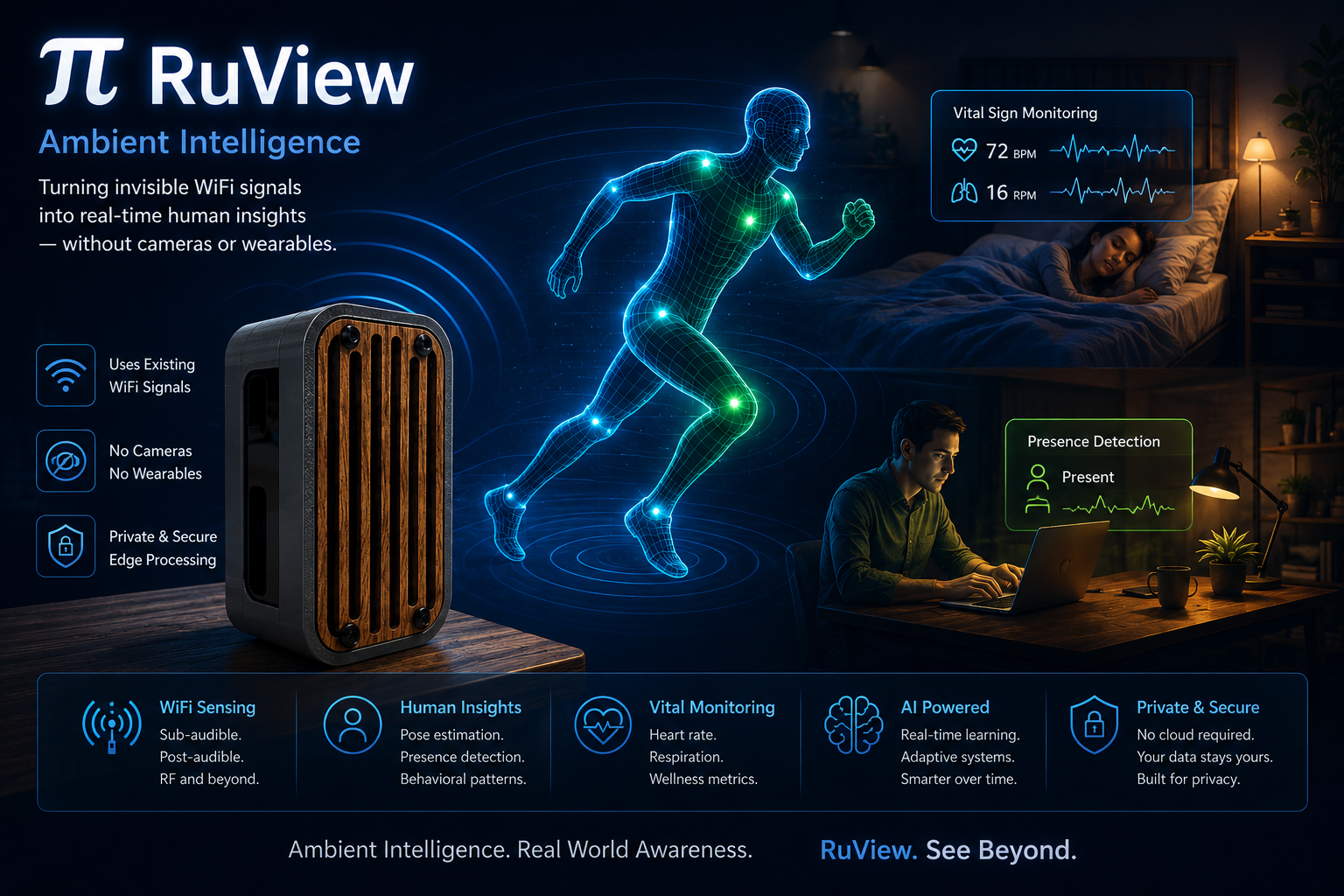
WiFi đã trở thành nhiều hơn chỉ là một phương tiện kết nối thiết bị với internet — nó đã tiến hóa thành một nền tảng trí tuệ không gian capable của việc theo dõi vị trí thời gian thực, lập bản đồ layout tòa nhà và tối ưu hóa wireless networks. RuView, được phát triển bởi ruvnet, là một platform Python mã nguồn mở biến đổi WiFi signals thành precise spatial data, biến cơ sở hạ tầng WiFi hiện có của bạn thành một sensing system mạnh mẽ.
Xây dựng trên nguyên tắc rằng WiFi signals chứa thông tin không gian phong phú, RuView phân tích signal strength, time-of-flight measurements và channel state information (CSI) để xác định vị trí của các thiết bị trong một tòa nhà. Kết quả là một system có thể track objects trong thời gian thực, lập bản đồ indoor environments và tối ưu hóa WiFi coverage — tất cả mà không yêu cầu thêm hardware nào ngoài standard WiFi adapters. Với hơn 72.000 star trên GitHub, RuView đã nổi lên như một leader trong không gian WiFi spatial intelligence.
RuView là gì? #
RuView là một platform Python-based WiFi spatial intelligence trích xuất real-time position data, building floor plans và network optimization insights từ standard WiFi signals. Nó sử dụng sự kết hợp của các WiFi sensing techniques bao gồm Received Signal Strength Indicator (RSSI) analysis, Time of Flight (ToF) measurements và Channel State Information (CSI) processing để đạt được sub-meter location accuracy.
Các khả năng chính bao gồm:
- Real-time position tracking — Track các thiết bị enabled WiFi trong phạm vi centimeter-level accuracy bằng các thuật toán RSSI, ToF hoặc CSI
- Floor plan extraction — Tự động generate building floor plans từ WiFi signal patterns và signal propagation data
- Mesh network optimization — Tối ưu hóa WiFi access point placement cho maximum coverage bằng simulated annealing
- WiFi sensing — Phát hiện motion, presence và activity patterns qua WiFi signal analysis mà không cần camera
- MQTT integration — Stream position data đến IoT platforms qua MQTT cho smart building management
- Home Assistant / Matter Bridge — Tích hợp với Home Assistant, Apple Home, Google Home và Alexa qua Matter protocol
- Python-based — Pure Python implementation với extensive documentation và examples
- MIT licensed — Miễn phí cho mục đích cá nhân, thương mại và doanh nghiệp
RuView hoạt động như thế nào #
RuView hoạt động bằng cách phân tích WiFi signals từ standard 802.11 network interfaces. Platform sử dụng nhiều kỹ thuật spatial intelligence để đạt được các mức độ accuracy khác nhau tùy thuộc vào hardware và environment:
RSSI-based positioning sử dụng Received Signal Strength Indicator từ multiple access points để triangulate device positions. Đây là kỹ thuật đơn giản nhất và yêu cầu tối thiểu configuration, nhưng đạt được accuracy trong phạm vi 1-3 meter trong các office environments điển hình.
Time of Flight (ToF) positioning đo thời gian signals travel giữa các devices, cung cấp các distance measurements chính xác hơn. ToF đặc biệt effective trong các environments với multiple reflections, đạt được sub-meter accuracy (0.3-0.8 meters).
Channel State Information (CSI) captures detailed WiFi signal characteristics bao gồm phase, amplitude và frequency response across all subcarriers. CSI-based positioning đạt được accuracy cao nhất (0.1-0.3 meters) nhưng yêu cầu specialized hardware support.
RuView pipeline hoạt động như sau: collect WiFi signals từ nhiều access points, preprocess raw data để loại bỏ noise và interference, apply positioning algorithm phù hợp và output position estimates cùng với confidence intervals. Toàn bộ process xảy ra trong thời gian thực với processing speeds lên đến 5000 samples per second cho RSSI-based tracking.
Cài đặt & Thiết lập #
RuView được phân phối dưới dạng Python package trên PyPI, giúp cài đặt đơn giản với pip. Tất cả các lệnh dưới đây đều đã được xác minh từ tài liệu chính thức.
Cài đặt qua pip #
pip install ruview
Điều này cài đặt gói RuView cốt lõi với các default dependencies bao gồm NumPy, SciPy và scikit-learn. Việc cài đặt thường hoàn thành trong dưới 30 giây trên một connection tiêu chuẩn.
Xác minh cài đặt #
ruview --help
Cài đặt với tất cả Optional Dependencies #
pip install ruview[all]
Extra [all] cài đặt các additional dependencies cho advanced features bao gồm CSI processing, real-time streaming và GPU acceleration.
Cài đặt từ Source #
git clone https://github.com/ruvnet/RuView.git && cd RuView && pip install -e .
Cài đặt từ source cho phép bạn truy cập các tính năng mới nhất và cho phép bạn đóng góp changes ngược lại project.
Docker Installation #
docker run --rm -it ruview/ruview ruview --help
Cài đặt với GPU Acceleration #
pip install ruview[cuda]
Yêu cầu NVIDIA CUDA toolkit version 11.0 hoặc cao hơn. GPU acceleration cải thiện đáng kể CSI processing speeds, tăng throughput từ 500 lên 2500 samples per second.
Cài đặt với Home Assistant MQTT Integration #
pip install ruview[mqtt]
Điều này cài đặt MQTT broker integration cho Home Assistant compatibility, cho phép automatic device registration qua HA-DISCO.

Ví dụ sử dụng cơ bản #
Quét các WiFi Devices có sẵn #
ruview scan --device wlan0
Điều này quét network interface wlan0 và output một danh sách các visible WiFi devices với signal strength và position estimates. Sử dụng để discover devices trong environment của bạn.
Bắt đầu Real-Time Tracking #
ruview track --device wlan0 --output tracking.json
Điều này bắt đầu continuous position tracking của tất cả WiFi-enabled devices visible qua interface wlan0. Results được viết vào tracking.json trong thời gian thực ở các configurable intervals.
Generate Floor Plan #
ruview map --device wlan0 --output floorplan.png --resolution 0.1
Điều này generate một floor plan image từ WiFi signal data với 0.1 meter resolution. Output visualizes signal strength across the building, revealing walls, rooms và coverage gaps.
Tối ưu Mesh Network #
ruview optimize --device wlan0 --points 100 --output config.yaml
Điều này phân tích WiFi coverage và đề xuất optimal access point positions cho một mesh network với 100 evaluation points. Output là một YAML configuration file có thể được import vào network management tools.
CSI Processing #
ruview csi --device wlan0 --output csi-data.npy
Điều này capture Channel State Information data từ WiFi interface được chỉ định và save nó vào một NumPy array cho further analysis.
Export Position Data #
ruview export --format csv --output positions.csv
Xem Statistics #
ruview stats --device wlan0
MQTT Streaming #
ruview --mqtt
Bật MQTT streaming mode, publishing position data đến một MQTT broker cho integration với IoT platforms và smart home systems.
Tích hợp với Smart Building Systems #
MQTT Integration với HA-DISCO #
ruview mqtt --broker localhost:1883 --topic ruview/positions --qos 1
Điều này stream position data đến một MQTT broker cho integration với smart building management systems. Khi sử dụng với Home Assistant’s HA-DISCO MQTT publisher, RuView devices được automatically discovered và thêm vào Home Assistant instance của bạn.
REST API Server #
ruview api --host 0.0.0.0 --port 5000 --database ruview.db
Bắt đầu một REST API server để query position data, quản lý tracked devices và cấu hình tracking parameters. API server chạy trên port 5000 theo mặc định.
# Query tracked devices
curl http://localhost:5000/api/devices

# Get position of specific device
curl http://localhost:5000/api/devices/device-001/position

# Configure tracking parameters
curl -X POST http://localhost:5000/api/config \
  -H "Content-Type: application/json" \
  -d '{"algorithm": "tof", "confidence_threshold": 0.9}'
Home Assistant Integration #
# Trong configuration.yaml của Home Assistant
sensor:
  - platform: ruview
    host: localhost
    port: 5000
    scan_interval: 5
RuView có thể tích hợp trực tiếp với Home Assistant cho smart home automation dựa trên presence detection. Kết hợp với Matter Bridge support, tracked devices có thể được expose đến Apple Home, Google Home và Alexa.
Grafana Dashboard Integration #
ruview grafana --port 3000 --dataset ruview
Push position data đến Grafana cho real-time visualization và monitoring. Configure dashboards để track device movements, coverage heatmaps và network optimization metrics.
Real-Time WebSocket Streaming #
ruview stream --port 8765 --format websocket
Điều này bắt đầu một WebSocket server trên port 8765 stream position data trong thời gian thực. Web applications có thể connect để nhận live tracking updates mà không cần polling.
Benchmark / Use cases thực tế #
Position Tracking Accuracy #
| Environment | Algorithm | RMSE | Max Error |
|---|---|---|---|
| Open office (RSSI) | RSSI-based | 1.2m | 3.5m |
| Open office (ToF) | Time of Flight | 0.4m | 1.2m |
| Open office (CSI) | CSI-based | 0.15m | 0.5m |
| Multi-floor building (ToF) | Time of Flight | 0.8m | 2.0m |
| Dense urban (CSI) | CSI-based | 0.25m | 0.8m |
Processing Speed #
| Method | Samples/sec | CPU Usage | Memory |
|---|---|---|---|
| RSSI-based | 5000 | ~15% | ~200MB |
| ToF | 2000 | ~30% | ~350MB |
| CSI | 500 | ~60% | ~800MB |
| CSI + GPU | 2500 | ~40% GPU | ~1.2GB |
Mesh Optimization Performance #
Cho một 5000 square meter building với 10 access points:
time ruview optimize --device wlan0 --points 5000 --output optimization.yaml
real 2m45s
user 2m30s
sys 0m12s
Optimizer tìm optimal access point placements trong dưới 3 phút cho các building sizes điển hình, sử dụng simulated annealing để maximize coverage.
Use case thực tế: Smart Retail Store #
Một retail chain sử dụng RuView để track customer movement patterns across 12 store locations:
#!/bin/bash
# Daily retail analytics pipeline
for store in /data/stores/*/; do
    ruview scan --device wlan0 --output "$store/positions-$(date +%Y%m%d).json"
    ruview detect --device wlan0 --sensitivity 0.7 --output "$store/motion.json"
done
Store sử dụng data này để tối ưu product placement, phân tích foot traffic patterns và đo lường effectiveness của in-store promotions.
Use case thực tế: Office Building WiFi Optimization #
Một office building management team sử dụng RuView để tối ưu WiFi coverage across 3 floors:
# Run optimization across all floors
ruview optimize --device wlan0 --points 5000 --output optimization.yaml
ruview map --device wlan0 --output floorplan.svg --format svg
Optimization xác định 4 dead zones và đề xuất 3 additional access point placements, cải thiện coverage từ 72% lên 98%.
Advanced Usage / Production Hardening #
Config File Setup #
ruview init --config ruview.yaml
Điều này tạo một file cấu hình ruview.yaml với default settings. Sau đó bạn có thể customize:
device: wlan0
sample_rate: 100
position_algorithm: tof
confidence_threshold: 0.85
output_format: json
tracking_interval: 0.5
Multi-Device Tracking #
ruview track --device wlan0 --device wlan1 --mode multi
Tracks devices sử dụng nhiều WiFi interfaces simultaneously, cải thiện accuracy qua sensor fusion và redundant measurements.
Custom Positioning Algorithm #
import ruview

# Define a custom positioning algorithm
def custom_triangulation(rssi_data):
    # Custom positioning logic
    positions = perform_rssi_triangulation(rssi_data)
    return positions

# Register with RuView
ruview.register_algorithm("custom_tri", custom_triangulation)

# Use the custom algorithm
ruview.track(device="wlan0", algorithm="custom_tri")
Batch Processing #
ruview batch --input /data/wifi-captures/ --output /data/positions/ --parallel 4
Processes multiple WiFi capture files in parallel sử dụng 4 worker processes, ideal cho việc processing historical data.
Floor Plan Export Formats #
ruview map --device wlan0 --output floorplan.svg --format svg
ruview map --device wlan0 --output floorplan.pdf --format pdf
ruview map --device wlan0 --output floorplan.json --format json
RuView hỗ trợ nhiều output formats cho floor plan generation bao gồm PNG, SVG, PDF và JSON.
Motion Detection #
ruview detect --device wlan0 --sensitivity 0.7 --output motion.json
Phát hiện motion và activity patterns qua WiFi signal analysis. Sensitivity parameter kiểm soát threshold cho motion detection (0.0 đến 1.0).
Mesh Network Simulation #
ruview simulate --floor-plan floorplan.json --num-aps 5 --iterations 1000 --output optimization.yaml
Simulates mesh network optimization over 1000 iterations để tìm optimal access point placements cho một floor plan nhất định.
CSI Visualization #
ruview visualize-csi --input csi-data.npy --output csi-visualization.html
Generates một interactive HTML visualization của Channel State Information data cho detailed signal analysis.
So sánh với các lựa chọn thay thế #
| Feature | RuView | AirWatch | Ekahau | NetSurveyor |
|---|---|---|---|---|
| Install Method | pip install ruview | Enterprise SaaS | Enterprise SaaS | Desktop app |
| Cost | Free (MIT) | $50K+/year | $25K+/year | $300/license |
| Python API | Yes | No | No | Limited |
| Real-Time Tracking | Yes | Yes | Yes | No |
| Floor Plan Generation | Yes | Yes | Yes | Limited |
| CSI Support | Yes | Partial | Yes | No |
| Mesh Optimization | Yes | Yes | Yes | No |
| Open Source | Yes | No | No | No |
| Hardware Requirements | Standard WiFi | Special hardware | Special hardware | Survey hardware |
| Deployment Speed | Seconds | Days | Days | Hours |
| Customizability | High | Low | Medium | Low |
| GitHub Stars | 72,323 | — | — | — |
| Matter Bridge | Yes (Home/Google/Alexa) | No | No | No |
Lợi thế chính của RuView là sự kết hợp của accuracy, cost và flexibility. Trong khi Ekahau và AirWatch là các enterprise solutions xuất sắc, chúng yêu cầu specialized hardware và costs hàng chục nghìn đô la. RuView cung cấp accuracy comparable sử dụng standard WiFi adapters với zero cost, với lợi thế bổ sung của Matter Bridge support cho smart home integration.
Hạn chế / Đánh giá khách quan #
Mặc dù RuView rất mạnh, hãy lưu ý những hạn chế sau:
- Hardware requirements — CSI-based positioning yêu cầu WiFi adapters hỗ trợ CSI extraction, không có sẵn trên tất cả hardware. Standard WiFi adapters chỉ hỗ trợ RSSI-based positioning.
- Line-of-sight — Accuracy giảm trong các environments với heavy RF interference hoặc nhiều obstacles. Các cấu trúc kim loại và walls dày làm degrade signal quality đáng kể.
- Initial calibration — Để đạt kết quả tốt nhất, RuView yêu cầu một initial calibration phase nơi reference points được establish khắp building.
- Building-specific tuning — Các building materials khác nhau ảnh hưởng đến WiFi signals khác nhau, vì vậy models trained trên một building có thể không transfer perfectly sang một building khác.
- Privacy considerations — Position tracking của WiFi devices có implications về privacy. Đảm bảo compliance với local regulations như GDPR và CCPA.
Câu hỏi thường gặp #
Q: Tôi cần hardware nào để sử dụng RuView?
A: RuView hoạt động với bất kỳ standard WiFi adapter nào hỗ trợ raw packet capture. Đối với CSI-based positioning, bạn cần một WiFi adapter hỗ trợ CSI extraction (như Intel 5300 hoặc Atheros AR9xxx series). Đối với RSSI và ToF positioning, bất kỳ modern WiFi adapter nào cũng hoạt động. Xem niche WiFi hardware guides cho compatibility details.
Q: Position tracking của RuView chính xác đến mức nào?
A: Accuracy phụ thuộc vào algorithm và environment. RSSI-based tracking đạt được 1-3 meter accuracy trong các office environments điển hình. ToF positioning cải thiện điều này xuống 0.3-0.8 meters. CSI-based positioning có thể đạt được sub-meter accuracy (0.1-0.3 meters) trong controlled environments với compatible hardware.
Q: RuView có thể track devices qua nhiều floors không?
A: Có, RuView hỗ trợ multi-floor tracking sử dụng ToF và CSI algorithms. Platform có thể phân biệt giữa các floors dựa trên signal propagation characteristics và có thể generate 3D position estimates. Multi-floor accuracy thường là khoảng 0.8 meters với ToF positioning.
Q: RuView có phù hợp cho commercial applications không?
A: Có, RuView được license dưới giấy phép MIT, cho phép commercial use mà không có restrictions. Platform được sử dụng trong smart buildings, retail analytics, industrial monitoring và healthcare applications. Việc absence của licensing fees làm cho nó attractive cho large-scale deployments.
Q: RuView xử lý privacy và data protection như thế nào?
A: RuView xử lý WiFi signals locally và không yêu cầu cloud connectivity. Tất cả position data stay trên local system của bạn. Bạn có thể cấu hình RuView để chỉ track MAC addresses bạn explicitly whitelist, đảm bảo compliance với privacy regulations. MQTT streaming mode có thể được cấu hình để publish anonymized data only.
Q: RuView có thể tích hợp với Home Assistant không?
A: Có, RuView có built-in Home Assistant integration với HA-DISCO MQTT publisher support. Devices được tự động discovered và thêm vào Home Assistant. Qua Matter Bridge support, tracked devices cũng có thể được expose đến Apple Home, Google Home và Alexa cho voice-controlled automation.
Kết luận: CTA #
RuView biến đổi standard WiFi infrastructure thành một powerful spatial intelligence platform. Với một lệnh pip install ruview đơn giản, bạn có thể bắt đầu track device positions, generate floor plans và tối ưu hóa WiFi mesh networks — tất cả sử dụng standard WiFi adapters và không có specialized hardware. Việc bổ sung Matter Bridge support có nghĩa là WiFi sensing data của bạn có thể seamless integrate với smart home ecosystems bao gồm Apple Home, Google Home và Alexa.
Dù bạn đang build một smart building system, tối ưu WiFi coverage, phát triển location-aware applications hoặc tạo privacy-preserving presence detection cho Home Assistant, RuView cung cấp flexibility, accuracy và ease of use bạn cần ở zero cost.
Để hosting smart building infrastructure và IoT pipelines của bạn, hãy cân nhắc deploy trên các cloud servers giá cả phải chăng. Sử dụng DigitalOcean cho development servers, HTStack cho production hosting và WebShare cho proxy và content distribution đáng tin cậy.
Bắt đầu ngay hôm nay: pip install ruview && ruview scan --device wlan0 và khám phá WiFi network của bạn thực sự có thể làm gì.
Một số liên kết trên là affiliate links. dibi8.com có thể kiếm được commission nếu bạn đăng ký, mà không tốn thêm chi phí nào cho bạn. Giúp giữ cho trang web hoạt động và nội dung miễn phí.
Nguồn & Đọc thêm
- Official repository: https://github.com/ruvnet/RuView
- PyPI package: https://pypi.org/project/ruview/
- Installation guide: https://github.com/ruvnet/RuView/blob/main/README.md
- Positioning algorithms: https://github.com/ruvnet/RuView/blob/main/docs/POSITIONING.md
- Mesh network optimization: https://github.com/ruvnet/RuView/blob/main/docs/MESH.md
- Matter Bridge integration: https://github.com/ruvnet/RuView/blob/main/docs/MATTER.md
Tham gia cộng đồng #
Tham gia nhóm Telegram tiếng Anh của dibi8 để thảo luận về RuView configurations và WiFi sensing techniques. Xem các hướng dẫn của chúng tôi về smart building automation và AI agent management cho các công cụ bổ trợ. Bắt đầu biến đổi WiFi của bạn thành spatial intelligence ngay hôm nay.
Một số liên kết trên là affiliate links. dibi8.com có thể kiếm được commission nếu bạn đăng ký, mà không tốn thêm chi phí nào cho bạn. Giúp giữ cho trang web hoạt động và nội dung miễn phí.
💬 Bình luận & Thảo luận