lang: vi slug: traefik title: ‘Traefik: 63,229 GitHub Stars’ description: ‘Traefik is a cloud-native application proxy and edge router with automatic service discovery. Compatible with Docker, Kubernetes, Consul, and Docker Compose. Covers installation, middleware, TLS, monitoring, and production hardening.’ tags: [“automation”, “ci-cd”, “github”, “guide”, “open-source”, “reference”, “tutorial”] date: 2026-05-19 00:00:00+08:00 lastmod: 2026-05-19 00:00:00+08:00 tech_stack: [] application_domain: Dev Utils source_version: ’' licensing_model: Open Source license_type: MIT file_size: ’' file_md5: ’' download_url: ’' backup_url: ’' github_repo: ‘https://github.com/traefik/traefik' last_maintained: ‘2026-05-19’ draft: false categories: [‘dev-utils’] aliases:- /posts/traefik/ faqs:
- q: ‘Does Traefik need to be restarted when I add a new service?’ a: ‘No. Traefik watches your Docker socket or Kubernetes API and updates its routing table in real time. New containers carrying Traefik labels are detected within seconds and traffic is routed immediately with no config reload.’
- q: ‘How do I use Traefik with multiple Docker Compose projects?’
a: ‘Create an external Docker network with
docker network create proxy, then attach Traefik and every application service to it. Each project keeps its own docker-compose.yml with Traefik labels, and Traefik auto-discovers them as long as they share that network.’ - q: ‘What is the difference between Kubernetes Ingress and Traefik’’s IngressRoute?’ a: ‘Standard Kubernetes Ingress is a generic resource with limited routing options. Traefik’’s IngressRoute CRD adds middleware chaining, TCP/UDP routing, weighted load balancing, traffic mirroring, and direct TLS configuration without relying on annotations.’
- q: ‘How fast is Traefik compared to Nginx and HAProxy?’ a: ‘In a community wrk2 benchmark on a 4 vCPU server, Traefik v3.2 handled about 18,291 requests/sec versus 25,367 for Nginx and 24,263 for HAProxy. Enabling Traefik’’s experimental FastProxy engine raised throughput to about 20,795 requests/sec, roughly a 50% gain over the standard engine.’
- q: ‘Is it safe to expose the Traefik dashboard?’
a: ‘Only with authentication. The dashboard reveals your complete routing configuration and backend services, so always protect it with a BasicAuth, ForwardAuth (Authelia/Authentik), or IP-whitelist middleware. Never use
--api.insecure=truein production.’
featureImage: /images/articles/7e31e3d0-traefik-63229-github-stars.png
—{{< resource-info >}}Managing ingress traffic in containerized environments is a persistent headache. Every time a new microservice spins up, someone has to update the reverse proxy configuration, reload the service, and pray nothing breaks. In a world where deployments happen dozens of times per day, this manual approach collapses under its own weight. Traefik, the open-source edge router built for cloud-native infrastructure, solves this by watching your container orchestrator and updating routes automatically — no config reloads, no downtime, no human intervention.This Traefik tutorial walks through a production-grade Traefik setup: Docker Compose deployment, Kubernetes ingress configuration, TLS automation, middleware hardening, and observability. Whether you are exploring Traefik vs Nginx for your stack or need a complete edge router setup, every config in this guide is copy-paste ready.## What Is Traefik?Traefik is an open-source HTTP reverse proxy and load balancer designed for dynamic, cloud-native environments. Originally released in 2015 by Containous (now Traefik Labs), it has grown to 63,229 GitHub stars and become the default ingress choice for Docker and Kubernetes operators who value automation over manual configuration. Unlike traditional proxies that rely on static config files, Traefik connects directly to your orchestrator’s API — Docker, Kubernetes, Consul, ECS, and more — and builds its routing table in real time as containers start and stop.

|-----------|---------|---------|
| EntryPoint | Listening port for incoming traffic | `:80`, `:443`, `:8080` |
| Router | Matches requests against rules | `Host("api.example.com")` |
| Middleware | Modifies requests/responses | BasicAuth, RateLimit, RedirectScheme |
| Service | Forwards to upstream backends | LoadBalancer across 3 replicas |
| Provider | Discovers services from orchestrator | Docker, Kubernetes CRD, Consul |## Installation & Setup### Docker Compose (Single Node, ≤5 Minutes)Create a dedicated directory and the main Traefik configuration:```
bas
h
mkdir -p ~/traefik/{data,configs}
cd ~/traefik
touch data/acme.json && chmod 600 data/acme.json
```T
h
e
`acme.json` file stores Let's Encrypt certificates. It must have restrictive permissions (`600`) or Let's Encrypt will refuse to write to it.**`docker-compose.yml`** — Traefik v3.x production-ready:```
yam
l
services:
  traefik:
    image: traefik:v3.2
    container_name: traefik
    restart: unless-stopped
    security_opt:
      - no-new-privileges:true
    read_only: true
    networks:
      - proxy
    ports:
      - "80:80"
      - "443:443"
      - "8080:8080"
    volumes:
      - /var/run/docker.sock:/var/run/docker.sock:ro
      - ./data/acme.json:/acme.json
      - ./data/traefik.yml:/etc/traefik/traefik.yml:ro
      - ./configs:/configs:ro
      - ./data/logs:/logs
    labels:
      - "traefik.enable=true"
      - "traefik.http.routers.traefik.rule=Host(`traefik.yourdomain.com`)"
      - "traefik.http.routers.traefik.entrypoints=websecure"
      - "traefik.http.routers.traefik.tls.certresolver=letsencrypt"
      - "traefik.http.routers.traefik.service=api@internal"
      - "traefik.http.middlewares.traefik-auth.basicauth.users=admin:$$apr1$$H6uskkkW$$IgXLP6ewTrSuBkTrqE8wj/"
      - "traefik.http.routers.traefik.middlewares=traefik```
bas
h
mkdir -p ~/traefik/{data,configs}
cd ~/traefik
touch data/acme.json && chmod 600 data/acme.json
```or
k
s
:
      - proxy
    labels:
      - "traefik.enable=true"
      - "traefik.http.routers.whoami.rule=Host(`whoami.yourdomain.com`)"
      - "traefik.http.routers.whoami.entrypoints=websecure"
      - "traefik.http.routers.whoami.tls.certresolver=letsencrypt"
      - "traefik.http.services.whoami.loadbala```
yam
l
services:
  traefik:
    image: traefik:v3.2
    container_name: traefik
    restart: unless-stopped
    security_opt:
      - no-new-privileges:true
    read_only: true
    networks:
      - proxy
    ports:
      - "80:80"
      - "443:443"
      - "8080:8080"
    volumes:
      - /var/run/docker.sock:/var/run/docker.sock:ro
      - ./data/acme.json:/acme.json
      - ./data/traefik.yml:/etc/traefik/traefik.yml:ro
      - ./configs:/configs:ro
      - ./data/logs:/logs
    labels:
      - "traefik.enable=true"
      - "traefik.http.routers.traefik.rule=Host(`traefik.yourdomain.com`)"
      - "traefik.http.routers.traefik.entrypoints=websecure"
      - "traefik.http.routers.traefik.tls.certresolver=letsencrypt"
      - "traefik.http.routers.traefik.service=api@internal"
      - "traefik.http.middlewares.traefik-auth.basicauth.users=admin:$$apr1$$H6uskkkW$$IgXLP6ewTrSuBkTrqE8wj/"
      - "traefik.http.routers.traefik.middlewares=traefik-auth"

  whoami:
    image: traefik/whoami
    container_name: whoami
    restart: unless-stopped
    networks:
      - proxy
    labels:
      - "traefik.enable=true"
      - "traefik.http.routers.whoami.rule=Host(`whoami.yourdomain.com`)"
      - "traefik.http.routers.whoami.entrypoints=websecure"
      - "traefik.http.routers.whoami.tls.certresolver=letsencrypt"
      - "traefik.http.services.whoami.loadbalancer.server.port=80"

networks:
  proxy:
    external: true
```t
a
r
-xzf traefik_v3.2.0_linux_amd64.tar.gz
sudo mv traefik /usr/local/bin/
sudo chmod +x /usr/local/bin/traefik
```### Kubernetes with HelmFor Traefik Kubernetes deployments, Helm is the standard method for installing the ingress controller on clusters:```
bas
h
helm repo add traefik https://traefik.github.io/charts
helm repo update
kubectl create namespace traefik
helm install traefik traefik/traefik \
  --namespace traefik \
  --set ingressRoute.dashboard.enabled=true \
  --set ports.websecure.tls.enabled=true \
  --set certResolvers.letsencrypt.acme.email=admin@yourdomain.com \
  --set certResolvers.letsencrypt.acme.storage=/data/acme.json \
  --set certResolvers.letsencrypt.acme.tlsChallenge=true
```Ver
i
f
y
the deployment:```
bas
h
kubectl get pods -n traefik
kubectl port-forward -n traefik svc/traefik 9000:9000
# Open http://localhost:9000/dashboard/
```## Integration with Docker, Kubernetes, Consul, and Docker Compose### Docker Provider (Auto-Discovery)The Docker provider is Traefik's killer feature. Any container with Traefik labels gets registered automatically:```
yam
l
services:
  api:
    image: myapp/api:latest
    networks:
      - proxy
    labels:
      - "traefik.enable=true"
      - "traefik.http.routers.api.rule=Host(`api.example.com`) && PathPrefix(`/v2`)"
      - "traefik.http.routers.api.entrypoints=websecure"
      - "traefik.http.routers.api.tls.certresolver=letsencrypt"
      - "traefik.http.routers.```
bas
h
docker network create proxy
docker compose up -d
```p
.middlewares.api-ratelimit.ratelimit.average=100"
      - "traefik.http.middlewares.api-ratelimit.rate```
yam
l
global:
  sendAnonymousUsage: false

api:
  dashboard: true
  insecure: false

entryPoints:
  web:
    address: ":80"
    http:
      redirections:
        entryPoint:
          to: websecure
          scheme: https
          permanent: true
  websecure:
    address: ":443"
  traefik:
    address: ":8080"

providers:
  docker:
    exposedByDefault: false
    network: proxy
    watch: true
  file:
    directory: /configs
    watch: true

certificatesResolvers:
  letsencrypt:
    acme:
      email: admin@yourdomain.com
      storage: /acme.json
      tlsChallenge: {}

log:
  level: INFO
  format: json
  filePath: "/logs/traefik.log"

accessLog:
  format: json
  filePath: "/logs/access.log"

metrics:
  prometheus:
    addEntryPointsLabels: true
    addRoutersLabels: true
    addServicesLabels: true
```f
i
k
's native `IngressRoute` CRD provides more control than standard Kubernetes `Ingress`:```
yam
l
apiVersion: traefik.io/v1alpha1
kind: IngressRoute
metadata:
  name: api-route
  namespace: production
spec:
  entryPoints:
    - websecure
  routes:
    - match: Host(`api.example.com`) && PathPrefix(`/v2`)
      kind: Rule
      middlewares:
        - name: rate-limit
        - name: strip-prefix
      services:
        - name: api-service
          port: 8080
          healthCheck:
            path: /health
            intervalSeconds: 10
    - match: Host(`api.example.com`) && PathPrefix(`/v1`)
      kind: Rule
      services:
        - name: api-v1-service
          port: 8080
  tls:
    certResolver: letsencrypt
```Cre
a
t
e
the middleware separately:```
yam
l
apiVersion: traefik.io/v1alpha1
kind: Middleware
metadata:
  name: rate-limit
  namespace: production
spec:
  rateLimit:
    average: 100
    burst: 50
---
apiVersion: traefik.io/v1alpha1
kind: Middleware
metadata:
  name: strip-prefix
  namespace: production
spec:
  stripPrefix:
    prefixes:
      - /v2
```### Consul Service DiscoveryFor H```
bas
h
wget https://github.com/traefik/traefik/releases/download/v3.2.0/traefik_v3.2.0_linux_amd64.tar.gz
tar -xzf traefik_v3.2.0_linux_amd64.tar.gz
sudo mv traefik /usr/local/bin/
sudo chmod +x /usr/local/bin/traefik
```i
n
t
:
      address: "127.0.0.1:8500"
      token: "your-consul-token"
```Regis
t
e
r
a service in Consul with Traefik tags:```
bas
h
curl -X PUT http://localhost:8500/v1/agent/service/register \
  -d '{
    "Name": "payments-api",
    "Tags": ["traefik.enable=true", "traefik.http.routers.payments.rule=Host(`payments.example.com`)"],
    "Port": 8080,
    "Ch```
bas
h
helm repo add traefik https://traefik.github.io/charts
helm repo update
kubectl create namespace traefik
helm install traefik traefik/traefik \
  --namespace traefik \
  --set ingressRoute.dashboard.enabled=true \
  --set ports.websecure.tls.enabled=true \
  --set certResolvers.letsencrypt.acme.email=admin@yourdomain.com \
  --set certResolvers.letsencrypt.acme.storage=/data/acme.json \
  --set certResolvers.letsencrypt.acme.tlsChallenge=true
```aef
i
k
.http.routers.api.rule=Host(`api.example.com`)"
      - "traefik.http.routers.api.entrypoints=websecure"
      - "traefik.http.routers.api.tls.certresolver=letsencrypt"
      - "traefik.http.services.api.loadbalancer.server.port=3000"
    environment:
      - DATABASE_URL=postgres://db:5432/api  db:
    image: postgres:16
    networks:
      - internal
    environment:
      - POSTGRES_DB=apinetworks:
  proxy:
    external: true
  internal:
    driver: bridge
a
s
h
kubectl get pods -n traefik
kubectl port-forward -n traefik svc/traefik 9000:9000
# Open http://localhost:9000/dashboard/
``` Performance BenchmarksCommunity benchmarks on a 4 vCPU AMD server with 16GB RAM show Traefik holds its own against established proxies:| Metric | Nginx | HAProxy | Traefik v3.2 | Traefik v3.2 + FastProxy | Caddy |
|--------|-------|---------|-------------|-------------------------|-------|
| Requests/sec | 25,367 | 24,263 | 18,291 | **20,795*```
yam
l
services:
  api:
    image: myapp/api:latest
    networks:
      - proxy
    labels:
      - "traefik.enable=true"
      - "traefik.http.routers.api.rule=Host(`api.example.com`) && PathPrefix(`/v2`)"
      - "traefik.http.routers.api.entrypoints=websecure"
      - "traefik.http.routers.api.tls.certresolver=letsencrypt"
      - "traefik.http.routers.api.middlewares=api-ratelimit,api-cors"
      - "traefik.http.middlewares.api-ratelimit.ratelimit.average=100"
      - "traefik.http.middlewares.api-ratelimit.ratelimit.burst=50"
      - "traefik.http.middlewares.api-cors.headers.accesscontrolallowmethods=GET,POST,PUT,DELETE,OPTIONS"
      - "traefik.http.middlewares.api-cors.headers.accesscontrolalloworiginlist=https://app.example.com"
      - "traefik.http.services.api.loadbalancer.server.port=8080"
      - "traefik.http.services.api.loadbalancer.healthcheck.path=/health"
      - "traefik.http.services.api.loadbalancer.healthcheck.interval=10s"
```t
i
n
g
communities. Automatic Let's Encrypt certificates, combined with the simple label-based config, make adding a new service a copy-paste operation.3. **Multi-Tenant SaaS Platform**: Using `HostRegexp` rules, a SaaS platform routes `{tenant}.app.example.com` to the correct namespace or service automatically:```
yam
l
- "traefik.http.routers.app.rule=HostRegexp(`{tenant:[a-z0-9-]+}.app.example.com`)"
- "traefik.http.routers.app.service=app-service"
```## Advanced Usage and Production Hardening### Security Checklist1. **Disable exposed by default** — Only register containers explicitly:
```y
a
m
l
providers:
  docker:
    exposedByDefault: false
```2. **Run read-only with no-new-privileges**:
```y
a
m
l
security_opt:
  - no-new-privileges:true
read_only: true
```3. **Protect the Docker socket** — Use a socket proxy instead of mounting `/var/run/docker.sock` directly:
```y
a
m
l
services:
  socket-proxy:
    image: tecnativa/docker-socket-proxy
    environment:
      - CONTAINERS=1
      - SERVICES=1
    volumes:
      - /var/run/docker.sock:/var/run/docker.sock:ro
```4. **Add security headers globally**:
```y
a
m
l
# configs/security.yml
http:
  middlewares:
    security-headers:
      headers:
        frameDeny: true
        sslRedirect: true
        browserXssFilter: true
        contentTypeNosniff: true
        forceSTSHeader: true
        stsIncludeSubdomains: true
        stsSeconds: 31536000
yam
l
apiVersion: traefik.io/v1alpha1
kind: IngressRoute
metadata:
name: api-route
namespace: production
spec:
entryPoints:
- websecure
routes:
- match: Host(api.example.com) && PathPrefix(/v2)
kind: Rule
middlewares:
- name: rate-limit
- name: strip-prefix
services:
- name: api-service
port: 8080
healthCheck:
path: /health
intervalSeconds: 10
- match: Host(api.example.com) && PathPrefix(/v1)
kind: Rule
services:
- name: api-v1-service
port: 8080
tls:
certResolver: letsencrypt
a
m
l
metrics:
prometheus:
addEntryPointsLabels: true
addRoutersLabels: true
addServicesLabels: true
buckets:
- 0.005
- 0.01
- 0.025
- 0.05
- 0.1
- 0.25
- 0.5
- 1.0
- 2.5
- 5.0
- 10.0
```Prometh
e
u
s
scrape config:```
yam
l
scrape_configs:
- job_name: 'traefik'
scrape_interval: 15s
static_configs:
- targets: ['traefik:8080']
```
*The official Traefik Grafana dashboard (ID 17346) visualizes request rates, error rates, and response latencies.*Import the official Traefik da```
yam
l
apiVersion: traefik.io/v1alpha1
kind: Middleware
metadata:
name: rate-limit
namespace: production
spec:
rateLimit:
average: 100
burst: 50
---
apiVersion: traefik.io/v1alpha1
kind: Middleware
metadata:
name: strip-prefix
namespace: production
spec:
stripPrefix:
prefixes:
- /v2
traefik_tls_certs_not_after - time() < 7 * 86400
### Scaling Beyond a Single NodeFor high availability, run multiple Traefik replicas behind a Layer 4 load balancer:
yam
l
docker-compose.yml (Swarm mode) #
services: traefik: image: traefik:v3.2 deploy: replicas: 3 placement: constraints: - node.role == manager update_config:``` yam l
traefik.yml snippet #
providers: consulCatalog: prefix: “traefik” exposedByDefault: false refreshInterval: “5s” endpoint: address: “127.0.0.1:8500” token: “your-consul-token”
u
r
e
| Traefik | Nginx | HAProxy | Caddy |
|---------|---------|-------|---------|-------|
| **Auto Service Discovery** | Yes (Docker, K8s, Consul) | No (requires reload) | No (requires reload) | Partial (via config) |
| **Config Reload Without Downtime** ```
bas
h
curl -X PUT http://localhost:8500/v1/agent/service/register \
-d '{
"Name": "payments-api",
"Tags": ["traefik.enable=true", "traefik.http.routers.payments.rule=Host(`payments.example.com`)"],
"Port": 8080,
"Check": {
"HTTP": "http://localhost:8080/health",
"Interval": "10s"
}
}'
```R
P
S
)** | ~18K (v3.2) / ~21K (FastProxy) | ~25K | ~24K | ~14K |
| **Memory Footprint** | Medium (~80-120MB) | Low (~20-40MB) | Low (~20-50MB) | Low (~30-60MB) |
| **Learning Curve** | Medium | Steep | Medium | Low |
| **Plugin Ecosystem** | Rich (30+ plugins) | Rich (modules) | Limited | Growing |
| **HTTP/3 Support** | Yes (experimental) | Yes (module) | No | Yes |
| **Config Format** | YAML / TOML / Labels | Custom syntax | Custom syntax | Caddyfile (JSON) |## Limitations and Honest Assessment
```y
a
m
l
# ~/projects/api/docker-compose.yml
services:
app:
image: myapi:latest
networks:
- proxy
- internal
labels:
- "traefik.enable=true"
- "traefik.http.routers.api.rule=Host(`api.example.com`)"
- "traefik.http.routers.api.entrypoints=websecure"
- "traefik.http.routers.api.tls.certresolver=letsencrypt"
- "traefik.http.services.api.loadbalancer.server.port=3000"
environment:
- DATABASE_URL=postgres://db:5432/api
db:
image: postgres:16
networks:
- internal
environment:
- POSTGRES_DB=api
networks:
proxy:
external: true
internal:
driver: bridge
```xplici
t
l
y
does not support HTTP/2 backends. If your services require H2C communication, you must use the standard (slower) engine.5. **Resource usage**: Traefik consumes 2-3x more memory than Nginx or HAProxy. On resource-constrained edge devices, this matters.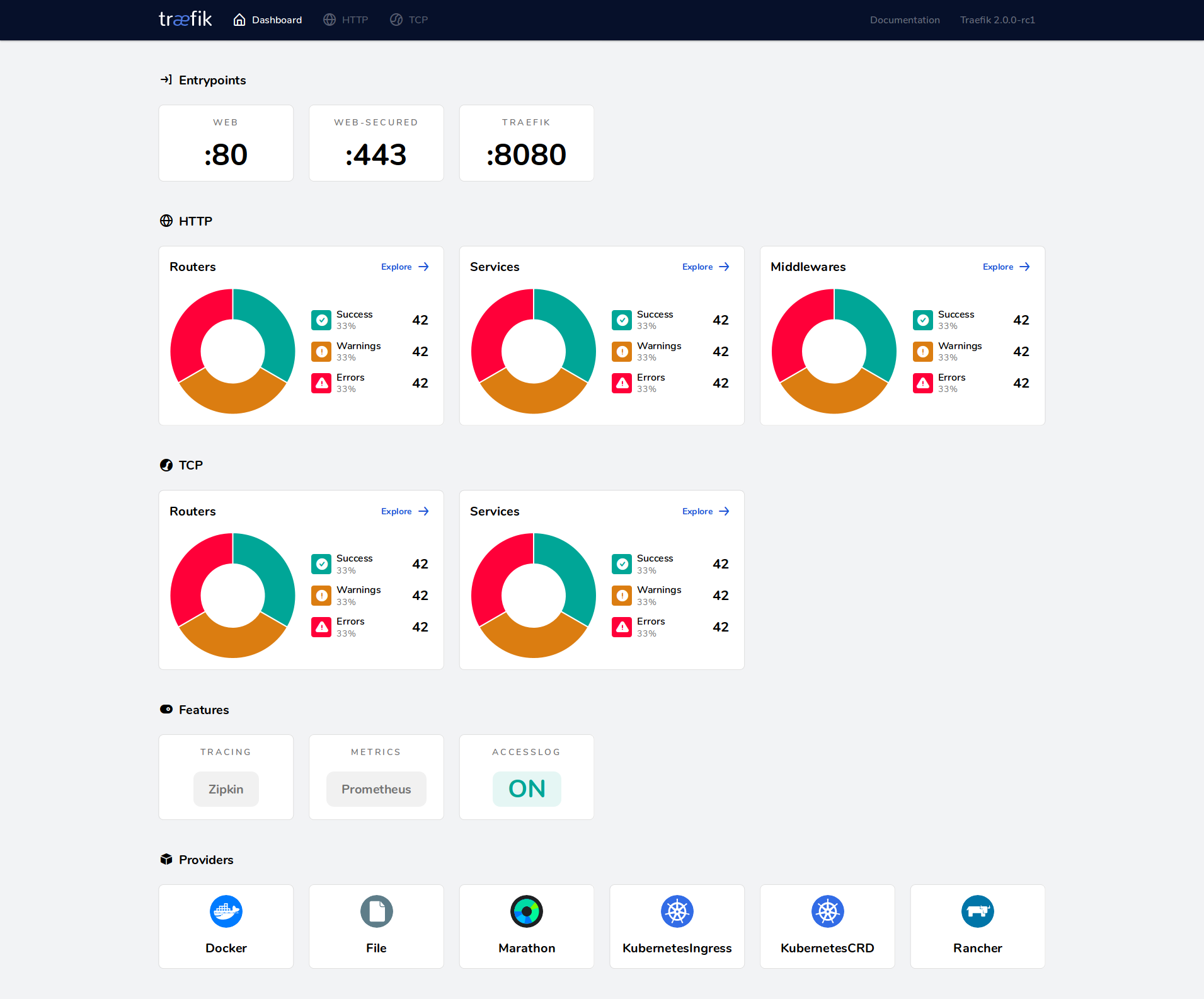
*Traefik's built-in dashboard shows routers, services, middlewares, and health status in real time.*Choose Traefik when you value **dynamic configuration and operational simplicity** over raw performance. Choose Nginx or HAProxy when you need maximum throughput with static configurations.## Frequently Asked Questions### Do```
bas
h
cd ~/projects/api && docker compose up -d
```?No. Traefik watches your Docker socket or Kubernetes API and updates routes in real time. New containers with Traefik labels are detected within seconds and traffic is routed immediately. This is the primary advantage over traditional proxies.### Can I use Traefik with multiple Docker Compose projects?Yes. Create an external Docker network (`docker network create proxy`) and attach Traefik and all application services to it. Each project can define its own `docker-compose.yml` with Traefik labels — Traefik will discover them automatically as long as they share the network.### How does Traefik handle Let's Encrypt rate limits?Traefik stores certificates in the `acme.json` file and only requests new ones when they are missing or expiring. For environments with frequent container recreations, mount `acme.json` as a persistent volume. Let's Encrypt produ```
yam
l
experimental:
fastProxy: {}
```ste
r
e
d
domain per week.### Is Traefik's dashboard safe to expose?Only with authentication. The dashboard shows your complete routing configuration, including backend services. Always apply a middleware with BasicAuth, ForwardAuth (to Authelia/Authentik), or IP whitelist before exposing it. Never use `--api.insecure=true` in production.### What is the difference between standard Ingress and Traefik's IngressRoute?Standard Kubernetes `Ingress` is a generic resource with limited routing options. Traefik's `IngressRoute` CRD adds middleware chaining, TCP/UDP routing, weighted load balancing, traffic mirroring, and direct TLS option configuration — all without annotations.### Can I migrate from Traefik v2 to v3 without downtime?Traefik v3 introduces breaking changes in CRD versions (`traefik.containo.us` → `traefik.io`) ```
yam
l
- "traefik.http.routers.app.rule=HostRegexp(`{tenant:[a-z0-9-]+}.app.example.com`)"
- "traefik.http.routers.app.service=app-service"
``` decommissioning v2. The Traefik documentation provides a detailed migration guide.## ConclusionTraefik earns its 63,229 GitHub stars by solving a real operational problem: dynamic service discovery in containerized environments. The combination of automatic Docker/Kubernete```
yam
l
providers:
docker:
exposedByDefault: false
```r
t
, and a functional dashboard makes it the pragmatic choice for teams running microservices.For ```
yam
l
security_opt:
- no-new-privileges:true
read_only: true
```js
o
n
"footer-cta-legacy" "DigitalOcean" >}} provides a straightforward platform with managed Kubernetes and load balancers that integrate cleanly with Traefik. For dedicated```
yam
l
services:
socket-proxy:
image: tecnativa/docker-socket-proxy
environment:
- CONTAINERS=1
- SERVICES=1
volumes:
- /var/run/docker.sock:/var/run/docker.sock:ro
```g
e
routing.**Next steps:**
1. Clone the official repository: `git clone https://github.com/traefik/traefik.git`
2. Deploy the Docker Compose setup from this guide
3. Add your first service with Traefik labels
4. Join the [Traefik c```
yam
l
# configs/security.yml
http:
middlewares:
security-headers:
headers:
frameDeny: true
sslRedirect: true
browserXssFilter: true
contentTypeNosniff: true
forceSTSHeader: true
stsIncludeSubdomains: true
stsSeconds: 31536000
customResponseHeaders:
X-Robots-Tag: "none,noarchive,nosnippet,notranslate,noimageindex"
Permissions-Policy: "camera=(), microphone=(), geolocation=()"
```li
n
k
s
help support the creation of free, in-depth technical guides.*
## Recommended Hosting & InfrastructureBefore you deploy any of the tools above into production, you'll need solid infrastructure. Two options dibi8 actually uses and recommends:- **DigitalOcean
** — $200 free credit for 60 days across 14+ global regions. The default option for indie devs running open-source AI tools.
- **HTStack
** — Hong Kong```
yam
l
http:
middlewares:
api-ratelimit:
rateLimit:
average: 100
burst: 50
period: 1m
api-circuitbreaker:
circuitBreaker:
expression: "LatencyAtQuantileMS(50.0) > 100"
checkPeriod: "10s"
fallbackDuration: "10s"
recoveryDuration: "10s"
```u
b
Repository](https://github.com/traefik/traefik)
- [Traefik v3.2 Release Notes — FastProxy Engine](https://traefik.io/blog/traefik-proxy-v3-2-a-munster-release)
- [Traefik v3.3 Observability Improvements](https://www.infoq.com/news/2025/02/traefik-observability-docs/)
- [Traefik FastProxy Experimental Configuration](https://doc.traefik.io/traefik/reference/install-configuration/experimental/fastpr```
yam
l
metrics:
prometheus:
addEntryPointsLabels: true
addRoutersLabels: true
addServicesLabels: true
buckets:
- 0.005
- 0.01
- 0.025
- 0.05
- 0.1
- 0.25
- 0.5
- 1.0
- 2.5
- 5.0
- 10.0
```s
Traefik vs HAProxy Comparison — Loft.sh](https://www.loft.sh/blog/nginx-vs-traefik-vs-haproxy-comparing-kubernetes-ingress-controllers)
- [Caddy vs Traefik vs HAProxy vs Nginx — BigMike.help](https://bigmike.help/en/posts/102/)
```y
a
m
l
scrape_configs:
- job_name: 'traefik'
scrape_interval: 15s
static_configs:
- targets: ['traefik:8080']
promq l
Request rate by router #
rate(traefik_router_requests_total[5m])
Error rate #
rate(traefik_router_requests_total{code=~“5..”}[5m])
95th percentile response time #
histogram_quantile(0.95, rate(traefik_service_request_duration_seconds_bucket[5m]))
Certificate expiry (alert when < 7 days) #
traefik_tls_certs_not_after - time() < 7 * 86400
yam
l
# docker-compose.yml (Swarm mode)
services:
  traefik:
    image: traefik:v3.2
    deploy:
      replicas: 3
      placement:
        constraints:
          - node.role == manager
      update_config:
        parallelism: 1
        delay: 10s
    ports:
      - target: 80
        published: 80
        mode: host
      - target: 443
        published: 443
        mode: host
```
💬 Bình luận & Thảo luận