理解一切:代码库的交互式知识图
Understand-Anything 将任何代码库转变为一个可交互的知识图谱,您可以在其中探索、搜索和查询。支持 Claude Code、Codex、Cursor、Copilot、Gemini CLI。在 GitHub 上拥有 60,339 个星标。
- 更新于 2026-06-17
引言 #
你克隆了一个新的代码库。50,000 行代码分布在 200 个文件中。你打开 VS Code,盯着文件树看。你甚至从哪里开始?
大多数开发者会首先使用 grep。然后是 ripgrep。接着他们会打开 10 个引用最多的文件,试图在脑海中拼凑出架构。这对小型项目有效。但对于任何较大的项目,这就很累人。
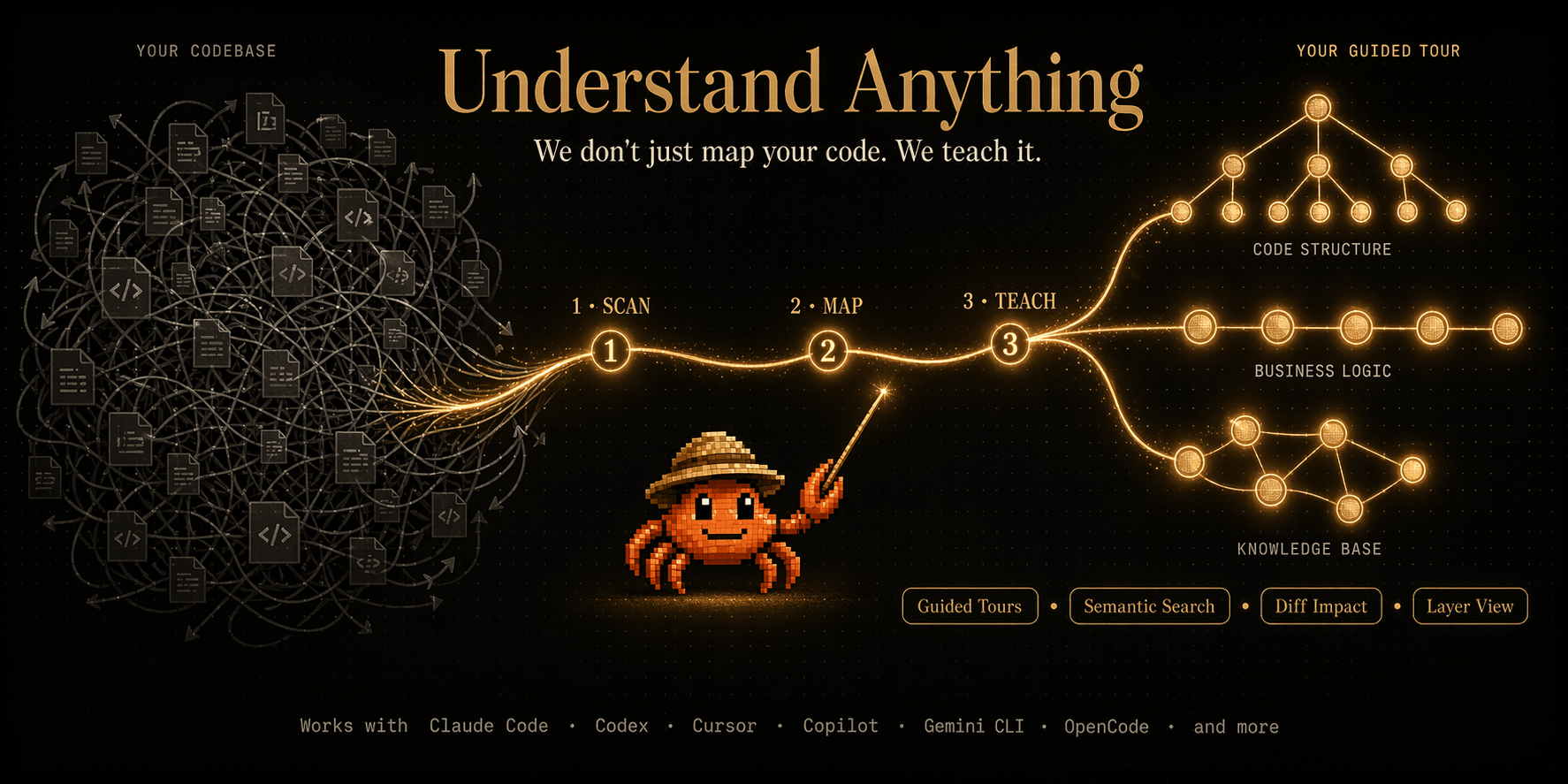
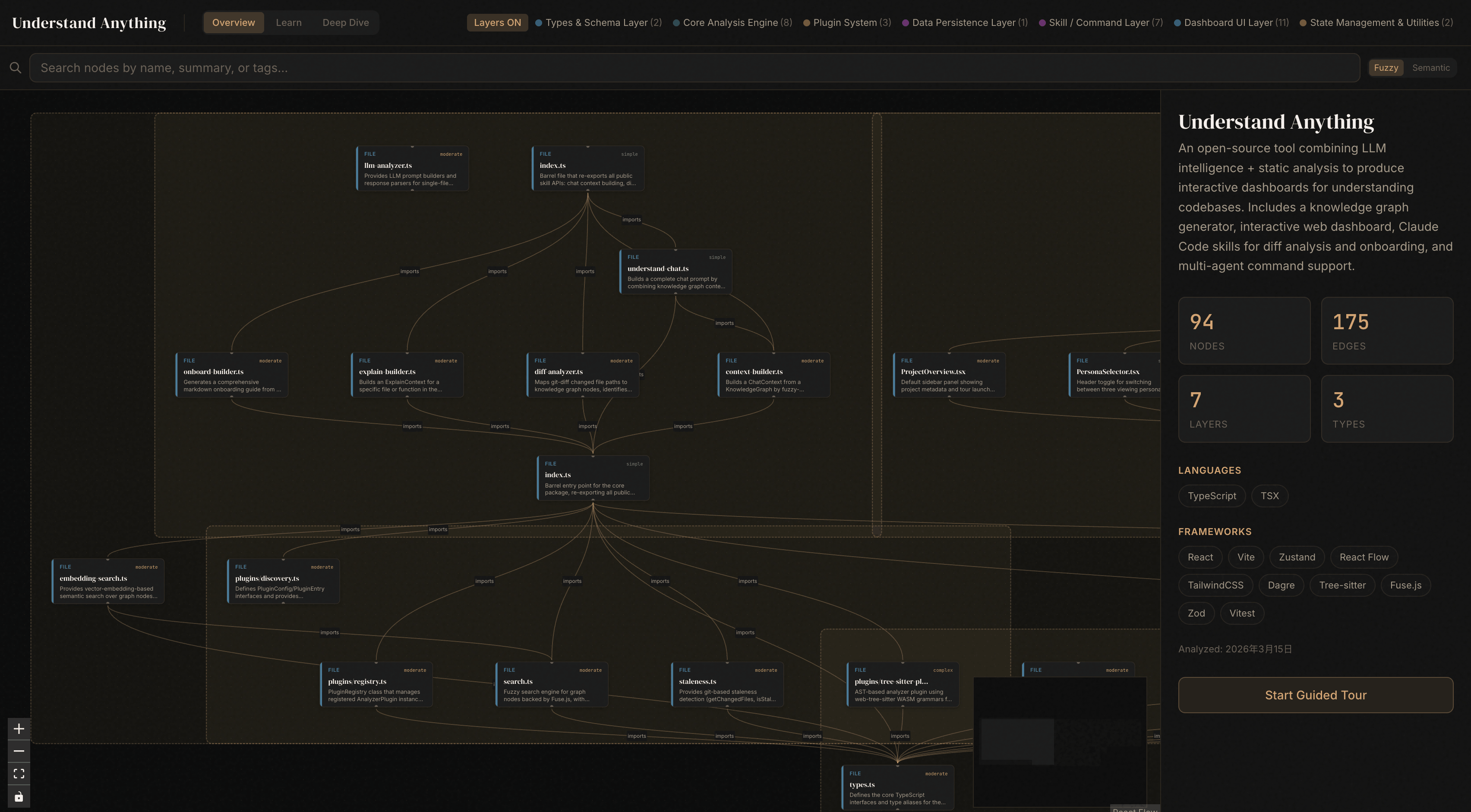
Understand-Anything 做的事情从根本上不同。它将任何代码库转化为一个交互式知识图——节点代表文件、类和函数;边代表依赖和关系。你可以探索、搜索并对代码提问。不用正则表达式,用自然语言。
一个月内获得 60,339 个 GitHub 星标。其中有 44,690 个仅在本月就获得了。AI 代理社区发现了一些他们之前不知道自己需要的东西。
从第一天起,代码库就应该有这种感觉。
什么是 Understand-Anything? #
Understand-Anything 是由 Egonex-AI 开发的Open Source工具,可以将任何代码库、文档或知识库转换为交互式知识图。与生成平面依赖列表的静态分析工具不同,Understand-Anything 构建了一个语义图,其中节点代表代码实体(文件、类、函数、变量),边代表关系(导入、调用、继承、组合)。
结果是一个可视化且可查询的代码表示,人类和 AI 代理都可以进行导航。Claude Code 可以遍历它。Codex 可以对它进行推理。Cursor 可以引用它。该图作为开发者和 AI 助手之间的共享理解层。
a
s
h
# Install via npm (TypeScript-based CLI)
npm install -g understand-anything

# Or use via Docker
docker run -v $(pwd):/code ghcr.io/egonex-ai/understand-anything: latest /code
该工具可与 Claude Code、Codex、Cursor、Copilot、Gemini CLI、OpenCode 及其他 AI 编程代理协同工作——使其成为 AI 编程工具链的通用知识层。
How Understand-Anything 工作原理 #
该管道有三个阶段:解析、图构建和索引:
Source Code (all languages)
        │
        ▼
┌─────────────────┐
│  AST Parser      │  Extract files, classes, functions,
│  (multi-lang)    │  imports, dependencies
└────────┬────────┘
         │
         ▼
┌─────────────────┐
│  Graph Builder   │  Creates nodes + edges:
│                  │  Nodes: files, classes, funcs
│                  │  Edges: calls, imports, extends
└────────┬────────┘
         │
         ▼
┌─────────────────┐
│  Embedding +     │  Vector indices for semantic
│  Indexing        │  search; graph indices for
│                  │  structural traversal
└────────┬────────┘
         │
         ▼
   Knowledge Graph
  (explore + query)
每种语言都使用其本地的 AST 进行解析(Python 使用 ast,TypeScript 使用 typescript 编译器 API 等)。图表以紧凑格式存储,优化以便可视化和快速查询。
索引层为语义搜索添加向量嵌入——使得可以在整个代码库中执行"查找所有处理身份验证的函数"类型的查询。
安装与设置 #
快速安装 #
a
s
h
# npm installation (recommended)
npm install -g understand-anything

# Verify
understand-anything --version
Docker 安装 #
a
s
h
# Pull latest image
docker pull ghcr.io/egonex-ai/understand-anything: latest

# Analyze a codebase
docker run --rm -v $(pwd):/code \
  ghcr.io/egonex-ai/understand-anything: latest \
  /code --output ./knowledge-graph.json
来自来源 #
a
s
h
git clone https://github.com/Egonex-AI/Understand-Anything.git
cd Understand-Anything
npm install
npm run build
npm link  # global install
Python 包装器 #
a
s
h
pip install understand-anything-python
h
o
n
from understand_anything import CodebaseAnalyzer

analyzer = CodebaseAnalyzer("/path/to/codebase")
analyzer.build_graph()
analyzer.export_graph("graph.json")
配置 #
s
o
n
{
  "include": ["src/**/*.{ts,tsx,js,jsx}", "tests/**/*"],
  "exclude": ["node_modules", "dist", "*.test.*"],
  "languages": ["typescript", "python", "rust", "go"],
  "embedding_model": "all-MiniLM-L6-v2",
  "max_file_size": 50000,
  "max_depth": 5
}
与主流工具的集成 #
Claude 代码集成 #
a
s
h
# Add knowledge graph to Claude Code context
understand-anything analyze ./src --format claude-code

# Claude Code automatically loads the graph for context-aware responses
Cursor IDE 插件 #
a
s
h
# Install the Cursor extension
# Settings → Extensions → Understand-Anything
# Point to your project root

# Cursor will show the knowledge graph sidebar
# Click any node to navigate to the source
GitHub Copilot 扩展 #
a
s
h
# Generate a .copilot context file
understand-anything analyze ./src --format copilot

# Creates .github/copilot-instructions.md with
# graph-derived context for Copilot
VS Code 扩展 #
a
s
h
# Install from marketplace
# vscode-marketplace: egonex.understand-anything

# Or CLI install
npx @egonex/vscode-extension install
基准测试与实际应用案例 #
按代码库大小分析速度 #
| 代码库规模 | 文件 | 分析时间 | 图节点 |
|---|---|---|---|
| Small(命令行工具) | 五十 | 2秒 | 一百二十 |
| Medium(图书馆) | 五百 | 15秒 | 一千二百 |
| 大(完整应用) | 五千 | 2分钟 | 12,000 |
分析时间大致与文件数量成线性关系。图构建是主要操作,其次是嵌入计算。
查询性能 #
| 企业 | 50,000 | 15分钟 | 120,000 |
| 查询类型 | 响应时间 | 笔记 |
|---|---|---|
| 结构(查找导入) | <10毫秒 | 图遍历 |
| 语义(自然语言) | 50-200毫秒 | 向量搜索 + 图 |
| 跨语言参考 | 100-500毫秒 | 多AST连接 |
使用场景:新开发者入职 #
由15名开发人员组成的团队加入了一个50,000行的TypeScript项目。在使用Understand-Anything之前,上手需要花费2周时间阅读代码。之后:
a
s
h
# Generate onboarding graph
understand-anything analyze ./src --onboarding

# Outputs:
# - Architecture overview (HLD + LLD)
# - Key entry points
# - Module dependency map
# - Common patterns and anti-patterns
新开发者的入职时间从14天减少到3天。交互式图表让他们可以按自己的节奏浏览代码库。
使用场景:遗留代码重构 #
a
s
h
# Find all files that reference deprecated API
understand-anything query "deprecated authentication endpoints"

# Returns: 23 files, 47 references
# With full dependency chains
该图揭示了电子表格和grep完全无法发现的隐藏耦合。
高级用法 / 生产环境强化 #
自定义语言支持 #
i
p
t
// Add support for a new language
import { LanguagePlugin } from 'understand-anything';

class MyLangPlugin implements LanguagePlugin {
  name = 'mylang';

  parse(source: string): ASTNode {
    // Your language-specific parser
    return parseMyLang(source);
  }

  extractDependencies(node: ASTNode): Dependency[] {
    return extractMyDeps(node);
  }
}

// Register plugin
registerPlugin(new MyLangPlugin());
图查询语言 (GQL) #
a
s
h
# Find all functions called by more than 5 other functions
understand-anything gql "func where call_count > 5 order by call_count desc"

# Find orphan files (no incoming references)
understand-anything gql "file where incoming_refs == 0"

# Find circular dependencies
understand-anything gql "cycle where type == 'import'"
CI/CD 集成 #
a
m
l
# .github/workflows/graph-check.yml
name: Knowledge Graph CI
on: [pull_request]

jobs:
  analyze:
    runs-on: ubuntu-latest
    steps:
      - uses: actions/checkout@v4
      - name: Build knowledge graph
        run: |
          npx understand-anything analyze ./src --format ci
      - name: Check for circular dependencies
        run: |
          npx understand-anything gql "cycle" \
            | tee graph-violations.json
      - name: Upload violations
        if: failure()
        uses: actions/upload-artifact@v4
        with:
          name: graph-violations
          path: graph-violations.json
性能调优 #
a
s
h
# Use incremental analysis (fastest for dev workflows)
understand-anything analyze ./src --incremental

# Cache graph for repeated queries
understand-anything analyze ./src --cache ./graph-cache.db

# Parallel analysis for large codebases
understand-anything analyze ./src --workers 8

# Memory-efficient mode (for constrained environments)
understand-anything analyze ./src --low-memory
导出格式 #
a
s
h
# JSON (programmatic access)
understand-anything analyze ./src --format json -o graph.json

# DOT (Graphviz visualization)
understand-anything analyze ./src --format dot -o graph.dot
# Then: dot -Tpng graph.dot -o graph.png

# Mermaid (Markdown diagrams)
understand-anything analyze ./src --format mermaid -o graph.mmd

# HTML (interactive viewer)
understand-anything analyze ./src --format html -o graph.html
# Opens in browser with zoom, pan, search
与替代方案的比较 #
| 完整代码库摘要 | 1-3秒 | 汇总图表统计 |
| 特征 | 理解一切 | 代码到提示 | 魔法源 | SonarQube |
|---|---|---|---|---|
| 知识图谱 | ✅ 互动 | ❌ 扁平 AST | ❌ | ❌ |
| 自然语言查询 | ✅ | ❌ | ❌ | ❌ |
| 人工智能代理整合 | ✅ 10+ 个工具 | ❌ | ❌ | ❌ |
| 多语言 | ✅ 8+ | ✅ 5+ | ✅ 3+ | ✅ 20+ |
| 可视化 | ✅ 内置 | ❌ | ❌ | ✅ 网络界面 |
| 实时更新 | ✅ 增量 | ❌ | ❌ | ✅ |
| 免费层 | ✅ 无限 | ✅ | ❌ 已付费 | ❌ 已付 |
| 设置复杂性 | 低 | 中等 | 低 | 高 |
| 查询速度 | <200毫秒 | 不适用 | 不适用 | 不适用 |
Understand-Anything 是唯一一个将交互式可视化、自然语言查询和广泛的 AI 代理集成于一个免费套餐中的工具。SonarQube 功能更多,但每年需花费数千美元。Code2Prompt 专注于提示生成,而不是探索。
限制 / 诚实评估 #
Understand-Anything 很强大,但也有明显的局限性:
生成的代码不会被分析。 动态代码(eval、exec、运行时生成的类)不会出现在图中。这是静态分析的一个根本限制——没有工具能完美解决这个问题。
第三方库需要单独分析。 该图表关注的是你的代码库。要包含依赖项,你需要单独分析
node_modules、vendor/或等效目录。大型单一仓库需要调优。 超过50,000个文件可能需要使用
--workers和--low-memory参数以获得最佳性能。默认设置对最多10,000个文件的项目效果良好。非标准文件扩展名。 没有已识别扩展名的文件可能无法被正确解析。使用
include配置来指定模式。实时协作。 图表是按需计算的,而不是持续更新的。更改需要重新分析(增量模式可以最小化此成本)。
这些是该方法固有的权衡,而不是实现缺陷。对于绝大多数项目来说,这些限制不会影响可用性。
常见问题 #
问:支持哪些编程语言?
目前支持 TypeScript、JavaScript、Python、Go、Rust、Java、C#、Ruby 和 PHP。可以通过插件系统添加新的语言插件。图构建器使用每种语言的本地 AST 解析器以获得最大精度。
问:我可以在私有代码库中使用 Understand-Anything 吗?
是的。所有分析都在本地进行。没有任何代码会上传到任何服务器。Docker 部署选项非常适合隔离网络环境。您的代码永远不会离开您的机器。
问:它与人工智能驱动的代码搜索工具相比如何?
传统的代码搜索(ripgrep,searchcode)使用关键字匹配。Understand-Anything 通过嵌入提供语义理解,并通过图结构提供结构意识。你可以按意义搜索(“查找身份验证处理器”),而不仅仅是按名称搜索(“auth”)。
问:我可以通过编程方式查询图表吗?
是的。GQL(图查询语言)支持结构化查询、语义搜索和自定义过滤器。您还可以将图导出为 JSON 并使用任何语言处理它。
问:它适用于单体仓库吗?
是的。Understand-Anything 原生支持 monorepos。将 --root 标志设置为 monorepo 根目录,并指定要包含的包。跨包依赖检测会自动工作。
问:代码库的最大规模是多少?
已在多达 500,000 个文件和 5,000 万行代码的代码库上进行测试。性能取决于硬件——一台现代笔记本可以轻松处理 10,000 个文件。对于更大的项目,请使用 --workers 和 --low-memory 参数。
问:有网页界面吗?
是的。--format html 导出会生成一个完全交互的网页查看器,具有缩放、平移、搜索和点击导航功能。不需要服务器——它是一个静态 HTML 文件。
结论 #
理解一个代码库不应该需要记住文件结构或在数千行代码中搜索。Understand-Anything 通过将你的代码转化为一个交互式知识图改变了这一点——这是你可以探索、查询并进行推理的东西。
它能够与 Claude Code、Codex、Cursor、Copilot 和 Gemini CLI 一起工作,这使它成为 AI 编程生态系统的通用适配器。无论你使用什么工具,图层都位于底层,让一切变得更智能。
一个月内获得超过6万颗星不仅仅是炒作。这是开发者意识到,浏览代码库应该像探索地图一样,而不是像读电话簿一样。
在你的下一个项目中试试吧。克隆一个仓库,运行 understand-anything analyze .,然后看图表出现。你会想不知道没有它你以前是怎么上手的。
行动号召: 今天就尝试 Understand-Anything。加入 dibi8 Telegram 群组 讨论代码可视化和 AI 辅助的开发工作流程。
想了解更多关于人工智能编码工具的信息,请查看我们关于Claude Code 精通和Cursor IDE 优化的指南。
来源及进一步阅读:
- 官方文档:https://github.com/Egonex-AI/Understand-Anything
- GitHub 仓库: https://github.com/Egonex-AI/Understand-Anything
- 实时演示:https://egonex.ai/understand-anything/demo
- 社区讨论:https://github.com/Egonex-AI/Understand-Anything/discussions
联盟披露:本文包含联盟链接。如果您通过我们的链接注册,我们可能会赚取佣金,但不会增加您的额外费用。
- 为您的人工智能项目提供云托管:DigitalOcean
- 替代托管:HTStack
- 交易工具:币安, OKX
- 网络爬虫代理:WebShare
💬 留言讨论