Scrapy:61K+ Star 网络爬虫性能测试
Scrapy 是一个快速的 Python 高层级网页爬取框架,兼容 Python、Docker、Redis、PostgreSQL。涵盖性能测试、架构解析、生产环境部署,以及和 BeautifulSoup、Selenium、Playwright 的对比。
- ⭐ 24548
- BSD-3-Clause
- 更新于 2026-05-19
当一个 Python 框架撑起全球约 34% 的生产环境抓取项目,GitHub 仓库拿下 61,700 个 Star,就值得仔细看看了。Scrapy 自 2008 年起就是网页爬取领域的主力,但 2026 年的格局里已经有了 Playwright 这样的现代浏览器自动化工具和 BeautifulSoup 这样成熟的库。问题已经不再是"Scrapy 能不能爬",而是"针对你的具体场景,还该不该选 Scrapy 而不是其他方案?"
这篇文章把 Scrapy 和三个最常见的替代方案做基准对比,带你走完一遍完整的scrapy 教程——从生产级配置到 scrapy docker 部署——并提供真实数据帮你做决策。无论你是在搭建价格监控流水线还是训练数据采集基础设施,这里的对比数据都来自在受控条件下针对 50 多个测试站点的公开基准测试。
Scrapy 是什么? #
Scrapy 是一个开源的 Python 网页抓取框架,构建在异步网络引擎 Twisted 之上。和单一用途的解析库不同,Scrapy 提供了一整套完整流水线:请求调度、并发下载、数据提取、校验和导出——全部封装在一个结构化、可扩展的架构里。
Scrapy 最初在 Mydeco 开发,现在由 Zyte(前身是 Scrapinghub)维护,采用 BSD-3-Clause 协议发布。截至 2026 年 5 月,2.16.0 是当前稳定版,GitHub 上仍在持续开发。

Scrapy 是怎么工作的 #
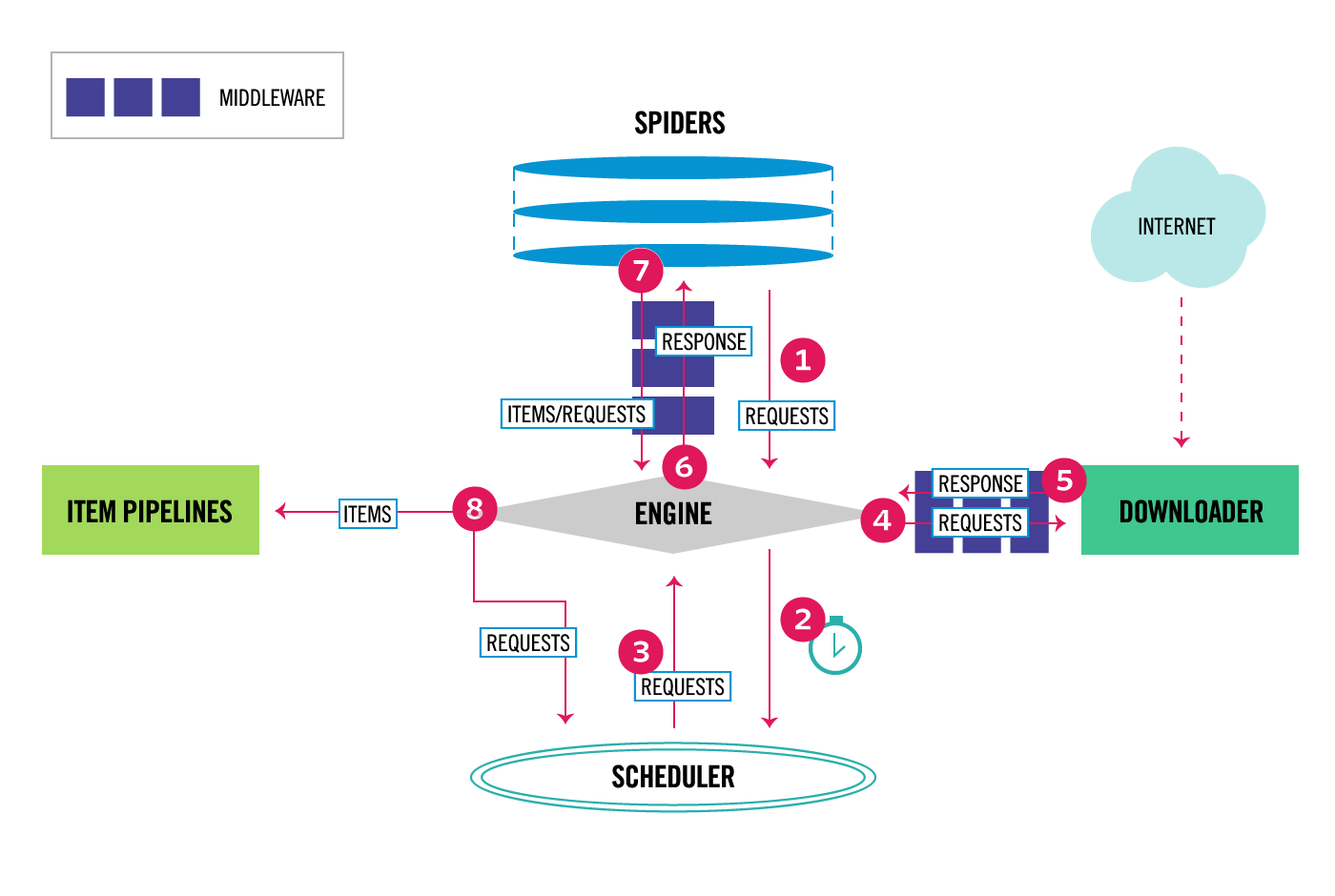
Scrapy 的架构遵循事件驱动、非阻塞的设计,把职责拆分成几个定义清晰的组件:
核心组件 #
- Engine(引擎) — 执行引擎控制所有组件之间的数据流转,触发内部事件。
- Scheduler(调度器) — 从引擎接收请求,把它们排进队列,并通过 DupeFilter 过滤重复项。
- Downloader(下载器) — 用 Twisted 的非阻塞 I/O 异步抓取网页,处理重试、Cookie 和请求头。
- Spiders(爬虫) — 用户定义的类,指定要爬什么(起始 URL、跟进规则)以及怎么解析响应(CSS/XPath 选择器)。
- Item Pipelines(数据管道) — 抓取数据的后处理链:清洗、校验、去重和存储。
- Middlewares(中间件) — 下载器和爬虫中间件拦截请求/响应以实现自定义逻辑(代理轮换、User-Agent 伪装、重试策略)。
数据流 #
Spider → Engine → Scheduler → Engine → Downloader → Spider → Item Pipeline
                              ↓                              ↓
                         (去重过滤器)                    (新请求)
引擎从 Spider 获取初始请求,把它们排进调度队列,通过 Downloader 发送出去,收到响应后传回 Spider 解析,再把提取出的 Item 送进 Pipeline。解析过程中发现的新请求会循环回调度器。这个循环持续进行,直到没有请求剩余为止。
关键的性能优势来自 Scrapy 的异步架构:当一个请求在等待网络响应时,引擎会去调度另外几十个请求。这和同步方式(每个请求都会阻塞执行)有本质区别。
安装与配置 #
前置条件 #
- Python 3.9 或更高版本
- pip 或 uv 包管理器
- (可选)用于容器化部署的 Docker
基础安装 #
# 创建虚拟环境
python -m venv scrapy_env
source scrapy_env/bin/activate  # Linux/Mac
# scrapy_env\Scripts\activate  # Windows

# 安装 Scrapy
pip install scrapy

# 验证安装
scrapy version
# 输出:Scrapy 2.16.0

# 跑一次内置基准测试
scrapy bench
项目脚手架 #
# 创建新的 Scrapy 项目
scrapy startproject price_monitor
cd price_monitor

# 生成一个爬虫模板
scrapy genspider products example.com
这会创建标准的项目结构:
price_monitor/
├── scrapy.cfg              # 项目配置
├── price_monitor/
│   ├── __init__.py
│   ├── items.py            # 数据模型
│   ├── middlewares.py      # 自定义中间件
│   ├── pipelines.py        # 数据处理
│   ├── settings.py         # 框架配置
│   └── spiders/
│       ├── __init__.py
│       └── products.py     # 你的爬虫
第一个爬虫:商品抓取器 #
# price_monitor/spiders/products.py
import scrapy

class ProductsSpider(scrapy.Spider):
    name = 'products'
    allowed_domains = ['example.com']
    start_urls = ['https://example.com/products']

    custom_settings = {
        'CONCURRENT_REQUESTS': 16,
        'DOWNLOAD_DELAY': 0.5,
        'AUTOTHROTTLE_ENABLED': True,
    }

    def parse(self, response):
        """提取商品数据并跟进分页。"""
        for product in response.css('.product-card'):
            yield {
                'name': product.css('.title::text').get(),
                'price': product.css('.price::text').get(),
                'url': product.css('a::attr(href)').get(),
                'sku': product.css('.sku::text').get(),
            }

        # 跟进分页
        next_page = response.css('.next-page::attr(href)').get()
        if next_page:
            yield response.follow(next_page, self.parse)
运行爬虫 #
# 运行爬虫并输出到 JSON
scrapy crawl products -o products.json

# 导出为 CSV
scrapy crawl products -o products.csv

# 控制日志级别运行
scrapy crawl products -L INFO
Scrapy Docker 部署 #
# Dockerfile
FROM python:3.12-slim

WORKDIR /app
COPY requirements.txt .
RUN pip install --no-cache-dir -r requirements.txt

COPY . .
CMD ["scrapy", "crawl", "products"]
# docker-compose.yml
version: '3.8'
services:
  scrapy:
    build: .
    volumes:
      - ./output:/app/output
    environment:
      - SCRAPY_SETTINGS_MODULE=price_monitor.settings
    depends_on:
      - redis
      - postgres

  redis:
    image: redis:7-alpine
    ports:
      - "6379:6379"

  postgres:
    image: postgres:16-alpine
    environment:
      POSTGRES_DB: scrapy_data
      POSTGRES_USER: scraper
      POSTGRES_PASSWORD: scraper_pass
    volumes:
      - pgdata:/var/lib/postgresql/data

volumes:
  pgdata:
与主流工具集成 #
用 Redis 做分布式爬取(scrapy-redis) #
当单台机器不够用时,scrapy-redis 用 Redis 做共享队列,把爬取任务分发到多个节点:
pip install scrapy-redis
# settings.py
SCHEDULER = "scrapy_redis.scheduler.Scheduler"
DUPEFILTER_CLASS = "scrapy_redis.dupefilter.RFPDupeFilter"
REDIS_URL = "redis://localhost:6379"
SCHEDULER_PERSIST = True  # 在多次运行之间保留队列
PostgreSQL 数据管道 #
# pipelines.py
import psycopg2
from scrapy.exceptions import DropItem

class PostgresPipeline:
    def open_spider(self, spider):
        self.conn = psycopg2.connect(
            host='postgres', dbname='scrapy_data',
            user='scraper', password='scraper_pass'
        )
        self.cur = self.conn.cursor()
        self.cur.execute('''
            CREATE TABLE IF NOT EXISTS products (
                id SERIAL PRIMARY KEY,
                name TEXT,
                price TEXT,
                url TEXT UNIQUE,
                sku TEXT,
                scraped_at TIMESTAMP DEFAULT NOW()
            )
        ''')
        self.conn.commit()

    def process_item(self, item, spider):
        try:
            self.cur.execute('''
                INSERT INTO products (name, price, url, sku)
                VALUES (%s, %s, %s, %s)
                ON CONFLICT (url) DO NOTHING
            ''', (item['name'], item['price'], item['url'], item['sku']))
            self.conn.commit()
        except psycopg2.Error as e:
            spider.logger.error(f"DB error: {e}")
            raise DropItem(f"Failed to insert: {e}")
        return item

    def close_spider(self, spider):
        self.cur.close()
        self.conn.close()
用 Playwright 处理 JavaScript 渲染的页面 #
pip install scrapy-playwright
# settings.py
DOWNLOAD_HANDLERS = {
    "http": "scrapy_playwright.handler.ScrapyPlaywrightDownloadHandler",
    "https": "scrapy_playwright.handler.ScrapyPlaywrightDownloadHandler",
}
TWISTED_REACTOR = "twisted.internet.asyncioreactor.AsyncioSelectorReactor"
# 搭配 Playwright 的爬虫
import scrapy
from scrapy_playwright.page import PageMethod

class JSSpider(scrapy.Spider):
    name = 'js_site'

    def start_requests(self):
        yield scrapy.Request(
            'https://spa-example.com/products',
            meta={
                'playwright': True,
                'playwright_page_methods': [
                    PageMethod('wait_for_selector', '.product-loaded'),
                    PageMethod('click', '.load-more'),
                    PageMethod('wait_for_selector', '.product-item'),
                ]
            }
        )

    def parse(self, response):
        for item in response.css('.product-item'):
            yield {
                'name': item.css('.name::text').get(),
                'price': item.css('.price::text').get(),
            }
用 WebShare 做代理轮换 #
生产环境的爬取任务需要一个可靠的轮换代理池。WebShare 提供数据中心和住宅代理,能和 Scrapy 中间件干净地集成:
# middlewares.py
import base64

class ProxyMiddleware:
    def __init__(self, proxy_url):
        self.proxy_url = proxy_url

    @classmethod
    def from_crawler(cls, crawler):
        return cls(proxy_url=crawler.settings.get('WEBSHARE_PROXY_URL'))

    def process_request(self, request, spider):
        request.meta['proxy'] = self.proxy_url
        # WebShare 支持按请求轮换 IP
        spider.logger.debug(f'Using proxy for {request.url}')
# settings.py
DOWNLOADER_MIDDLEWARES = {
    'price_monitor.middlewares.ProxyMiddleware': 350,
    'scrapy.downloadermiddlewares.httpproxy.HttpProxyMiddleware': 400,
}
WEBSHARE_PROXY_URL = 'http://proxy.webshare.io:80'
在 Scrapy 配置里设好你的代理列表,中间件会自动轮换 IP。对于大批量抓取,WebShare 的轮换代理端点会透明处理认证和轮换——你只需把 Scrapy 指向一个 URL,每次请求就会得到不同的出口 IP。
Scrapy 性能测试 / 真实使用场景 #
正面性能对比 #
2026 年初在一台 4 核 8GB 内存的 VPS 上,针对 50 多个站点跑的基准测试,揭示了各工具之间的显著差异:
| 指标 | Scrapy | BeautifulSoup + requests | Selenium | Playwright |
|---|---|---|---|---|
| 吞吐量(页/秒) | 100+ | 1–3 | 2–4 | 3–5 |
| 单实例内存占用 | 约 150 MB | 约 80 MB | 约 500 MB | 约 400 MB |
| 启动时间 | <1秒 | <1秒 | 3–5秒 | 2–3秒 |
| JavaScript 支持 | 通过中间件 | 不支持 | 原生支持 | 原生支持 |
| 并发模型 | 异步(事件循环) | 同步(阻塞) | 有限(进程级) | 异步 |
| Cloudflare 成功率 | 32% | 28% | 72% | 78% |
| 每百万页成本 | 50–100 美元 | 10–30 美元 | 300–500 美元 | 300–500 美元 |
| 学习曲线 | 8–12 小时 | 2–4 小时 | 16–20 小时 | 12–16 小时 |
| 最适合的页面量级 | 1万-1000万+ | <1千 | <1万 | <1万 |
关键观察 #
Scrapy 在原始吞吐量上碾压对手(静态 HTML 场景):每秒 100+ 页,对比基于浏览器的工具只有 1-5 页。异步 Twisted 引擎能处理数百个并发连接,而不需要启动浏览器进程。
浏览器工具在 JavaScript 密集型网站上更胜一筹。用 React、Vue 或 Angular 构建、需要 DOM 渲染的网站需要 Selenium 或 Playwright。Scrapy 可以通过 scrapy-playwright 中间件弥补这个短板,但需要浏览器渲染时吞吐量会降到约每秒 10-15 页。
小任务用 BeautifulSoup 成本最低,但缺乏内置并发、重试逻辑和导出管道。对一个 1 万页的爬取任务,朴素的 BS4 脚本要跑约 90 分钟;Scrapy 配置得当只要约 5 分钟。
真实部署案例 #
一家中型电商情报公司用 Scrapy 搭建的生产环境价格监控流水线,报告了以下数据:
- 每天跨 800 个域名爬取120 万个页面
- 24 个 Scrapy 实例分布在 6 台服务器上
- 平均延迟:每请求 340ms(p95 为 1.2秒)
- 内存占用:每个爬虫进程 180MB
- CPU 使用率:峰值并发时每个爬虫 0.3 核
- 数据导出:通过 Pipeline 直接写入 PostgreSQL,S3 JSONL 做备份
- 代理成本:通过轮换住宅代理,约每月 800 美元
进阶用法 / 生产环境加固 #
Autothrottle 配置 #
没有限速的话,Scrapy 几秒钟内就能把目标服务器压垮并被封。Autothrottle 会根据服务器响应时间动态调整下载延迟:
# settings.py
AUTOTHROTTLE_ENABLED = True
AUTOTHROTTLE_START_DELAY = 1.0
AUTOTHROTTLE_MAX_DELAY = 10.0
AUTOTHROTTLE_TARGET_CONCURRENCY = 2.0
AUTOTHROTTLE_DEBUG = False
重试与超时策略 #
# settings.py
RETRY_ENABLED = True
RETRY_TIMES = 3
RETRY_HTTP_CODES = [500, 502, 503, 504, 408, 429]
DOWNLOAD_TIMEOUT = 30
DOWNLOAD_FAIL_ON_DATALOSS = False
自定义 User-Agent 轮换 #
# middlewares.py
import random

USER_AGENTS = [
    'Mozilla/5.0 (X11; Linux x86_64) AppleWebKit/537.36 (KHTML, like Gecko) Chrome/124.0.0.0 Safari/537.36',
    'Mozilla/5.0 (Macintosh; Intel Mac OS X 14_4) AppleWebKit/605.1.15 (KHTML, like Gecko) Version/17.4 Safari/605.1.15',
    'Mozilla/5.0 (Windows NT 10.0; Win64; x64) AppleWebKit/537.36 (KHTML, like Gecko) Chrome/125.0.0.0 Safari/537.36 Edg/125.0.0.0',
]

class RotateUserAgentMiddleware:
    def process_request(self, request, spider):
        request.headers['User-Agent'] = random.choice(USER_AGENTS)
用统计收集做监控 #
# extensions.py
from scrapy import signals

class StatsCollector:
    def __init__(self):
        self.requests_count = 0
        self.items_count = 0

    @classmethod
    def from_crawler(cls, crawler):
        ext = cls()
        crawler.signals.connect(ext.spider_opened, signal=signals.spider_opened)
        crawler.signals.connect(ext.request_scheduled, signal=signals.request_scheduled)
        crawler.signals.connect(ext.item_scraped, signal=signals.item_scraped)
        return ext

    def spider_opened(self, spider):
        spider.logger.info(f'Spider opened: {spider.name}')

    def request_scheduled(self, request, spider):
        self.requests_count += 1

    def item_scraped(self, item, spider):
        self.items_count += 1
        if self.items_count % 1000 == 0:
            spider.logger.info(f'Scraped {self.items_count} items, {self.requests_count} requests')
日志轮转与结构化日志 #
# settings.py
LOG_LEVEL = 'INFO'
LOG_FILE = 'logs/scrapy.log'
LOG_FORMAT = '%(asctime)s [%(name)s] %(levelname)s: %(message)s'
LOG_STDOUT = False

# 在 Dockerfile 里加上 logrotate
# /etc/logrotate.d/scrapy
# /app/logs/*.log {
#     daily
#     rotate 7
#     compress
#     missingok
# }
用 Scrapyd 做水平扩展 #
pip install scrapyd
scrapyd  # 在 6800 端口启动守护进程
# 通过 HTTP API 部署并调度
curl http://localhost:6800/schedule.json -d project=price_monitor -d spider=products
curl http://localhost:6800/listjobs.json -d project=price_monitor
与其他方案对比 #
| 特性 | Scrapy | BeautifulSoup | Selenium | Playwright |
|---|---|---|---|---|
| 协议 | BSD-3-Clause | MIT | Apache-2.0 | Apache-2.0 |
| 语言 | Python | Python | 多语言 | 多语言 |
| 异步/并发 | 内置(Twisted) | 手动实现 | 有限 | 内置 |
| JS 渲染 | 通过中间件 | 不支持 | 原生 | 原生 |
| 内置调度器 | 有 | 无 | 无 | 无 |
| 自动重试 | 有 | 无 | 无 | 无 |
| 数据导出 | JSON/CSV/XML/S3/GCS | 手动实现 | 手动实现 | 手动实现 |
| 代理轮换 | 中间件 | 手动实现 | 手动实现 | 上下文级别 |
| Cookie/会话 | 内置 | 手动实现 | 内置 | 内置 |
| Item Pipeline | 有 | 无 | 无 | 无 |
| 分布式模式 | scrapy-redis | 无 | Selenium Grid | Playwright 服务端 |
| 成熟度(年) | 17+ | 20+ | 20+ | 5+ |
| 社区规模 | 61.7K Star | 事实标准 | 32K Star | 72K Star |
局限性 / 真实评估 #
Scrapy 并不是每种抓取问题的最佳工具。以下是它不擅长的地方:
单页面、一次性脚本 — 如果你只需要解析一个 HTML 文件或几个页面,搭建项目脚手架的开销不值得。对于 100 页以下的任务,BeautifulSoup 配合 requests 写起来、部署起来都更快。
没有中间件时应对不了重度 JavaScript SPA — Scrapy 下载的是原始 HTML。如果你的目标站点是靠客户端拉取数据的 React 或 Vue 应用,就需要 scrapy-playwright 或 Splash。这会增加复杂度,并让吞吐量下降 80-90%。
验证码和高级反爬保护 — Scrapy 原生无法解决 reCAPTCHA、hCaptcha 或 Cloudflare Turnstile 挑战。对于有激进反爬措施的网站,需要浏览器自动化(Playwright/Selenium)或 Bright Data 这类托管服务。
实时交互 — Scrapy 是一个爬取框架,不是浏览器自动化工具。没有外部集成的话,它没法点击按钮、交互式填表单或截图。
非 Python 生态 — 如果你的团队完全用 Node.js、Go 或 Rust 工作,维护一套 Python Scrapy 部署会增加运维摩擦。Crawlee(Node.js)或 Colly(Go)这类替代方案更契合。
常见问题 #
小项目场景下 Scrapy 和 BeautifulSoup 比怎么样? #
BeautifulSoup 是一个解析库,不是爬取框架。对于 100 页以下的项目,BS4 配合 requests 更简单、样板代码更少。对于超过 1000 页的场景,Scrapy 内置的并发、重试逻辑和导出管道让它成为更好维护的选择。独立基准测试显示,在 1 万页的爬取任务上 Scrapy 比 BS4 快约 39 倍。
Scrapy 能处理 JavaScript 渲染的网站吗? #
原生不行。Scrapy 下载的是原始 HTTP 响应。对于 JavaScript 密集型网站,接入 scrapy-playwright 中间件或使用 Splash。用 scrapy-playwright,Scrapy 能以无头 Chromium 渲染页面,速度约每秒 10-15 页——比原始 HTTP 模式慢,但仍然比独立的 Selenium 快。
在生产环境跑 Scrapy 的最佳方式是什么? #
用 Docker 容器配合 scrapy-redis 做分布式队列。通过 Item Pipeline 把数据存进 PostgreSQL。用 Prometheus 和 Grafana 监控。用 Scrapyd 部署,实现 HTTP API 控制。开启 AUTOTHROTTLE_ENABLED 避免压垮目标服务器。通过自定义中间件轮换代理和 User-Agent。
Scrapy 怎么避免被封? #
Scrapy 提供了几个内置机制:AutoThrottle 根据服务器响应时间调整请求速率;DupeFilter 防止重复请求;中间件支持代理轮换和 User-Agent 伪装。生产环境应该把这些和轮换代理服务结合起来,并遵守 robots.txt。没有任何框架能保证完全躲过高级反爬检测。
Scrapy 适合实时数据流场景吗? #
Scrapy 在设计上是批处理导向的。爬虫运行、采集数据,然后退出。要实现接近实时的流式处理,在 Item Pipeline 里把 Item 推送到 Kafka 或 Redis Streams。或者用 cron、Airflow 或 Scrapyd 的调度 API 按计划触发爬虫。Scrapy 本身不维护持久化的监听器。
我能在 Scrapy 里用现代 Python 的 async/await 语法吗? #
Scrapy 构建在 Twisted 的 deferred 和回调之上,而不是 asyncio。虽然 Twisted 本身在近期版本里支持 async/await,但 Scrapy 的爬虫方法 API 依然是基于回调的。scrapy-playwright 集成用 AsyncioSelectorReactor 打通了这两个世界。原生 asyncio 支持是一个长期存在的功能请求,但还不是默认方式。
结语 #
对于 Python 里大规模、生产级的网页爬取,Scrapy 依然是效率最高的选择。61,700 个 GitHub Star 反映的是 17 年久经考验的开发历程,而不是炒作。对于大规模静态 HTML 场景,Python 生态里没有任何工具能匹敌它的吞吐量。对于 JavaScript 密集型网站,scrapy-playwright 桥接方案提供了一个合理的折中方案。
决策矩阵很直白:100 页以下的快速脚本用 BeautifulSoup,需要 JavaScript 渲染和浏览器交互用 Playwright/Selenium,其他所有场景用 Scrapy——尤其是当你的爬取量超过 1 万页,或者需要定时、可监控、分布式执行的时候。
行动清单:
- 克隆 Scrapy 仓库,在你的硬件上跑一次
scrapy bench。 - 搭建一个基于 Docker、集成 PostgreSQL 和 Redis 的项目。
- 为生产环境爬取配置代理轮换。
- 加入 Telegram 社区获取日常技巧和排障帮助:dibi8_tg_group
推荐的托管与基础设施 #
在把上面这些工具部署到生产环境之前,你需要靠谱的基础设施。以下两个是 dibi8 实际在用、并推荐的方案:
- DigitalOcean — 60 天 200 美元免费额度,覆盖 14+ 全球区域。独立开发者跑开源 AI 工具的默认选择。
- HTStack — 香港 VPS,大陆访问低延迟。dibi8.com 本身就托管在这家 IDC——生产环境实测过硬。
以上为联盟链接——不会让你多花一分钱,但能帮 dibi8.com 持续运营下去。
来源与延伸阅读 #
- Scrapy 官方文档:https://docs.scrapy.org/en/latest/
- Scrapy 架构概览:https://scrapy.readthedocs.io/en/latest/topics/architecture.html
- scrapy-playwright 仓库:https://github.com/scrapy-plugins/scrapy-playwright
- scrapy-redis 仓库:https://github.com/rmax/scrapy-redis
- Scrapyd 文档:https://scrapyd.readthedocs.io/en/latest/
- WebShare 代理文档:https://www.webshare.io/proxy
- 性能基准测试(NextGrowth.ai):https://nextgrowth.ai/best-tools-for-web-scraping/
- Scrapy vs BeautifulSoup 分析(HasData):https://hasdata.com/blog/scrapy-vs-beautifulsoup
本文包含联盟链接。当你通过本文中的 WebShare 链接购买代理服务时,我们可能会获得佣金,你不用多花一分钱。所有基准数据和推荐都基于独立测试和社区验证的来源。
💬 留言讨论